
1. 서론
This manual provides comprehensive instructions for the proper setup, operation, maintenance, and troubleshooting of your U.S. Solid Digital Precision Lab Scale, Model USS-DBS00059. This electronic balance is designed for accurate weighing in various applications, offering a maximum capacity of 15KG with a readability of 0.1g. It features a durable stainless steel weighing pan, multiple measurement units, AC/DC power options, and essential functions such as counting and tare.
Please read this manual thoroughly before using the scale to ensure correct operation and to maximize its lifespan.
2. 안전수칙
- Operate the scale on a stable, level, and vibration-free surface.
- Avoid placing the scale near strong electromagnetic fields, heat sources, or direct sunlight.
- Do not expose the scale to extreme temperatures or humidity.
- Use only the provided AC adapter or specified DC batteries.
- 계량 접시와 주변을 깨끗하게 유지하고 이물질이 없도록 하십시오.
- Do not overload the scale beyond its maximum capacity of 15KG.
- Disconnect power before cleaning or if the scale will not be used for an extended period.
3. 제품 오버view
The U.S. Solid Digital Precision Lab Scale (USS-DBS00059) is equipped with features designed for reliable and precise measurements.
주요 특징:
- 용량: 15KG with 0.1g readability.
- 저울 접시: 150x180 mm stainless steel for corrosion resistance.
- 표시하다: Backlit LCD for clear readings.
- 힘: AC (100-240V) and DC (9V battery) operation.
- 단위: 11 selectable measurement units (g, ct, oz, ozt, lb, GN, t, dwt, kg, dr, tlT, N, %).
- 기능: Weighing, parts counting, tare, unit conversion, manual calibration, and fault alerts.
- 건설: Durable ABS housing with height-adjustable feet and a level bubble.
구성 요소:


4. 설정
4.1 풀기
Carefully remove all components from the packaging. Verify that all items listed in Figure 3.2 are present and undamaged. Retain the packaging for future transport or storage.
4.2 배치
Place the scale on a firm, level, and stable surface. Ensure the location is free from vibrations, drafts, direct sunlight, and rapid temperature changes, which can affect measurement accuracy.
4.3 저울 수평 맞추기
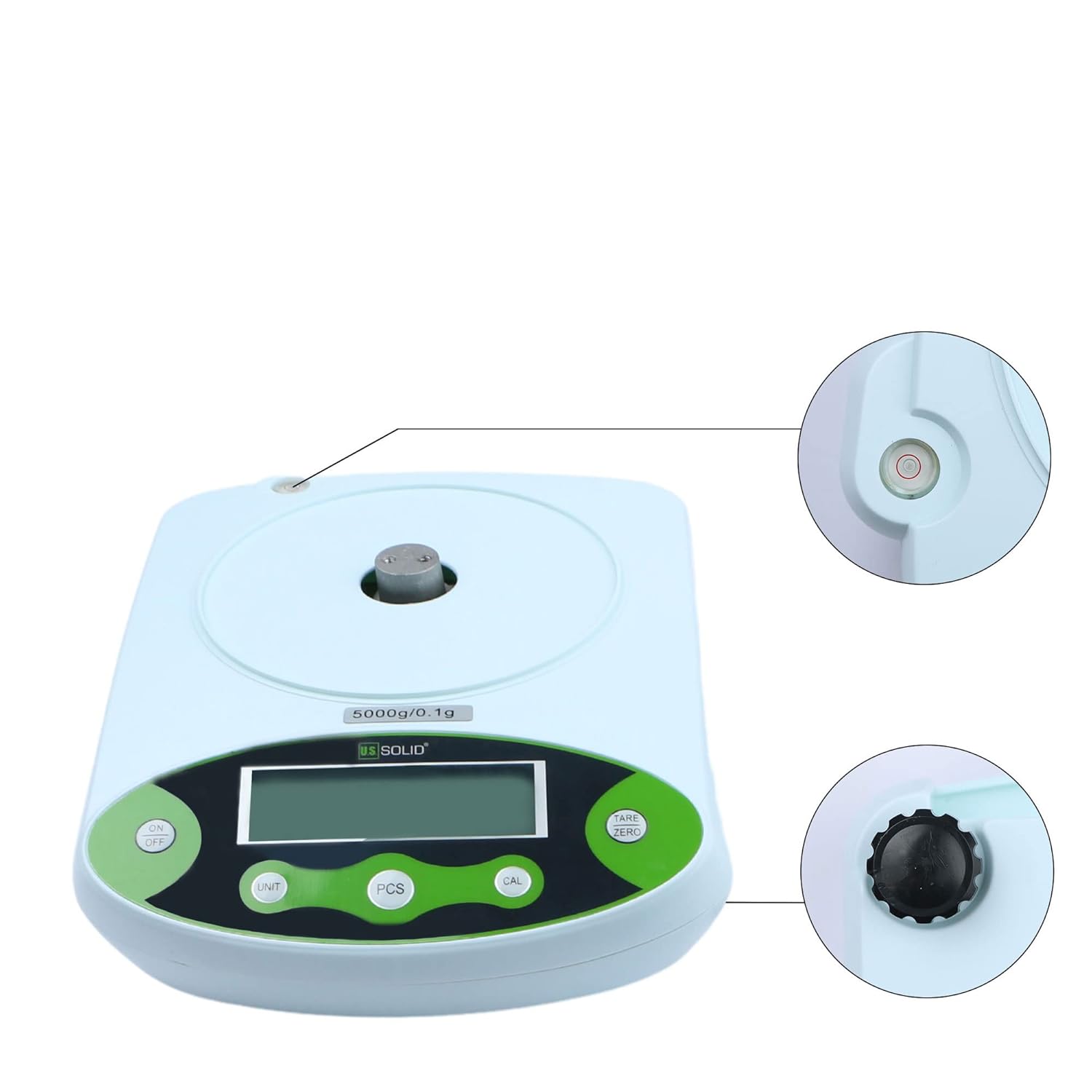
The scale must be perfectly level for accurate readings. Adjust the four height-adjustable feet located on the bottom of the scale until the bubble in the built-in level indicator is centered within the red circle.

4.4 전원 연결
- AC 전원: Connect the provided AC adapter to the power input port on the rear of the scale, then plug it into a suitable electrical outlet (100-240V).
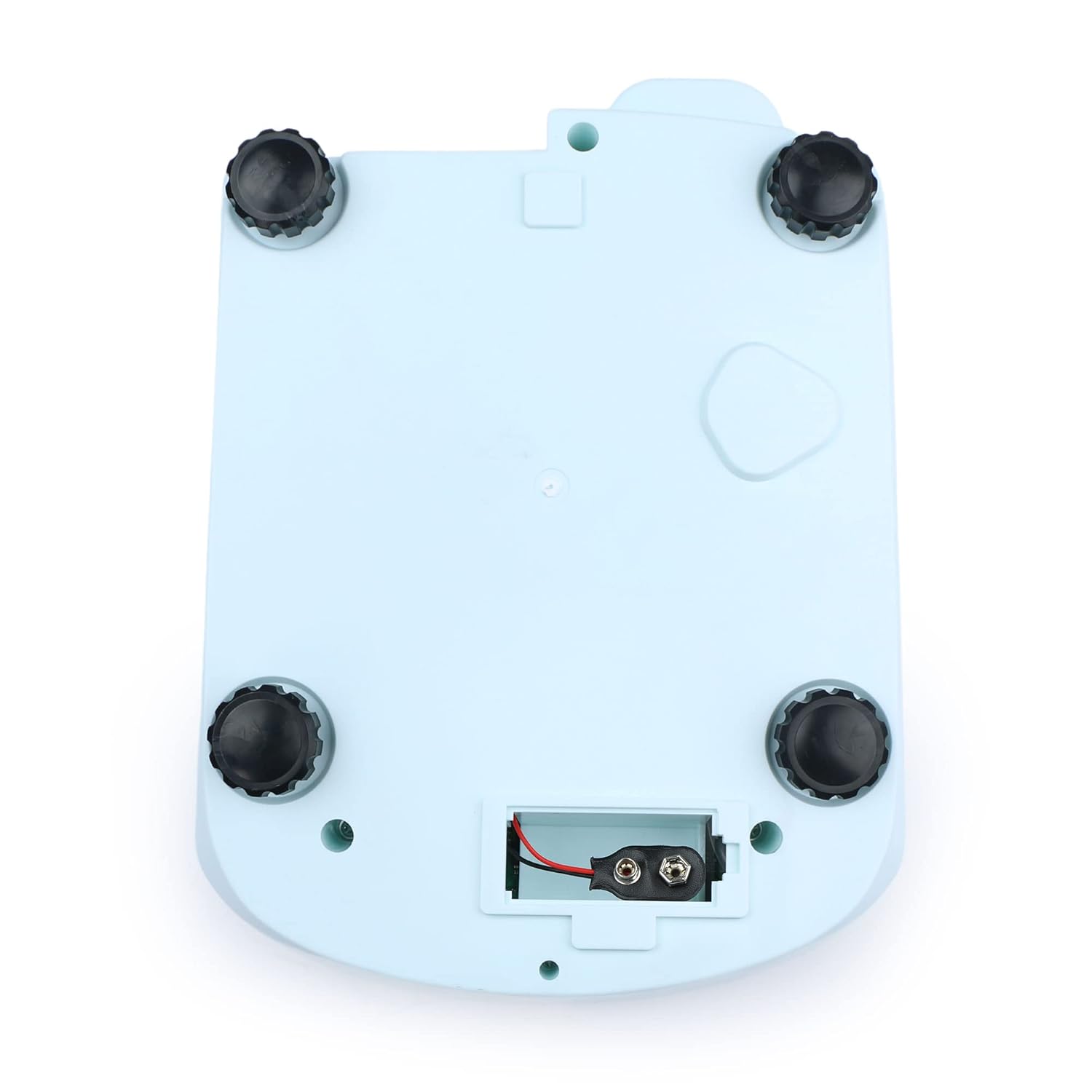
- 직류 전원(배터리): For portable use, open the battery compartment on the bottom of the scale (Figure 4.3) and insert a 9V DC battery, ensuring correct polarity.
4.5 초기 워밍업
After connecting power, allow the scale to warm up for at least 30 minutes before performing critical measurements. This stabilizes the internal components and ensures optimal accuracy.

5. 사용 설명서
5.1 제어판 이상view


5.2 전원 켜기/끄기
- 를 누르세요 켜짐/꺼짐 버튼을 눌러 저울을 켭니다.
- 를 누르고 계세요 켜짐/꺼짐 저울을 끄는 버튼입니다.
5.3 기본 계량
- Ensure the scale is level and powered on.
- Wait for the display to show "0.0" or "0.00" (depending on the unit).
- Carefully place the item to be weighed onto the center of the stainless steel weighing pan.
- LCD 화면에 표시된 안정 중량을 읽으십시오.
5.4 용기 기능
용기 무게를 제외하는 용기 무게 제외 기능을 사용하면 내용물의 순중량만 측정할 수 있습니다.
- 저울판 위에 빈 용기를 올려놓습니다.
- 를 누르세요 용기/영점 버튼을 누르면 디스플레이가 "0.0" 또는 "0.00"으로 재설정됩니다.
- 측정할 재료를 용기에 넣으세요. 디스플레이에 재료의 순중량이 표시됩니다.
5.5 단위 환산
The scale supports 11 different measurement units.
- 를 누르세요 단위 button repeatedly to cycle through the available units: g, ct, oz, ozt, lb, GN, t, dwt, kg, dr, tlT, N, and %.
- The selected unit will be indicated on the LCD.

5.6 Parts Counting (PCS)
This function allows you to count a large number of identical items by weight.
- Place a known quantity of items (e.g., 10, 20, 50, 100) on the pan.
- 를 누르세요 PC(전자제품) button. The display will show a prompt for sample size (e.g., "P-10").
- 를 누르세요 단위 s를 선택하려면 버튼을 누르세요ample size that matches the number of items you placed on the pan.
- 를 누르세요 PC(전자제품) button again to confirm. The scale is now in counting mode.
- Add more items of the same type to the pan, and the display will show the total count.

5.7 교정
Regular calibration ensures the accuracy of your scale. It is recommended to calibrate the scale after initial setup, if it has been moved, or if you suspect inaccurate readings. A calibration weight (not included) is required.
- Ensure the scale is powered on and the pan is empty.
- 를 누르고 계세요 칼 화면에 "CAL"이 나타날 때까지 버튼을 누르십시오.
- 그러면 디스플레이에 필요한 교정 무게(예: "15000g")가 표시됩니다.
- 지정된 교정용 추를 계량 접시 중앙에 조심스럽게 올려놓으십시오.
- Wait for the display to show "PASS" or return to normal weighing mode, indicating successful calibration.
- 교정용 추를 제거하세요.
6. 유지관리
6.1 청소
- 청소하기 전에 항상 전원 공급 장치를 분리하십시오.
- Wipe the scale's housing with a soft, damp 천. 연마성 세척제나 용매를 사용하지 마십시오.
- The stainless steel weighing pan can be removed and cleaned with mild soap and water, then dried thoroughly before reattaching.
- Ensure no liquids enter the internal components of the scale.
6.2 보관
When not in use for extended periods, store the scale in a dry, dust-free environment at room temperature. If using battery power, remove the battery to prevent leakage.
7. 문제 해결
| 문제 | 가능한 원인 | 해결책 |
|---|---|---|
| 체중계의 전원이 켜지지 않습니다 | No power supply; AC adapter unplugged; Dead battery. | Check AC adapter connection; Replace 9V battery. |
| 부정확한 판독 | Scale not level; Drafts or vibrations; Needs calibration; Overloaded. | Adjust leveling feet; Move to a stable environment; Perform calibration; Do not exceed 15KG. |
| Display shows "OUE" or "EEEE" | 과부하 오류. | Remove excess weight from the pan. |
| Display shows "UNST" | Unstable reading. | Ensure scale is on a stable surface, free from vibrations or air currents. |
| 디스플레이에 "LO"가 표시됩니다. | 배터리가 부족합니다. | Replace the 9V battery or use AC power. |
8. 사양

| 사양 | 값 |
|---|---|
| 모델 번호 | USS-DBS00059 |
| 상표 | 미국 솔리드 |
| 용량 | 15 Kilograms (15KG) |
| Readability / Accuracy | 0.1그램 |
| 저울판 재질 | 스테인리스 스틸 |
| 계량 접시 크기 | 150 x 180mm |
| 디스플레이 유형 | 백라이트 LCD |
| 전원 공급 장치 | AC 100-240V; DC 9V Battery |
| 측정 단위 | g, ct, oz, ozt, lb, GN, t, dwt, kg, dr, tlT, N, % |
| 기능 | Weighing, Counting, Tare, Unit Conversion, Calibration |
| 품목 무게 | 4.33파운드 |
| 패키지 크기 | 11.61 x 9.37 x 5.55 인치 |
9. 보증 및 지원
U.S. Solid products are manufactured to high-quality standards. For information regarding warranty coverage, please refer to the warranty card included with your product or visit the official U.S. Solid web대지.
If you encounter any issues or require technical assistance, please contact U.S. Solid customer support. Contact details can typically be found on the product packaging, the official web사이트나 구매 플랫폼을 통해서도 구매할 수 있습니다.