
1. 서론
Thank you for choosing the USX MOUNT TV Wall Mount. This manual provides essential information for the safe and correct installation, operation, and maintenance of your new TV wall mount. Please read these instructions thoroughly before installation and retain them for future reference.
2. 안전 정보
경고: Failure to read and follow these instructions may result in serious personal injury, property damage, or voiding of your warranty. If you have any questions, please contact customer service.
- 설치 표면이 마운트와 텔레비전의 총 무게를 안전하게 지탱할 수 있는지 확인하십시오.
- 최대 적재 용량은 35kg(77lbs)을 초과하지 마십시오.
- This product is designed for installation on wood studs or solid concrete walls only. Do not install on drywall alone.
- 목재 스터드를 정확하게 찾으려면 항상 스터드 파인더를 사용하십시오.
- 설치 시에는 눈 보호구를 포함한 적절한 안전 장비를 착용하십시오.
- 안전을 위해 설치 시 두 사람이 함께 작업하는 것을 권장합니다.
3. 패키지 내용
Verify that all components are present and undamaged before beginning installation. If any parts are missing or defective, contact customer service.
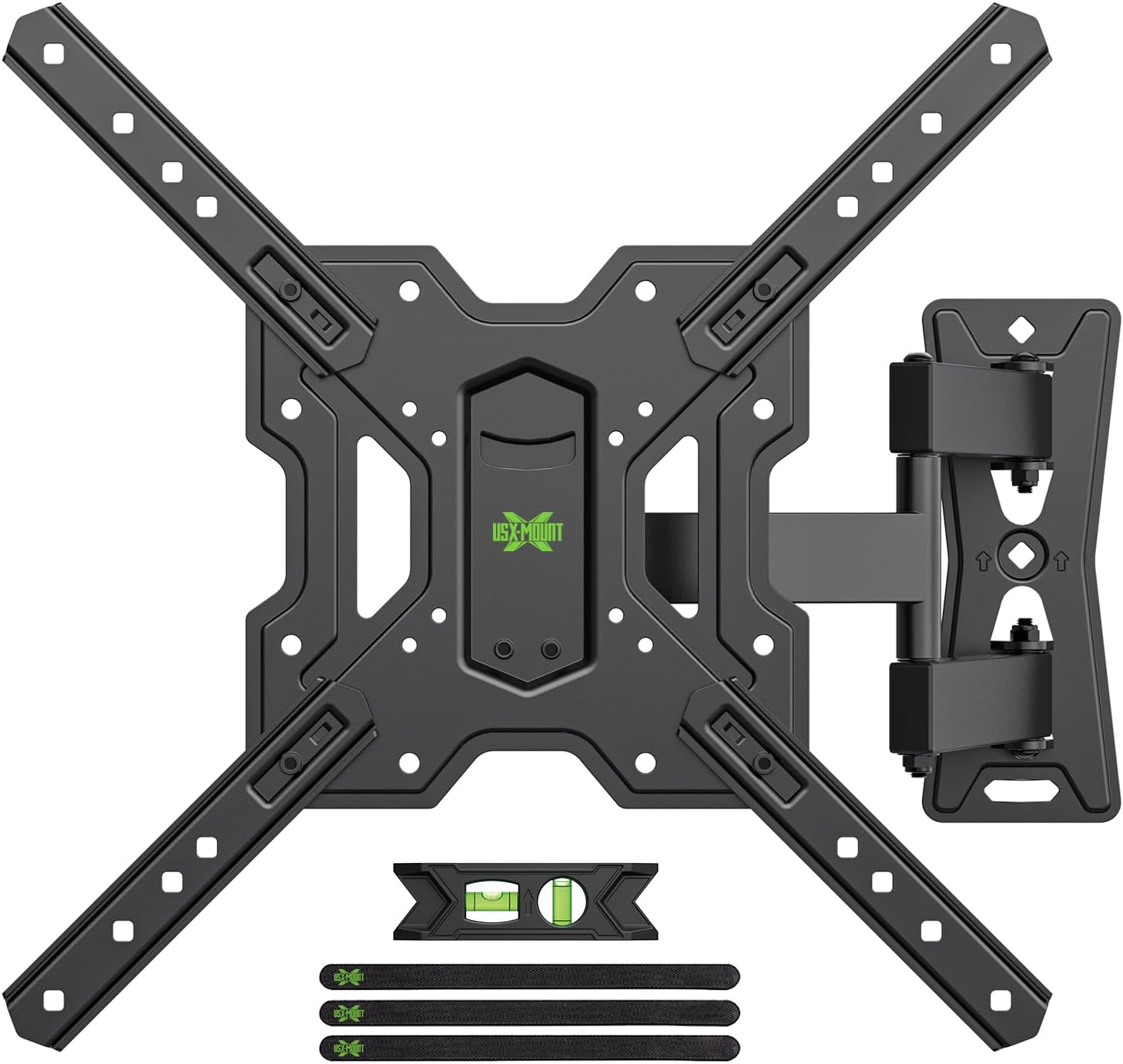
그림 3.1: 위에view of the USX MOUNT TV Wall Mount and all included accessories, such as the main mount assembly, VESA extension arms, bubble level, and cable ties.
포함된 하드웨어:
- 벽판 조립체
- TV Plate (VESA Adapter)
- Various screws, washers, and spacers for TV attachment
- Lag bolts and concrete anchors for wall attachment
- 버블 레벨
- 케이블 타이
- 육각 키
4. 사양
| 특징 | 사양 |
|---|---|
| 호환 가능한 TV 크기 | 26-55 인치 |
| 최대 하중 용량 | 35kg(77파운드) |
| VESA 호환성 | 75x75mm, 100x100mm, 100x200mm, 200x100mm, 200x200mm, 150x150mm, 200x300mm, 200x400mm, 300x200mm, 300x300mm, 400x200mm, 400x300mm, 400x400mm |
| 기울기 각도 | +5° ~ -15° |
| 회전 각도 | ±90° (depending on TV size) |
| 레벨 조정 | ±4° |
| 벽까지의 거리 | 70mm(최소) ~ 480mm(최대) |
| 재료 | 강철 |
| 색상 | 검은색 |

그림 4.1: VESA compatibility chart and maximum load capacity for the mount. Always check your TV's VESA pattern before installation.

그림 4.2: Visual representation of various VESA mounting patterns supported by the mount, indicating horizontal and vertical screw hole distances.
5. 설치 지침
Step 1: Attach TV Plate to TV
- 화면 손상을 방지하기 위해 TV를 부드럽고 깨끗한 표면에 화면이 아래로 향하도록 조심스럽게 놓으십시오.
- TV 뒷면에 있는 VESA 장착 구멍을 확인하세요.
- 제공된 하드웨어 키트에서 TV 장착 구멍에 맞는 적절한 나사, 와셔, 스페이서를 선택하세요.
- Attach the TV plate (VESA adapter) to the back of your TV using the selected hardware. Ensure it is securely fastened but do not overtighten.
2단계: 벽판을 벽에 부착
중요한: Determine your wall type before proceeding. This mount is suitable for wood stud walls and solid concrete walls.

그림 5.1: Illustration of compatible wall types for installation: wood stud and solid concrete. Ensure your wall matches one of these types.
목재 스터드 벽의 경우:
- Use a stud finder to locate the edges and center of the wood stud. Mark the center of the stud.
- Position the wall plate at your desired height and use the integrated bubble level to ensure it is perfectly horizontal. Mark the pilot hole locations.
- Drill pilot holes into the center of the stud at the marked locations. The drill bit size should be 5/32" (4 mm) and the depth approximately 2.36" (60 mm).
- Attach the wall plate to the wall using the provided lag bolts. Tighten securely with a wrench.
견고한 콘크리트 벽의 경우:
- Position the wall plate at your desired height and use the integrated bubble level to ensure it is perfectly horizontal. Mark the pilot hole locations.
- Drill pilot holes into the concrete at the marked locations. The drill bit size should be 3/8" (10 mm) and the depth approximately 2.36" (60 mm).
- Insert the concrete anchors into the drilled holes. Tap them gently with a hammer until they are flush with the wall surface.
- Attach the wall plate to the wall using the provided lag bolts. Tighten securely with a wrench.
Step 3: Hang and Secure TV to Wall Plate
- With assistance, carefully lift the TV (with the TV plate attached) and hook it onto the wall plate.
- Ensure the TV is properly seated and centered on the wall plate.
- Secure the TV to the wall plate using the safety screws or locking mechanisms provided. This prevents accidental dislodgement.
동영상 5.1 : A short demonstration of the installation process, including attaching the TV plate, mounting the wall plate, and hanging the TV. This video also briefly shows the leveling and tilting adjustments.
6. 작동 지침 (조정)
Your USX MOUNT TV Wall Mount offers various adjustments for optimal view주고받음.
기울기 조정:
The mount allows for a tilt range of +5° to -15°. To adjust the tilt:
- Locate the tilt adjustment knobs on the TV plate.
- Loosen the knobs to allow the TV to tilt freely.
- Adjust the TV to your desired vertical angle.
- Tighten the knobs to secure the TV in place.
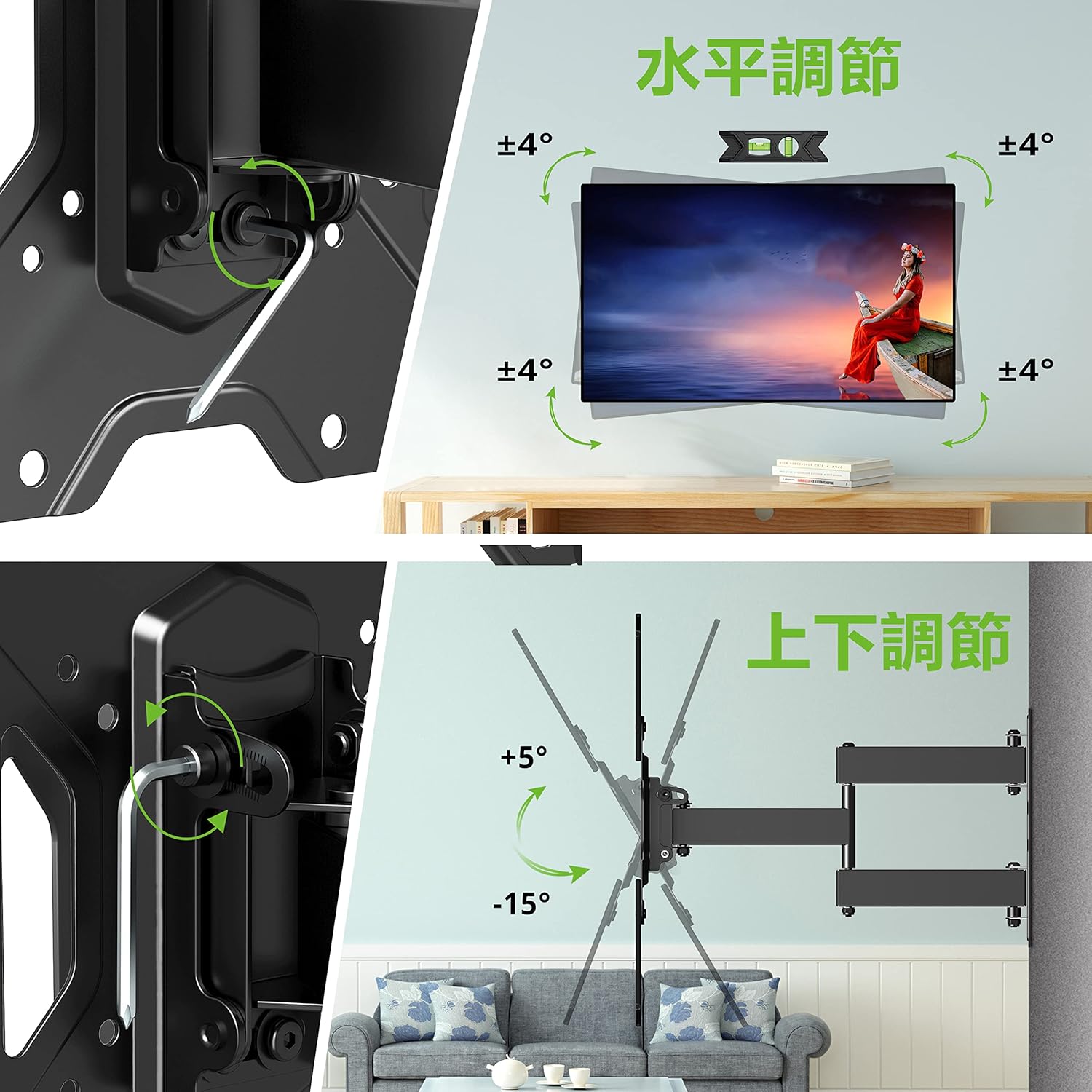
그림 6.1: Visual guide for adjusting the horizontal level and vertical tilt of the TV. The top panel shows ±4° leveling, and the bottom panel shows +5° to -15° tilt.

그림 6.2: This image illustrates the adjustable distance from the wall (70mm to 426mm) and the tilt angles (+5° backward, -15° forward) of the TV mount.
회전 조정:
The mount allows for a swivel of up to ±90° (left/right), depending on the size of your TV. To adjust the swivel:
- Gently push or pull the TV to the desired left or right angle.
- The friction joints will hold the TV in position.

그림 6.3: This diagram demonstrates the ±90° swivel capability of the TV mount, allowing for flexible view방 안의 다양한 위치에서 각도를 측정합니다.
레벨 조정 :
The mount allows for a level adjustment of ±4° after installation. To adjust the level:
- Use the provided hex key to loosen the leveling screws on the TV plate.
- Adjust the TV until it is perfectly level using the bubble level.
- Tighten the leveling screws to secure the TV in the desired horizontal position.
7. 유지관리
- 모든 나사와 볼트가 단단히 조여져 있는지 정기적으로 점검하세요. 필요하면 다시 조이세요.
- 부드럽고 마른 천으로 마운트를 닦으십시오. 연마성 세척제나 용제를 사용하지 마십시오.
- Ensure cables are managed neatly using the provided cable ties to prevent strain or damage.
8. 문제 해결
설치 중 또는 설치 후 문제가 발생하면 다음의 일반적인 해결 방법을 참조하십시오.
- TV 수평이 안 맞음: Use the level adjustment feature as described in Section 6.
- 마운트가 느슨해진 느낌: Recheck all wall and TV attachment points and tighten any loose fasteners. Ensure the wall type is appropriate for installation.
- 기울기/회전 조절에 어려움이 있습니다. Ensure all adjustment knobs/screws are sufficiently loosened before attempting to move the TV.
If the problem persists, contact USX MOUNT customer support.
9. 보증 및 지원
USX MOUNT provides a 10-year quality guarantee from the date of purchase. This warranty covers manufacturing defects and ensures the product's structural integrity under normal use.
For any questions, missing parts, or support needs, please contact USX MOUNT customer service. Our team is dedicated to providing assistance and ensuring your satisfaction.
연락처 정보: Please refer to the contact details provided with your purchase or visit the official USX MOUNT web대지.


