
DXPICR SMWACTH42
DXPICR 스마트 워치 사용 설명서
Model: SMWACTH42
소개
This manual provides comprehensive instructions for the operation, maintenance, and troubleshooting of your DXPICR Smart Watch. Please read this manual carefully before using the device to ensure proper functionality and to maximize your user experience.

Image: The DXPICR Smart Watch, featuring a light pink band and a vibrant display showing various app icons.
설정 및 초기 페어링
Before using your DXPICR Smart Watch, ensure it is adequately charged. The watch comes with a Lithium Polymer battery (included). Follow these steps to set up and pair your watch with your smartphone:
- 앱 다운로드: Download the official DXPICR companion application from your mobile app store (compatible with Android and iOS).
- 블루투스 활성화: 스마트폰의 블루투스를 켜세요.
- 시계 페어링: Open the DXPICR app on your phone. Navigate to the "Add a device" section and search for "Y20 GT" to connect.
- Enable Call Function (for calling features): On your watch, swipe down the screen to access quick settings and turn on the 'call' function switch.
- 통화를 위해 블루투스 연결: Open your phone's Bluetooth settings page. Find and connect to "Y20 GT_Phone" to enable call answering and dialing directly from your watch.
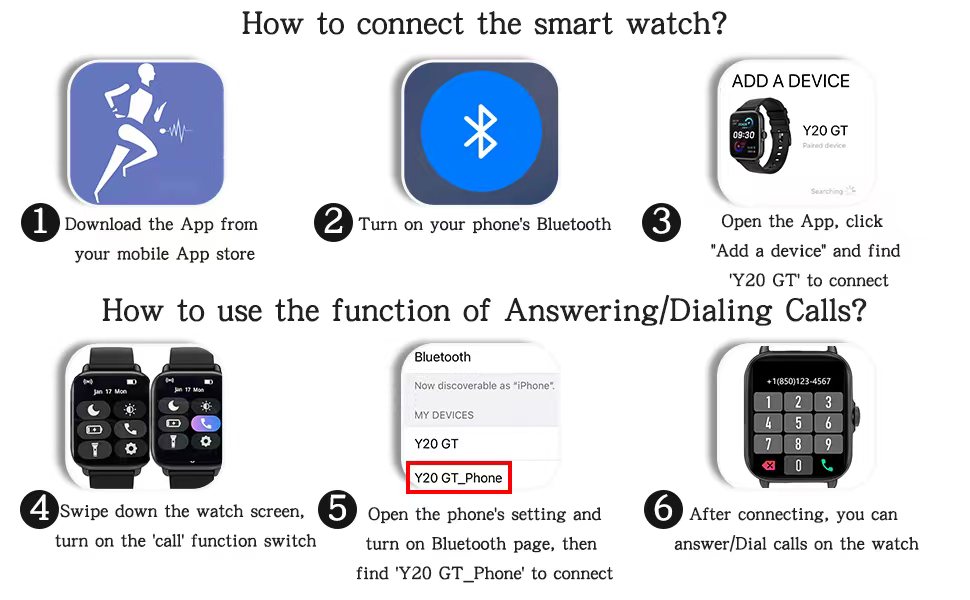
Image: A visual guide illustrating the six steps for connecting the smart watch and enabling its call answering/dialing functions via the mobile app and Bluetooth settings.

Image: A woman using her DXPICR Smart Watch to answer or dial calls directly from her wrist, demonstrating the Bluetooth call function.
스마트 워치 작동하기
Your DXPICR Smart Watch features a 1.7-inch TFT color full touch screen (240x280 pixels) for intuitive navigation. Use the touchscreen and the physical dial/button for interaction.
주요 특징 및 기능:
- Call Receive/Dial: Once paired, you can make and receive calls directly from your watch using the dial pad, call records, or contacts.
- 스마트 알림: Receive notifications for calls, messages, and social media apps directly on your wrist.

Image: A user interacting with their laptop while their DXPICR Smart Watch displays various notifications, including calls, messages, and social media alerts.
- 건강 모니터링:
- 심박수 모니터: Built-in optical heart rate sensor provides real-time heart rate data.

Image: A woman meditating, with her DXPICR Smart Watch displaying her heart rate, illustrating the heart rate monitoring feature.
- 수면 모니터: Tracks awake time, light sleep, and deep sleep patterns to help you understand your sleep quality.

Image: A person sleeping, with the DXPICR Smart Watch displaying detailed sleep monitoring data, including awake time, light sleep, and deep sleep.
- 혈액 산소(SpO2) 모니터: 혈중 산소 포화도를 측정합니다.
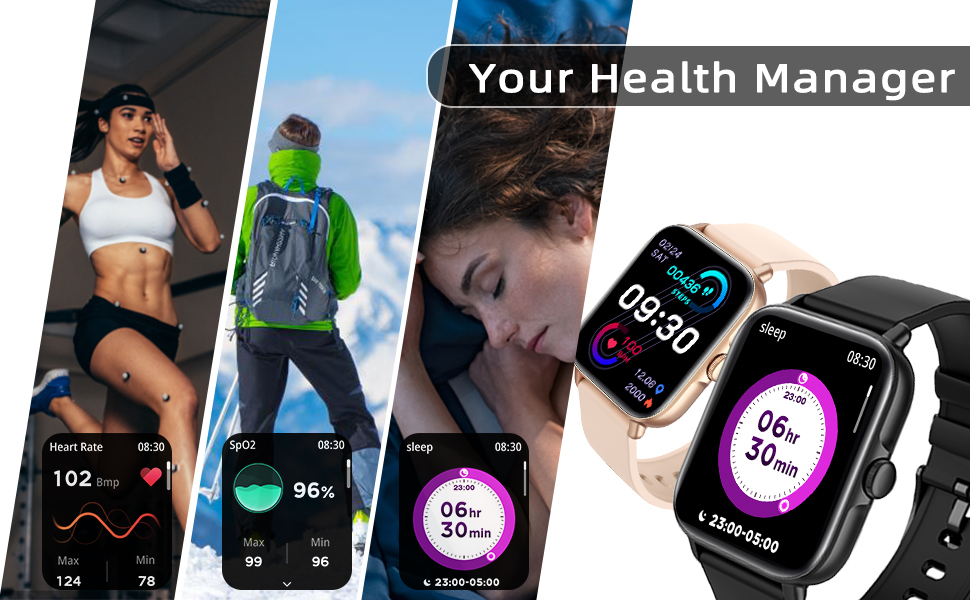
이미지: 콜라주 쇼asing the health management features of the DXPICR Smart Watch, including heart rate, SpO2, and sleep tracking.
- 심박수 모니터: Built-in optical heart rate sensor provides real-time heart rate data.
- Activity Tracking & Sports Modes: Built-in activity tracker records steps, calories burned, distance, and active hours. It supports 28 sports modes with GPS connectivity (via phone).

Image: A woman celebrating after a workout, with her DXPICR Smart Watch displaying activity data such as steps, calories, distance, and active minutes, highlighting the 28 sports modes.

Image: A dynamic image illustrating various sports modes available on the DXPICR Smart Watch, including walking, cycling, and swimming, with corresponding activity data.
- 실용적인 도구: Your watch includes various useful tools:
- 음성 어시스턴트 : Access AI voice commands.
- 호흡 훈련: 이완을 위한 호흡 운동 가이드.
- 음악 제어: 페어링된 스마트폰에서 음악 재생을 제어하세요.
- 카메라 제어: 시계를 휴대폰 카메라의 원격 셔터로 사용하세요.
- 앉아있는 알림: 장시간 활동하지 않은 후 움직임을 유도하는 알림 기능.
- 알람 시계: 시계에서 바로 알람을 설정하세요.
- 날씨 표시: 실시간 날씨 업데이트를 받아보세요.
- 플래시: A basic flashlight function.

Image: A compilation of icons representing the DXPICR Smart Watch's practical functions, including weather display, blood oxygen monitoring, music control, call features, and alarm clock.
- Personalized Watch Face: Customize your watch face with your favorite pictures or photos through the app.
유지 보수 및 관리
Proper care will extend the life and performance of your DXPICR Smart Watch.
- 청소: Regularly wipe the watch screen and band with a soft, damp 옷감. 가혹한 화학 물질이나 연마재를 사용하지 마십시오.
- 방수 기능: The watch is designed to be waterproof. However, avoid prolonged submersion in water, hot water, or steam. It is suitable for daily use and light water exposure like hand washing or rain.
- 충전 중: Use the provided charging cable. Ensure the charging contacts on the watch and cable are clean and dry before charging.
- 저장: 장시간 사용하지 않을 경우 시계를 서늘하고 건조한 곳에 보관하세요.
문제 해결
If you encounter issues with your DXPICR Smart Watch, refer to the following common solutions:
| 문제 | 가능한 해결책 |
|---|---|
| 시계가 켜지지 않거나 충전이 안 됩니다. | Ensure the charging cable is properly connected to both the watch and a power source. Check if the charging contacts are clean. Allow the watch to charge for at least 30 minutes before attempting to turn it on. |
| 블루투스 연결 끊김. | Ensure the watch and phone are within Bluetooth range. Restart both the watch and your phone. Unpair and re-pair the devices through the app and phone's Bluetooth settings. Check if the app is running in the background and has necessary permissions. |
| 알림이 나타나지 않습니다. | Verify that notification permissions are enabled for the DXPICR app in your phone's settings. Ensure notifications are enabled within the DXPICR app itself. Check if "Do Not Disturb" mode is active on either the watch or phone. |
| 심박수/산소포화도 측정값이 정확하지 않습니다. | Ensure the watch is worn snugly on your wrist, not too tight or too loose. Keep the sensor clean and free from debris. Remain still during measurements. |
| 앱이 충돌하거나 정지됩니다. | Update the DXPICR app to the latest version. Clear the app's cache and data (this may require re-pairing). Reinstall the app if the issue persists. Ensure your phone's operating system is up to date. |
제품 사양
| 특징 | 세부 사항 |
|---|---|
| 상표 | DXPICR |
| 모델명 | DXPICR Smart Watch |
| 품목 모델 번호 | SMWACTH42 |
| 제품 치수 | 3.7 x 3.4 x 1.7 인치 |
| 품목 무게 | 3.84 온스 |
| 색상 | 라이트 핑크 |
| 디스플레이 기술 | TFT |
| 화면 크기 | 1.7 인치 |
| 해결 | 240 x 280 픽셀 |
| 운영 체제 | 안드로이드, iOS 호환 |
| 연결 기술 | 블루투스 |
| 배터리 유형 | 1개의 리튬 폴리머 배터리(포함) |
| 특별 기능 | Phone Call, Heart Rate Monitor, Sleep Monitor, Blood Oxymeter (SpO2), Music Player, Camera, Sedentary Reminder, Alarm Clock, Calorie Tracker, Time Display, Voice Call, Waterproof, Multisport Tracker, Notifications, Activity Tracker, Breath Monitor |
| 휴먼 인터페이스 입력 | Dial, Touchscreen |
보증 및 지원
For warranty information or technical support, please refer to the contact details provided with your product packaging or visit the official DXPICR website. Our customer service team is available to assist you with any questions or concerns regarding your smart watch.
Ask a question about this manual
Ask about setup, troubleshooting, compatibility, parts, safety, or missing instructions. Manuals+ will review the question and use this page’s manual context to help answer it.