
1. 서론
This manual provides detailed instructions for the operation and maintenance of your SEETEC ATEM173S 17.3-inch Multi-Camera Broadcast Monitor. Please read this manual thoroughly before using the product to ensure proper function and to prevent damage.
2. 안전 정보
- 화재나 감전 위험을 방지하기 위해 모니터를 비나 습기에 노출시키지 마십시오.
- c를 열지 마세요asing. 모든 서비스는 자격을 갖춘 담당자에게 의뢰하세요.
- 과열을 방지하려면 모니터 주위에 적절한 환기가 이루어지도록 하십시오.
- 이 장치에 지정된 전원 어댑터만 사용하세요.
- Clean the screen with a soft, dry cloth. Avoid using liquid cleaners.
3. 패키지 내용
패키지에 모든 품목이 들어 있는지 확인하세요.
- SEETEC ATEM173S Monitor
- 전원 어댑터
- 사용 설명서 (본 문서)
- V-mount battery plate (pre-installed or included)
- USB Flash Disk (for LUT import)
4. 제품 오버view
The SEETEC ATEM173S is a 17.3-inch IPS broadcast monitor designed for multi-camera studio and television production environments. It features multiple input and output options, advanced monitoring tools, and flexible power solutions.
4.1 전면 패널 컨트롤
The front panel includes buttons for menu navigation, input selection, and function shortcuts. Specific button functions are detailed in the 'Operating Instructions' section.
4.2 후면 패널 연결
The rear panel provides various ports for video input/output, control, and power.

이미지 설명: This image displays the rear panel of the SEETEC ATEM173S monitor, highlighting its various input and output ports. Visible connections include four 3G-SDI inputs and outputs, one HDMI input, RS485 IN/OUT, GPI, USB for upgrades and LUT import, and a DC 12V power input. The image also details supported SDI and HDMI formats.
- 4 x 3G-SDI Input: For connecting SDI video sources (supports 2K).
- 4 x 3G-SDI Output: For looping through or distributing SDI signals (supports 2K).
- 1 x HDMI Input: For connecting HDMI video sources (supports 1080P).
- RS485 입/출력: For UMD control and daisy-chaining.
- GPI: General Purpose Interface for Tally control.
- USB: For firmware upgrades and 3D LUT file 수입.
- DC 12V 입력: 주 전원 연결부.
- XLR 커넥터: Additional power input option.
- V-mount Battery Plate: For portable power solutions.
5. 설정
5.1 전원 연결
- Connect the provided DC 12V power adapter to the monitor's DC input port.
- Alternatively, attach a compatible V-mount battery to the V-mount plate for portable operation. An optional Anton Bauer plate can also be used.
- Ensure the power source is stable before turning on the monitor.
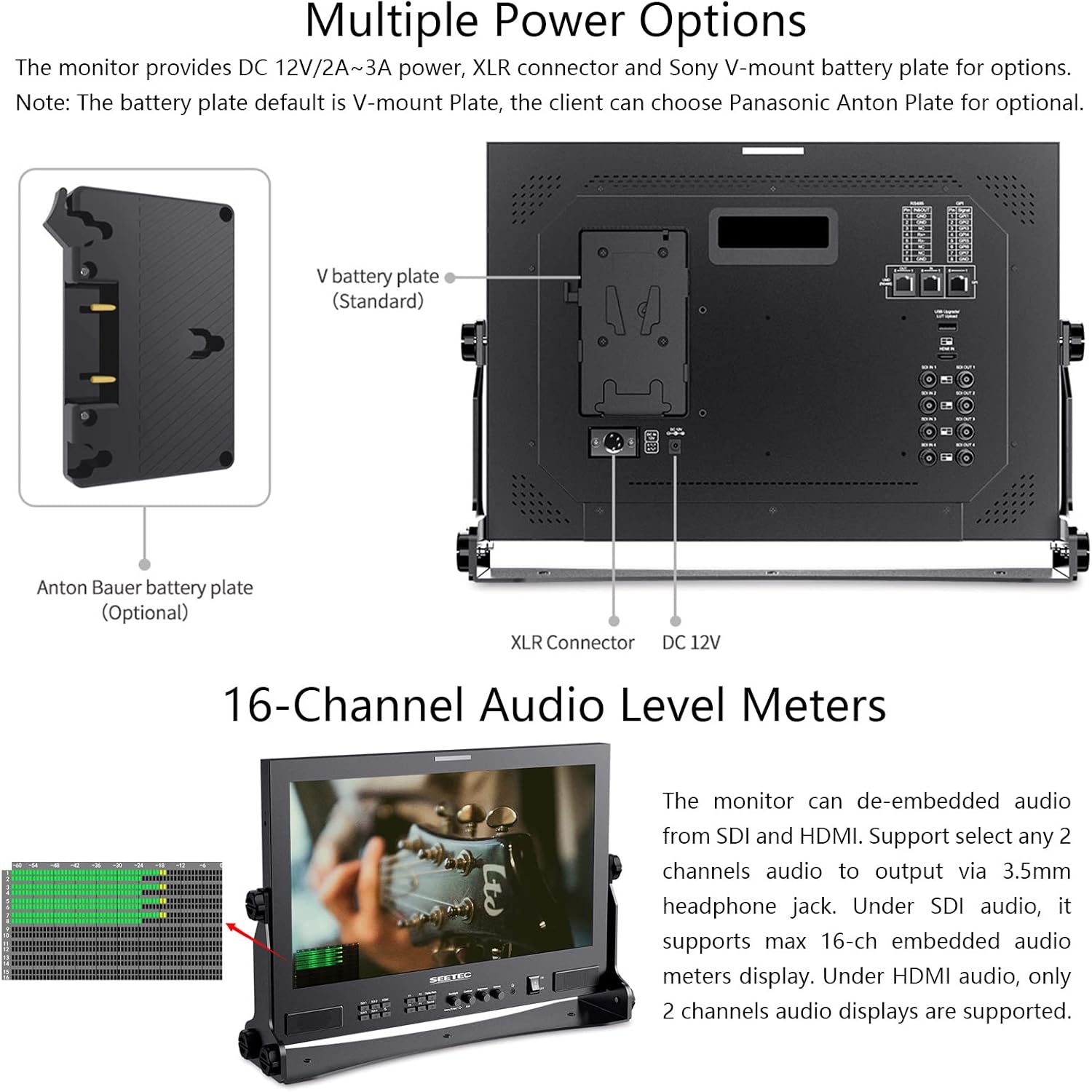
이미지 설명: This image illustrates the various power input options for the SEETEC ATEM173S monitor. It shows the DC 12V input, an XLR connector, and a V-mount battery plate (standard). An optional Anton Bauer battery plate is also indicated. This highlights the monitor's flexibility for different power setups.
5.2 Video Input Connection
- Connect your SDI video sources to the 3G-SDI IN ports (SDI IN 1-4).
- Connect your HDMI video source to the HDMI IN port.
- Use the 3G-SDI OUT ports to loop through or distribute the SDI signals to other devices.
6. 사용 설명서
6.1 기본 작업
- 전원 켜기/끄기: Press the power button on the front panel to turn the monitor on or off.
- 입력 선택: Use the 'Source' button or menu options to switch between SDI 1-4 and HDMI inputs.
- 메뉴 탐색: Use the menu buttons (e.g., 'Menu', 'Up', 'Down', 'Enter') to navigate the on-screen display (OSD) menu and adjust settings.
6.2 Multiple Display Modes (Quad View, PIP)
The ATEM173S supports various display modes including full screen, Picture-in-Picture (PIP), and Quad View.

이미지 설명: This image shows the SEETEC ATEM173S monitor displaying four distinct video feeds simultaneously in a quad-split layout. Each quadrant shows a different scene, demonstrating the monitor's multi-camera monitoring capability. The monitor's front panel controls are visible below the screen.
- 쿼드 View: Displays up to four SDI inputs simultaneously. In quad mode, the monitor supports displaying 4-channel audio meters and 4 time codes.
- PIP(Picture-in-Picture): Displays one input as the main image and another input in a smaller window. The size and position of the sub-window can be adjusted via the OSD menu.
6.3 3D LUT Functionality
The monitor supports 3D LUTs for color calibration and creative looks. It comes with built-in DE-log LUTs and allows user-defined LUTs.

이미지 설명: This image presents a split-screen view demonstrating the effect of a 3D LUT. The left side shows a scene (Venice canal) with a flat, uncorrected color profile ("Before Loading"), while the right side shows the same scene with enhanced colors and contrast after a 3D LUT has been applied ("After Loading"). This illustrates how 3D LUTs can recreate film looks.
- Loading Custom LUTs: Connect a USB flash disk containing .cube LUT files to the monitor's USB port. Navigate to the LUT menu in the OSD to import (up to 36 custom LUTs).
- Applying LUTs: Select desired LUTs from the menu to apply them to the video signal for real-time color transformation.
6.4 Accurate Waveform Monitoring
The ATEM173S includes professional waveform monitoring tools to analyze video signals.

이미지 설명: This image shows two SEETEC ATEM173S monitors side-by-side. The left monitor displays a video scene with a waveform overlay, while the right monitor shows the same scene with multiple scope displays (waveform, vectorscope, histogram) active simultaneously. Below the monitors, icons represent various monitoring functions like 3D LUT, Waveform, Vectorscope, Histogram, Picture In Picture, False Colors, Anamorphic Mode, Time Code, Nine Grid, Pixel-to-Pixel, Image Freeze, Screen Marker, Center Marker, and Embedded Audio.
- Available Scopes: Waveform (RGB Parade, YUV Parade, Y Parade), Vectorscope, Histogram, Audio Phase, and Level Displays.
- 활성화: These functions can be activated individually or all at once via a dedicated menu option or shortcut.
6.5 Dynamic UMD & Tally Lights
The monitor supports Under Monitor Display (UMD) and Tally light functionality for professional broadcast environments.

이미지 설명: This image shows the SEETEC ATEM173S monitor from the front and rear. The front view highlights the Tally light indicator (red bar at the top) and a UMD display showing "CAMERA 1" at the bottom. The rear view details the GPI and RS485 connections used for Tally and UMD control. The image also illustrates different display modes like 4P (Quad View) and 2P PIP (Picture-in-Picture).
- UMD: Supports TSL 3.1/4.0 protocol with address selection (0-126) and displays up to 16 characters. UMD inputs via RS485 and outputs via RS485.
- Tally Lights: GPI controls Red Tally (recording) and Green Tally (preview), providing visual cues for camera status.
6.6 오디오 모니터링
The monitor provides integrated audio monitoring capabilities.
이미지 설명: This image shows the SEETEC ATEM173S monitor displaying a video feed with a 16-channel audio level meter overlay on the left side of the screen. This visual representation helps users monitor audio levels in real-time. The image also includes diagrams of the monitor's multiple power options (DC 12V, XLR, V-mount battery plate) and an optional Anton Bauer battery plate.
- Embedded Audio Meters: Supports up to 16-channel embedded audio meters display for SDI inputs.
- 헤드폰 출력: A stereo headphone jack allows for monitoring selected audio channels. Under HDMI audio, only 2 channels are displayed.
7. 고급 기능
The ATEM173S includes a range of advanced features for precise video monitoring:
- HDR 모니터링: Supports High Dynamic Range for improved clarity and detail.
- 초점 지원: Highlights in-focus areas (Yellow, Red, Green, Blue, White options).
- 거짓 색상: Assists in exposure adjustment by displaying different exposure levels as distinct colors.
- 얼룩말: Indicates overexposed areas (70IRE, 80IRE, 90IRE options).
- 타임코드 표시: Shows timecode information on screen.
- Under Scan, Over Scan: Adjusts the display area to show more or less of the image.
- 아나모픽 모드: 아나모픽 푸를 압축 해제합니다tage (1.25X, 1.33X, 1.5X, 2.0X, 2.0X mag options).
- 픽셀 대 픽셀 : 크기 조정 없이 원래 해상도로 이미지를 표시합니다.
- 센터 마커: Displays a crosshair at the center of the screen.
- 안전 마커: Overlays various aspect ratio guides (70%, 80%, 90%, 16:9, 16:10, 4:3, 5:4, 1.85:1, 2.35:1, user-defined).
- 마커 매트: Provides opaque overlays for various aspect ratios (16:9, 16:10, 4:3, 1.85:1, 2.35:1).
- 이미지 정지: 현재 비디오 프레임을 일시 정지합니다.
8. 유지관리
- 청소: Use a soft, lint-free cloth to clean the monitor screen and casing. 연마성 세척제나 용제를 사용하지 마십시오.
- 저장: 장기간 사용하지 않을 경우 모니터를 직사광선과 극한 온도 변화를 피해 서늘하고 건조한 곳에 보관하십시오.
- 펌웨어 업데이트: Periodically check the SEETEC website for available firmware updates to ensure optimal performance and access to new features. Updates can be installed via the USB port.
9. 문제 해결
If you encounter issues with your ATEM173S monitor, refer to the following common problems and solutions:
- 전원 없음:
- 전원 어댑터가 모니터와 작동하는 전원 콘센트에 제대로 연결되어 있는지 확인하십시오.
- If using a battery, check that it is charged and properly attached.
- 비디오 신호 없음:
- 영상 소스의 전원이 켜져 있고 신호가 출력되고 있는지 확인하십시오.
- Check all SDI/HDMI cable connections.
- 모니터에서 올바른 입력 소스가 선택되었는지 확인하십시오.
- Confirm the input signal format is supported by the monitor (refer to Specifications).
- 이미지 왜곡/잘못된 색상:
- Check video cable integrity.
- OSD 메뉴를 통해 모니터 설정을 공장 초기값으로 재설정하세요.
- Ensure no unintended 3D LUTs or color settings are applied.
- 오디오 문제:
- Verify the audio source is active.
- Check headphone connection and volume levels.
- Ensure embedded audio is present in the video signal.
For persistent issues, contact SEETEC customer support.
10. 기술 사양
| 특징 | 사양 |
|---|---|
| 화면 크기 | 17.3인치 IPS |
| 해결 | 1920×1080픽셀 |
| 종횡비 | 16시 9분 |
| 명도 | 300cd/m² |
| 대비율 | 700시 1분 |
| View잉 각도 | 89 ° / 89 ° (L / R) 89 ° / 89 ° (U / D) |
| 입력 Voltage | 직류 12V |
| 전력 소비 | ≤22W |
| 작동 온도 | 0℃~50℃ |
| Unit Size (W/O bracket) | 425L×296H×23D (mm) |
| 단위 무게 | 2.84kg |
| SDI 지원 형식 | 720p (60/59.94/50/30/29/25/24/23.98), 1080i (60/59.94/50), 1080p (60/59.94/50/30/29.97/25/24/24sF/23.98/23.98sF), 2048x1080i (60/59.94/50), 2048x1080p (60/59.94/50/30/29.97/25/24/23.98) |
| HDMI 지원 형식 | 480i/576i/480p/576p, 720p (60/59.94/50/30/29.97/25/24/23.98), 1080i (60/59.94/50), 1080p (60/59.94/50/30/29.97/25/24/23.98) |
11. 보증 및 지원
For warranty information and technical support, please refer to the official SEETEC web사이트를 방문하거나 가까운 대리점에 문의하세요. 보증 청구를 위해 구매 증빙 자료로 구매 영수증을 보관하세요.
Web대지: www.seetec.cn (전amp(링크는 실제 링크와 다를 수 있습니다)