
중요한 안전 정보
Please read this manual carefully before assembly and use to ensure safe operation and to prevent damage to the product or injury to yourself.
- 최대 적재 용량을 초과하지 마십시오. 100kg. Overloading can cause instability and damage.
- 높이 조절 중 케이블이 걸려 넘어지거나 손상되는 것을 방지하기 위해 모든 케이블이 제대로 정리되고 고정되어 있는지 확인하십시오.
- 작동 중에는 어린이와 애완동물이 책상에 접근하지 못하도록 하세요.
- Do not place hands or other body parts near moving parts of the desk frame during height adjustment.
- 책상은 작업 공간으로서의 본래 용도로만 사용하세요.
- 모든 나사와 볼트가 제대로 조여져 있는지 정기적으로 점검하십시오.
제품 끝view
The FLEXISPOT E1B Electric Standing Desk is designed to provide a versatile and ergonomic workspace. It features a robust dual-motor system for smooth height adjustments and a durable tabletop.
주요 특징:
- 듀얼 모터 시스템: Ensures stable and efficient height adjustment at 25 mm/s.
- 높이 범위: Adjustable from 70 cm to 119 cm to suit various user heights and work preferences.
- 하중 용량: Supports up to 100 kg, accommodating multiple monitors and office equipment.
- 메모리 사전 설정: Control panel with memory functions for saving preferred height settings.
- High-Quality Tabletop: 160x80cm black tabletop, made in the EU from FSC-certified MDF with scratch-resistant high-pressure laminate.
패키지 내용
Before starting assembly, verify that all components listed below are present and undamaged. If any parts are missing or damaged, please contact customer support.
- Desk Frame (E1B) components (legs, feet, crossbar, motor, control box)
- Tabletop (DT1608-BLACK-EU18)
- 메모리 기능이 있는 제어판
- 전원 어댑터 및 케이블
- Assembly Hardware (screws, bolts, Allen keys)
- 케이블 관리 액세서리
- 사용자 설명서
설치 및 조립 지침
Assembly is designed to be straightforward. It is recommended to assemble the desk on a soft, clean surface to prevent scratches. Two people are recommended for easier assembly.
1단계: 구성 요소 풀기
모든 부품을 포장에서 조심스럽게 꺼내 펼쳐 놓으세요. 포장 내용물 목록을 확인하세요.
Step 2: Assemble the Desk Frame
- Attach the lifting columns to the crossbar using the provided screws.
- 책상 다리를 리프팅 컬럼 바닥에 고정합니다.
- Mount the control box to the designated area on the frame.
- Connect the motor cables from the lifting columns to the control box.
- 제어판 케이블을 제어 상자에 연결하십시오.

Image: The FLEXISPOT E1B desk frame in black and white, illustrating the height adjustment range from 70cm to 119cm, highlighting the dual motor system, 25mm/s adjustment speed, and low noise operation (less than 50dB).
3단계: 테이블탑 부착
Carefully place the tabletop upside down on a soft surface. Position the assembled desk frame onto the tabletop, aligning the pre-drilled holes. Secure the tabletop to the frame using the provided screws.

Image: A FLEXISPOT desk with a black tabletop, featuring a laptop, books, and a pen holder, demonstrating a functional and organized workspace.
Step 4: Connect Power and Cable Management
Connect the power adapter to the control box and then to a power outlet. Use the included cable management accessories to organize and secure all cables, preventing them from interfering with the desk's movement.
작동 지침
제어판 이상view:
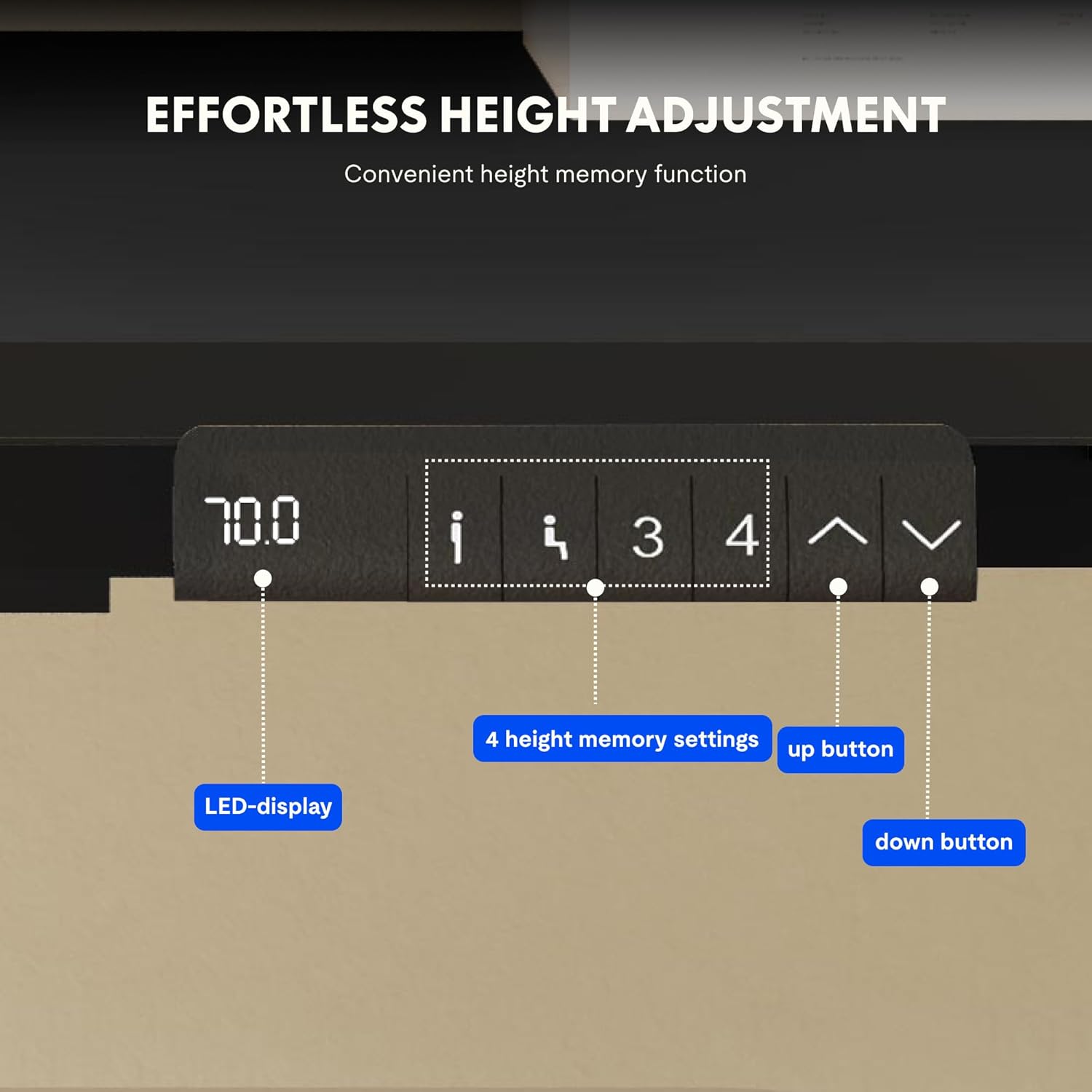
Image: Close-up of the FLEXISPOT desk control panel, showing the LED display for current height, up and down arrow buttons for manual adjustment, and four numbered buttons for saving and recalling height memory presets.
Manual Height Adjustment:
- 를 누르고 계세요 위쪽 화살표(^) 책상을 올리는 버튼.
- 를 누르고 계세요 아래쪽 화살표(v) 책상 높이를 낮추는 버튼.
- 원하는 높이에서 버튼에서 손을 떼세요. LED 디스플레이에 현재 높이가 표시됩니다.
메모리 사전 설정:
- 위/아래 화살표를 사용하여 책상 높이를 원하는 대로 조절하세요.
- 를 누르세요 "중" or "세트" (사용 가능한 경우 버튼을 클릭하고, 그렇지 않으면 3단계로 진행하십시오.)
- 번호가 매겨진 메모리 버튼 중 하나를 누르십시오(1, 2, 3, 또는 4) within 3 seconds. The display will show "S-" followed by the number, indicating the height is saved.
메모리 사전 설정 불러오기:
Simply press the desired numbered memory button (1, 2, 3, 또는 4). 책상이 자동으로 저장된 높이로 이동합니다.
재설정 기능:
If the desk encounters an error or does not move smoothly, a reset may be required. Press and hold the "아래에" button until the desk reaches its lowest position, then release and press it again for 5-10 seconds until the display shows "RST" or "E-1" and then returns to the lowest height. The desk will then reset to its factory lowest position.
유지
- 청소: 책상 표면과 프레임을 부드러운 천으로 닦으세요.amp 천으로 닦으세요. 연마성 세제나 강한 화학 물질은 피하세요.
- 점검: 모든 나사와 연결부가 단단히 조여져 있는지 정기적으로 점검하세요. 필요하면 다시 조이세요.
- 케이블 관리 : Ensure cables remain tidy and do not obstruct the desk's movement.
- 무게 분포 : Distribute weight evenly on the tabletop to prevent strain on the motors and frame.
문제 해결
| 문제 | 가능한 원인 | 해결책 |
|---|---|---|
| 책상이 움직이지 않습니다. | Power cable disconnected; control box error; overloaded desk. | Check power connections. Perform a reset (see Operating Instructions). Reduce weight on the desk. |
| 책상이 고르지 않게 움직이거나 이상한 소리가 납니다. | 연결 부위가 헐거워짐; 장애물; 무게 분산이 불균형함. | Check all screws and connections. Remove any obstructions. Redistribute weight evenly. Perform a reset. |
| 디스플레이에 오류 코드(예: E01, E02)가 표시됩니다. | 내부 시스템 오류입니다. | Perform a reset. If the error persists, contact customer support. |
| 메모리 사전 설정이 작동하지 않습니다. | 사전 설정이 올바르게 저장되지 않았습니다. | Re-save the memory presets following the instructions. |
명세서
| 특징 | 세부 사항 |
|---|---|
| 상표 | 플렉스팟 |
| 모델 번호 | E1B+DT1608-BLACK-EU18 |
| 테이블 상판 치수(L x W) | 160cm x 80cm |
| 높이 조절 범위 | 70cm - 119cm |
| 하중 용량 | 100kg |
| 조정 속도 | 25mm/초 |
| 모터 유형 | 듀얼 모터 |
| 테이블탑 소재 | FSC-certified MDF with high-pressure laminate |
| 프레임 소재 | 합금강 |
| 색상 | Black Tabletop + Black Frame |
보증 및 지원
FLEXISPOT products are manufactured to high-quality standards. For warranty information and customer support, please refer to the official FLEXISPOT web사이트를 방문하거나 판매점에 문의하세요.
- 보증: Specific warranty terms may vary by region and product. Please check your purchase documentation or the manufacturer's web자세한 내용은 사이트.
- 고객 지원: For technical assistance, missing parts, or operational questions, please visit the 플렉시스팟 브랜드 스토어 또는 공식 지원 채널에 문의하세요.