
LFF DAB Plus Digital FM Radio
LFF DAB Plus 디지털 FM 라디오 사용 설명서
Model: DAB Plus Digital FM Radio
브랜드: LFF
1. 서론
This manual provides detailed instructions for the LFF DAB Plus Digital FM Radio. It covers setup, operation, maintenance, and troubleshooting to ensure optimal performance and user experience. Please read this manual thoroughly before using the device.

앞쪽 view of the LFF DAB Plus Digital FM Radio, showing the speaker grille, color display, and extended antenna.
2. 패키지 내용
다음 품목이 패키지에 포함되어 있는지 확인하세요.
- 1 x LFF DAB Plus Digital FM Radio
- 1 x AC 전원 어댑터
- 1 x 빠른 시작 가이드
3. 제품 오버view
라디오의 구성 요소와 제어 장치에 대해 알아보세요.
3.1 주요 특징

This diagram illustrates the radio's key functions: DAB+ radio, 60 station presets, FM radio, sleep timer, headphone jack, Bluetooth connectivity, full-color screen, and dual alarm capability.
3.2 컨트롤 및 포트

상단 및 측면 view of the radio, showing control buttons and knobs on the top panel, and the 3.5mm headphone jack located on the side.
Refer to the diagram above for the location of the following:
- 전원 버튼: 라디오를 켜거나 끕니다.
- 모드 버튼: DAB+, FM, 블루투스 모드 간 전환이 가능합니다.
- 튜닝/선택 노브: Rotates to tune stations or navigate menus, press to select.
- 볼륨 노브: 오디오 볼륨을 조절합니다.
- 사전 설정 버튼: For saving and recalling favorite stations.
- Alarm/Sleep Timer Button: 알람 및 취침 타이머 설정에 접근합니다.
- 컬러 디스플레이: 역 정보, 시간, 메뉴 옵션을 표시합니다.
- 헤드폰 잭(3.5mm): 개인적으로 듣기 위한 것입니다.
- DC IN 포트: AC 전원 어댑터를 연결합니다.
- 텔레스코픽 안테나: 라디오 수신 성능 향상을 위해.
4. 설정
4.1 전원 켜기
The radio can be powered by the included AC adapter or by batteries.
- AC 전원: Connect the AC power adapter to the DC IN port on the back of the radio and plug it into a wall outlet.
- 배터리 전원: Open the battery compartment on the back of the radio and insert 4 x 1.5V AA (LR6) batteries, ensuring correct polarity.
뒤쪽에 view of the radio, detailing the battery compartment for 4x AA batteries, the AC adapter input (5V/1000mA), and the 360° rotatable antenna. Product dimensions are also indicated.
4.2 안테나 조정
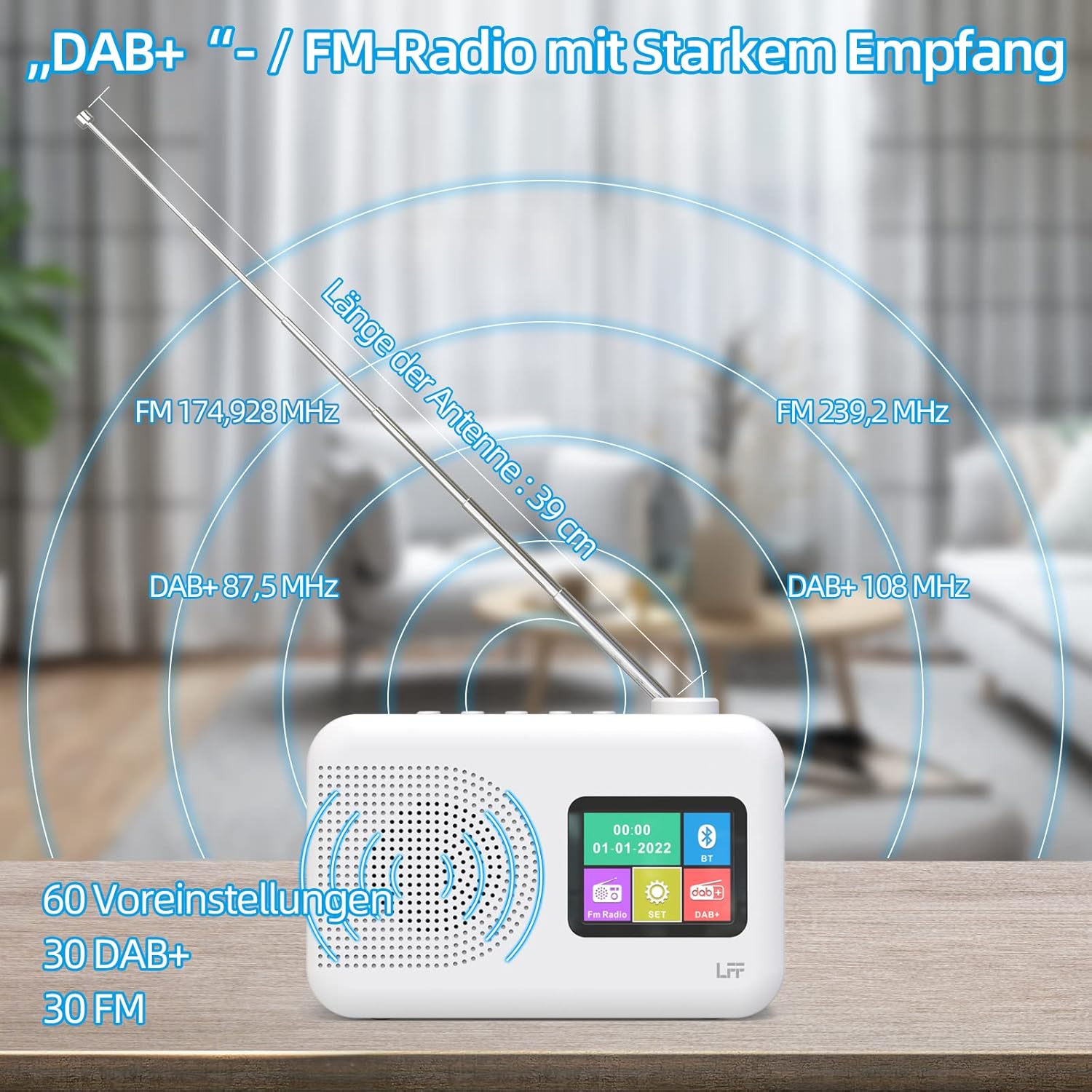
Extend the telescopic antenna fully (approximately 39 cm) and adjust its angle for optimal reception, especially for DAB+ and FM stations.

This diagram illustrates the radio's strong DAB+ and FM reception capabilities with the fully extended 39cm antenna, showing frequency ranges and the capacity for 60 total presets (30 DAB+, 30 FM).
4.3 초기 스캔(DAB+)
- 라디오를 켜세요.
- Ensure the mode is set to DAB+. If not, press the 방법 버튼을 전환합니다.
- The radio will automatically perform a full scan for available DAB+ stations. This may take a few minutes.
- 스캔이 완료되면 라디오 화면에 검색된 방송국 목록이 표시됩니다.
5. 사용 설명서
5.1 DAB+ 라디오 모드
- 를 누르세요 방법 DAB+ 모드를 선택하려면 버튼을 누르세요.
- 회전하다 조정/선택 knob to browse through the available stations.
- 를 누르세요 조정/선택 채널을 선택하는 노브.
- 사전 설정 저장: 방송국을 저장하려면 버튼을 길게 누르세요. 사전 설정 button until the display confirms. To recall, briefly press the corresponding 사전 설정 button. Up to 30 DAB+ stations can be saved.
5.2 FM 라디오 모드
- 를 누르세요 방법 FM 모드를 선택하려면 버튼을 누르세요.
- 회전하다 조정/선택 주파수를 수동으로 조절할 수 있는 노브.
- 를 누르고 계세요 조정/선택 knob for a few seconds to auto-scan for the next available station.
- 사전 설정 저장: Similar to DAB+ mode, press and hold a 사전 설정 button to save, and briefly press to recall. Up to 30 FM stations can be saved.
5.3 블루투스 모드

This diagram illustrates the three primary playback options for the radio: through its internal speaker, via Bluetooth connection to an external device, or using headphones connected to the headphone jack.
- 를 누르세요 방법 button to select Bluetooth mode. The display will show "Bluetooth Pairing" or similar.
- On your external device (e.g., smartphone), enable Bluetooth and search for available devices.
- Select "LFF Radio" (or similar name) from the list to pair.
- 페어링이 완료되면 라디오 스피커를 통해 기기의 오디오를 재생할 수 있습니다.
- 메모: This radio acts as a Bluetooth receiver. It does not support connecting to Bluetooth headphones or other Bluetooth speakers.
5.4 슬립 타이머
취침 타이머 기능은 설정된 시간이 지나면 라디오가 자동으로 꺼지도록 해줍니다.

This image depicts the sleep timer function, offering selectable durations of 15, 30, 45, 60, 90, and 120 minutes before the radio automatically powers off.
- 를 누르세요 Alarm/Sleep Timer button repeatedly to cycle through sleep timer options (15 min, 30 min, 45 min, 60 min, 90 min, 120 min, OFF).
- Select your desired duration. The radio will turn off automatically after this time.
5.5 알람 시계
이 라디오는 이중 알람 기능을 갖추고 있습니다.
- 를 누르고 계세요 Alarm/Sleep Timer button to enter alarm settings.
- 사용하세요 조정/선택 knob to set the alarm time, alarm source (DAB+, FM, or buzzer), and volume.
- 를 누르세요 조정/선택 knob to confirm each setting.
- 필요한 경우 두 번째 경보에 대해서도 동일한 과정을 반복하십시오.
5.6 헤드폰 사용
Plug 3.5mm headphones into the headphone jack on the side of the radio for private listening. The internal speaker will automatically mute.
6. 유지관리
6.1 청소
- 라디오 표면을 부드럽고 마른 천으로 닦으세요.
- 연마성 세척제, 왁스 또는 용제는 마감재를 손상시킬 수 있으므로 사용하지 마십시오.
6.2 배터리 교체
When using battery power, replace all four AA batteries when the low battery indicator appears on the display or when performance degrades.
- Ensure the radio is turned off and disconnected from AC power.
- 뒷면의 배터리실 덮개를 엽니다.
- 오래된 배터리를 제거하고 올바르게 폐기하십시오.
- Insert new 4 x 1.5V AA (LR6) batteries, observing correct polarity (+/-).
- 배터리 덮개를 단단히 닫으세요.
6.3 Screen Protection Film
The radio's display comes with a transparent protective film. For optimal clarity, gently peel off this film before first use.
7. 문제 해결
문제가 발생하면 다음의 일반적인 문제와 해결 방법을 참조하세요.
| 문제 | 가능한 원인 | 해결책 |
|---|---|---|
| 전원이 없습니다 | AC 어댑터가 연결되지 않았거나, 배터리가 방전되었거나, 잘못 삽입되었습니다. | AC 어댑터 연결을 확인하세요. 배터리를 교체하거나 극성이 올바른지 확인하세요. |
| 라디오 수신 불량 | 안테나가 확장되지 않아 신호가 약한 지역이며 간섭이 발생합니다. | Fully extend and adjust the telescopic antenna. Move the radio to a different location. Avoid sources of interference. |
| 블루투스가 연결되지 않습니다 | Radio not in Bluetooth mode, device too far, already paired with another device. | Ensure radio is in Bluetooth mode. Keep devices within range. Disconnect from other devices. |
| 소리가 나지 않습니다 | 볼륨이 너무 낮음, 헤드폰이 연결되어 있고 음소거가 활성화되어 있습니다. | 볼륨을 높이세요. 헤드폰을 분리하세요. 음소거 기능이 활성화되어 있는지 확인하세요. |
8. 사양
- 상표: LFF 확장
- 모델: DAB Plus Digital FM Radio
- 색상: 하얀색
- 연결 기술 : 블루투스
- 치수(길이 x 너비 x 높이): 16.1cm x 5.9cm x 10.9cm
- 튜닝 기술: 소량
- 전원: AC Adapter (5V/1000mA) or 4 x 1.5V AA (LR6) Batteries
- 지원되는 라디오 대역: DAB+, FM
- DAB+ 주파수 범위: 174.928~239.2MHz
- FM 주파수 범위 : 87.5~108MHz
- 사전 설정 : 30 DAB+, 30 FM
- 안테나 길이: 39 cm (extendable)
- 특별 기능: DAB Plus Radio, Sleep Timer, Dual Alarm, Headphone Jack, Color Display
- 포함된 구성 요소: DAB Digital Radio, AC Power Adapter, Quick Start Guide
9. 보증 및 지원
For any quality-related issues or technical support, please contact the seller directly. We are committed to resolving any problems you may encounter with your LFF DAB Plus Digital FM Radio.
Ask a question about this manual
Ask about setup, troubleshooting, compatibility, parts, safety, or missing instructions. Manuals+ will review the question and use this page’s manual context to help answer it.