
1. 서론
The Sunshine DT-17N Digital Multimeter is a versatile and reliable tool designed for accurate electrical measurements. It is particularly suitable for phone repair technicians and general electronics work, capable of measuring various electrical parameters including voltage, current, resistance, capacitance, and temperature. Its compact design and user-friendly features make it an essential tool for diagnosing and repairing electronic devices.

Figure 1: The Sunshine DT-17N Digital Multimeter, demonstrating its compact size for portability.
2. 안전 정보
To ensure safe operation and prevent damage to the meter, please read and follow all safety instructions carefully. This multimeter features double insulation protection for enhanced user safety.
- Always ensure the test leads are in good condition and properly connected before taking measurements.
- 볼륨을 적용하지 마십시오tage or current that exceeds the maximum rated values for each range.
- Never use the multimeter if it appears damaged or if the test leads are frayed.
- 볼륨 작업 시 주의하세요tag30V AC RMS, 42V 피크 또는 60V DC 이상의 전압은 감전 위험이 있으므로 사용하지 마십시오.
- 회로의 전원을 항상 차단하고 고전압을 방전시키십시오.tag저항, 연속성 또는 다이오드를 측정하기 전에 커패시터를 먼저 확인하십시오.
- 배터리 부족 표시등이 켜지면 정확한 측정값을 얻기 위해 즉시 배터리를 교체하십시오.
3. 제품 오버view
3.1. Multimeter Components

그림 2: 전면 view of the DT-17N Multimeter, highlighting its main display and controls.
3.2. 디스플레이 기능
The DT-17N features a large LCD display with a backlight, ensuring clear readability in various lighting conditions.

Figure 3: The multimeter's LCD display with its backlight feature, improving visibility in low-light environments.
- 대형 LCD 디스플레이: Provides clear numerical readings.
- 백라이트: Improves visibility in dark or low-light conditions. Activated by pressing and holding the HOLD button.
- 측정 단위 : Displays the appropriate unit (e.g., V, A, Ω, °C/°F).
- 배터리 상태: 현재 배터리 잔량을 나타냅니다.
- Automatic Polarity Display: Shows positive or negative polarity automatically.
3.3. Controls and Input Ports
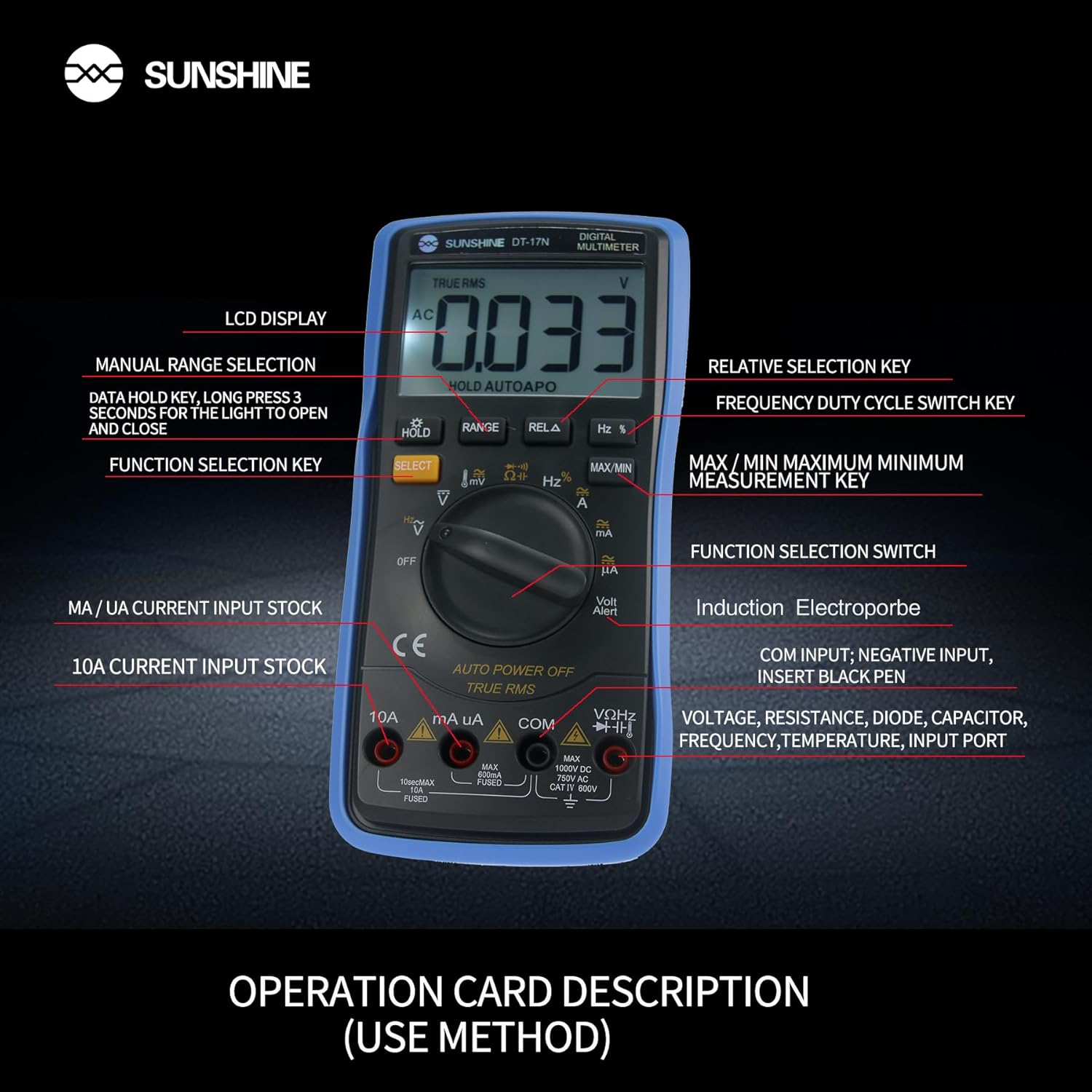
그림 4: 상세 view of the multimeter's controls and input ports with their respective functions.
- 회전 기능 스위치: Used to select the desired measurement function (e.g., Voltag예: 전류, 저항, 온도).
- 선택 버튼: 회전 스위치의 한 위치에서 다양한 측정 모드 간 전환이 가능합니다(예: AC/DC 볼륨).tag예: 다이오드/연속성).
- 홀드 버튼: Freezes the current reading on the display. Press and hold to activate/deactivate the backlight.
- 범위 버튼: Allows manual selection of measurement ranges, overriding the automatic ranging feature.
- RELA Button (Relative Selection Key): 저장된 기준값과 현재 측정값의 차이를 측정합니다.
- Hz % Button (Frequency Duty Cycle Switch Key): 주파수 측정과 듀티 사이클 측정 사이를 전환합니다.
- 최대/최소 버튼: Displays the maximum or minimum measured value during a measurement session.
- VΩHz Input Port: 볼륨 측정을 위해 빨간색 테스트 리드를 연결하세요.tage, resistance, frequency, capacitance, diode, and temperature measurements.
- COM 입력 포트: Connect the black test lead (common ground) for all measurements.
- mA/uA Input Port: Connect the red test lead for measuring small currents (milliamp에레스와 마이크로amp에레스).
- 10A Input Port: Connect the red test lead for measuring large currents (up to 10 Amp에레스).
- Volt Alert (NCV): 비접촉 Voltage 감지 기능.
4. 설정
4.1. 배터리 설치
The DT-17N is battery-powered. To install or replace the battery:
- 멀티미터가 꺼져 있는지 확인하세요.
- 장치 뒷면에서 배터리 덮개를 찾으세요.
- 고정 나사를 풀고 덮개를 제거하십시오.
- Insert the new battery, observing correct polarity (+ and -).
- 배터리 칸 덮개를 다시 덮고 나사로 고정합니다.
4.2. 테스트 리드 연결
Always connect the black test lead to the COM input jack. Connect the red test lead to the appropriate input jack based on the measurement you intend to perform:
- 볼륨tage, Resistance, Capacitance, Frequency, Diode, and Temperature measurements: Connect the red test lead to the VΩHz 잭.
- For Current measurements (mA/uA): Connect the red test lead to the mA/uA 잭.
- For High Current measurements (10A): Connect the red test lead to the 10A 잭.
5. 사용 설명서
The Sunshine DT-17N features automatic identification for most ranges, simplifying operation. Use the rotary switch to select the primary function and the SELECT button to toggle sub-functions.
5.1. 부피 측정tage(교류/직류)
- 로터리 스위치를 V 위치.
- 필요한 경우 선택하다 button to toggle between AC (~) and DC (—) voltage.
- 검정색 테스트 리드를 코. 잭과 빨간색 테스트 리드 VΩHz 잭.
- 측정하려는 회로 또는 부품에 테스트 프로브를 병렬로 연결하십시오.
- vol을 읽어보세요tag디스플레이의 e 값.

Figure 5: The multimeter showing a DC millivolt measurement on its display.
5.2. 전류 측정 (교류/직류)
주의: Never connect the multimeter in parallel when measuring current, as this can damage the meter and the circuit. Always connect in series.
- 로터리 스위치를 mA/uA or 10A position, depending on the expected current.
- 필요한 경우 선택하다 button to toggle between AC (~) and DC (—) current.
- 검정색 테스트 리드를 코. 잭. 빨간색 테스트 리드를 연결하세요. mA/uA or 10A jack accordingly.
- 회로를 열고 테스트 프로브를 부하와 직렬로 연결하십시오.
- 디스플레이에서 현재 값을 읽으세요.
5.3. 저항 측정
- 로터리 스위치를 Ω 위치.
- 검정색 테스트 리드를 코. 잭과 빨간색 테스트 리드 VΩHz 잭.
- 회로의 전원이 차단되고 모든 콘덴서가 방전되었는지 확인하십시오.
- 부품의 저항을 측정하려면 테스트 프로브를 부품 양단에 연결하십시오.
- 디스플레이에서 저항 값을 읽으십시오.
5.4. 정전 용량 측정
- 로터리 스위치를 정전 용량 symbol (often shared with diode/continuity).
- 를 누르세요 선택하다 button until the capacitance mode is active.
- 검정색 테스트 리드를 코. 잭과 빨간색 테스트 리드 VΩHz 잭.
- 테스트 프로브를 연결하기 전에 커패시터가 완전히 방전되었는지 확인하십시오.
- 테스트 프로브를 커패시터에 연결합니다.
- 디스플레이에서 커패시턴스 값을 읽습니다.
5.5. Measuring Frequency / Duty Cycle
- 로터리 스위치를 헤르츠 % 위치.
- 를 누르세요 헤르츠 % button to toggle between frequency (Hz) and duty cycle (%).
- 검정색 테스트 리드를 코. 잭과 빨간색 테스트 리드 VΩHz 잭.
- 테스트 프로브를 신호 소스에 병렬로 연결하십시오.
- 디스플레이에 표시된 주파수 또는 듀티 사이클 값을 읽으십시오.
5.6. 온도 측정
The DT-17N can measure temperature using a K-type thermocouple (not always included, check package contents).

그림 6: 예ample of temperature measurement using the DT-17N Multimeter with a thermocouple.
- 로터리 스위치를 ° C / ° F 위치.
- 필요한 경우 선택하다 button to choose between Celsius or Fahrenheit.
- K형 열전대를 연결하십시오. VΩHz 그리고 코. 잭, 극성 관찰.
- 측정하고자 하는 온도 대상 물체 위에 또는 물체 내부에 열전대 끝을 놓으십시오.
- 디스플레이에 표시된 온도 값을 읽으십시오.
5.7. 다이오드 테스트 및 연속성 검사
- 로터리 스위치를 다이오드/연속성 상징.
- 를 누르세요 선택하다 다이오드 테스트와 연속성 테스트 사이를 전환하는 버튼입니다.
- 검정색 테스트 리드를 코. 잭과 빨간색 테스트 리드 VΩHz 잭.
- For Diode Test: Connect the probes across the diode. The display will show the forward voltage drop. Reverse the probes to check for open circuit.
- For Continuity Test: Connect the probes across the circuit or component. A beep indicates continuity (low resistance).
5.8. 비접촉 Voltage(NCV) 검출
The NCV function allows detection of AC voltag도체와 직접 접촉하지 않고.
- 로터리 스위치를 NCV position (often indicated by a Volt Alert symbol).
- Move the top part of the multimeter near the conductor.
- The meter will beep and/or flash an indicator light if AC voltage가 감지되었습니다.
5.9. 데이터 홀드 및 백라이트
- 데이터 보유 : 를 누르세요 잡고 있다 버튼을 짧게 누르면 디스플레이에 현재 값이 고정됩니다. 다시 누르면 손에서 놓입니다.
- 백라이트: 를 누르고 계세요 잡고 있다 button for approximately 3 seconds to turn the display backlight ON or OFF.
5.10. 최대/최소 측정
This function records the maximum and minimum values measured during a session.
- 원하는 측정 기능을 선택하십시오 (예: 볼륨)tag이자형).
- 를 누르세요 최대/최소 button. The display will show 'MAX' and the maximum value recorded.
- 누르다 최대/최소 again to cycle to 'MIN' and view the minimum value.
- 누르고 있으세요 최대/최소 이 모드를 종료합니다.
6. 유지관리
적절한 유지관리는 멀티미터의 수명과 정확성을 보장합니다.
6.1. 청소
광고로 케이스를 닦으세요amp 천과 순한 세제를 사용하십시오. 연마제나 용제는 사용하지 마십시오. 사용 전 측정기가 완전히 건조되었는지 확인하십시오.
6.2. 배터리 교체
Refer to Section 4.1 for battery replacement instructions. Always use the specified battery type.
6.3. Holster Care
The multimeter is protected by a thick rubber shockproof holster, designed for durability and a non-slip grip. Keep the holster clean and free from debris.

Figure 7: The durable rubber holster provides protection and a comfortable grip for the multimeter.
7. 문제 해결
If you encounter issues with your DT-17N multimeter, refer to the table below for common problems and solutions.
| 문제 | 가능한 원인 | 해결책 |
|---|---|---|
| 디스플레이가 없거나 어둡습니다 | Low or dead battery; Poor battery contact | Replace battery; Check battery contacts |
| 잘못된 판독 | Wrong function selected; Improper test lead connection; Damaged test leads; Out of range | Select correct function; Ensure leads are in correct jacks; Replace leads; Select higher range or check specifications |
| 연속성 경고음이 없습니다. | Circuit resistance too high; Continuity mode not selected | Ensure resistance is below threshold; Press SELECT to enter continuity mode |
| Fuse blown (for current measurements) | Overcurrent applied | Replace fuse with specified type and rating; Ensure correct current measurement procedure |
8. 사양
Technical specifications for the Sunshine DT-17N Digital Multimeter.
| 특징 | 사양 |
|---|---|
| 모델 | DT-17N |
| 측정 유형 | 멀티미터 |
| 표시하다 | 5999 (5 5/6) counts, Automatic Polarity Display, Backlit LCD |
| Samp링율 | 초당 약 3회 |
| 전원 | 배터리 구동 |
| 최소 작동 볼륨tage | 3볼트(DC) |
| 온도 측정 범위 | 0°C ~ 1000°C(32°F ~ 1832°F) |
| Induction Electroprobe Function | Yes (NCV) |
| 이중 적분 A/D 변환 | 예 |
| 품목 치수 | 5.51 x 2.76 x 1.18 인치 |
| 품목 무게 | 0.55 킬로그램 |
| 색상 | 파란색 |
9. 보증 및 지원
9.1. 보증 정보
This product comes with a warranty of 구매일로부터 3개월보증 청구를 위해 구매 증빙 자료를 보관해 주십시오. 보증은 정상적인 사용 조건에서 발생하는 제조상의 결함에 적용됩니다.
9.2. 고객 지원
For technical assistance or inquiries regarding your Sunshine DT-17N Digital Multimeter, please contact your retailer or the manufacturer's customer service department. Refer to your purchase documentation for specific contact details.