
1. 소개 및 안전 정보
Thank you for choosing the CABLETECH UCH0199-1 Universal Full-Motion TV Wall Mount. This manual provides detailed instructions for safe installation, operation, and maintenance of your TV mount. Please read all instructions carefully before assembly and use to ensure proper installation and to prevent personal injury or property damage.
중요 안전 경고:
- 중량 용량: Do not exceed the maximum load capacity of 35 kg (77 lbs). Exceeding this limit may result in serious injury or property damage.
- 화면 크기: 이 거치대는 37인치에서 70인치 사이의 TV에 맞게 설계되었습니다.
- 벽 유형: Ensure the mounting surface can safely support the combined weight of the mount and your TV. This mount is suitable for solid concrete walls, brick walls, and wood stud walls. Do not install on drywall alone.
- 전문적인 설치: 설치 과정에 대해 확신이 없다면 자격을 갖춘 전문가에게 문의하세요.
- 어린이들: Keep children away from the assembly area during installation. Small parts may be a choking hazard.
- 도구: Use appropriate tools and follow all safety precautions for tool usage.
- 정기 점검: 거치대가 안전하게 고정되어 있는지, 모든 고정 장치가 단단히 조여져 있는지 주기적으로 확인하십시오.
2. 패키지 내용
Verify that all components are present and undamaged before beginning installation. If any parts are missing or defective, contact CABLETECH customer support.

그림 2.1: 위에view of the CABLETECH UCH0199-1 TV Wall Mount components. The image displays the main articulating arm assembly, the wall plate, and the two vertical TV bracket arms.
- 벽판 조립체 (1)
- Articulating Arm Assembly (1)
- TV 브래킷 암 (2)
- 장착 하드웨어 키트(나사, 앵커, 와셔, 스페이서)
3. 사양
Refer to the following technical specifications to ensure compatibility with your television and installation environment.
| 특징 | 사양 |
|---|---|
| 화면 크기 호환성 | 37인치 - 70인치 |
| 최대 하중 용량 | 35kg(77파운드) |
| VESA 호환성 | 200x200, 300x200, 300x300, 400x200, 400x300, 400x400, 600x400 mm |
| 기울기 각도 | +5° / -18° |
| 회전 각도 | +90° / -90° |
| 벽과의 거리 | 105mm - 429mm |
| 케이블 관리 | 통합 |
| 재료 | 강철 |
| 색상 | 검은색 |
| 제품 무게 | 2.2kg |
4. 설정 및 설치
4.1 설치 전 체크리스트
- 필요한 도구: Pencil, drill, stud finder (for wood studs), level, Phillips head screwdriver, socket wrench.
- 벽 유형: Identify your wall type (wood stud, solid concrete, brick). Different wall types require specific mounting hardware and procedures.
- TV Weight and VESA Pattern: Confirm your TV's weight is within the mount's capacity and its VESA pattern matches the mount's compatibility.
4.2 단계별 설치
Step 1: Determine TV Height and Wall Plate Position
- Decide on the desired viewTV 높이를 조절하세요.
- Using a stud finder, locate the center of the wood studs in your desired mounting area. Mark these locations with a pencil. For concrete/brick walls, choose a suitable location away from electrical wires or plumbing.
Step 2: Install the Wall Plate Assembly
- Hold the wall plate assembly against the wall at the marked height and use a level to ensure it is perfectly horizontal.
- Mark the drilling holes through the wall plate onto the wall.
- Drill pilot holes at the marked locations. For wood studs, use a smaller drill bit than the lag bolts. For concrete/brick, use a masonry drill bit and insert wall anchors.
- Secure the wall plate assembly to the wall using the provided lag bolts and washers. Tighten firmly but do not overtighten.
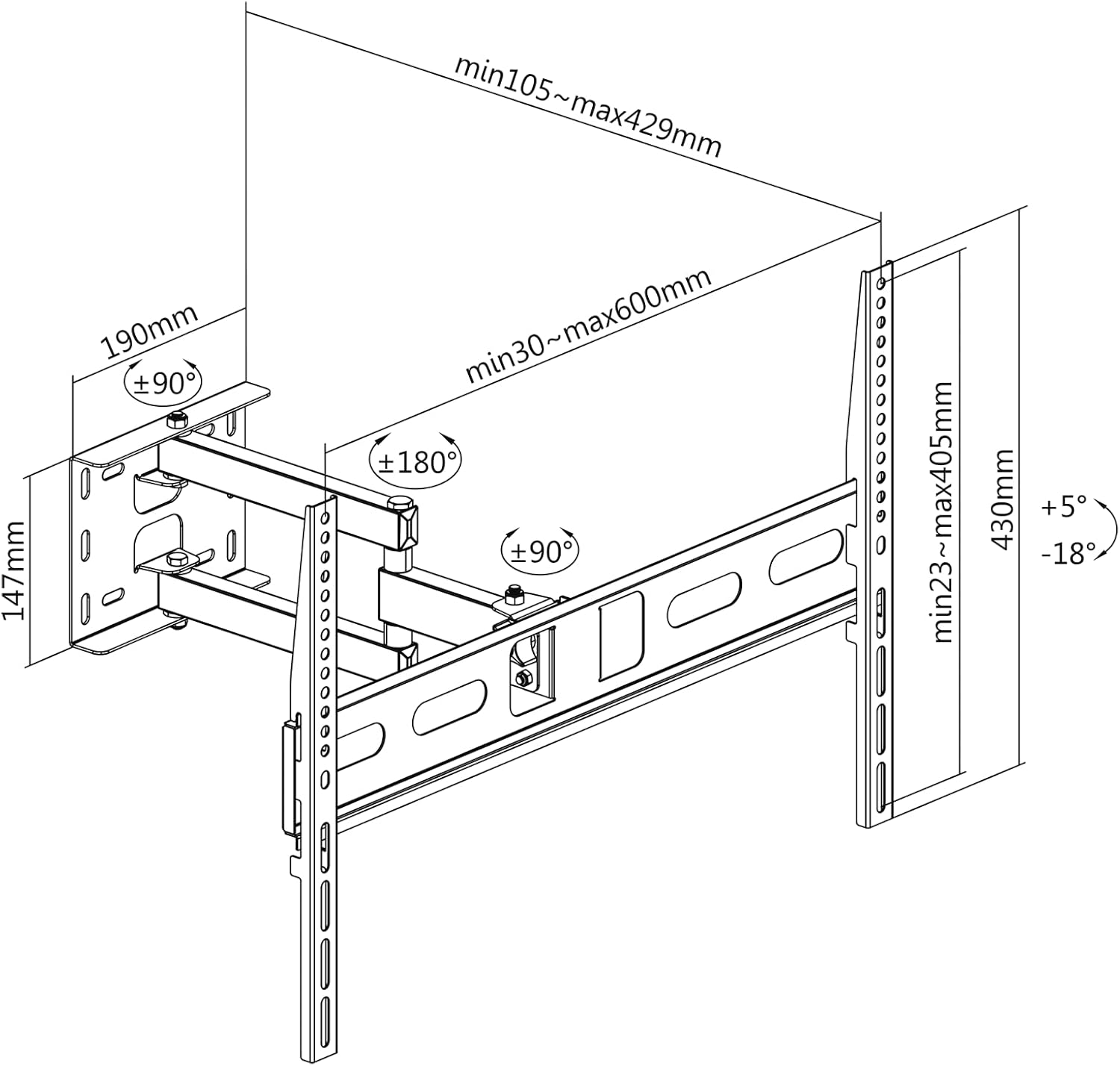
그림 4.1: Dimensional drawing showing the mount's measurements, VESA compatibility, and articulation ranges. This diagram assists in planning the installation and understanding the mount's capabilities.
3단계: TV 브래킷을 TV에 부착하세요
- 화면 손상을 방지하기 위해 TV를 부드럽고 깨끗한 표면에 화면이 아래로 향하도록 조심스럽게 놓으십시오.
- TV 뒷면에 있는 VESA 장착 구멍을 확인하세요.
- Select the appropriate screws, washers, and spacers from the hardware kit that fit your TV's VESA holes.
- Attach the two TV bracket arms to the back of your TV. Ensure the hooks on the brackets are facing upwards and the brackets are centered and level. Tighten the screws securely.
4단계: 벽면 플레이트에 TV 장착
- 다른 사람의 도움을 받아 부착된 브래킷을 이용해 TV를 조심스럽게 들어 올리십시오.
- Hook the TV bracket arms onto the wall plate assembly. Ensure both brackets are securely seated on the wall plate.
- Locate the safety screws or locking mechanisms on the bottom of the TV brackets and tighten them to prevent the TV from accidentally lifting off the mount.
5. 사용 설명서
Once installed, your CABLETECH UCH0199-1 mount allows for flexible TV positioning.
5.1 기울기 각도 조정
- The mount allows for a tilt range of +5° (upwards) to -18° (downwards).
- To adjust the tilt, loosen the tilt adjustment knobs or bolts located on the TV bracket arms.
- 원하는 각도로 TV를 조심스럽게 기울이세요.
- Tighten the tilt adjustment knobs/bolts to secure the TV in place.

그림 5.1: Visual representation of the TV tilt adjustment feature, showing the range of motion from upward to downward tilt.
5.2 Adjusting Swivel Angle and Wall Distance
- The articulating arm allows for a swivel range of +90° to -90° (depending on TV size and wall clearance) and extends the TV from 105 mm to 429 mm from the wall.
- Gently grasp the sides of your TV and move it to the desired swivel angle or extend/retract it from the wall. The joints are designed to move smoothly.
- No locking mechanism is typically required for swivel, as the friction in the joints holds the position.

그림 5.2: The mount shown fully extended from the wall, demonstrating its maximum reach and swivel capability.
5.3 Portrait and Landscape Orientation
- This mount supports installing your TV in either portrait or landscape orientation. This is typically achieved during the initial installation by aligning the TV's VESA mounting holes with the mount's brackets in the desired orientation.
- 메모: The mount itself does not provide a rotational mechanism to switch between portrait and landscape after installation. This feature refers to the flexibility of initial setup.
5.4 케이블 관리
- Utilize the integrated cable clips or channels on the articulating arm to route and secure your TV cables. This helps maintain a tidy appearance and prevents cables from snagging during adjustments.
6. 유지관리
정기적인 유지 관리는 TV 벽걸이 거치대의 수명 연장과 안전한 작동을 보장합니다.
- 견고성 확인: Every 3-6 months, check all screws and bolts (wall plate, arm joints, TV brackets) to ensure they are securely tightened. Do not overtighten.
- 청소: Wipe the mount with a soft, dry cloth to remove dust. For stubborn marks, a slightly damp 천을 사용하여 세척한 후 건조시키세요. 연마성 세척제나 용제는 사용하지 마세요.
- 매끄럽게 하기: The articulating joints are designed for smooth movement. If movement becomes stiff, a small amount of silicone-based lubricant can be applied to the pivot points, but this is rarely necessary.
7. 문제 해결
If you encounter issues with your CABLETECH UCH0199-1 TV wall mount, refer to the following common problems and solutions.
- TV 설치 후 수평이 맞지 않습니다.
해결책: Ensure the wall plate was installed level. Some mounts offer post-installation leveling adjustments on the TV brackets; check your specific model for this feature. If not, you may need to slightly adjust the wall plate. - 마운트가 헐거워지거나 불안정하게 느껴집니다.
해결책: Immediately remove the TV from the mount. Re-check all mounting screws and bolts for tightness, both on the wall plate and the TV brackets. Ensure the wall anchors (if used) are properly seated and the wall material is suitable. If the issue persists, consult a professional installer. - Difficulty moving the articulating arm:
해결책: The arm joints are designed to hold the TV's position. If movement is too stiff, check for any overtightened bolts on the arm joints. If too loose, gently tighten the bolts at the pivot points. - TV가 마운트에 맞지 않습니다:
해결책: Verify your TV's VESA pattern and weight against the specifications in Section 3. If they do not match, the mount is incompatible with your TV.
8. 보증 및 지원
For warranty information or technical support, please refer to the documentation included with your purchase or contact CABLETECH customer service directly. Keep your proof of purchase for warranty claims.
CABLETECH is committed to providing high-quality products and support. If you have any questions or require assistance, do not hesitate to reach out to our support team.