
1. 서론
Thank you for choosing the DIHOOM 2K PTZ Solar Wi-Fi Security Camera. This manual provides essential information for setting up, operating, and maintaining your camera to ensure optimal performance and security. This camera features 2K high-definition video, Pan-Tilt-Zoom (PTZ) functionality, solar power for continuous operation, and advanced human detection capabilities, making it ideal for outdoor surveillance.

Image 1: DIHOOM 2K PTZ Solar Wi-Fi Security Camera with solar panel.
2. 제품 오버view
The DIHOOM security camera is designed for comprehensive outdoor monitoring. It integrates a high-resolution camera with PTZ capabilities, a solar panel for self-sustaining power, and smart detection features.
주요 특징:
- 2K High-Definition Video: 선명하고 자세한 음식 사진을 촬영합니다.tage.
- PTZ 기능: 355° horizontal pan and 90° vertical tilt for wide area coverage.
- 10배 디지털 줌: 세부 사항을 더 자세히 살펴볼 수 있게 해줍니다.
- 태양열 전원: Equipped with a 7.5W solar panel and 16000mAh battery for continuous operation.
- PIR 인간 감지: Reduces false alarms by detecting human heat and shape.
- 컬러 나이트 비전: 저조도 환경에서도 선명한 풀컬러 영상을 제공합니다.
- 양방향 오디오 : 통신을 위한 마이크와 스피커가 내장되어 있습니다.
- IP65 방수: 다양한 야외 기상 조건을 견딜 수 있도록 설계되었습니다.
- 앱 제어: Remote monitoring and control via a dedicated smartphone application.
구성 요소:
The package includes the camera unit with integrated solar panel, mounting bracket, screws, and a USB charging cable.

Image 2: Product dimensions and included components.
3. 설정
3.1 초기 준비
- 카메라 충전: Before first use, fully charge the camera for approximately 8 hours using the provided USB cable.
- 카메라 재설정: Press and hold the reset button on the camera for more than 10 seconds. This ensures the camera is ready for pairing with the app.
- 앱 다운로드: Download the dedicated smartphone application from your device's app store.
3.2 네트워크 연결
- 카메라는 지원합니다 2.4GHz Wi-Fi 전용. Ensure your smartphone is connected to a 2.4GHz Wi-Fi network during setup. If you have a 5GHz/2.4GHz dual-band router, select the 2.4GHz option.
- During setup, place the camera close to your Wi-Fi router (ideally 30-100 cm) to ensure a stable connection.
- If other 2.4GHz wireless devices are nearby, try to keep the camera's antennas at least 1 meter away from them to avoid interference.
- Follow the in-app instructions to add the camera. When scanning the QR code displayed on your phone, hold the camera lens 15-25 cm away from the phone screen. A voice prompt will confirm successful connection.
3.3 설치
- The recommended installation height is 2.1 meters, with a camera tilt angle of approximately 15 degrees for optimal PIR detection. The PIR detection range is approximately 7 meters forward from the camera.
- The solar panel can be detached from the main unit and installed in a separate, sunnier location to maximize charging efficiency.

Image 3: Easy installation with screws, showing the IP65 waterproof design.
4. 사용 설명서
4.1 앱 제어
Manage all camera functions through the dedicated smartphone app. This includes live viewing, playback, PTZ control, settings adjustments, and receiving notifications.

Image 4: Smartphone app interface for real-time monitoring, manual siren, light operation, and sensitivity settings.
4.2 PTZ and Zoom Functionality
카메라는 355° 수평 팬과 90° 수직 틸트를 제공하여 원격으로 조정할 수 있습니다. viewing angle via the app. With 10x digital zoom, you can magnify specific areas for more detail.

Image 5: Illustrates 360-degree wide-angle coverage and 10x magnification capabilities.
4.3 PIR Human Detection and Alarms
The camera uses PIR (Passive Infrared) human detection technology to accurately identify human movement, minimizing false alarms from pets or swaying trees. Upon detection, you will receive instant push notifications on your smartphone. You can also manually activate the built-in white LED lights and a 100dB siren via the app to deter intruders.
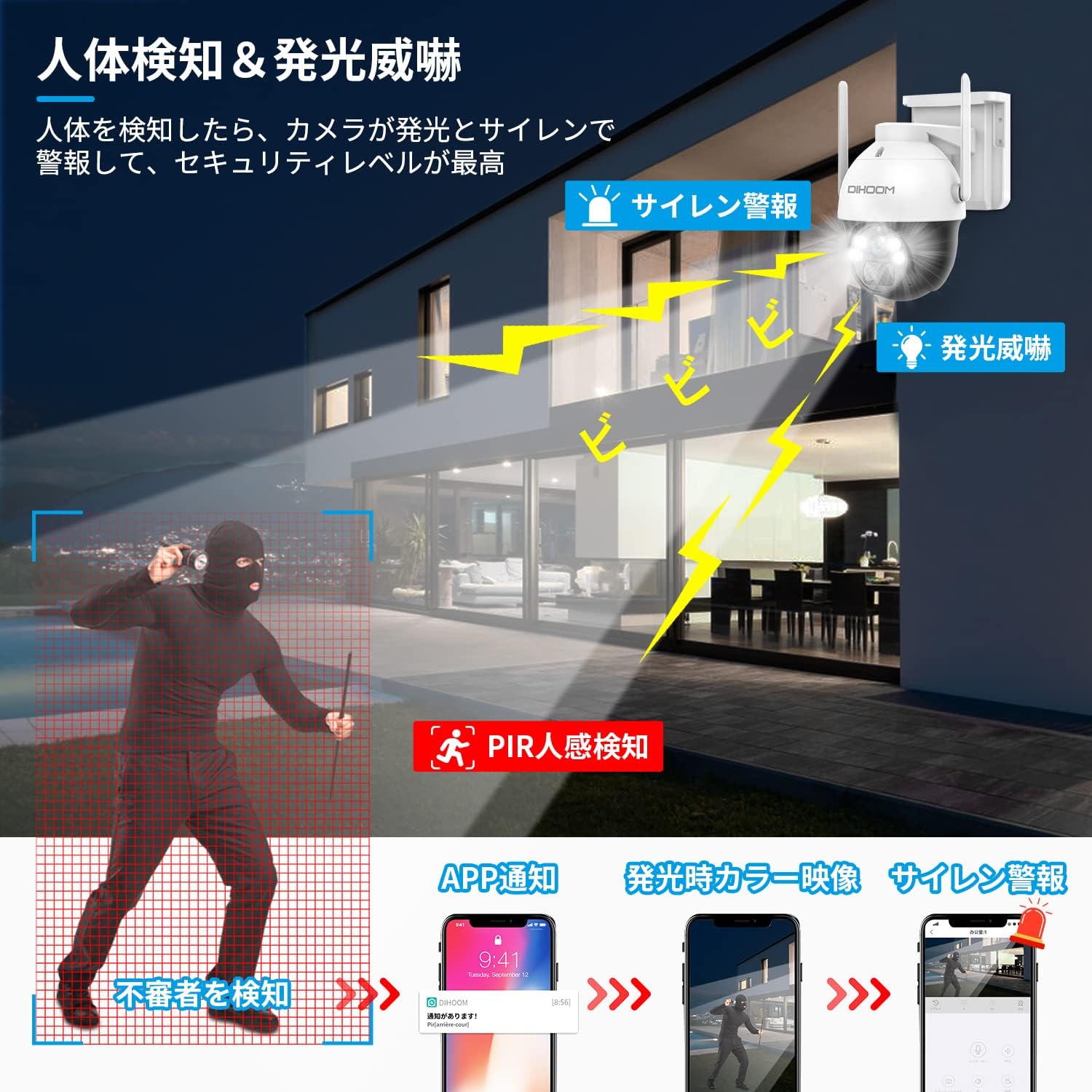
Image 6: Demonstrates PIR human detection triggering light and sound alarms, with smartphone notifications.
4.4 양방향 오디오
With the integrated microphone and speaker, you can engage in two-way conversations through the camera. This allows you to communicate with visitors or deter unwanted individuals remotely.

Image 7: Shows two-way audio communication and manual alarm activation via the app.
4.5 야간 투시경
The camera features 2K color CMOS sensors and white LED lights, enabling clear color video recording even in minimal illumination (1 LUX). This ensures that details are visible day and night.

Image 8: Comparison of 2K color night vision and infrared night vision.
4.6 비디오 저장
녹화된 푸tage can be stored on a Micro SD card (up to 128GB, sold separately) or via a paid cloud service. The camera utilizes H.265+ video compression for efficient storage.

Image 9: Storage options including Micro SD card and cloud service.
4.7 Multi-Camera Management and Sharing
The app allows you to add and manage multiple DIHOOM cameras simultaneously. You can also share live or recorded video with family and friends by creating viewing IDs (up to 100 per camera) and setting specific permissions for each shared user.
5. 유지관리
- 태양광 패널: Ensure the solar panel is clean and free from obstructions (e.g., leaves, dirt) to maintain optimal charging efficiency.
- 배터리 모니터링: Monitor the battery level via the app. You will receive a notification when the battery drops below 20%.
- 내후성: The IP65 rating ensures the camera is protected against dust and water jets. However, avoid submerging the camera in water.
- 청소: 카메라 렌즈와 태양광 패널을 부드러운 천으로 살살 닦아주세요.amp 필요에 따라 천으로 닦아주세요. 연마성 세제는 사용하지 마세요.

Image 10: The camera is designed to withstand various weather conditions, including rain and snow, with its IP65 rating.
6. 문제 해결
- Wi-Fi 연결 문제:
- 라우터가 2.4GHz Wi-Fi 신호를 방송하는지 확인하세요.
- Verify the camera is within range of your Wi-Fi router.
- 카메라를 재설정하고 설정 과정을 다시 시도해 보세요.
- 잦은 오경보:
- Adjust the PIR detection sensitivity settings in the app (10 levels available).
- Ensure the camera is not pointed at areas with constant movement (e.g., busy roads, swaying branches).
- 배터리가 빨리 소모됨:
- Ensure the solar panel is receiving adequate direct sunlight.
- Check for obstructions on the solar panel.
- Reduce the frequency of motion detection events or live viewing if possible.
- 낮은 비디오 품질:
- Check your Wi-Fi signal strength in the camera's location.
- 카메라 렌즈가 깨끗한지 확인하세요.
7. 사양
| 특징 | 사양 |
|---|---|
| 분야 View | 110도 |
| 설치 유형 | 스크류 인 |
| 나이트 비전 범위 | 20 미터 |
| 프레임 속도 | 30fps |
| 재료 | 플라스틱 |
| 광원 | 백색 LED |
| 특징 | PTZ 기술, 모션 센서 |
| 코팅 특징 | 방수복 |
| 제품 무게 | 1.79 킬로그램 |
| 권장 사용 | 집 밖의 |
| 연결 기술 | 무선 전화 |
| 호환 장치 | 스마트폰 |
| 전원 | 배터리 구동 |
| 연결 프로토콜 | 와이파이 |
| 비디오 캡처 해상도 | 1440p(2K) |
| 항목 수 | 3 (Camera, Solar Panel, Mount) |
| 무선 통신 기술 | 와이파이 |
8. 보증 및 지원
The DIHOOM 2K PTZ Solar Wi-Fi Security Camera comes with a manufacturer's one-year warranty. If you encounter any issues, please do not hesitate to contact us.
- 연락처 이메일: dihoomjp@hotmail.com
- 영업 시간: 월요일~금요일, 오전 10시~오후 6시 (일본 표준시)
- Technical issues will be addressed by our technical professionals.
This product is certified with the PSE Mark and Radio Law (Technical Conformity Mark), ensuring a safe and reliable user experience.
9. 제품 비디오
Watch these official product videos for a visual guide to the camera's features and capabilities.
Video 1: Anker Eufy SoloCam S340 Overview. This video demonstrates the camera's 360-degree coverage, AI motion tracking, 3K high-quality zoom, solar charging, and IP65 weather resistance.
Video 2: Anker Eufy SoloCam S340 Features. This video highlights the camera's 360-degree coverage, no wiring or charging requirements, AI motion tracking, alarm and light functions, 3K high-quality video, 8x zoom, night vision, and IP65 durability.