
Edision EDI-RCU 4 Learn
Edision EDI-RCU 4 Learn Universal Remote Control User Manual
Model: EDI-RCU 4 Learn (07-00-0064)
Brand: Edision
1. 소개 및 이상view
The Edision EDI-RCU 4 Learn is a versatile 2-in-1 universal remote control designed for seamless operation of your Edision receiver and television. It is pre-programmed for common TV brands like Samsung and LG, and offers a learning function to customize up to four buttons for any TV.

이 이미지는 앞면을 보여줍니다 view of the Edision EDI-RCU 4 Learn universal remote control, highlighting its compact design and button layout.
주요 특징:
- 2-in-1 functionality for Edision receivers and televisions.
- Pre-programmed for major TV brands (Samsung, LG).
- Four programmable TV buttons for custom control.
- Original replacement remote for compatible Edision models.

This image highlights the 2-in-1 functionality of the Edision EDI-RCU 4 Learn remote, indicating its use for both Set-Top Box (STB) and TV control. It also shows a close-up of the TV control buttons.
2. 설정
2.1 배터리 설치
The Edision EDI-RCU 4 Learn remote control requires two AAA batteries (not included). Follow these steps to install them:
- 리모콘 뒷면에 있는 배터리함 덮개를 찾으세요.
- 덮개를 아래로 밀거나 걸쇠를 눌러서 엽니다.
- AAA 배터리 2개를 넣고 양극(+)과 음극(-) 단자가 배터리함 내부의 표시기와 올바르게 맞춰졌는지 확인합니다.
- 딸깍 소리가 날 때까지 배터리 덮개를 다시 제자리에 밀어 넣습니다.
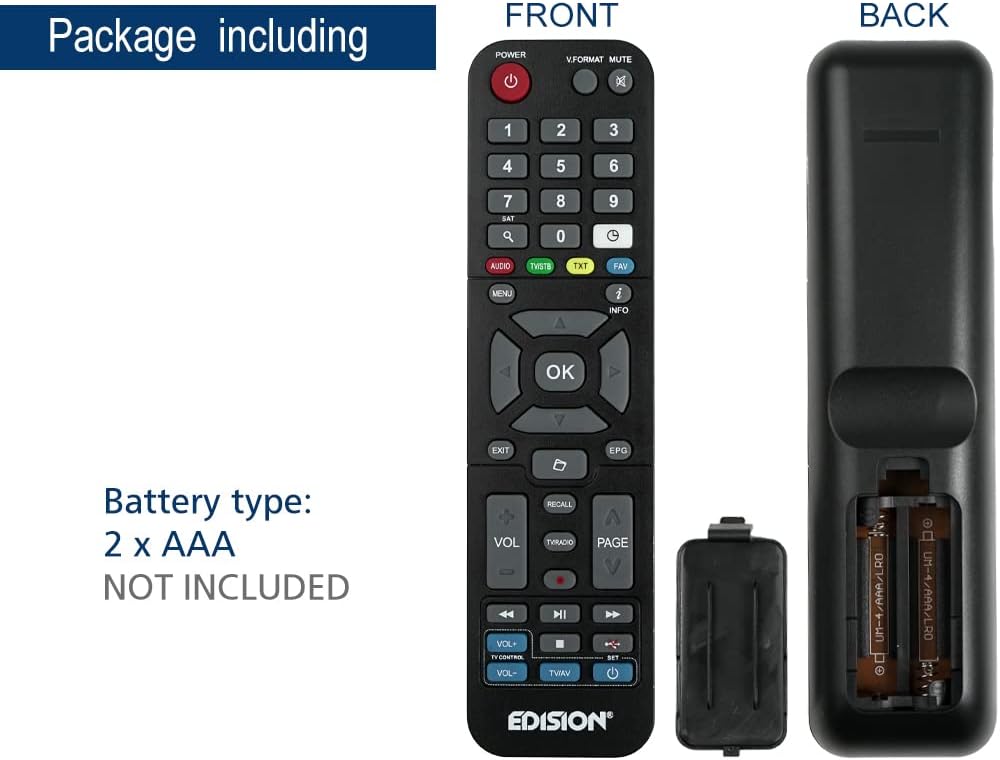
This image illustrates the battery compartment of the Edision EDI-RCU 4 Learn remote control, showing where to insert two AAA batteries. Batteries are not included.
2.2 Initial Setup and Pre-programmed Functions
The remote is pre-programmed for immediate use with compatible Edision receivers. Additionally, the four main TV control buttons (VOL+, VOL-, TV/AV, Power) are pre-programmed for Samsung and LG televisions. For other TV brands or custom functions, use the learning feature described in the Operating Instructions section.
3. 사용 설명서
3.1 기본 기능
The remote control features standard buttons for navigating your Edision receiver and controlling basic TV functions:
- 전원 버튼(빨간색): Turns the Edision receiver on or off.
- 숫자 키패드(0-9): 채널 직접 입력용입니다.
- 탐색 버튼(위, 아래, 왼쪽, 오른쪽, 확인): 메뉴 탐색 및 선택을 위해.
- 볼륨+ / 볼륨-: Adjusts volume (pre-programmed for TV).
- CH+ / CH-: 채널을 변경합니다.
- 음소거: Mutes TV sound.
- 메뉴: 수신기의 메인 메뉴에 접근합니다.
- 출구: 현재 메뉴 또는 화면을 종료합니다.
- 정보: 프로그램 정보를 표시합니다.
- TV/AV: Switches TV input source (pre-programmed for TV).
- TV Power Button (Blue): Turns the TV on or off (pre-programmed for TV).
3.2 Learning Function for TV Control
The EDI-RCU 4 Learn allows you to program its four dedicated TV control buttons (VOL+, VOL-, TV/AV, TV Power) using your original TV remote control. This enables universal control over your TV's essential functions.
- 학습 모드로 들어가기: Press and hold the blue 'SET' button on the EDI-RCU 4 Learn remote until the red LED light stays lit.
- Select Button to Learn: Press the specific TV control button on the EDI-RCU 4 Learn remote that you wish to program (e.g., VOL+). The red LED will blink slowly.
- 신호 전송: Point your original TV remote control directly at the EDI-RCU 4 Learn remote (infrared sensors should face each other, typically 1-3 cm apart). Press and hold the corresponding button on your original TV remote (e.g., TV's VOL+ button). The red LED on the EDI-RCU 4 Learn will blink rapidly, then light up steadily to indicate successful learning.
- 학습 모드 종료: Once all desired buttons are programmed, press the blue 'SET' button again to exit learning mode. The red LED will turn off.

Image illustrating holding the SET button to enter learning mode.

Image showing selection of a button on the EDI-RCU 4 Learn remote for learning.

Image depicting the process of transmitting the signal from the original TV remote to the EDI-RCU 4 Learn.

Image showing pressing the SET button to exit learning mode.
Tips for Learning:
- Ensure both remotes have fresh batteries.
- Perform the learning process in a well-lit area, away from direct sunlight or strong artificial light sources that might interfere with infrared signals.
- If a button fails to learn, repeat the process for that specific button.
4. 유지관리
4.1 배터리 교체
Replace the AAA batteries when the remote's performance degrades or if the LED indicator does not light up during button presses. Refer to section 2.1 for battery installation instructions.
4.2 청소
리모컨을 청소하려면 부드럽고 마른 천을 사용하세요. 잘 지워지지 않는 오염의 경우, 가볍게 두드리세요.amp천에 물이나 순하고 연마성이 없는 세제를 묻혀 닦아주세요. 독한 화학 물질을 사용하거나 리모컨을 물에 담그지 마세요.
5. 문제 해결
- 리모컨이 응답하지 않음:
- 배터리가 올바르게 삽입되었는지, 충전량이 충분한지 확인하십시오. 필요한 경우 교체하십시오.
- Ensure there are no obstructions between the remote and the receiver/TV.
- 리모컨이 기기의 적외선 센서를 직접 향하고 있는지 확인하십시오.
- 학습 기능이 작동하지 않습니다.
- Ensure the original remote has working batteries and is transmitting a strong signal.
- Make sure the distance between the two remotes is correct (1-3 cm) and they are aligned properly.
- Avoid strong light sources during the learning process.
- 학습 단계를 꼼꼼히 반복하세요.
- Some buttons work, others don't:
- For TV control buttons, re-program the non-working buttons using the learning function.
- For receiver control buttons, ensure the remote is compatible with your specific Edision receiver model.
6. 사양

This image displays the Edision EDI-RCU 4 Learn remote control, indicating its dimensions: approximately 17.5 cm in length and 4.5 cm in width. It also lists key features such as original replacement, 2-in-1 functionality, learn function, and 4 programmable TV buttons.
| 특징 | 세부 사항 |
|---|---|
| 모델명 | EDI-RCU 4 배우기 |
| 모델 번호 | 07-00-0064 |
| 상표 | 에디션 |
| 색상 | 검은색 |
| 연결 기술 | 적외선 |
| 특징 | 범용, 프로그래밍 가능 |
| 호환 장치 | EDISION Set Top Box, Various TVs (via learning function) |
| 배터리 유형 | 2 x AAA (포함되지 않음) |
| 최대 범위 | 2 미터 |
| Number of Programmable Buttons | 4 (for TV control) |
7. 보증 및 지원
Warranty information for the Edision EDI-RCU 4 Learn remote control is typically provided with your purchase or can be found on the official Edision web사이트. 보증 청구를 위해 구매 증빙 자료를 보관하세요.
For technical support, troubleshooting assistance, or further inquiries, please visit the official Edision support website or contact their customer service department. Contact details are usually available on the manufacturer's packaging or web대지.
Ask a question about this manual
Ask about setup, troubleshooting, compatibility, parts, safety, or missing instructions. Manuals+ will review the question and use this page’s manual context to help answer it.