
WGP T6 Plus
WGP Teleheer T6 Plus 오토바이 블루투스 헤드셋 사용 설명서
Model: T6 Plus | Brand: WGP
소개
This manual provides detailed instructions for the installation, operation, and maintenance of your WGP Teleheer T6 Plus Motorcycle Bluetooth Headset. Please read this manual thoroughly before using the device to ensure proper function and safety. The T6 Plus is designed for motorcycle riders, offering full-duplex Bluetooth real-time intercom communication, hands-free calling, music playback, and voice assistant integration.
주요 특징
- Full Duplex Bluetooth Real-time Intercom: Stable signal transmission up to 1500 meters (93 MPH) with ceramic antenna.
- Hands-free & Multi-function Keys: Bluetooth 5.1 connectivity, supports call handling (answer/refuse/redial), music playback. Automatic switch to phone mode for incoming calls. Large button design for easy operation with gloves.
- IP65 Waterproof & Dustproof Design: Withstands various weather conditions, operational down to -15°F.
- HD Speakers & Ultra High Quality Sound: High-definition sound quality, especially for bass, with effective wind noise reduction.
- All-in-One Type-C Port: Integrated audio, data transfer, and charging.
- 긴 배터리 수명: 850 mAh battery providing 30 hours of continuous use and 500 hours standby.
패키지 내용
패키지에 모든 품목이 들어 있는지 확인하세요.
- WGP Teleheer T6 Plus Bluetooth Headset Unit (2 units for 2-pack)
- 헬멧 스피커
- 마이크 (오픈페이스 헬멧용 붐 마이크, 풀페이스 헬멧용 소프트 마이크)
- Mounting Clip (clamp and adhesive options)
- USB Type-C 충전 케이블
- 사용자 설명서

Image: A detailed diagram illustrating the components of the WGP Teleheer T6 Plus headset, including the main unit with its Type-C port, indicator light, and control buttons (OFF/ON, Volume+, Volume-, Telephone, Connect). It also shows the securing clip, microphone, and trumpet (speakers), providing a clear visual guide to the parts included and their connections.
설정 및 설치
1. 장치 충전
Before first use, fully charge the T6 Plus headset. Connect the provided USB Type-C cable to the headset's Type-C port and the other end to a USB power adapter (not included). The indicator light will show charging status and turn off when fully charged.
- 충전 시간: 약 2~3시간.
- Indicator light: Red during charging, off when fully charged.
2. Installing the Headset in Your Helmet
The T6 Plus can be installed using either the clamp mount or the adhesive mount.
- 장착 위치 선택: Select a flat area on the left side of your helmet where the headset unit can be easily accessed.
- 스피커 설치: Attach the speakers inside the helmet's ear pockets using the adhesive pads. Ensure they are positioned directly over your ears for optimal sound quality.
- 마이크 설치:
- For full-face helmets: Use the soft wire microphone and position it inside the chin bar, close to your mouth.
- For open-face or modular helmets: Use the boom microphone and position it in front of your mouth.
- 메인 유닛 장착:
- Clamp 산: cl을 슬라이드하세요amp between the helmet shell and the inner padding. Secure it tightly.
- 접착 마운트: Clean the chosen surface on the helmet. Peel off the protective film from the adhesive mount and firmly press it onto the helmet for at least 30 seconds. Allow 24 hours for the adhesive to cure before use.
- 케이블 연결: Plug the speaker/microphone cable into the Type-C port on the main headset unit.

Image: A WGP Teleheer T6 Plus headset unit mounted on the side of a motorcycle helmet. This image demonstrates the typical installation position of the headset on a helmet, showing its compact design and how it integrates with the helmet's exterior. The control buttons are visible, indicating ease of access for the rider.
작동 지침
1. 전원 켜기/끄기
- 전원 켜기: 를 누르고 계세요 전원 버튼 for 3 seconds until the indicator light flashes.
- 전원 끄기 : 를 누르고 계세요 전원 버튼 for 3 seconds until the indicator light turns off.
2. 블루투스를 이용한 휴대폰 페어링
- Ensure the T6 Plus is powered off.
- 를 누르고 계세요 전원 버튼 for approximately 5-7 seconds until the indicator light flashes red and blue alternately, indicating pairing mode.
- On your mobile phone, enable Bluetooth and search for "Teleheer T6 Plus".
- Select "Teleheer T6 Plus" from the list of available devices to connect. Once connected, the indicator light will flash blue slowly.
3. 인터콤 페어링 (두 대의 기기)
To establish intercom communication between two T6 Plus units:
- Ensure both T6 Plus units are powered off.
- On Unit 1, press and hold the 전원 버튼 for 5-7 seconds until the indicator light flashes red and blue alternately.
- On Unit 2, press and hold the 전원 버튼 for 5-7 seconds until the indicator light flashes red and blue alternately.
- 짧게 누르세요 전원 버튼 on either Unit 1 or Unit 2 (one short press). The units will search for each other.
- 연결이 완료되면 두 장치의 표시등이 파란색으로 천천히 깜빡이고 확인음이 들립니다.
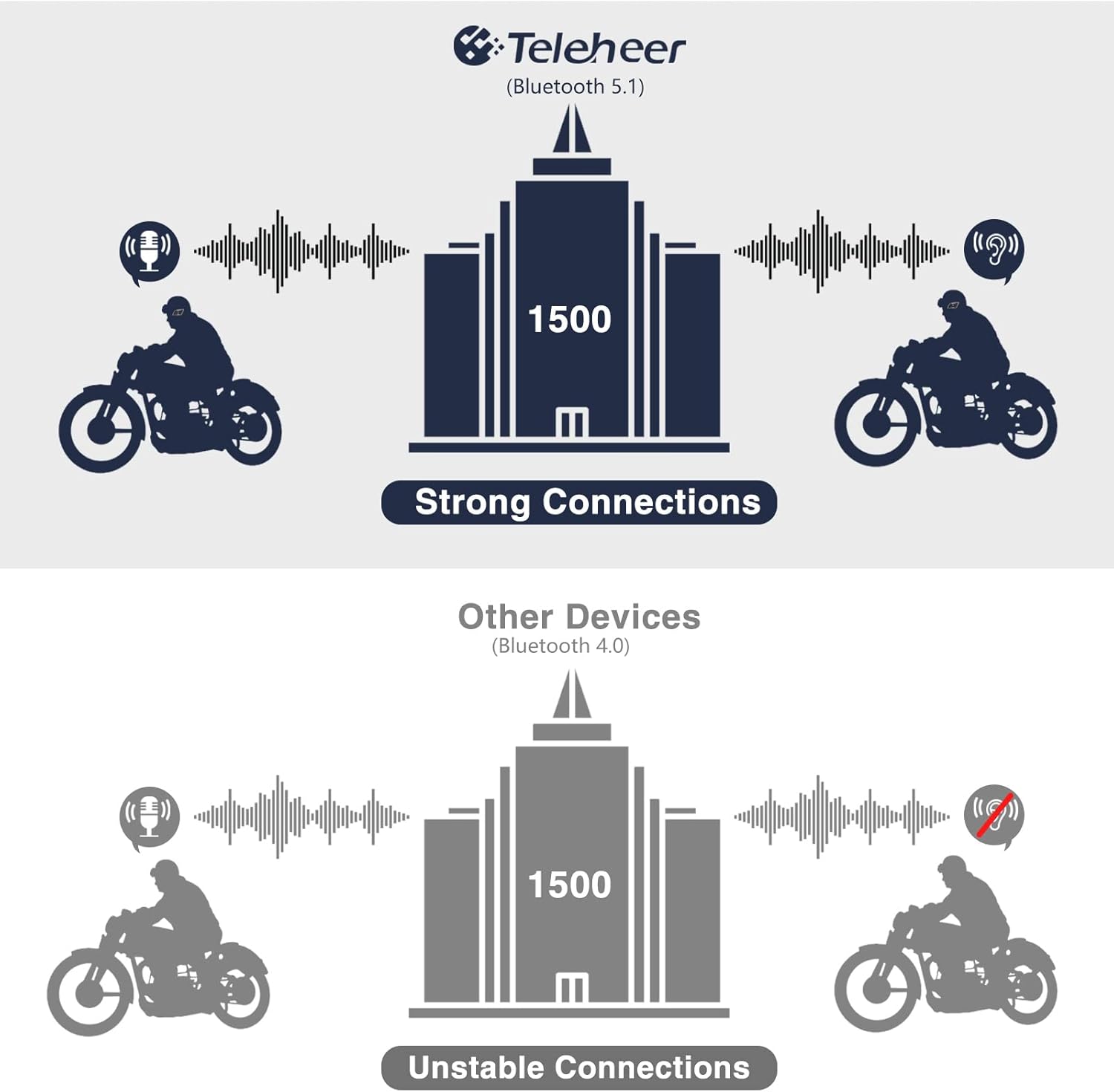
Image: A graphic illustrating the effective intercom range of the Teleheer T6 Plus (Bluetooth 5.1) compared to older Bluetooth 4.0 devices. The T6 Plus shows stable connections over 1500m, while older devices show unstable connections over shorter distances. This highlights the improved signal stability and range due to Bluetooth 5.1 and the ceramic antenna.
4. 전화 통화 기능
- 전화 받기: 짧게 누르세요 전화 버튼.
- 통화 종료: 짧게 누르세요 전화 버튼.
- 전화 거부: 를 누르고 계세요 전화 버튼 2초 동안.
- 마지막 번호 재다이얼: 두 번 누르세요 전화 버튼.
5. 음악 재생
- 재생/일시 중지: 짧게 누르세요 전화 버튼.
- 다음 트랙: 짧게 누르세요 볼륨 높이기 버튼.
- 이전 트랙 : 짧게 누르세요 볼륨 작게 버튼.
- 볼륨 조절: 를 누르고 계세요 볼륨 업/다운 버튼 볼륨을 늘리거나 줄이세요.
6. 음성 비서 (시리/구글 어시스턴트)
- Voice Assistant 활성화 : 두 번 누르세요 전원 버튼.

Image: A graphic depicting the voice assistant feature of the Teleheer T6 Plus, showing a helmeted rider interacting with their phone via voice commands like "Hey Siri" or "Ok Google". This illustrates the hands-free convenience for navigation, calls, and other smartphone functions while riding.
유지 보수 및 관리
- 청소: 헤드셋 본체를 부드러운 천으로 닦으세요.amp 옷감. 강한 화학 물질이나 연마성 세제를 사용하지 마십시오.
- 방수 기능: The device is IP65 waterproof. While it can withstand water jets, avoid submerging it in water for extended periods. Ensure the Type-C port cover is securely closed when not charging.
- 저장: 사용하지 않을 때는 기기를 서늘하고 건조한 곳에 보관하세요. 극한의 온도는 피하세요.
- 배터리 관리 : 배터리 수명을 연장하려면 배터리를 자주 완전히 방전시키지 마십시오. 장기간 사용하지 않더라도 기기를 정기적으로 충전하십시오.

Image: A WGP Teleheer T6 Plus headset unit partially submerged in water with splashes, demonstrating its IP65 waterproof rating. The image emphasizes the device's ability to withstand water exposure, making it suitable for various weather conditions during riding.
문제 해결
| 문제 | 가능한 원인 | 해결책 |
|---|---|---|
| 장치의 전원이 켜지지 않습니다. | 배터리가 부족합니다. | 장치를 완전히 충전하십시오. |
| 휴대전화와 페어링할 수 없습니다. | 기기가 페어링 모드에 있지 않음; 휴대전화의 Bluetooth가 꺼져 있음; 페어링된 기기가 너무 많음. | Ensure device is in pairing mode (red/blue flashing). Turn on phone's Bluetooth. Delete old Bluetooth connections on phone. |
| 인터콤 연결이 불안정하거나 통신 거리가 짧습니다. | Obstructions; out of range; interference. | Ensure clear line of sight. Stay within 1500m range. Avoid strong electromagnetic interference. |
| 스피커에서 소리가 나지 않습니다. | 스피커가 제대로 연결되지 않았습니다. 볼륨이 너무 낮습니다. | Check speaker connection to Type-C port. Increase volume. |
| 마이크가 음성을 인식하지 못합니다. | Microphone not connected properly; microphone position. | 마이크 연결 상태를 확인하세요. 마이크가 입 가까이에 있는지 확인하십시오. |
| Wind noise during calls/intercom. | High speed; improper microphone placement. | Ensure microphone is positioned correctly to minimize wind exposure. The device has DSP noise suppression, but extreme conditions may affect performance. |
명세서
| 특징 | 세부 사항 |
|---|---|
| 모델명 | Teleheer T6 Plus |
| 블루투스 버전 | 블루투스 5.1 |
| 인터콤 범위 | Up to 1500 meters (93 MPH) |
| 배터리 용량 | 850mAh |
| 연속 사용 시간 | 30시간 |
| 대기 시간 | 500시간 |
| 충전 포트 | C타입 |
| 방수성 | IP65 (Jet-proof) |
| 작동 온도 | 영하 15도까지 내려간다 |
| 안테나 소재 | 세라믹 |
| 제어 방법 | 터치/물리 버튼 |
| 품목 무게 | 14.4 온스(약 408그램) |
| 치수(패키지) | 8.54 x 3.9 x 2.95 인치 |
보증 및 지원
For warranty information and technical support, please refer to the official WGP web사이트를 방문하거나 고객 서비스에 직접 문의하세요. 보증 청구를 위해 구매 증빙 자료로 구매 영수증을 보관하세요.
추가 지원이 필요하면 다음을 방문하세요. Amazon의 제품 페이지 또는 아마존 플랫폼을 통해 판매자에게 직접 연락하세요.
Ask a question about this manual
Ask about setup, troubleshooting, compatibility, parts, safety, or missing instructions. Manuals+ will review the question and use this page’s manual context to help answer it.