
소개
This manual provides detailed instructions for the installation, setup, and operation of your SANNCE 2K 3MP PoE Security Camera System. This system includes an 8-channel 6MP Surveillance NVR and 8 x 3MP HD weatherproof cameras, designed for reliable video surveillance with advanced features like H.265 video compression, Smart IR LED, and remote access capabilities.
설치하기 전에 이 설명서를 자세히 읽고 나중에 참고할 수 있도록 보관하세요.
상자 안에 무엇이 들어있나요?
아래 나열된 모든 구성품이 패키지에 포함되어 있는지 확인하세요.
- 1 x NVR (Network Video Recorder)
- 8 x Bullet Cameras
- NVR용 1 x 전원 어댑터
- 1 x USB 마우스
- NVR 사용자 설명서 1부
- 8 x User Manuals for Cameras
- 8 x Drill Templates
- 8 x 24-Hour Video Surveillance Wall Stickers
- 8 x Waterproof Lids for Ethernet connections
- 장착 나사 봉투 8개
- 1 x 1.8M HDMI 케이블
- 1 x 1M 네트워크 케이블
- 4 x 18M Network Cables
- 4 x 30M Network Cables
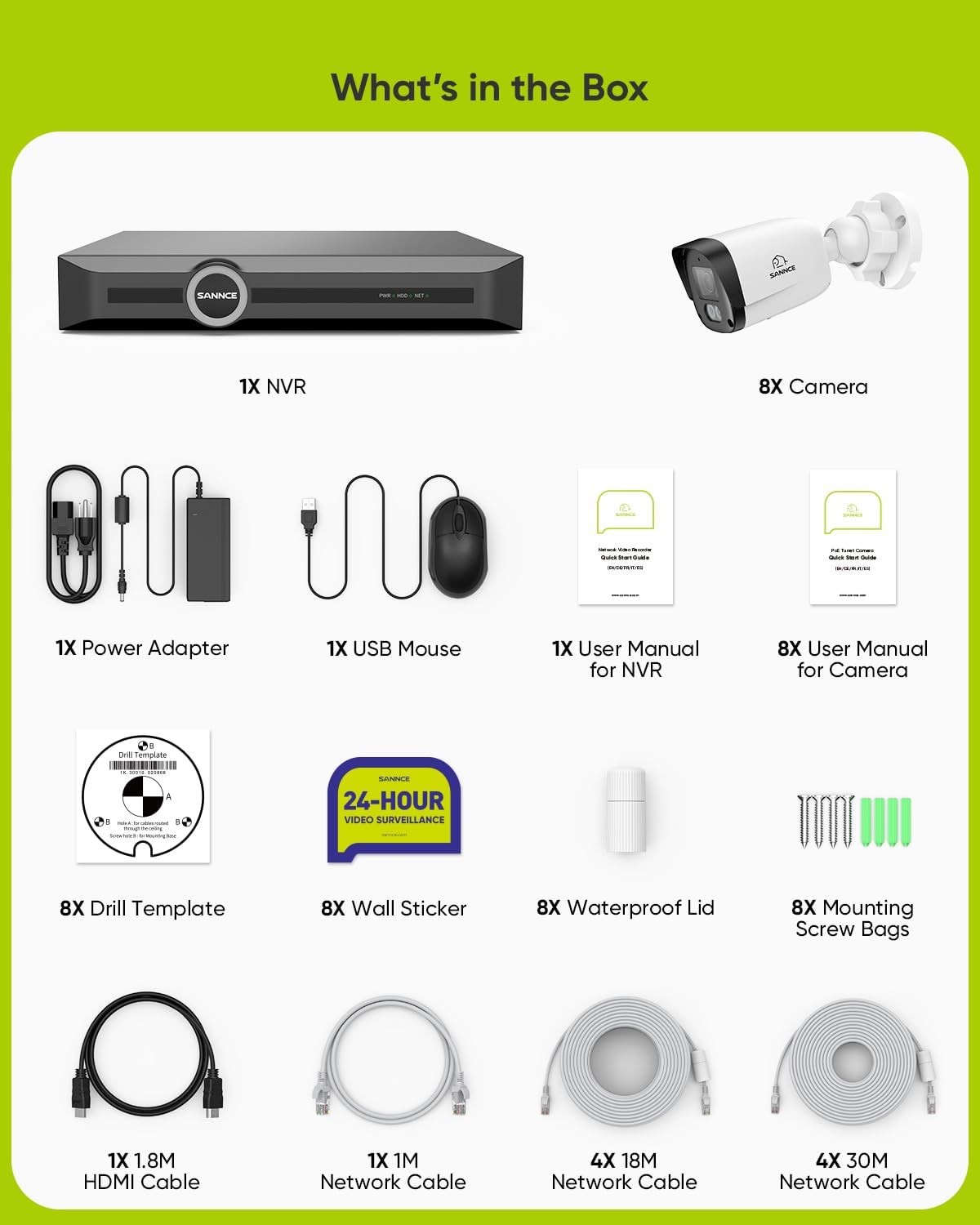
Image: All components included in the SANNCE PoE Security Camera System package.
시스템 설정
Follow these steps to set up your SANNCE PoE Security Camera System.
1. Connecting the NVR
- 네트워크에 연결: Connect one end of a network cable to the NVR's LAN port. Connect the other end to a network port on your router or switch that has internet access.
- USB 마우스 연결: USB 마우스를 NVR의 USB 포트 중 하나에 꽂습니다.
- 모니터에 연결: Insert the HDMI cable into the HDMI port of the NVR and the other end into the HDMI input of your monitor. Alternatively, use a VGA cable for VGA connections.
- 카메라 연결: Insert the network cables from your cameras into the PoE ports (numbered 1-8) on the NVR. The NVR will provide power and data to the cameras through these cables. Ensure the waterproof caps are used for outdoor installations.
- 전원 켜기: Connect the power cord to the power adapter, then insert the power adapter's plug into the NVR's power port. Finally, plug the power adapter into a power strip or wall outlet to power on the NVR.
Video: This video demonstrates the physical connection process for the PoE CCTV system, including connecting the NVR to the network, monitor, mouse, cameras, and power supply.
2. Initial NVR Configuration
Upon first power-on, the NVR will guide you through a quick setup wizard on the connected monitor.
- 언어 선택: Select your preferred language. English is the default. If you change the language, the NVR may require a reboot.
- 암호를 설정하세요: Create a strong password for the 'Admin' user. The password should be 8-16 characters, combining numbers, lowercase letters, uppercase letters, and special characters. This password is essential for activating the NVR.
- Pattern Lock: Set an unlocking pattern for quick access.
- 보안 질문: Fill in your email address and answer security questions. This information is crucial for password recovery if you forget your login details.
- 시간 설정: Configure the time zone for your region and set the correct date and time format.
- 네트워크 구성: The network settings are typically configured by default (DHCP). Confirm these settings or adjust if necessary for your specific network environment.
- 포맷 디스크: If a hard drive is installed, format it for first-time use. If no hard drive is present, you can skip this step.
- Camera Recognition: The NVR will automatically recognize and configure connected IP cameras.
- Mobile Monitoring Setup: Scan the provided QR code to download the mobile application. Once installed, use the app to scan the device ID QR code to add your NVR for remote view주고받음.

Image: Diagram illustrating the connections for the NVR, including network, monitor, and cameras.
작업
살다 View 그리고 녹음
After successful setup, the NVR will display live video feeds from all connected cameras on your monitor. The system is configured for continuous recording or motion-triggered recording based on your settings.
Smart Motion Detection and Alerts
The system features smart motion detection to identify human and vehicle movement, reducing false alarms. You can customize detection areas and set up privacy masks to protect sensitive zones. When motion is detected, the system can send push alerts to your mobile application.

Image: Illustration of smart motion detection distinguishing between human and vehicle movement.

Image: Mobile application interface displaying push alerts and customizable detection/privacy zones.
Remote Access and Multi-Device View잉
Access your security system anytime, anywhere via the dedicated mobile application, web browser, or client software. The system supports simultaneous login and viewing from multiple devices, including smartphones, tablets, and computers.

Image: Various devices showing live feeds from the security cameras, demonstrating multi-device access.
유지
하드 드라이브 관리
Regularly check the status of your NVR's hard drive. If the hard drive becomes full, the system will typically overwrite the oldest recordings. You may need to format the hard drive periodically or replace it if it shows signs of failure. The S+265 video compression technology helps save up to 75% storage space, extending recording time.

Image: Visual representation of S+265 video compression efficiency compared to H.264.
Camera Care and Weatherproofing
The cameras are IP67 weatherproof, designed to withstand various weather conditions from -30°C to 60°C (-22°F to 140°F). Periodically clean the camera lenses to ensure clear image quality. Ensure all cable connections, especially for outdoor cameras, are properly sealed with the provided waterproof lids to prevent moisture ingress.

Image: A SANNCE camera shown in rain, illustrating its IP67 weatherproof rating and resistance to extreme temperatures.
문제 해결
This section addresses common issues you might encounter with your SANNCE PoE Security Camera System.
- 영상이 표시되지 않음:
- NVR의 전원이 켜져 있고 전원 어댑터가 제대로 연결되어 있는지 확인하세요.
- Check HDMI/VGA cable connections between the NVR and the monitor.
- Verify that cameras are properly connected to the NVR's PoE ports.
- Confirm the monitor input source is correctly selected (HDMI/VGA).
- 네트워크 연결 없음:
- Ensure the network cable is securely connected between the NVR's LAN port and your router/switch.
- Check if your router/switch has an active internet connection.
- Verify NVR network settings (DHCP enabled or static IP configured correctly).
- 야간 시력이 좋지 않음:
- 카메라 렌즈가 깨끗하고 이물질이 없는지 확인하십시오.
- Check for strong light sources near the camera that might interfere with IR illumination.
- Verify camera settings for night vision mode (e.g., IR cut filter).

Image: Close-up of a SANNCE camera lens, highlighting its 6-layer all-glass construction for clear imaging.
- 허위 모션 경고:
- Adjust motion detection sensitivity in the NVR settings.
- Define specific detection zones and privacy masks to exclude irrelevant areas (e.g., public roads, moving trees).
- 원격 액세스 문제:
- NVR이 인터넷에 연결되어 있는지 확인하세요.
- Verify the mobile app is updated to the latest version.
- Check if the device ID is correctly added to the mobile application.
For further assistance, please refer to the detailed user manual available on the SANNCE support website or contact SANNCE technical support.
명세서
| 상표 | 산 네스 |
| 모델 번호 | N98PBM0-78EQ |
| 연결 기술 | 유선(PoE) |
| 비디오 캡처 해상도 | 6MP(NVR), 3MP(카메라) |
| 특별 기능 | Night Vision, Weatherproof (IP67) |
| 채널 수 | 8 |
| 전원 | 코드식 전기 |
| 호환 장치 | 카메라, 개인용 컴퓨터 |
| 신호 형식 | 디지털 |
| 카메라 설명 | Outdoor 2K/3MP IP67 Rated Camera with Night Vision and 4mm Lens |
| 나이트 비전 범위 | 최대 100피트 |
| 프레임 속도 | 15프레임 |
| 녹화 모드 | 동작 감지 |
| 광센서 기술 | CMOS |
| 하드웨어 인터페이스 | AV Port, HDMI, VGA, USB |
| 렌즈 유형 | 고정형(4mm) |
| View잉 각도 | 86.6도 |
| Item Dimensions (NVR) | 10 x 2 x 3 인치 |
보증 및 지원
SANNCE is committed to providing high-quality products and technical support. For any questions, troubleshooting assistance, or warranty inquiries, please refer to the official SANNCE web사이트를 방문하거나 고객 서비스에 직접 문의하세요.
Optional protection plans are available for extended coverage. Please refer to your purchase details for more information on available plans.