
PETKIT Eversweet 3 Pro
PETKIT Eversweet 3 Pro Cat Water Fountain User Manual
Brand: PETKIT | Model: Eversweet 3 Pro
1. 제품 오버view
The PETKIT Eversweet 3 Pro is an advanced cat water fountain designed to provide fresh, filtered water for your pets. Featuring an upgraded wireless pump and a durable SUS 304 stainless steel container, it ensures safe and clean drinking water. Its smart design allows for easy cleaning and app control for convenient monitoring and mode switching.
주요 특징:
- Upgraded Wireless Pump: Quiet operation (less than 25dB) with no wires submerged in water for enhanced safety. Detachable for easy cleaning.
- SUS 304 Stainless Steel Container: High-quality, BPA-free stainless steel ensures durability and pet safety.
- APP 제어 : Monitor working status, filter life, and switch between Smart, Normal, and DND modes via the PETKIT app (Bluetooth connection). Remote control is possible with other PETKIT main devices.
- 1.35L/46oz Large Capacity: Provides fresh water for 1-2 cats for approximately 5-7 days.
- Separate Design: Main body and power supply base are separate, simplifying water refilling and cleaning.
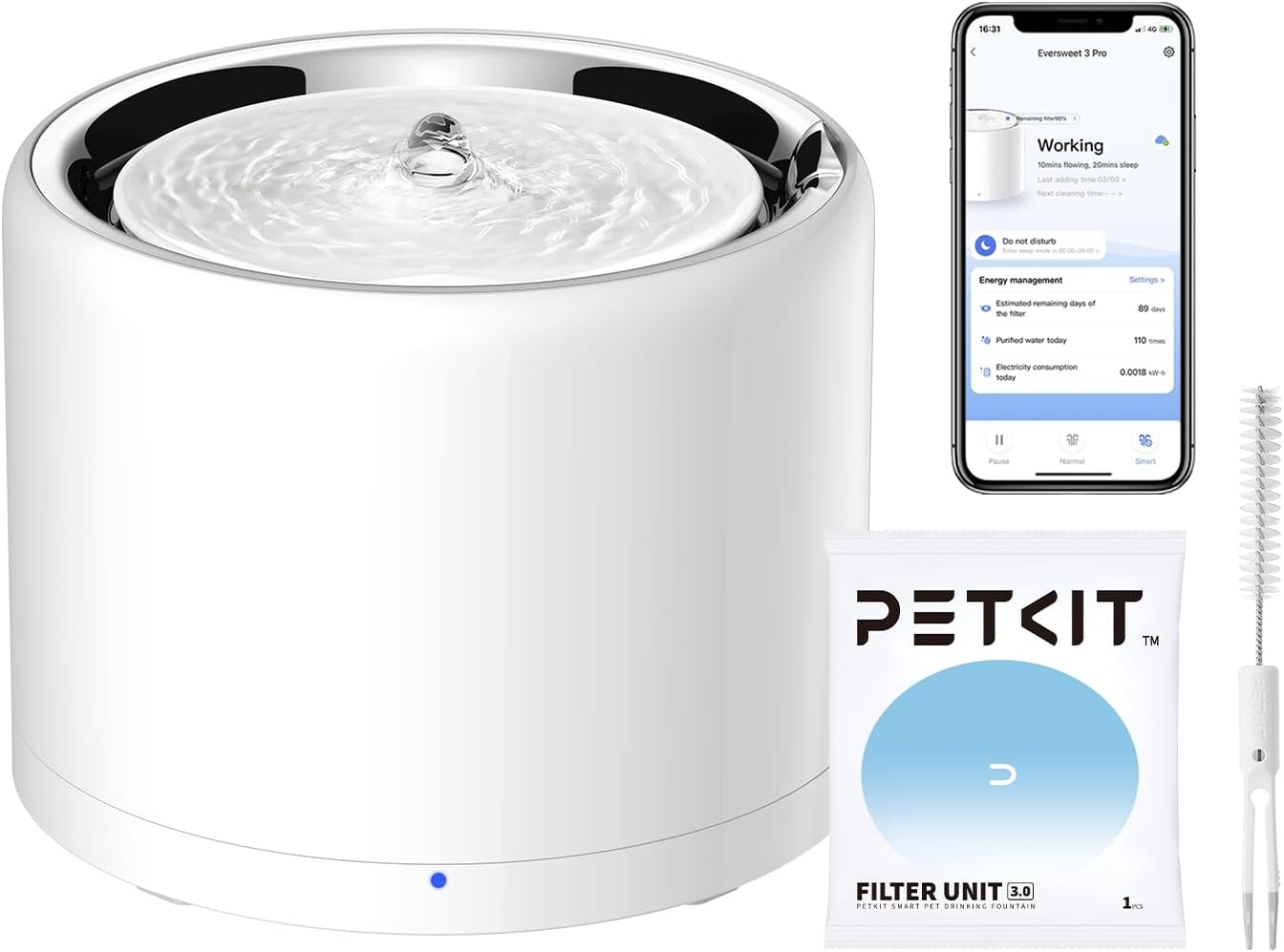
Image: The PETKIT Eversweet 3 Pro Cat Water Fountain, showcasing its sleek design, accompanying mobile app interface, filter unit, and cleaning brush.
2. 패키지 내용
설치를 진행하기 전에 패키지에 모든 구성품이 있는지 확인하십시오.

Image: A visual representation of the PETKIT Eversweet 3 Pro package contents, including the main fountain unit, a user manual, and a filter unit.
- 1 x PETKIT Eversweet 3 Pro Water Fountain
- 1 x USB 케이블
- 필터 유닛 1개
- 1 x 사용자 매뉴얼(이 문서)
3. 설정 지침
Follow these steps to set up your PETKIT Eversweet 3 Pro Cat Water Fountain:
- 구성 요소 풀기: 모든 품목을 포장에서 조심스럽게 꺼내세요.
- 분수를 조립하십시오: Place the stainless steel water container onto the power supply base. Ensure it is seated correctly.
- 필터 설치: Rinse the new filter unit under running water for a few minutes. Place the filter into its designated slot within the fountain.
- 물로 채우십시오: Fill the fountain with clean water up to the MAX fill line. The capacity is 1.35L (46oz).
- 전원 연결: Connect the USB cable to the power supply base and plug it into a compatible USB adapter (not included) and then into a wall outlet.
- 앱 연결(선택 사항이지만 권장): Download the PETKIT app from your device's app store. Follow the in-app instructions to connect your fountain via Bluetooth for smart features and monitoring.
Video: Official guide on how to set up the PETKIT Eversweet 3 Pro water fountain, demonstrating assembly and initial power-up steps.

Image: Illustrates the detachable base design of the fountain, highlighting its waterproof seal and ease of separation for cleaning or refilling.
4. 사용 설명서
The PETKIT Eversweet 3 Pro offers various operating modes and smart features accessible via the PETKIT app.
Working Modes (via PETKIT App):
- 스마트 모드 : Customizes the interval time of flow to save power and filter consumption.
- 일반 모드: The fountain continuously releases water.
- DND 모드: Allows you to customize a sleep period during which the fountain operates silently or less frequently.
앱 기능:
- 작업 상태: View current operating mode and status.
- Filter Situation: Monitor the remaining life of your filter and receive reminders for replacement.
- 워터쇼어tage 경고: Receive notifications if the water level is low.
- 밝기 설정 : Adjust the indicator light brightness and light time.
- Remote Interconnection: If you own other PETKIT main devices (e.g., PuraX, PuraMax, Fresh Element Solo, Fresh Element Infinity), you can control the fountain remotely through these devices.

Image: A detailed diagram illustrating the multi-layer filtration process of the fountain's filter, including high-density filter, coconut shell activated charcoal, and ion exchange resin.
5. 유지관리
Regular cleaning and filter replacement are crucial for maintaining the fountain's performance and ensuring clean water for your pet.
분수 청소:
- 빈도: It is recommended to clean the fountain and pump once a week in summer and every two weeks in winter.
- 분해 : Unplug the fountain. Separate the main body from the power supply base. Disassemble the top tray, filter tray, and the wireless pump.
- 청소 구성요소: Wash all components (except the power supply base) with mild soap and water. Use a brush to clean the pump thoroughly, ensuring no debris is left.
- 헹구고 다시 조립하세요: Rinse all parts thoroughly to remove any soap residue. Reassemble the fountain once all parts are clean and dry.
Video: A step-by-step guide on how to effectively clean the wireless pump of the PETKIT Eversweet 3 Pro, ensuring optimal performance and hygiene.

이미지: 폭발된 view diagram demonstrating the easy disassembly of the fountain's components, including the wireless pump, for thorough cleaning.
필터 교체:
The PETKIT app will notify you when it's time to replace the filter. Typically, filters should be replaced every 2-4 weeks depending on usage and water quality. Always rinse a new filter thoroughly before installation.
6. 문제 해결
If you encounter issues with your PETKIT Eversweet 3 Pro, consider the following:
- 분수에서 물이 나오지 않습니다:
- Check if the fountain is properly plugged in and receiving power.
- Ensure there is sufficient water in the reservoir. The app will notify you of water shortage.
- Clean the wireless pump and filter thoroughly, as blockages can prevent water flow.
- 비정상적인 소음:
- Ensure the fountain is placed on a flat, stable surface.
- Check for any debris or hair caught in the pump impeller. Clean the pump as per maintenance instructions.
- Ensure the water level is adequate; low water levels can sometimes cause pump noise.
- 앱 연결 문제:
- 모바일 장치에서 Bluetooth가 활성화되어 있는지 확인하십시오.
- Make sure your device is within Bluetooth range of the fountain.
- Restart the PETKIT app or your mobile device.
- Unplug and replug the fountain to reset its connection.
For persistent issues, please refer to the support section or the official PETKIT web대지.
7. 사양
| 상표 | 펫킷 |
| 모델명 | Eversweet 3 Pro |
| 품목 모델 번호 | Eversweet 3 Pro |
| 제품 치수 | 7.7인치 길이 x 7.7인치 너비 x 5.8인치 높이 |
| 품목 무게 | 3.8 파운드 |
| 재료 | ABS 플라스틱, 스테인레스 스틸 |
| 색상 | 하얀색 |
| 용량 | 1.35L / 46온스 |
| 전원 | USB Cord (Adapter not included) |
| 대상 청중 | 집고양이 (모든 생명 S)tag그것은) |
| 특정 용도 | 실내 |
8. 보증 정보
The PETKIT Eversweet 3 Pro Cat Water Fountain comes with a 1 년 제조업체 보증보증 청구를 위해 구매 증빙 서류를 보관하세요.
9. 지원 및 연락처
For further assistance, technical support, or inquiries regarding your PETKIT Eversweet 3 Pro Cat Water Fountain, please contact PETKIT customer service or visit their official web대지.
You can also refer to the official User Manual PDF for detailed information: 사용자 매뉴얼 다운로드(PDF)
Ask a question about this manual
Ask about setup, troubleshooting, compatibility, parts, safety, or missing instructions. Manuals+ will review the question and use this page’s manual context to help answer it.