
소개
This manual provides essential information for setting up, operating, maintaining, and troubleshooting your Xiaomi Redmi Note 11S smartphone. Please read this guide thoroughly to ensure optimal performance and longevity of your device.
오버view of the Redmi Note 11S, highlighting its 108MP pro-grade main camera, 90Hz FHD+ AMOLED DotDisplay, and 33W Pro fast charging capabilities.
설정
1. 언박싱 및 초기 검사
Carefully unpack your Redmi Note 11S. Ensure all items are present:
- Xiaomi Redmi Note 11S 스마트 폰
- 빠른 차량용 충전기
- SIM 트레이 이젝터
- 벽 충전기
2. SIM 카드 설치
The Redmi Note 11S supports dual nano SIM cards. To install:
- 기기 측면에서 SIM 카드 트레이를 찾으세요.
- SIM 트레이 꺼내기 도구를 트레이 옆에 있는 작은 구멍에 넣고 트레이가 튀어나올 때까지 살짝 누르세요.
- 나노 SIM 카드를 트레이의 지정된 슬롯에 넣으십시오. 금색 접촉면이 아래쪽을 향하도록 하십시오.
- 트레이를 조심스럽게 전화기에 다시 삽입하세요.
3. 초기 충전 및 전원 켜기
Before first use, it is recommended to fully charge your device. Connect the wall charger to the phone and a power outlet. The Redmi Note 11S supports 33W Pro fast charging for quick recharging of its 5000mAh battery.

Illustration of the 33W Pro fast charging feature for the 5000mAh battery, showing charging efficiency and estimated usage times for video, calling, and music.
To power on, press and hold the power button located on the side of the device until the Xiaomi logo appears.
작동 지침
1. 기본 탐색
The Redmi Note 11S features a responsive touchscreen. Use gestures such as tap, swipe, pinch, and spread to navigate the MIUI 12 operating system. The power button controls screen on/off and device power, while the volume buttons adjust audio levels.
2. 디스플레이 기능
Your device is equipped with a 6.43-inch FHD+ AMOLED DotDisplay with a 90Hz high refresh rate for smooth visuals. It also includes Sunlight Display for readability in bright conditions and Reading Mode 3.0 to reduce eye strain.

The 6.43-inch FHD+ AMOLED DotDisplay of the Redmi Note 11S, emphasizing its 90Hz high refresh rate for a responsive touchscreen experience.
3. 카메라 시스템
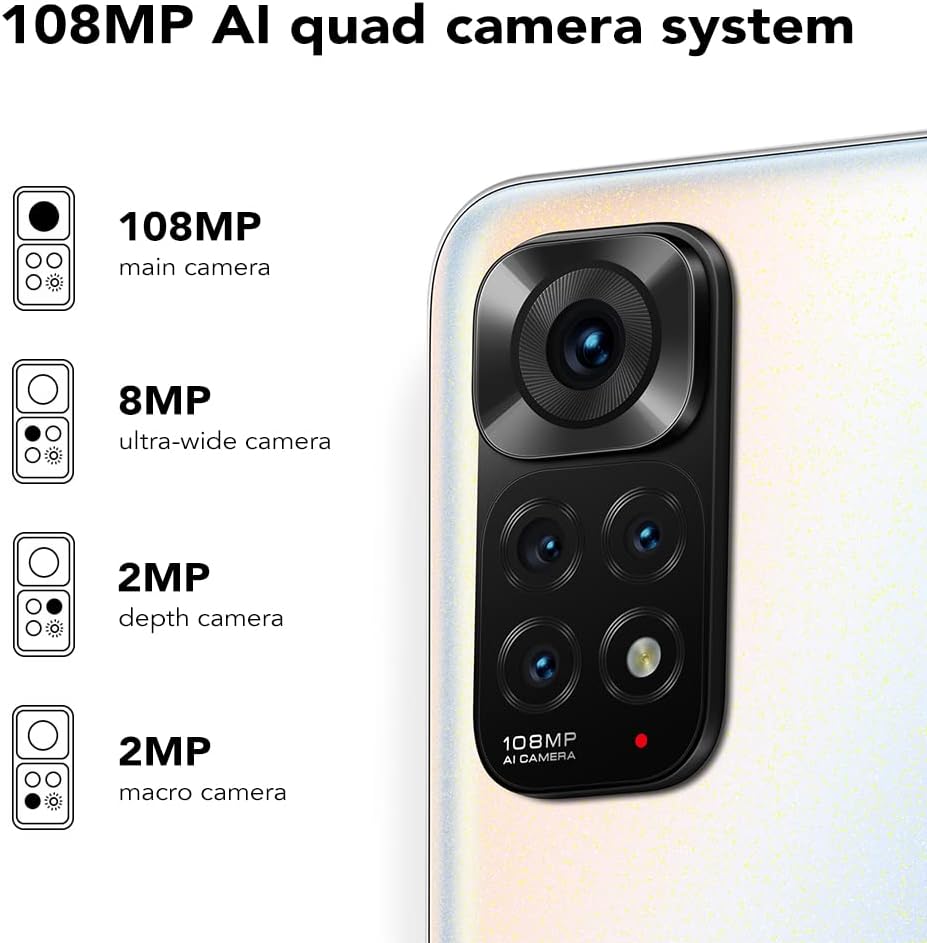
The Redmi Note 11S features a 108MP AI quad camera system on the rear and a 16MP selfie camera. The rear camera setup includes:
- 108MP 메인 카메라
- 8MP 초광각 카메라
- 2MP 매크로 카메라
- 2MP 깊이 카메라
Open the Camera application to access various modes such as Photo, Video, Portrait, Night Mode, and more.

상세한 view of the 108MP AI quad camera system on the Redmi Note 11S, featuring a 108MP main camera, 8MP ultra-wide camera, 2MP depth camera, and 2MP macro camera.
4. 저장 및 성능
The device comes with 128GB of internal storage, expandable up to 1TB via a microSD card (sold separately). It is powered by the MediaTek Helio G96 processor, ensuring smooth performance for daily tasks and gaming.
5. 연결성
The Redmi Note 11S supports 4G cellular networks, Wi-Fi, and GPS for navigation and location services.
유지
1. 기기 청소
부드럽고 보풀이 없는 천을 사용하여 휴대폰 화면과 본체를 닦으세요. 강한 화학 물질이나 연마재는 사용하지 마세요. 기기를 과도한 습기에 노출시키지 마세요.
2. 소프트웨어 업데이트
기기에 최신 기능, 보안 패치 및 성능 향상 기능이 적용되었는지 확인하려면 소프트웨어 업데이트를 정기적으로 확인하고 설치하세요. 설정 > 휴대전화 정보 > MIUI 버전 업데이트를 확인하세요.
3. 배터리 관리
배터리 수명을 연장하려면:
- 극한의 온도를 피하세요.
- 배터리가 자주 완전히 방전되지 않도록 하세요.
- Use the original charger provided with the device.
4. 열 발산
The Redmi Note 11S incorporates LiquidCool technology with multiple layers of graphite and copper foil for efficient heat dissipation. Ensure proper airflow around the device during heavy usage to prevent overheating.

내부 view illustrating the multi-dimensional heat dissipation system using LiquidCool technology, which incorporates multiple layers of graphite and copper foil for efficient cooling.
문제 해결
이 섹션에서는 Redmi Note 11S에서 발생할 수 있는 일반적인 문제에 대해 설명합니다.
장치가 켜지지 않음
- 배터리가 충전되어 있는지 확인하세요. 기기를 충전기에 최소 30분 이상 연결해 두세요.
- 전원 버튼을 10~15초간 길게 눌러 강제 재시작을 실행하세요.
Apps Freezing or Crashing
- 문제가 있는 앱을 닫았다가 다시 열어보세요.
- 앱의 캐시와 데이터를 지웁니다. 설정 > 앱 > 앱 관리 > [앱 이름] > 데이터 지우기.
- Ensure your apps and operating system are up to date.
불쌍한 배터리 수명
- Adjust screen brightness and reduce screen timeout.
- 필요하지 않을 때는 Wi-Fi, 블루투스, GPS 등의 사용하지 않는 기능을 비활성화하세요.
- 백그라운드에서 실행 중인 전력 소모가 큰 앱을 식별하여 닫습니다.
네트워크 연결 문제
- 기기를 다시 시작하세요.
- SIM 카드가 제대로 삽입되었는지 확인하세요.
- 네트워크 설정을 재설정하세요 설정 > 연결 및 공유 > Wi-Fi, 모바일 네트워크 및 Bluetooth 재설정.
명세서
The following table outlines the key specifications for the Xiaomi Redmi Note 11S (Model: 2201117SY).
| 특징 | 사양 |
|---|---|
| 모델명 | NOTE 11s |
| 품목 모델 번호 | 2201117SY |
| 상표 | 샤오미 |
| 운영 체제 | 미유아이12 |
| 화면 크기 | 6.43 인치 |
| 디스플레이 유형 | FHD+ AMOLED DotDisplay, 90Hz Refresh Rate |
| 후방 카메라 | 108MP Main, 8MP Ultra-wide, 2MP Macro, 2MP Depth |
| 전면 카메라 | 16MP |
| 숫양 | 6GB (XNUMX기가바이트) |
| 메모리 저장 용량 | 128GB(최대 1TB까지 확장 가능) |
| 배터리 용량 | 5000밀리amp한 시간 전(mAh) |
| 충전 중 | 33W 프로 고속 충전 (완충까지 58분 소요) |
| 셀룰러 기술 | 4G |
| 무선 통신사 | 모든 이동 통신사에 대해 잠금 해제 됨 |
| 연결 기술 | Wi-Fi, 셀룰러 |
| 특별 기능 | Dual SIM, GPS, Smartphone |
| 제품 치수 | 2.9 x 0.32 x 6.29 인치 |
| 품목 무게 | 6.3온스(179그램) |
| 색상 | 펄 화이트 |

The aesthetic flat-frame design of the Redmi Note 11S, highlighting its slim profile (8.09mm thickness) and light weight (179g) for a comfortable grip.
보증 정보
Specific warranty terms and conditions for the Xiaomi Redmi Note 11S may vary by region and retailer. Please refer to the warranty card included with your product packaging or visit the official Xiaomi website for detailed warranty information applicable to your purchase. Retain your proof of purchase for warranty claims.
지원하다
For further assistance, technical support, or service inquiries regarding your Xiaomi Redmi Note 11S, please visit the official Xiaomi support website or contact their customer service. You can typically find contact information and FAQs on the manufacturer's official web대지.