
1. 서론
This manual provides comprehensive instructions for the installation, operation, and maintenance of your HCMOUNTING Long Arm TV Wall Mount. Designed for 42-80 inch TVs weighing up to 110 lbs, this full-motion mount offers exceptional flexibility and stability. Its 43-inch extension articulating arms allow for versatile viewing angles, while the swivel and tilt features ensure optimal screen positioning.
주요 특징은 다음과 같습니다.
- 43 Inch Extra Long Arm: Extends up to 43 inches from the wall and retracts to 2.75 inches, ideal for various viewing needs and corner placement.
- 무한 View각도: Swivels 180° (left/right), tilts 10° (down/up), and offers ±3° post-installation leveling for perfect alignment.
- 폭넓은 호환성: Supports flat or curved TVs from 42 to 80 inches with VESA patterns from 200x200mm to 600x400mm.
- 간편한 설치: Comes with pre-divided hardware and detailed directions for mounting on 16”/18" wood studs, brick, or concrete walls.
- 강화된 안전성: Constructed from heavy gauge steel with thicker mounting arms, boasting a 110lb load capacity for secure operation.
2. 설정 및 설치
Proper installation is crucial for the safety and performance of your TV mount. Please follow these steps carefully. It is recommended to have a second person assist with the installation of the TV onto the mount.
2.1 설치 전 확인 사항
Use the provided punching diagram to locate your studs or mark drill points for concrete/brick. Ensure the mount is level before drilling.
- Check Wall Types: The mount is suitable for 16”/18" wood studs, brick, or concrete walls. 건식벽체에만 설치하지 마십시오.
- Check TV Size & Weight: Compatible with TVs from 42 to 80 inches, weighing up to 110 lbs.
- VESA 패턴을 확인하세요: Supports VESA patterns from minimum 200x200mm to maximum 600x400mm. Ensure no potential blockages on your TV's VESA mounting holes.
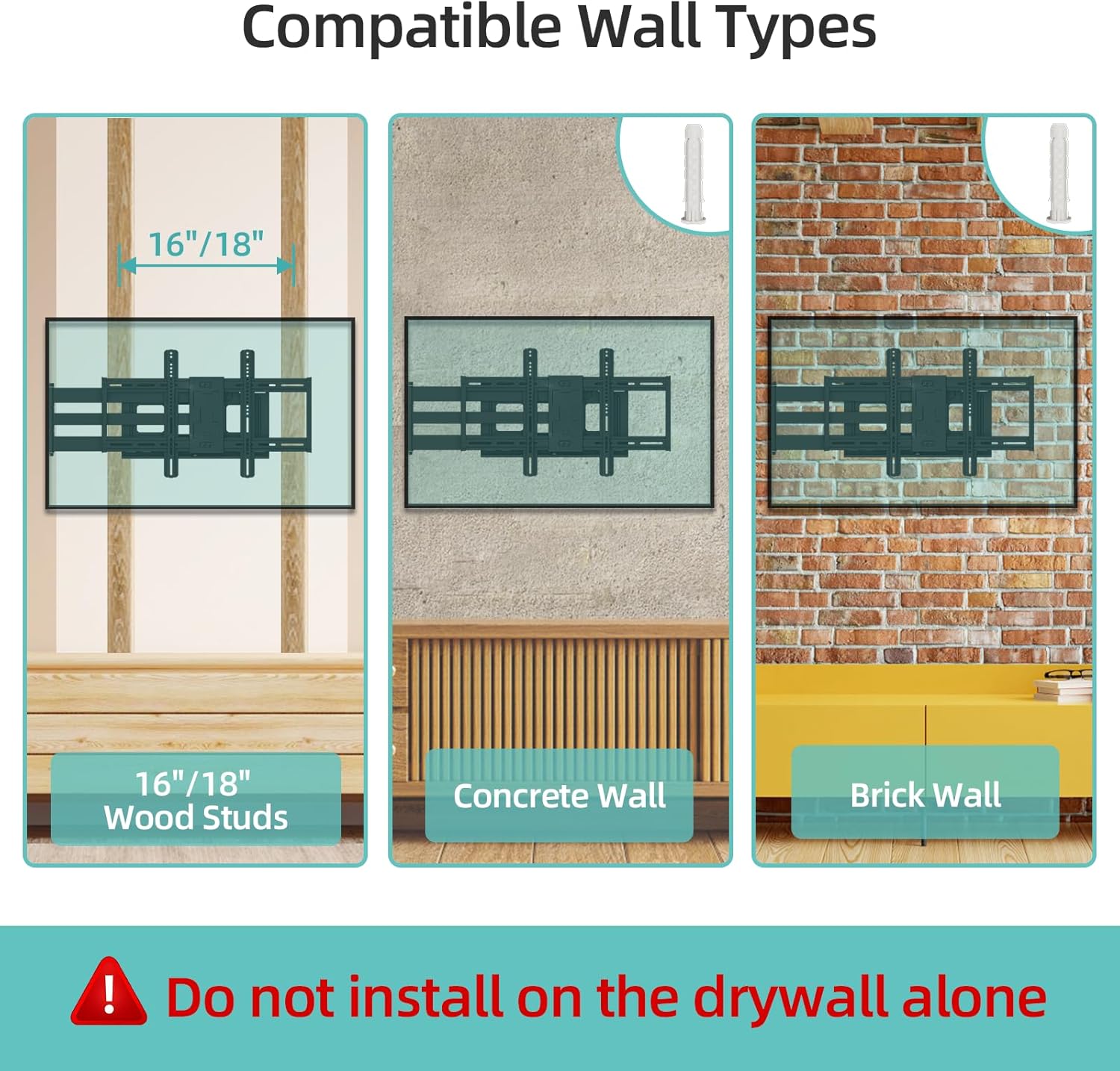
Figure 2.1: Compatible Wall Types. The mount can be installed on 16"/18" wood studs, concrete walls, or brick walls. Installation on drywall alone is not supported.

Figure 2.2: Guide on how to check if the TV mount fits your TV, including wall types, TV specs, and VESA patterns.
2.2 벽면 플레이트 장착
Use the provided punching diagram to locate your studs or mark drill points for concrete/brick. Ensure the mount is level before drilling.
Video 2.1: Installation instructions for the Long Arm TV Wall Mount. This video demonstrates the process of mounting the wall plate and attaching the TV.
Video 2.2: HCMOUNTING Long Arm TV Mount Installation Video. A quick overview of the installation process for the TV mount.

Figure 2.3: Simplified steps for installation: 1. Attach brackets to TV. 2. Attach wall plate. 3. Hang your TV.
2.3 Attaching TV Brackets and Hanging the TV
Secure the TV brackets to the back of your television. Once the wall plate is firmly installed, carefully lift and hang your TV onto the mount.
Video 2.3: How to install the face panel. This video provides detailed instructions for attaching the face panel to the TV mount.
3. TV 마운트 작동 방법
Your HCMOUNTING TV Wall Mount offers full motion capabilities for an optimal view경험.
3.1 확장 및 수축
Gently pull the TV away from the wall to extend the arm up to 43 inches. Push the TV back towards the wall to retract it to a minimum distance of 2.75 inches. This allows for flexible positioning and space-saving.

Figure 3.1: The mount features a 43-inch long arm design, allowing for significant extension and retraction to save space. Includes cable management clips for a clean setup.
3.2 Swivel and Tilt Adjustment
The mount allows for 180° swivel (left or right) to accommodate different seating positions. You can also tilt the TV 10° down or up to reduce glare and optimize view각도를 나타냅니다.
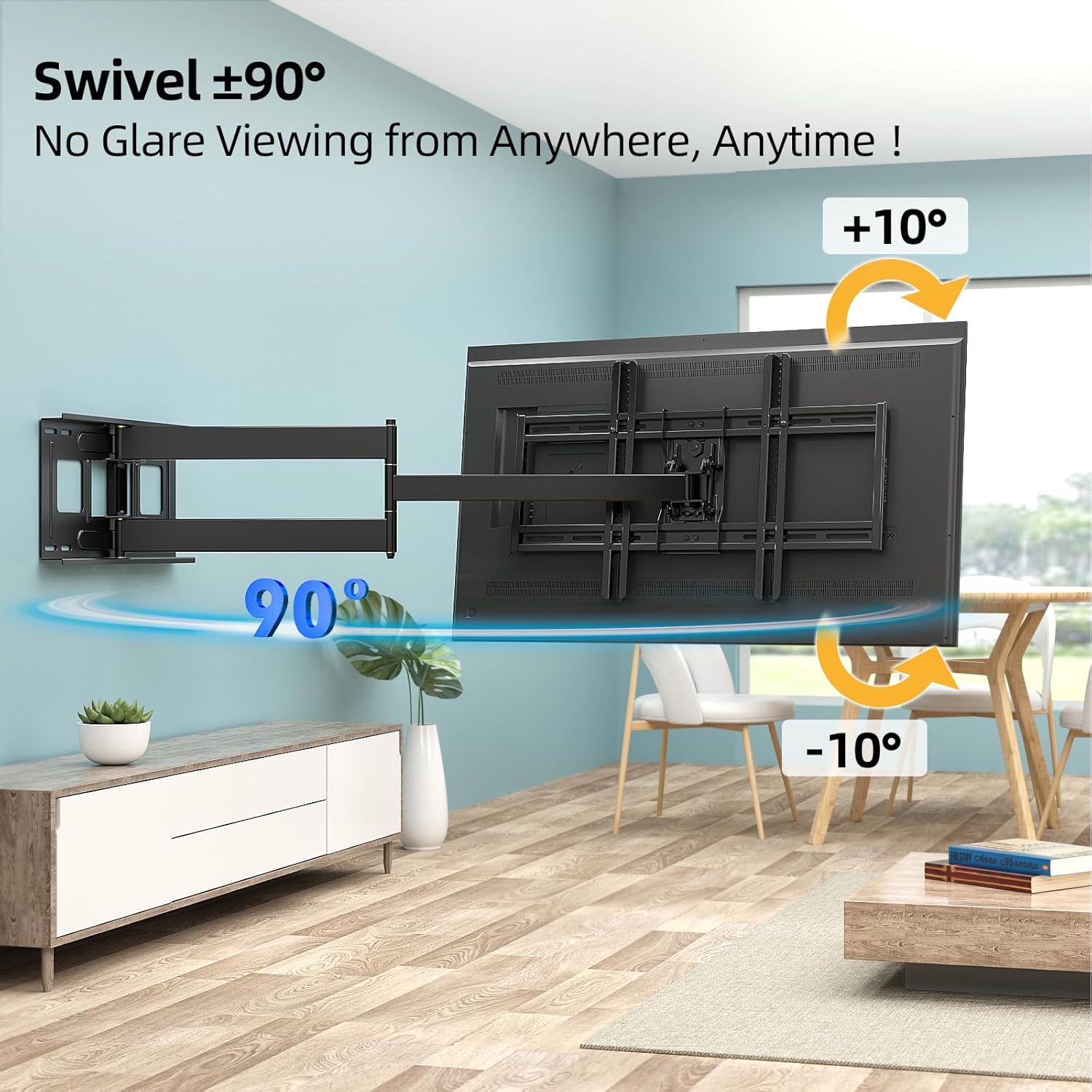
Figure 3.2: The mount offers a swivel range of ±90° and a tilt range of +10° to -10° for optimal viewing from anywhere.

그림 3.3: 이상view of TV wall mount features including long extension, 180° swivel, and +/-10° tilt capabilities.
3.3 설치 후 수평 조정
After installation, you can make minor level adjustments of ±3° to ensure your TV is perfectly aligned.

Figure 3.4: Post-installation leveling allows for perfect alignment of the TV with adjustments of ±3°.
4. 유지관리
To ensure the longevity and safe operation of your TV mount, regular maintenance is recommended.
- 정기 점검: Periodically check all screws and bolts to ensure they are securely tightened. Over time, vibrations or frequent adjustments may cause them to loosen.
- 청소: Clean the mount with a soft, dry cloth. Avoid using abrasive cleaners or solvents that could damage the finish.
- 매끄럽게 하기: 관절형 팔이 시간이 지남에 따라 뻑뻑해지면 회전축에 소량의 실리콘 기반 윤활유를 바르면 됩니다.
5. 문제 해결
If you encounter any issues with your TV mount, please refer to the following common troubleshooting tips:
- TV가 수평이 아닙니다: Use the post-installation leveling feature (±3°) to adjust the TV's horizontal alignment. Ensure the wall plate itself was installed level.
- 마운트가 느슨해진 느낌: Re-check all mounting bolts and screws on both the wall plate and the TV brackets. Tighten any loose fasteners. Ensure the mount is properly anchored into solid studs or concrete/brick.
- 늘리거나 줄이는 데 어려움이 있습니다. Ensure no cables are snagged or obstructing the arms' movement. Apply a small amount of silicone-based lubricant to the pivot points if stiffness persists.
- TV not securely attached to mount: Verify that the TV brackets are correctly seated on the mount's arms and that the safety screws/locks are engaged.
For further assistance, please contact HCMOUNTING customer support.
6. 사양
| 사양 | 세부 사항 |
|---|---|
| 상표 | HC마운팅 |
| 모델 번호 | TV 벽 마운트 |
| 품목 무게 | 23.9파운드 |
| 패키지 크기 | 33 x 12.25 x 3.5 인치 |
| 원산지 | 중국 |
| 색상 | 검은색 |
| 장착 유형 | 벽걸이형 |
| 이동 유형 | Swivel, Extension, Tilt, Level, Articulating |
| 재료 | 합금강 |
| 최대 호환 크기 | 80 인치 |
| 최소 호환 크기 | 42 인치 |
| 최대 기울기 각도 | 10도 |
| 하중 용량 | 110파운드 |
| VESA 호환성 | 200x200mm ~ 600x400mm |
7. 보증 및 지원
For any questions or concerns regarding your HCMOUNTING TV Wall Mount, please refer to the product's original packaging or contact the manufacturer's customer support directly. Warranty information is typically provided with the product at the time of purchase.