
1. 서론
Thank you for choosing the Sharp QW-MA814-SS3 Freestanding Dishwasher. This manual provides essential information for the safe and efficient operation, installation, maintenance, and troubleshooting of your appliance. Please read this manual thoroughly before using the dishwasher and keep it for future reference.
2. 안전 정보
Always follow basic safety precautions when using electrical appliances to reduce the risk of fire, electric shock, or injury. This appliance is intended for household use only. Do not allow children to play with or in the dishwasher. Ensure the appliance is properly grounded. Do not operate the dishwasher if it is damaged. Only qualified personnel should perform repairs.
3. 제품 특징
The Sharp QW-MA814-SS3 dishwasher is designed for efficient and convenient dish cleaning, offering a range of features to suit various needs:
- 용량: 14 place settings, accommodating a wide range of dishes.
- 8 세척 프로그램: Includes Auto, Intensive, Normal, Glass, Eco, 90 min, Rapid, and Soak, providing versatile options for different soil levels.
- 3-Layer Cutlery Drawer: Offers flexible loading solutions for cutlery and small items.
- Alternative Wash: Allows cleaning of only the upper or lower basket, or both, optimizing water and energy for partial loads.
- Smart Sensor (Auto Program): Automatically adjusts water and energy consumption based on load size and soil level for efficient cleaning.
- 스테인리스 스틸 욕조: Durable and hygienic, designed to reduce odors.
- Anti-bacterial Filter: Helps inhibit micro-organism buildup for enhanced hygiene.
- 인테리어 LED 조명: Illuminates the tub for easier loading and unloading.
- 아동 잠금: Secures the control panel to prevent accidental operation.
- 지연 시작: Allows pre-selection of washing time from 1 to 24 hours for flexible operation.

그림 1: Diagram of Sharp QW-MA814-SS3 Dishwasher interior components, including LED light, top spray arm, adjustable 3rd rack, adjustable upper rack, upper spray arm, lower spray arm, lower rack, detergent dispenser, rinse aid dispenser, tub gasket, power wash spray, heating element, filter system, cup shelf, and control panel.

그림 2: This image displays the spacious interior of the dishwasher, featuring a dedicated three-layer cutlery drawer for organizing utensils and a durable stainless steel tub designed for hygiene and odor reduction.

그림 3: The multi-component anti-bacterial filter system helps maintain a high level of hygiene by inhibiting micro-organism buildup, even during eco-friendly cycles.

그림 4: The interior LED light illuminates the tub for easier loading and unloading. The image also conceptually represents the child lock feature, which secures the control panel to prevent accidental operation.
4. 설정 및 설치
식기세척기의 성능과 안전을 위해서는 올바른 설치가 매우 중요합니다. 자격을 갖춘 기술자가 설치하는 것이 좋습니다.
4.1 배치
- Position the dishwasher on a level, stable surface near a water supply, drain, and electrical outlet.
- Ensure adequate clearance for the door to open fully.
4.2 물 연결
- Connect the water inlet hose to a hot water supply (max 60°C) with sufficient pressure.
- Connect the drain hose to a suitable drain pipe or sink trap, ensuring it is securely fastened to prevent leaks.
4.3 전기 연결
- 전원 공급 장치가 정격 명판에 표시된 사양과 일치하는지 확인하십시오.
- The dishwasher must be properly grounded to prevent electric shock.
4.4 레벨링
- Adjust the leveling feet to ensure the dishwasher is perfectly level. This prevents water leakage and ensures proper operation.
5. 사용 설명서
Follow these steps for optimal cleaning results.
5.1 제어판 이상view

그림 5: The control panel displays the 8 wash programs: Auto, Intensive, Normal, Glass, Eco, 90 min, Rapid, and Soak. Use the push buttons to select your desired program and options.
5.2 식기 세척기 로딩
- 접시에 묻은 큰 음식물 찌꺼기를 긁어내세요.
- 큰 물건은 아래쪽 선반에, 작고 깨지기 쉬운 물건은 위쪽 선반에 놓으세요.
- Utilize the 3-layer cutlery drawer for forks, knives, and spoons.
- 스프레이 암이 자유롭게 회전할 수 있는지 확인하세요.

그림 6: 이것 view shows the dishwasher with its door open and racks pulled out, demonstrating the accessibility for loading dishes into both the upper and lower baskets.

그림 7: A close-up of the lower rack, illustrating the foldable plate supports that provide flexibility to accommodate larger items like pots and pans.
5.3 세제 및 린스 보조제 추가
- 세제통에 식기세척기 세제를 적당량 채워주세요.
- Check the rinse aid indicator and refill the rinse aid dispenser as needed for spot-free drying.
5.4 Selecting a Program and Starting a Cycle
- 전원 버튼을 눌러 식기세척기를 켭니다.
- Select your desired wash program using the program selection button.
- Close the dishwasher door firmly to start the cycle.
5.5 Using Delay Start
그림 8: This image illustrates the delay start feature on the control panel, allowing users to pre-select a washing time from 1 to 24 hours for flexible operation.
- After selecting a program, press the Delay Start button repeatedly to set the desired delay time (1-24 hours).
- Close the door to activate the delay. The cycle will begin after the set delay time.
5.6 Using Alternative Wash
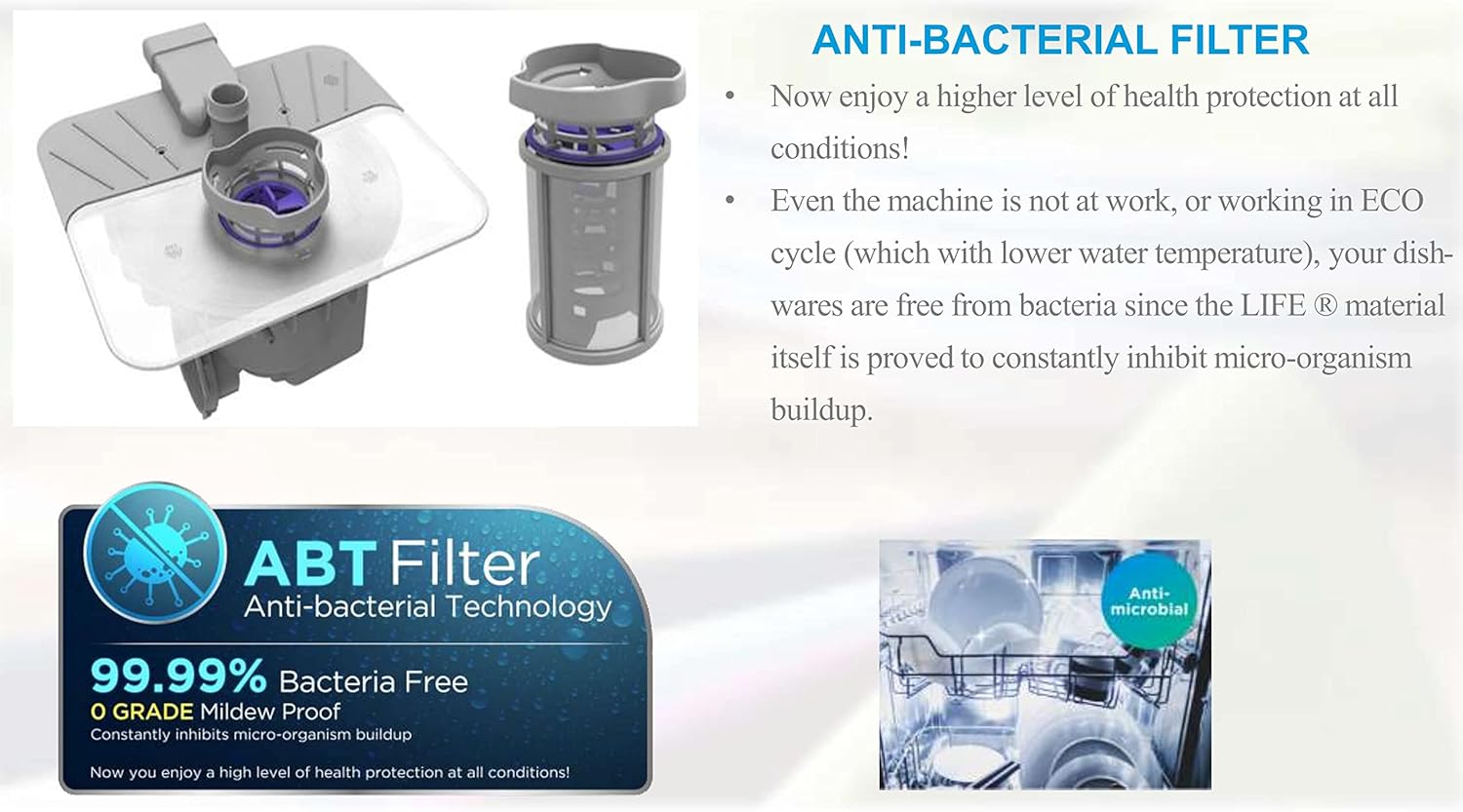
그림 9: The alternative wash feature allows cleaning of only the upper or lower basket, or both for a full load, optimizing water and energy usage for partial loads.
- This feature allows you to wash dishes in only the upper or lower basket, or both.
- Select the desired program, then press the Alternative Wash button to cycle through upper basket only, lower basket only, or full load options.
- The corresponding spray arms will activate for the selected zone.
6. 유지관리
정기적인 유지관리는 식기 세척기의 수명과 최적의 성능을 보장합니다.
6.1 필터 청소
- 식기세척기 바닥에 있는 필터 시스템을 정기적으로 점검하고 청소하십시오.
- Remove food particles and rinse the filters under running water.
- Reassemble the filters correctly to prevent damage and ensure proper drainage.
6.2 세척 스프레이 암
- Periodically remove the spray arms and clean the nozzles to ensure unobstructed water flow.
- Use a soft brush or toothpick to clear any blockages.
6.3 외부 및 내부 청소
- 외부를 광고로 닦으세요amp 천과 순한 세제.
- Clean the interior with a dishwasher cleaner or a mixture of vinegar and baking soda to remove mineral buildup and odors.
7. 문제 해결
고객 서비스에 문의하기 전에, 이 섹션에서 일반적인 문제와 해결 방법을 확인하십시오.
| 문제 | 가능한 원인 | 해결책 |
|---|---|---|
| 식기 세척기가 시작되지 않음 | 전원 공급 장치 문제, 문이 제대로 닫히지 않음, 프로그램이 선택되지 않음. | 전원 연결을 확인하고, 문이 제대로 잠겼는지 확인한 후, 세탁 프로그램을 선택하세요. |
| 청소 결과 불량 | 부적절한 적재, 스프레이 암 막힘, 세제 부족, 필터 더러움. | 접시를 올바르게 다시 넣고, 스프레이 암과 필터를 청소하고, 적절한 양의 세제를 사용하세요. |
| 물이 빠지지 않아요 | 배수 호스나 필터가 막혔거나, 배수 펌프가 고장났습니다. | Clean filters and drain hose. If issue persists, contact service. |
| 오류 코드 E4 | Water overflow or leakage detected. | Turn off the dishwasher, check for visible leaks, and contact customer service for assistance. |
8. 사양
| 특징 | 사양 |
|---|---|
| 브랜드 이름 | 날카로운 |
| 모델명 | QW-MA814-SS3 |
| 설치 유형 | 독립형 |
| 마무리 유형 | 스테인리스 스틸 |
| 색상 | 스테인리스 스틸 |
| 용량 | 14인분 세팅 |
| 프로그램 수 | 8 |
| 제어 유형 | 푸시 버튼 |
| 디스플레이 유형 | 주도의 |
| 특별 기능 | 똑똑한 |
| 제품 크기(D x W x H) | 59.8 x 61 x 84.5cm |
| 품목 무게 | 8 킬로그램 |
| 소음 수준 | 49데시벨 |
| 포함된 구성 요소 | 칼 바구니 |
9. 보증 및 지원
Your Sharp QW-MA814-SS3 Dishwasher comes with a manufacturer's warranty. Please refer to the warranty card included with your purchase for specific terms and conditions, including coverage period and service procedures. For technical support, spare parts, or service inquiries, please contact Sharp customer service through their official web사이트 또는 보증서에 제공된 연락처 정보를 참조하세요.