
소개
Thank you for choosing the Fila Unisex Digital Watch, Model 38-191-104. This manual provides essential information for the proper setup, operation, and maintenance of your watch. Please read it carefully to ensure optimal performance and longevity of your device.
제품 끝view
The Fila Model 38-191-104 is a digital wrist watch designed for unisex use, featuring a style inspired by 1970s fashion. It combines a retro aesthetic with modern digital timekeeping and an alarm function.
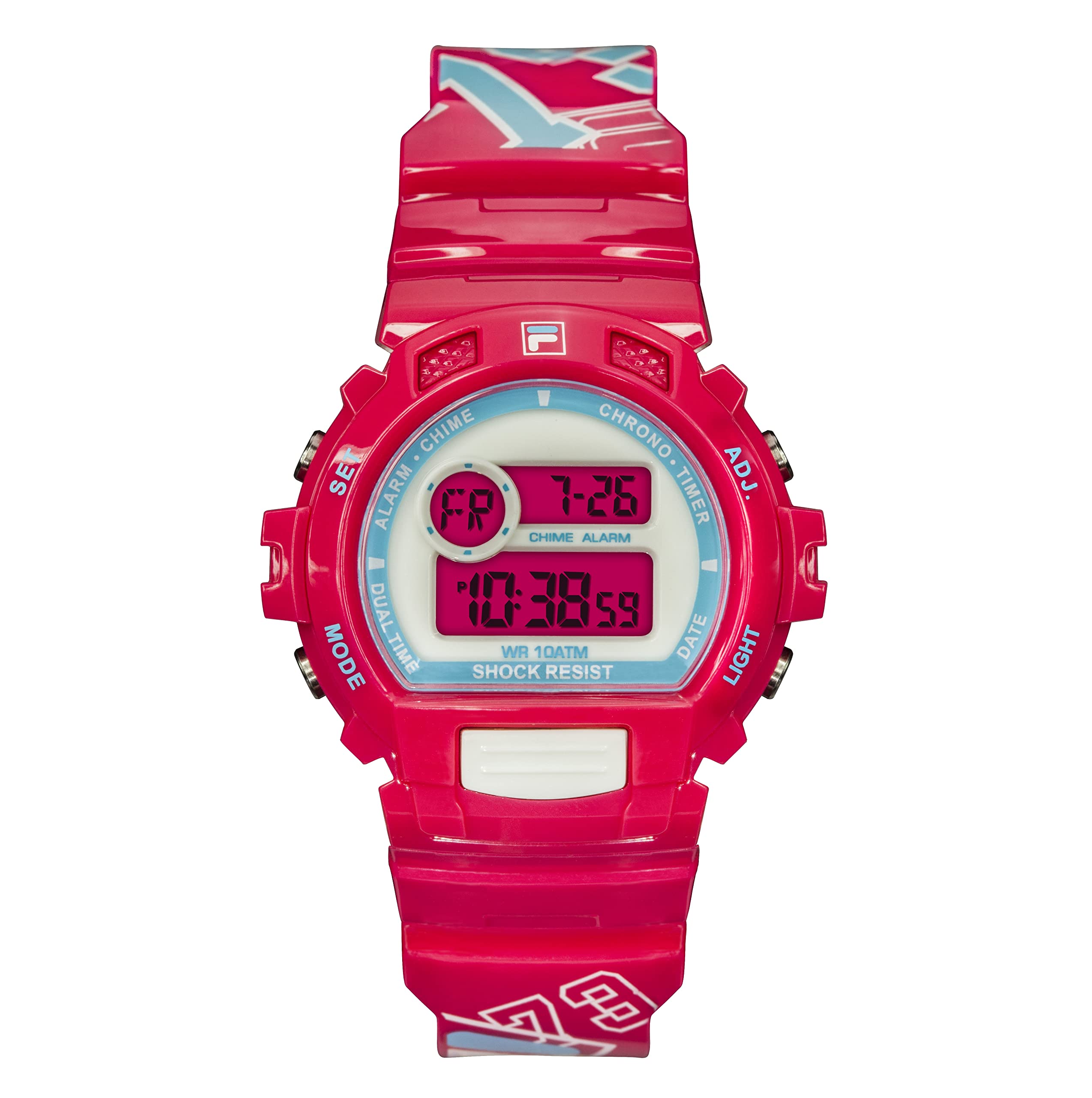
Image: Fila Unisex Digital Watch, Model 38-191-104, showcasing its digital display and pink silicone strap.
설정
배터리 설치
Your Fila digital watch comes with one Lithium Ion battery pre-installed. No immediate battery installation is required for initial use.
초기 시간 설정
- 버튼 식별: Locate the control buttons on the side of your watch. Typically, there are buttons for 'Mode', 'Set', 'Adjust', and 'Light'. Refer to the watch's physical markings if available.
- 시간 설정 모드로 들어가기: Press the 'Mode' button repeatedly until the time display starts flashing or indicates a setting mode.
- 시간 조정: Use the 'Adjust' or 'Set' button to change the hour, minute, and other time parameters. The 'Mode' button usually cycles through the different settings (hours, minutes, 12/24-hour format).
- 설정 확인: Once the time is set, press the 'Mode' button or a dedicated 'Confirm' button to exit the setting mode.
Note: Specific button functions may vary slightly. If you encounter difficulties, refer to the general operating instructions below.
작동 지침
기본 기능
- 시간 표시: The watch primarily displays time in digital format.
- 날짜 표시: Press the 'Mode' button once from the time display to view 날짜.
- 백라이트: Press the 'Light' button (if available) to illuminate the display in low-light conditions.
알람 설정
Your watch includes an alarm feature.
- 경보 모드 접근: Press the 'Mode' button until "AL" or "Alarm" appears on the display.
- 알람 시간 설정: Use the 'Set' or 'Adjust' button to set the desired alarm hour and minute.
- 알람 활성화/비활성화: In alarm mode, use a specific button (often 'Adjust' or 'Start/Stop') to toggle the alarm ON or OFF. An alarm icon will typically appear when activated.
- 경보 모드 종료: Press the 'Mode' button to return to the normal time display.
유지
청소
시계를 청소하려면 부드럽고 마른 천으로 살살 닦아주세요. 실리콘 스트랩의 경우에도 마찬가지입니다.amp 순한 비누를 묻힌 천으로 닦은 후 완전히 말리십시오. 강한 화학 약품이나 연마재는 사용하지 마십시오.
방수성
This watch is water-resistant up to 10 meters. This means it can withstand splashes or brief immersion in water, such as during hand washing or light rain. It is ~ 아니다 suitable for swimming, showering, or diving. Do not operate buttons while the watch is wet.
배터리 교체
When the display dims or functions become erratic, the battery may need replacement. Battery replacement should ideally be performed by a qualified watch technician to ensure proper sealing and water resistance. The watch requires one Lithium Ion battery.
문제 해결
- 시계에 시간이 표시되지 않음: Check if the battery is depleted. If the watch is new, ensure any protective plastic tabs have been removed.
- 시간이 잘못되었습니다: "초기 시간 설정" 지침에 따라 시간을 재설정하십시오.
- 알람이 울리지 않습니다: Ensure the alarm function is activated (look for an alarm icon on the display). Check the alarm time setting.
- 화면이 어둡습니다: This usually indicates a low battery. Consider professional battery replacement.
명세서
| 특징 | 세부 사항 |
|---|---|
| 모델 번호 | 38-191-104 |
| 상표 | 필라 |
| 디스플레이 유형 | 디지털 |
| 이동 유형 | 일본석영 |
| 타겟 성별 | Unisex (Adult) |
| 케이스 소재 | 폴리카보네이트 |
| 케이스 직경 | 40 밀리미터 |
| 케이스 두께 | 12 밀리미터 |
| 밴드 소재 유형 | 실리콘 |
| 대역폭 | 6 밀리미터 |
| 밴드 색상 | 분홍색 |
| 다이얼 색상 | 회색 |
| 걸쇠 유형 | 버클 |
| 방수 깊이 | 10 미터 |
| 특별 기능 | 경보 |
| 전원 | 배터리 구동(리튬 이온 배터리 1개 포함) |
| 제품 치수 | 0.59 x 0.59 x 0.59cm |
| 품목 무게 | 100그램 |
보증 및 지원
보증 정보
This Fila watch comes with a 6개월 한정 보증 구매일로부터 적용됩니다. 이 보증은 정상적인 사용 조건에서 발생하는 제조상의 결함에 한해 적용됩니다. 단, 사고, 부적절한 사용, 무단 수리 또는 정상적인 마모로 인한 손상은 보증 대상에서 제외됩니다.
고객 지원
For warranty claims, technical assistance, or any questions regarding your Fila watch, please contact the retailer or the official Fila customer service in your region. Please have your purchase receipt and watch model number (38-191-104) available when contacting support.