
소개
This manual provides detailed instructions for the setup, operation, and maintenance of your AcuRite Iris (5-in-1) Wireless Weather Station and Add-On Display. This system is designed to monitor various environmental conditions, including indoor and outdoor temperature, humidity, wind speed, wind direction, and rainfall.
제품 끝view
The AcuRite Iris (5-in-1) Weather Station combines multiple sensors into a single outdoor unit, transmitting data wirelessly to an indoor display. The add-on display allows for monitoring conditions from additional locations within your home or office.
주요 특징
- Comprehensive weather information with over 55 data points, including historical data, heat index, dew point, 'feels like' temperature, and pressure trends.
- Real-time monitoring of indoor/outdoor temperature and humidity, wind speed/direction, barometric pressure, and rainfall.
- Compatibility with any AcuRite 5-in-1 Weather Sensor, enabling observation of conditions from multiple rooms with additional displays.
- Illuminated color display with manual and auto-dimming brightness, providing a 12 to 24-hour weather forecast.
- Includes mounting hardware for easy setup and features a 2-year battery life for the outdoor sensor (batteries not included).

Image: The AcuRite Iris 5-in-1 Weather Station, showing the outdoor sensor and the indoor display unit. Callouts indicate its ability to accurately measure indoor and outdoor temperature and humidity, monitor wind speed and direction, provide a visual readout of current weather conditions, and offer a real-time weather ticker for straightforward information.
상자 안에 무엇이 들어있나요?
설치를 진행하기 전에 모든 구성 요소가 있는지 확인하세요.
- AcuRite Iris (5-in-1) Outdoor Sensor
- 디지털 디스플레이 장치
- Power Adapter for Display
- Mounting Hardware (for outdoor sensor)
- 사용 설명서(본 문서)
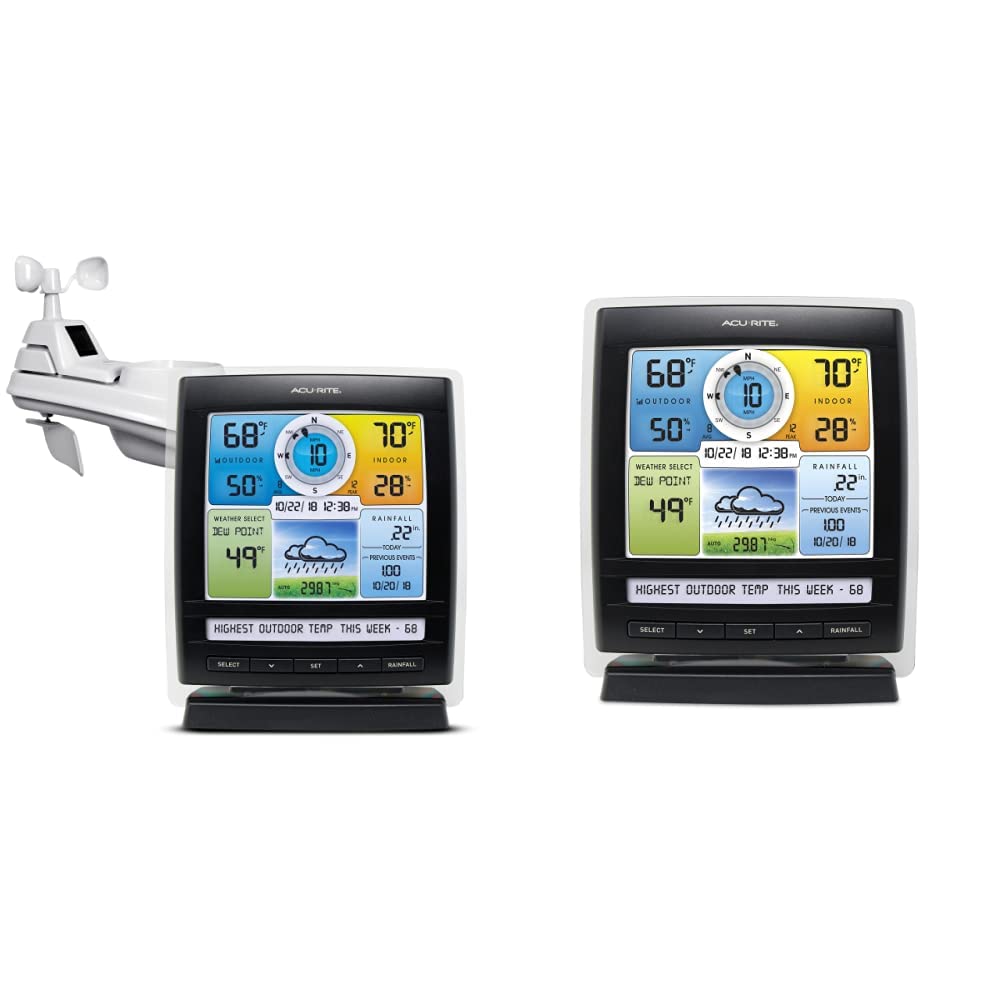
Image: The main components of the AcuRite Iris 5-in-1 Weather Station, featuring the outdoor sensor and the indoor digital display unit.
설정
짐 풀기
포장에서 모든 구성품을 조심스럽게 꺼내십시오. 나중에 보관이나 운송이 필요할 경우를 대비하여 포장재를 보관해 두십시오.
디스플레이 전원 공급
- Plug the included power adapter into the display unit and then into a standard electrical outlet.
- Optional: For backup power, insert 6 AA alkaline batteries (not included) into the battery compartment on the back of the display.
센서 배치
Proper placement of the 5-in-1 outdoor sensor is crucial for accurate readings. Choose a location that is:
- 지면에서 최소 5피트(1.5미터) 떨어져 있어야 합니다.
- Away from direct heat sources (e.g., exhaust vents, air conditioners).
- Free from obstructions that could block wind or rain (e.g., tall buildings, trees).
- Within 330 feet (100 meters) of the display unit for optimal wireless signal.
센서 장착
Use the included mounting hardware to securely attach the 5-in-1 sensor to a post or pole. Ensure the sensor is level for accurate rainfall measurements.
작동 지침
디스플레이 오버view
The illuminated color LCD display presents various weather data in an organized manner. Familiarize yourself with the different sections:
- 야외 섹션: Displays outdoor temperature, humidity, and trend indicators.
- Wind Section: Shows current wind speed, average wind speed, peak wind speed, and wind direction.
- 실내 섹션: 실내 온도와 습도를 표시합니다.
- Weather Select: 허용합니다 viewing of dew point, heat index, or 'feels like' temperature.
- Rainfall Section: Shows current day's rainfall and historical rainfall data.
- 일기 예보: Provides a 12 to 24-hour forecast based on barometric pressure changes.

Image: The AcuRite Iris display unit, highlighting sections for weather, humidity, and wind information with trend indicators; dew point, weather forecast, and rainfall visuals; and the date and time.
기본 탐색
Use the buttons located below the display to navigate through settings and view different data points:
- 선택하다: Cycles through various weather data points in the 'Weather Select' area.
- 세트: Enters setup mode for time, date, and other preferences.
- 위/아래 화살표: Adjusts values during setup or navigates through historical data.
- RAINFALL: Displays daily, weekly, monthly, or yearly rainfall totals.

이미지: 깨끗한 앞면 view of the AcuRite Iris digital display, showing the color screen with various weather readings and the control buttons at the bottom.
독서 이해
The display provides real-time data. Trend arrows indicate whether temperature, humidity, or pressure are rising, falling, or steady. The self-calibrating forecasting feature improves accuracy over time by analyzing barometric pressure changes.
날씨 티커
The 'Weather Ticker' at the bottom of the display streams useful environmental information, such as 'feels like' temperature, number of days since last rainfall, and other relevant alerts or data points.
유지
배터리 교체
The outdoor 5-in-1 sensor requires 4 AA batteries (not included) and has an estimated battery life of 2 years. Replace batteries when the low battery indicator appears on the display. Ensure to use fresh, high-quality alkaline or lithium batteries (lithium recommended for temperatures below -4°F / -20°C).
센서 청소
Periodically inspect the outdoor sensor for debris, especially in the rain collector funnel and around the wind cups. Clean gently with a damp cloth. Ensure the rain gauge tipping bucket mechanism moves freely.
문제 해결
If you encounter issues with your AcuRite Iris Weather Station, consider the following common solutions:
- 실외 센서 데이터 없음: Ensure the sensor is within range of the display (max 330 ft / 100 m) and has fresh batteries. Try relocating the display or sensor to reduce interference.
- Inaccurate Temperature/Humidity: Verify the sensor is not exposed to direct sunlight or heat sources. Allow up to 30 minutes for readings to stabilize after setup or relocation.
- Inaccurate Rainfall: Check that the sensor is level and the rain collector funnel is clear of debris.
- 디스플레이 전원이 켜지지 않음: Confirm the power adapter is securely connected and the electrical outlet is functional. If using batteries, ensure they are correctly inserted and fresh.
For more detailed troubleshooting guides and support, please visit the official AcuRite web대지.
명세서
| 상표 | 아큐 라이트 |
| 전원(센서) | Battery Powered (4 AA, not included) |
| 전원 공급 장치(디스플레이) | 4.5V Power Adapter (included) or 6 AA batteries (not included) |
| 연결 기술 | 무선 전화 |
| 온도 정확도 | ±1 °C |
| 상한 온도 등급 | 섭씨 45도 |
| 디스플레이 유형 | LCD 컬러 디스플레이 |
| 포함된 구성 요소 | Power Adapter, Stand, Mounting Hardware |
보증 및 지원
AcuRite products are designed for reliability and performance. For information regarding product warranty, technical support, or to register your product, please visit the official AcuRite web해당 사이트를 방문하거나 고객 서비스 부서에 문의하세요. 구매 증빙 자료로 구매 영수증을 보관하세요.
Web대지: www.acurite.com