
에디파이어 W280NB
Edifier W280NB 블루투스 무선 넥밴드 이어버드 사용 설명서
Model: W280NB | Brand: Edifier
1. 서론
Thank you for choosing the Edifier W280NB Bluetooth Wireless Neckband Earbuds. These earbuds are designed to provide a high-quality audio experience with features like Active Noise Cancellation (ANC), Ambient Sound Monitoring, and AI call noise reduction. Their lightweight, comfortable design and IP55 water resistance make them ideal for various activities, including gym workouts and running.
2. 상자 안에 무엇이 들어있나요?
- Edifier W280NB Earbuds
- 충전 케이블
- Multiple Sizes of Eartips and Ear Wings
3. 제품 오버view
Familiarize yourself with the components of your Edifier W280NB earbuds:

그림 3.1: Edifier W280NB Neckband Earbuds. The image shows the black neckband-style earbuds with the control module visible on the right side of the neckband.
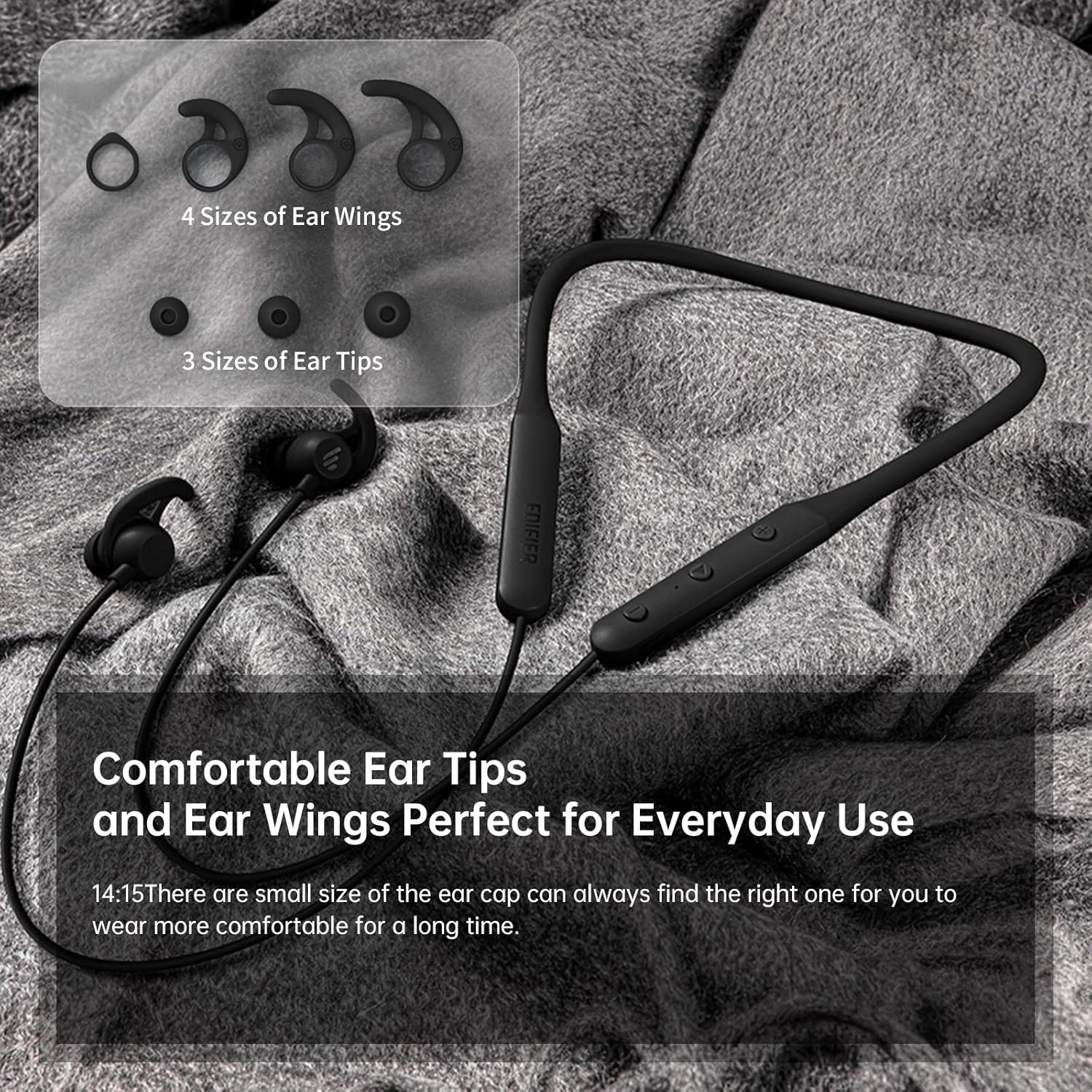
그림 3.2: Comfortable Ear Tips and Ear Wings. This image displays different sizes of silicone ear tips and ear wings, highlighting the customizable fit for user comfort.
The earbuds feature a flexible neckband for secure wear, with integrated controls for easy access to functions like volume, playback, and call management. The ear tips and ear wings are designed for a comfortable and stable fit during various activities.
4. 설정
4.1 이어버드 충전하기
Before first use, fully charge the earbuds. Connect the provided charging cable to the charging port on the neckband and to a USB power source. The indicator light will show charging status. A full charge provides up to 13 hours of playtime (ANC off). For quick use, a 2-minute charge can provide approximately 2 hours of playtime.

그림 4.1: Fast Charge and Long Playback Time. This image illustrates the battery life with ANC on (11 hours) and ANC off (13 hours), and the quick charge capability (10 minutes charge for 2.5 hours use).
4.2 블루투스 페어링
- 이어버드가 충전되어 있고 전원이 꺼져 있는지 확인하세요.
- 전원 버튼을 길게 눌러 표시등이 파란색과 빨간색으로 깜박이면 페어링 모드임을 나타냅니다.
- 기기(스마트폰, 태블릿, 노트북)에서 Bluetooth를 활성화하고 사용 가능한 기기를 검색하세요.
- Select "Edifier W280NB" from the list of found devices.
- 연결되면 표시등이 파란색으로 켜집니다.
5. 사용 설명서
5.1 컨트롤
목걸이형 제어 모듈을 통해 다양한 기능을 관리할 수 있습니다.
- 전원 버튼: 길게 눌러 전원을 켜거나 끌 수 있습니다. 짧게 눌러 음악을 재생/일시 정지하거나 전화를 받거나 끊을 수 있습니다.
- 볼륨 높이기(+): 짧게 누르면 볼륨이 커지고, 길게 누르면 다음 트랙으로 넘어갑니다.
- 볼륨 낮추기(-): 짧게 누르면 볼륨이 감소합니다. 길게 누르면 이전 트랙으로 돌아갑니다.
- 기능 버튼: (Specific button for ANC/Ambient mode, refer to product diagram if available, otherwise assume integrated with power/volume)
5.2 능동형 소음 제거(ANC)
The ANC feature reduces ambient noise, providing a more immersive listening experience. Activate or deactivate ANC using the designated control button (often a long press on the power button or a dedicated button).

그림 5.1: Active Noise Cancellation. A man is shown wearing the earbuds, with text indicating the ANC technology for a quieter experience.
5.3 Ambient Sound Monitoring
This mode allows you to hear your surroundings without removing the earbuds, enhancing safety and awareness. Toggle this mode on/off via the control module.

그림 5.2: Ambient Sound Mode. A woman is shown wearing the earbuds, with text explaining the real-time sensation of ambient sound monitoring.
5.4 통화 기능
The earbuds support hands-free calling with AI call noise reduction technology, ensuring clear conversations by filtering out ambient noise.
- 전화 받기/종료: 전원 버튼을 짧게 누릅니다.
- 전화 거부: 전원 버튼을 길게 누르세요.

그림 5.3: Call Noise Cancellation. A woman is shown wearing the earbuds, with text describing the AI call noise-cancelling technology for clear calls.
6. 유지관리
6.1 청소
- 이어폰 끝부분은 부드럽고 마른 천으로 정기적으로 닦아주세요.
- If necessary, remove the ear tips and wash them with mild soap and water, ensuring they are completely dry before reattaching.
- Wipe the neckband and earbud surfaces with a slightly damp 옷감. 가혹한 화학 물질이나 연마재를 사용하지 마십시오.
6.2 방수 및 방진(IP55)
The Edifier W280NB earbuds are IP55 rated, meaning they are protected against dust ingress and low-pressure water jets from any direction. This makes them suitable for use during workouts and in light rain. However, they are not designed for submersion in water.

그림 6.1: IP55 Dust and Water Resistance. A man is shown wearing the earbuds, with text highlighting their IP55 protection against dust and water.
6.3 보관
Store the earbuds in a cool, dry place away from direct sunlight and extreme temperatures. Avoid tangling the neckband to prevent damage.
7. 문제 해결
| 문제 | 가능한 원인 | 해결책 |
|---|---|---|
| 이어폰 전원이 켜지지 않습니다 | 배터리 부족 | 이어버드를 완전히 충전하세요. |
| 기기와 페어링할 수 없습니다 | 이어버드가 페어링 모드가 아닙니다. 기기에서 블루투스가 꺼져 있습니다. 기기와의 거리가 너무 멀습니다. | Ensure earbuds are in pairing mode (flashing blue/red). Turn on Bluetooth on your device. Move earbuds closer to your device (within 10 meters). |
| 소리가 나지 않거나 볼륨이 작음 | Volume too low; earbuds not connected; incorrect audio output selected | Increase volume on earbuds and device. Reconnect earbuds. Check your device's audio output settings. |
| 음질이 좋지 않습니다 | Interference; ear tips not sealed properly; dirty earbuds | Move away from sources of interference. Adjust ear tips for a secure fit. Clean ear tips and earbud nozzles. |
8. 사양
| 특징 | 세부 사항 |
|---|---|
| 모델 번호 | W280NB |
| 연결 기술 | 무선 전화 |
| 무선 통신 기술 | 블루투스 5.0 |
| 포함된 구성 요소 | 케이블, 이어팁 |
| 재료 | 실리콘 |
| 제품의 특정 용도 | 스포츠와 운동 |
| 제품의 권장 용도 | 전화, 실행 |
| 호환 장치 | 스마트폰, 태블릿, 노트북, 데스크탑 |
| 제어 유형 | 미디어 제어 |
| 케이블 기능 | 케이블 없이 |
| 방수 레벨 | 방수 (IP55) |
| 주파수 범위 | 20Hz - 20KHz |
| 제어 방법 | 만지다 |
| 항목 수 | 1 |
| 배터리 수명 | 13시간 (ANC 꺼짐) |
| 오디오 드라이버 유형 | 동적 드라이버 |
| 블루투스 범위 | 10 미터 |
| 이어피스 모양 | 인이어 |
| USB 2 포트 수 | 1 |
| 한국어: | 875674006623 |
9. 보증 및 지원
에디파이어 제품에는 일반적으로 제한적 보증이 제공됩니다. 제품에 동봉된 보증 카드를 참조하거나 에디파이어 공식 웹사이트를 방문하십시오. website for detailed warranty terms and conditions. For technical support, product inquiries, or service requests, please contact Edifier customer service through their official channels.
Ask a question about this manual
Ask about setup, troubleshooting, compatibility, parts, safety, or missing instructions. Manuals+ will review the question and use this page’s manual context to help answer it.