
1. 서론
Thank you for choosing the iPega PG-P4008 Wireless Game Controller. This manual provides detailed instructions on how to set up, operate, and maintain your controller. The PG-P4008 offers broad compatibility with PS4, PS3, Android (10.0+), iOS (13.0+), and Windows PC, connecting wirelessly via Bluetooth for an enhanced gaming experience.
2. 제품 오버view
The iPega PG-P4008 is designed for versatile gaming across multiple platforms. It features a comfortable ergonomic design, responsive controls, and several advanced functionalities to immerse you in your games.
주요 특징:
- Wireless Bluetooth connectivity (BT2.1+EDR) with up to 8 meters range.
- No driver installation required for connection.
- Integrated colored LED light indicator for operational status.
- Dual motors for realistic vibration feedback during gameplay.
- Built-in three-dimensional acceleration sensor and gyroscope sensor with six-axis induction.
- Integrated speaker and 3.5mm earphone jack for game audio.
- Dual-point capacitive touchpad for enhanced control.
- Compatible with PS4, PS3, Android (10.0+), iOS (13.0+), and Windows PC.
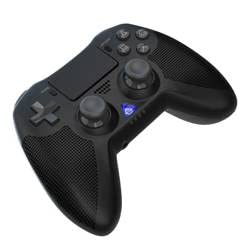
이미지 1: 앞쪽 view of the iPega PG-P4008 Wireless Game Controller. This image displays the controller's ergonomic design, dual analog sticks, D-pad, action buttons, touchpad, and the central LED indicator.
3. 설정 및 연결
The PG-P4008 controller connects wirelessly via Bluetooth. Follow these steps to pair your controller with your device:
- 전원 켜기: Ensure the controller is charged. Press and hold the PS 버튼 (or equivalent power button) to turn on the controller.
- 페어링 모드 :
- For PS4/PS3: Connect the controller to the console using a USB cable. Once recognized, you can disconnect the cable for wireless play. The connection method is similar to the official P4 controller.
- For Android/iOS: Activate Bluetooth on your mobile device. On the controller, press and hold the SHARE button + PS button simultaneously until the LED indicator flashes rapidly, indicating pairing mode. Select "PG-P4008" (or similar) from your device's Bluetooth list to connect.
- For Windows PC: Ensure your PC has Bluetooth capability. On the controller, press and hold the PS button + OPTIONS button simultaneously until the LED indicator flashes rapidly. On your PC, go to Bluetooth settings, add a new device, and select "PG-P4008" (or similar) to pair.
- 성공적인 연결: Once connected, the LED indicator on the controller will change to a solid color, indicating a successful pairing.
메모: No additional driver software is required for operation. The controller supports a stable connection up to 8 meters.
4. 사용 설명서
LED 표시등:
The built-in colored LED light indicates the controller's operational status and player assignment, similar to the official PS4 controller. Different colors will signify different stages or player numbers.
진동 피드백:
The controller features dual motors embedded in the handles, providing tactile vibration feedback to enhance your gaming immersion. This feedback will vary based on in-game events.
터치패드:
The dual-point capacitive touchpad allows for intuitive control in games that support touch input, offering an additional layer of interaction.
오디오 기능:
Connect your 3.5mm earphones to the integrated jack on the controller to experience game audio directly, providing a private and immersive sound experience.
5. 유지관리
- Keep the controller dry and away from moisture to prevent damage to internal components.
- 컨트롤러를 부드럽고 마른 천으로 정기적으로 닦아주세요. 강한 화학 약품이나 연마제를 사용하지 마십시오.
- 사용하지 않을 때는 컨트롤러를 서늘하고 건조한 곳에 보관하십시오.
- 컨트롤러를 극한 온도나 직사광선에 노출시키지 마세요.
- Do not attempt to disassemble or modify the controller, as this will void any potential warranty and may cause damage.
6. 문제 해결
- 컨트롤러가 연결되지 않음:
- 컨트롤러가 완전히 충전되었는지 확인하세요.
- 기기에서 Bluetooth가 활성화되어 있는지 확인하세요.
- Make sure the controller is in the correct pairing mode for your device (refer to Section 3).
- 컨트롤러와 장치를 모두 다시 시작해 보세요.
- 기기의 블루투스 목록에서 이전에 페어링했던 기기를 삭제한 후 다시 페어링을 시도해 보세요.
- 입력 지연 또는 연결 끊김:
- 8미터 작동 범위 내에 있는지 확인하십시오.
- 다른 무선 장치의 간섭을 최소화하세요.
- Check for any physical obstructions between the controller and the device.
- 진동이 작동하지 않습니다:
- 플레이하는 게임이 진동 피드백을 지원하는지 확인하세요.
- 게임 내 설정에서 진동이 활성화되어 있는지 확인하세요.
- Audio not working via 3.5mm jack:
- Ensure your earphones are properly plugged in.
- Check the volume settings on your device and in-game.
- Test with another pair of earphones to rule out earphone issues.
7. 사양
| 모델 번호 | PG-P4008 |
| 상표 | 아이페가 |
| 연결성 | Bluetooth (BT2.1+EDR) |
| 무선 범위 | 최대 8미터 |
| 호환 장치 | PS4, PS3, Android (10.0+), iOS (13.0+), Windows PC |
| 특별 기능 | Wireless, Touchpad, Vibration, 6-axis Gyroscope, Built-in Speaker, 3.5mm Audio Jack |
| 버튼 수량 | 17 |
| 전원 | 배터리 구동 |
8. 보증 및 지원
본 설명서에는 제품 보증 및 고객 지원 관련 정보가 포함되어 있지 않습니다. 제품 포장 또는 판매점을 참조하십시오. web보증 범위 및 고객 지원 문의 방법에 대한 자세한 내용은 해당 사이트를 참조하십시오.