
1. 제품 오버view
The Satechi USB-C Multiport MX Adapter is a versatile docking solution designed to expand the connectivity of your USB-C enabled devices, including MacBooks, Windows laptops, and iPads. It provides a comprehensive array of ports to enhance your productivity and multimedia experience.

Image: The Satechi USB-C Multiport MX Adapter, a compact and sleek device.
2. 설정 지침
- 어댑터를 연결하십시오: Plug the integrated USB-C cable from the Multiport MX Adapter into an available USB-C port on your host device (laptop, tablet, etc.).
- 전원 연결(선택 사항이지만 권장): For optimal performance and to charge your host device, connect your USB-C power adapter to the USB-C PD port on the Multiport MX Adapter. This port supports up to 100W Power Delivery.
- Dual HDMI Display Setup:
- Connect your HDMI-enabled monitors to the two HDMI ports on the adapter. One port supports 4K@60Hz, and the other supports 4K@30Hz.
- 중요한: For both HDMI ports to function simultaneously, installation of the SiliconMotion software is required. Please refer to the official Satechi website for the latest software and installation guide.
- 주변기기 연결: Plug in your USB-A devices, Ethernet cable, Micro/SD cards, and audio devices into their respective ports on the adapter.

Image: The Satechi USB-C Multiport MX Adapter connected to a laptop via its integrated USB-C cable.
3. 사용 설명서
The Satechi USB-C Multiport MX Adapter is designed for plug-and-play functionality, requiring no additional drivers for most basic operations (except for dual HDMI as noted above). Simply connect your devices to the corresponding ports.
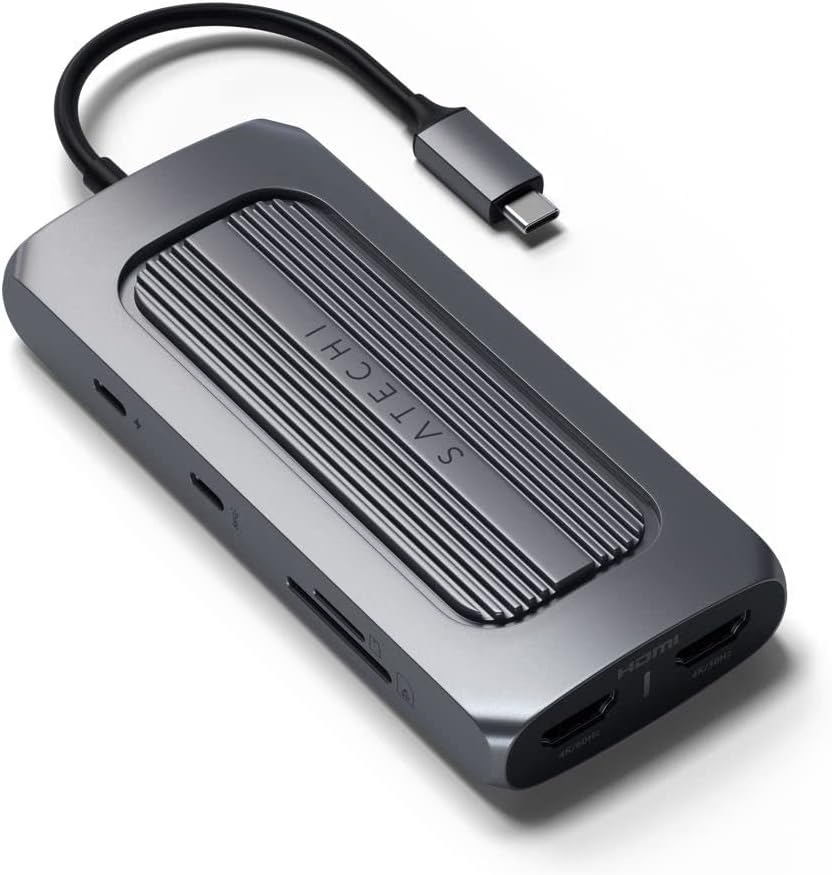
이미지: 측면 view of the adapter highlighting USB-C PD, USB-C Data, SD, and MicroSD card slots.
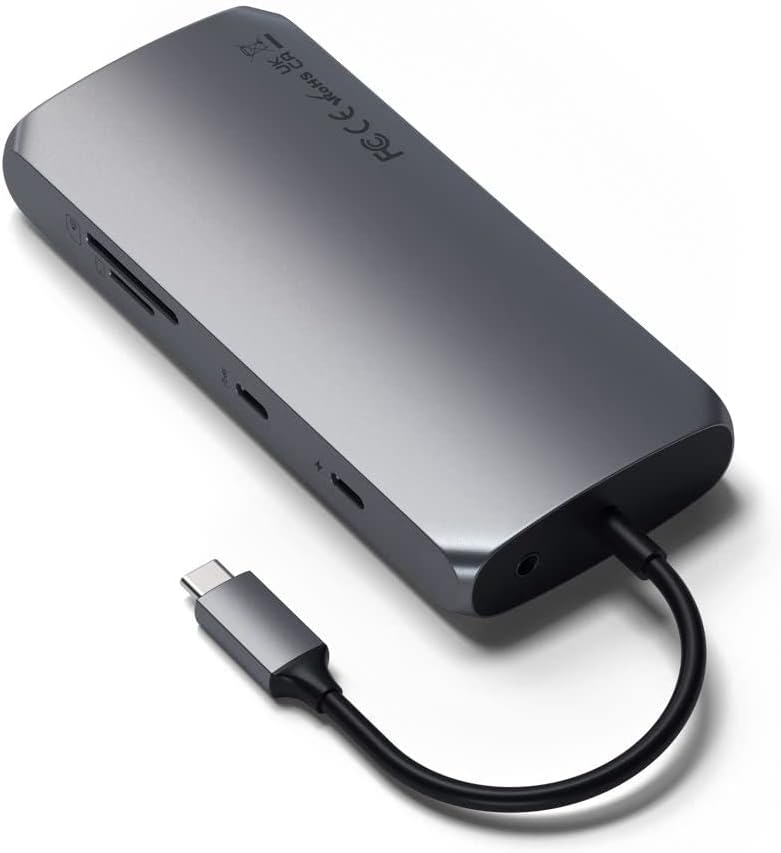
이미지: 측면 view of the adapter highlighting Ethernet, USB-A 3.0 ports, and HDMI ports.
- USB-C 전력 공급(PD) 포트: Use this port to power your host device and the adapter itself. It supports up to 100W input, with approximately 15W reserved for the adapter's operation.
- USB-C 데이터 포트: Connect USB-C peripherals for data transfer speeds up to 5Gbps. This port is for data only and does not support video output.
- USB-A 3.0 포트(2개): Connect traditional USB-A devices such as external hard drives, keyboards, mice, or flash drives. These ports offer data transfer speeds up to 5Gbps.
- Dual 4K HDMI Ports: Connect external monitors for extended or mirrored display. One port supports 4K resolution at 60Hz, and the other supports 4K resolution at 30Hz. Ensure SiliconMotion software is installed for dual display functionality.
- 이더넷 포트 : Provides a stable and fast wired network connection with Gigabit Ethernet speeds.
- Micro/SD Card Readers: Insert MicroSD and standard SD cards for quick data transfer (UHS-I speeds).
- 오디오 잭 : 오디오 출력을 위해 헤드폰이나 스피커를 연결하세요.
Video: Official Satechi overview of the USB-C Multiport MX Adapter, demonstrating its various ports and features.
4. 유지관리
- 청소: 어댑터를 닦을 때는 부드럽고 마른 천을 사용하십시오. 강한 화학 약품이나 연마성 재료는 사용하지 마십시오.
- 저장: 어댑터는 직사광선과 극한의 온도를 피해 서늘하고 건조한 곳에 보관하세요.
- 온도: The adapter is designed to operate within a temperature range of 30-50°C (86-122°F). Prolonged use outside this range may affect performance.
5. 문제 해결
- 외부 모니터에 아무것도 표시되지 않음:
- Ensure your HDMI cables are securely connected to both the adapter and the monitors.
- Verify that the SiliconMotion software is correctly installed on your host device. This software is crucial for dual HDMI output.
- Check your display settings on your computer to ensure the external monitors are detected and configured correctly (extended or mirrored).
- 어댑터가 따뜻하게 느껴집니다: It is normal for the adapter to become warm during operation, especially when multiple ports are in use or when charging your device at high wattage. This is due to power conversion and data processing. If it becomes excessively hot, disconnect it and allow it to cool down.
- USB-C Port Not Functioning: Ensure your host device's USB-C port supports the necessary functions (Power Delivery, DisplayPort Alt Mode, data transfer) for the features you are trying to use. Not all USB-C ports have the same capabilities.
- 느린 데이터 전송: Ensure you are using high-quality cables and that your connected devices support the advertised speeds (e.g., USB 3.0 for 5Gbps).
- 이더넷 연결 문제: Check the Ethernet cable connection. Ensure your network drivers are up to date on your host device.
6. 사양
| 상표 | 사테치 |
| 모델 | USB-C 멀티포트 MX 어댑터 |
| 하드웨어 인터페이스 | USB 타입 C |
| 호환 장치 | MacBook Pro 14/16-inch (2025 M5/M4/M3/M2/M1), MacBook Air 13/15-inch (2025 M4/M3/M2/M1), iPad Pro 11/13-inch (2025 M5/M4/M2/M1), iPad Air 11/13-inch (2025 M3/M2/M1), iPad Mini (2024 A17/6th Gen), Mac Mini (2024 M4/M2/M1), iMac (2024 M4/M3/M1), Mac Studio (2025 M4/M3/M2/M1), Lenovo ThinkPad, Microsoft Surface, Google Pixelbook |
| 총 USB 포트 | 4 (1x USB-C Data, 2x USB-A 3.0, 1x USB-C PD) |
| 포트 수 | 9 (including HDMI, Ethernet, Card Readers, Audio Jack) |
| 제품 치수 | 5.12인치 길이 x 2.28인치 너비 x 0.79인치 높이 |
| 품목 무게 | 171그램 |
| 총 HDMI 포트 | 2 (4K@60Hz, 4K@30Hz) |
| 왓tage | 100W 전력 공급 |
| 색상 | 스페이스 그레이 |
| 한국어: | 810086360130 |
7. 보증 및 지원
Satechi 제품은 다음 보증을 받습니다. 2년 한정 보증 against defects in materials and workmanship under normal use. For customer support, technical assistance, or warranty claims, please visit the official Satechi web사이트 또는 고객 서비스 부서에 문의하십시오.
For further assistance, please refer to the Satechi support page or contact their customer service directly.