
IPRO EPro A25
IPRO EPro A25 휴대폰 사용 설명서
Model: EPro A25 | Brand: IPRO
1. 서론
Welcome to the user manual for your new IPRO EPro A25 mobile phone. This guide provides detailed instructions on how to set up, operate, and maintain your device. The IPRO EPro A25 is a reliable feature phone designed for essential communication, featuring dual SIM support, a camera, multimedia capabilities, and a wireless FM radio.
2. 제품 오버view
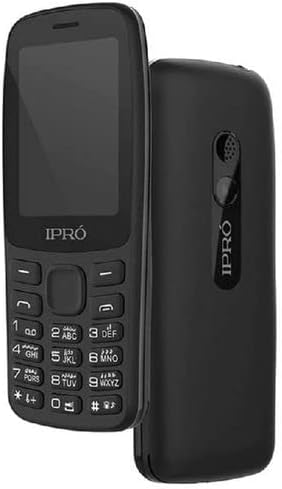
이미지: 앞면과 뒷면 view of the IPRO EPro A25 mobile phone. The front shows the screen and keypad, while the back highlights the speaker and camera area.
The IPRO EPro A25 is a compact and user-friendly mobile phone. Key features include a 2.4-inch screen, dual SIM card slots for managing two numbers simultaneously, a 3.5mm audio jack, MP3/MP4 playback, wireless FM radio, and an HD camera. It also supports a Micro SD card for expandable storage.
3. 시작하기: 초기 설정
3.1 Inserting SIM Cards and Battery
- Carefully remove the back cover of the phone by gently prying it from the notch usually located at the bottom or side.
- Insert your SIM card(s) into the designated SIM card slots. Ensure the gold contacts face downwards and the cut corner aligns with the slot. This phone supports dual SIMs.
- 배터리 접점을 휴대폰 내부의 단자에 맞춰 배터리를 제자리에 부드럽게 눌러 넣으세요.
- 뒷면 커버를 다시 끼우고, 제자리에 단단히 고정되었는지 확인하세요.
3.2 Inserting a Memory Card (Micro SD)
- Locate the Micro SD card slot, typically near the SIM card slots.
- Insert the Micro SD card with the gold contacts facing downwards until it clicks into place.
- 제거하려면 카드가 튀어나올 때까지 안쪽으로 살살 밀어주세요.
3.3 장치 충전
Before first use, fully charge the phone's battery. Connect the charger to the phone's charging port and plug it into a power outlet. The battery indicator on the screen will show the charging status. Disconnect the charger once the battery is full.
4. 기본 작업
4.1 전원 켜기/끄기
To power on, press and hold the Power/End Call key until the screen lights up. To power off, press and hold the Power/End Call key until the power-off options appear, then select 'Power off'.
4.2 전화 걸기
From the home screen, enter the phone number using the keypad. Press the Call key (usually green) to initiate the call. To end a call, press the End Call key (usually red).
4.3 메시지 보내기
Navigate to 'Messages' from the main menu. Select 'Write message' or 'New message'. Enter the recipient's number or select from contacts, then type your message. Press 'Send'.
4.4 카메라 기능
Access the 'Camera' application from the main menu. Frame your shot using the screen. Press the center navigation key or a dedicated camera button to capture a photo. Photos are saved to the phone's memory or inserted Micro SD card.
4.5 Multimedia Playback (MP3/MP4)
To play music (MP3) or videos (MP4), transfer your media files to the phone's memory or a Micro SD card. Access the 'Music Player' or 'Video Player' from the main menu, then browse and select your file재생을 위한 s.
4.6 무선 FM 라디오
Access the 'FM Radio' application from the main menu. This phone supports wireless FM, meaning headphones are not required as an antenna. Scan for available stations and select your preferred one.
5. 유지관리 및 관리
- 청소: Use a soft, dry cloth to clean the phone's screen and body. Avoid liquid cleaners or abrasive materials.
- 배터리 관리 : Do not expose the battery to extreme temperatures. Avoid overcharging or completely draining the battery frequently to prolong its lifespan.
- 저장: 휴대폰은 직사광선과 습기를 피해 시원하고 건조한 곳에 보관하세요.
- 방수 기능: 이 휴대폰은 방수 기능이 없습니다. 물이나 높은 습도에 노출시키지 마십시오.
6. 일반적인 문제 해결
| 문제 | 가능한 해결책 |
|---|---|
| 전화기 전원이 켜지지 않습니다 | Ensure the battery is correctly inserted and fully charged. Try charging for at least 30 minutes. |
| 전화를 걸거나 받을 수 없습니다 | Check if SIM card is properly inserted. Ensure you have network signal. Contact your service provider if issues persist. |
| 음질이 좋지 않음 | Check volume settings. Ensure speaker/earpiece is not blocked. |
| Memory card not detected | Reinsert the memory card. Ensure it is properly formatted and not damaged. |
7. 기술 사양
| 특징 | 사양 |
|---|---|
| 브랜드 이름 | Generic (Manufacturer: iPro) |
| 화면 크기 | 2.4인치(가시 화면 대각선: 3인치/7cm) |
| 셀룰러 기술 | 2세대(GSM) |
| 연결 기술 | 블루투스, Wi-Fi |
| 색상 | multicolor (Product image shows black) |
| SIM 카드 슬롯 수 | 듀얼 SIM |
| 폼 팩터 | 슬레이트 |
| 디스플레이 유형 | 액정표시장치 |
| 카메라 설명 | Rear, Front (HD Camera mentioned in description) |
| 오디오 잭 | 3.5mm |
| 미디어 지원 | MP3/MP4 |
| 확장 가능한 스토리지 | Micro SD 카드 지원 |
8. 보증 및 지원
This product comes with a standard manufacturer's warranty. Please refer to the warranty card included in your product packaging for specific terms and conditions. For technical support, service, or warranty claims, please contact your retailer or the manufacturer's authorized service center. Keep your purchase receipt as proof of purchase.
For further assistance, you may visit the official IPRO website or contact their customer service line, if available in your region.
관련 문서EPro A25


Ask a question about this manual
Ask about setup, troubleshooting, compatibility, parts, safety, or missing instructions. Manuals+ will review the question and use this page’s manual context to help answer it.