
트로닉스
Ctronics 5MP 30X Optical Zoom Security Camera User Manual
Model: CTIPC-295C-B
1. 서론
This user manual provides detailed instructions for the installation, operation, and maintenance of your Ctronics 5MP 30X Optical Zoom Security Camera. Please read this manual thoroughly before using the product to ensure proper functionality and safety. This camera is designed for outdoor surveillance, offering advanced features such as high-resolution video, extensive night vision, and intelligent detection capabilities.
2. 안전 정보
- Ensure the power supply matches the camera's specifications (12 Volts DC, 12 watts).
- 카메라를 작동 범위(-10°C ~ 50°C)를 벗어난 극한 온도에 노출시키지 마십시오.
- 렌즈가 강한 광원에 직접 노출되지 않도록 하십시오. 센서가 손상될 수 있습니다.
- Install the camera securely to prevent accidental falls.
- 카메라를 분해하거나 개조하지 마십시오. 그렇게 하면 보증이 무효화됩니다.
- Keep the camera away from corrosive chemicals.
3. 패키지 내용
아래 나열된 모든 품목이 패키지에 포함되어 있는지 확인하세요.
- Ctronics 5MP 30X Optical Zoom Security Camera
- 전원 어댑터(충전기)
- 장착 나사 및 벽면 플러그
- 네트워크 케이블용 방수 키트
- 빠른 시작 가이드

Figure 3.1: Main product image of the Ctronics 5MP 30X Optical Zoom Security Camera, showing its dome shape, antenna, and mounting bracket.
4. 제품 오버view
4.1 주요 특징
- 5MP HD 및 30배 광학 줌: Features a Sony IMX335 5MP CMOS sensor (2560x1920 resolution) and 30X optical zoom for sharp, vivid images and detailed long-distance view주고받음.
- 492ft Night Vision & Smart PTZ: Equipped with 7 high-performance infrared array LED lights (including 2 laser infrared lights) for up to 492 feet (150 meters) night vision. Offers 355° pan and 90° tilt for comprehensive coverage.
- 사람 감지 및 자동 추적: Intelligently detects human shapes, reducing false alarms by 95%. Automatically tracks suspicious persons within the monitoring range.
- Sound Light Alarm & Two-way Audio: Triggers audible and red/blue light alarms upon intrusion. Built-in speaker and microphone enable real-time two-way communication.
- Support All Platforms & IP66 Waterproof: Compatible with iOS and Android systems, FTP server, and HIP2P Client. Connects via 2.4Ghz WiFi or network cable. Supports TF cards up to 128GB (not included). IP66 rated for outdoor use.
4.2 카메라 구성 요소
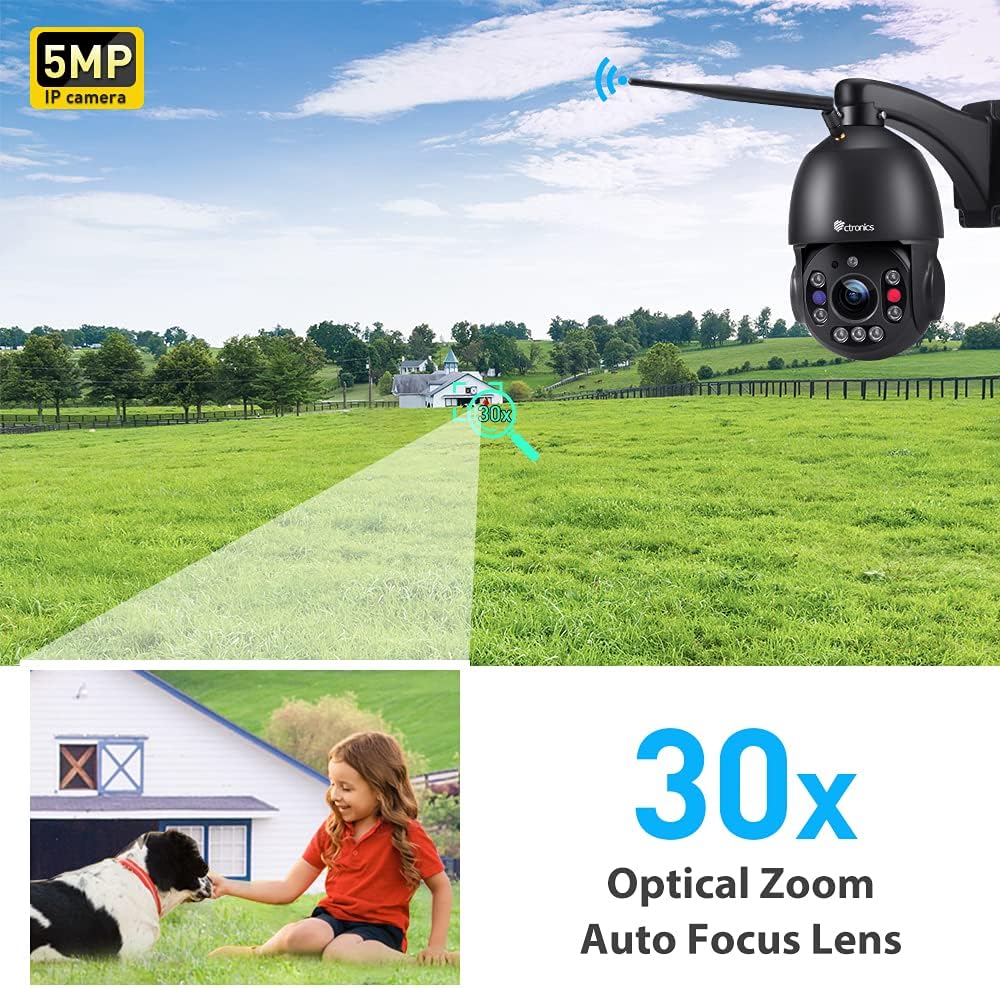
그림 4.1: 클로즈업 view of the camera's lens and infrared LEDs, highlighting the optical zoom capability.

Figure 4.2: Illustration showing the Micro SD card slot, supporting up to 128GB for local storage.
5. 설정
5.1 전원 켜기
Connect the provided power adapter to the camera's power input. The camera will perform a self-check, rotating its lens for calibration. This process indicates the camera is powering on correctly.
Video 5.1: Demonstrates the initial power-up sequence and self-check rotation of the camera, followed by the Wi-Fi connection process via the mobile app.
5.2 모바일 앱 설치
Download the Ctronics APP from your device's app store (iOS App Store or Google Play Store). Alternatively, scan the QR code provided in the Quick Start Guide to directly download the app.

Figure 5.1: Image illustrating the broad compatibility of the Ctronics camera with various operating systems and platforms, including iOS, Android, Mac OS, and Windows.
5.3 Initial Setup & Wi-Fi Connection
Follow the in-app instructions to add your camera. For Wi-Fi connection, ensure your mobile device is connected to a 2.4Ghz or 5Ghz Wi-Fi network. The camera supports both frequencies. You may need to reset the camera by pressing the reset button (usually located near the cables) until you hear a chime, indicating it's ready for network configuration.
Video 5.2: Guide on how to add the camera to the HiP2P Client End software on a PC, including logging in and inputting the camera's UID.
6. 카메라 작동
6.1 라이브 View 및 PTZ 제어
Once connected, open the Ctronics app to access the live video feed. Use the on-screen controls to pan (355° horizontally) and tilt (90° vertically) the camera, allowing you to monitor a wide area without blind spots.
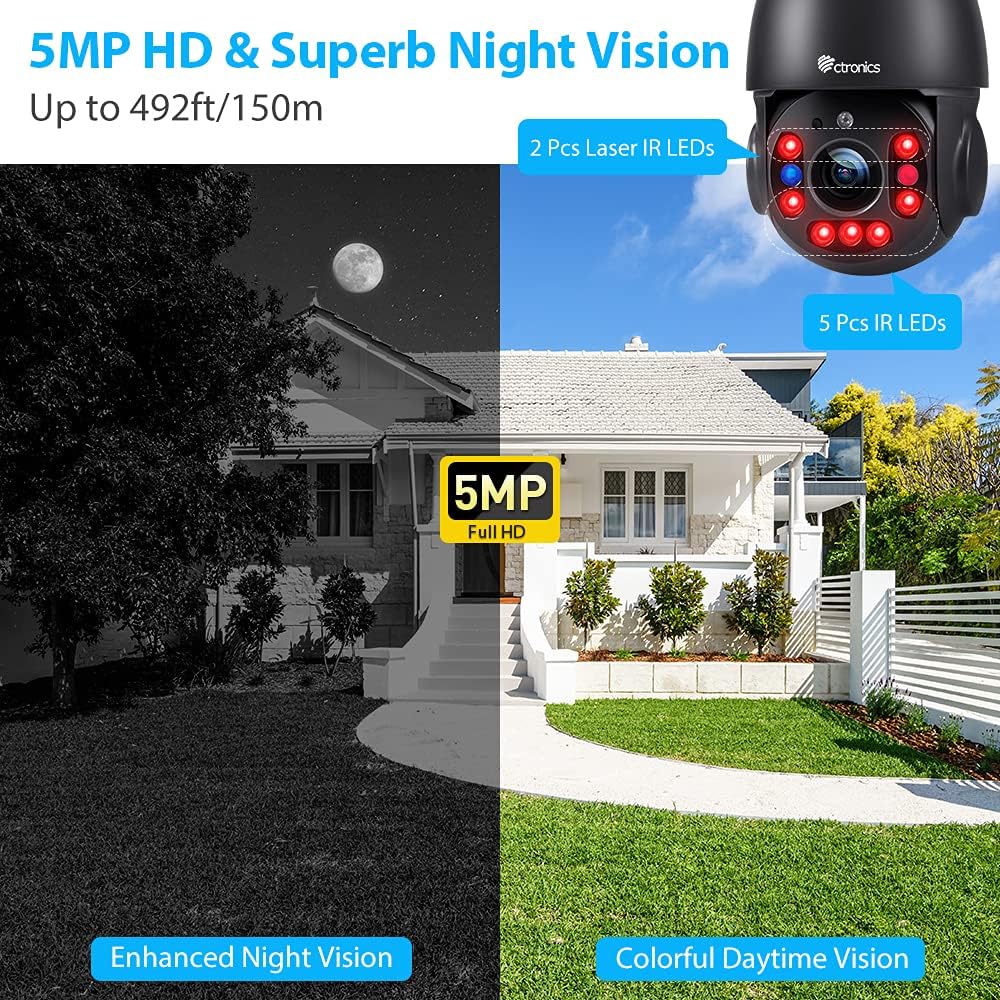
Figure 6.1: A smartphone displaying the live view from the Ctronics camera, with controls for 355° pan and 90° tilt, providing comprehensive coverage of the monitored area.
6.2 광학 줌
The camera features a powerful 30X optical zoom. Use the zoom controls within the app to magnify distant objects without losing image clarity, allowing you to capture important details like faces or license plates.
비디오 6.1: 끝view of the Ctronics 5MP PTZ camera, showcasing its 30X optical zoom and pan-tilt capabilities for outdoor security.
6.3 야간 투시경
The camera automatically switches to night vision mode in low-light conditions, providing clear black-and-white images up to 492 feet (150 meters). The laser infrared lights enhance visibility over long distances.

Figure 6.2: Depiction of the camera's enhanced night vision, showing a clear black-and-white view of a house at night, with visible IR LEDs on the camera.
6.4 사람 감지 및 자동 추적
Enable human detection in the app settings to receive real-time alerts when a person is detected. The auto-tracking feature will automatically follow the detected human, ensuring continuous monitoring of their movement.

Figure 6.3: An illustration showing the camera's auto-tracking and smart alarm features, with a phone receiving an alert message when human motion is detected.

Figure 6.4: Visual representation of the sound and light alarm feature, showing the camera activating red and blue flashing lights to deter intruders.
6.5 양방향 오디오
Utilize the two-way audio function to communicate with individuals near the camera. This feature is useful for greeting visitors or deterring unwanted guests.
Figure 6.5: A person speaking into a smartphone, demonstrating the two-way audio feature to communicate with someone near the camera.
7. 유지관리
7.1 청소
깨끗한 화질을 유지하려면 부드럽고 마른 천으로 카메라 렌즈를 정기적으로 닦으세요. 강한 화학 물질이나 연마재는 사용하지 마세요.
7.2 펌웨어 업데이트
Ctronics 앱에서 정기적으로 펌웨어 업데이트를 확인하세요. 카메라 펌웨어를 최신 상태로 유지하면 최적의 성능을 유지하고 새로운 기능을 이용할 수 있습니다.
7.3 스토리지 관리
If using a TF card for local storage, regularly back up important recordings and format the card as needed to maintain recording efficiency. The camera supports TF cards up to 128GB.
8. 문제 해결
| 문제 | 가능한 원인 | 해결책 |
|---|---|---|
| 카메라 오프라인 | No power, Wi-Fi signal weak, incorrect Wi-Fi password. | Check power connection. Ensure strong Wi-Fi signal. Re-enter Wi-Fi password in app. Reset camera if necessary. |
| 화질이 나쁘다 | 렌즈가 더럽고, 조명이 부족하고, 네트워크 대역폭 문제가 있습니다. | Clean the lens. Ensure adequate lighting for optimal daytime performance. Check network speed. |
| 허위 경보 | Environmental factors (e.g., trees, rain, insects). | Adjust human detection sensitivity in the app. Reposition camera to minimize environmental triggers. |
| 양방향 오디오 없음 | 마이크/스피커 차단, 앱 권한, 볼륨 설정. | Ensure nothing is obstructing the microphone or speaker. Check app permissions for audio. Adjust volume in app and on device. |
| Cannot connect to 5Ghz Wi-Fi | Camera is not compatible with 5Ghz (Note: This model supports both 2.4Ghz and 5Ghz). | Ensure your router is broadcasting a 5Ghz signal. If issues persist, try connecting to a 2.4Ghz network. |
9. 기술 사양
| 사양 | 값 |
|---|---|
| 모델명 | CTIPC-295C-B |
| 비디오 캡처 해상도 | 5MP(2560x1920) |
| 광학 줌 | 30X |
| 팬 범위 | 355° |
| 기울기 범위 | 90° |
| 나이트 비전 범위 | 492피트(150미터) |
| 연결 기술 | Wireless (2.4Ghz/5Ghz Wi-Fi) & Wired (Network Cable) |
| 국제 보호 등급 | IP66 |
| 전원 | 유선 전기 (12V DC, 12W) |
| 저장 | 최대 128GB TF 카드(별매)를 지원합니다. |
| 재료 | 금속 |
| 품목 무게 | 4.6 파운드 |
10. 보증 및 지원
Ctronics products typically come with a manufacturer's warranty. For specific warranty details, please refer to the documentation included with your product or visit the official Ctronics website. For technical support, troubleshooting assistance, or any inquiries, please contact Ctronics customer service through their official channels.
추가 자료와 다운로드 가능한 PDF 사용자 매뉴얼은 다음에서 확인하실 수 있습니다. Ctronics User Manual (PDF)
Figure 10.1: The camera is shown outdoors in rainy conditions, illustrating its IP66 waterproof and weather-resistant design, suitable for various climates.
Ask a question about this manual
Ask about setup, troubleshooting, compatibility, parts, safety, or missing instructions. Manuals+ will review the question and use this page’s manual context to help answer it.