
1. 제품 오버view
The MAKINGTEC B-40 Laser Measure is a compact and versatile digital device designed for accurate distance, area, and volume measurements. It features an LCD backlit display, multiple measurement modes, and a durable, waterproof design. This manual will guide you through its functions and proper usage.
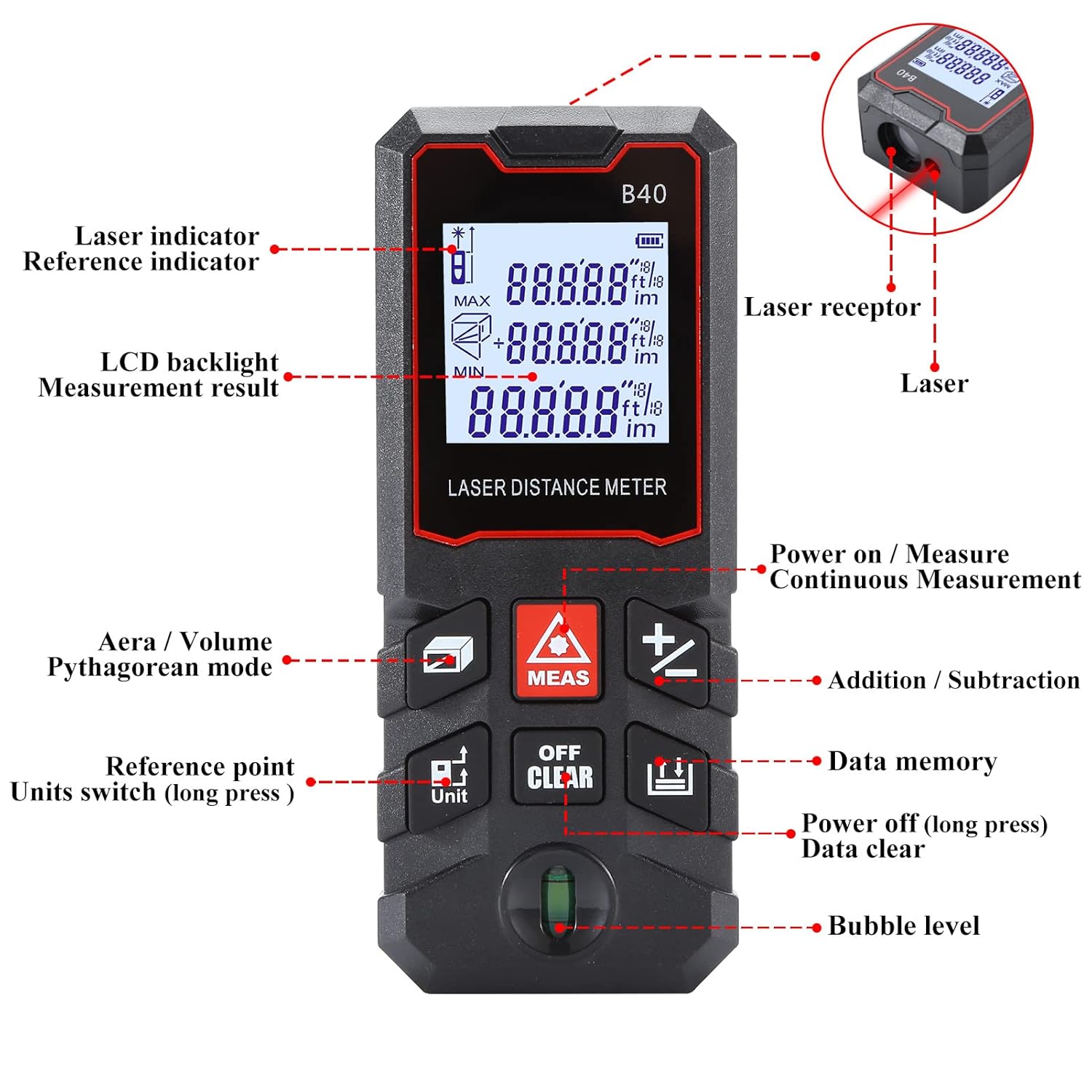
그림 1.1: 앞쪽 view of the MAKINGTEC B-40 Laser Measure with key components labeled. This includes the laser indicator, LCD backlight, measurement result display, area/volume/Pythagorean mode button, reference point/units switch, power on/measure button, continuous measurement, addition/subtraction, data memory, power off/data clear, and bubble level.
2. 설정 및 초기 사용
2.1 배터리 설치
The MAKINGTEC B-40 Laser Measure operates on alkaline batteries, which are typically included. To install or replace batteries:
- 장치 뒷면에서 배터리 덮개를 찾으세요.
- 덮개를 밀거나 잠금장치를 풀어서 여세요.
- 극성(+/-)이 맞는지 확인하여 배터리를 삽입하십시오.
- 배터리 덮개를 단단히 닫으세요.
2.2 전원 켜기/끄기
- 전원을 켜려면: 를 누르세요 측정 button. The device will turn on and be ready for measurement.
- 전원을 끄려면: 길게 누르세요 끄기/지우기 버튼을 2초 이상 누르세요.
3. 기본 동작
This section covers the fundamental steps for using your laser measure.
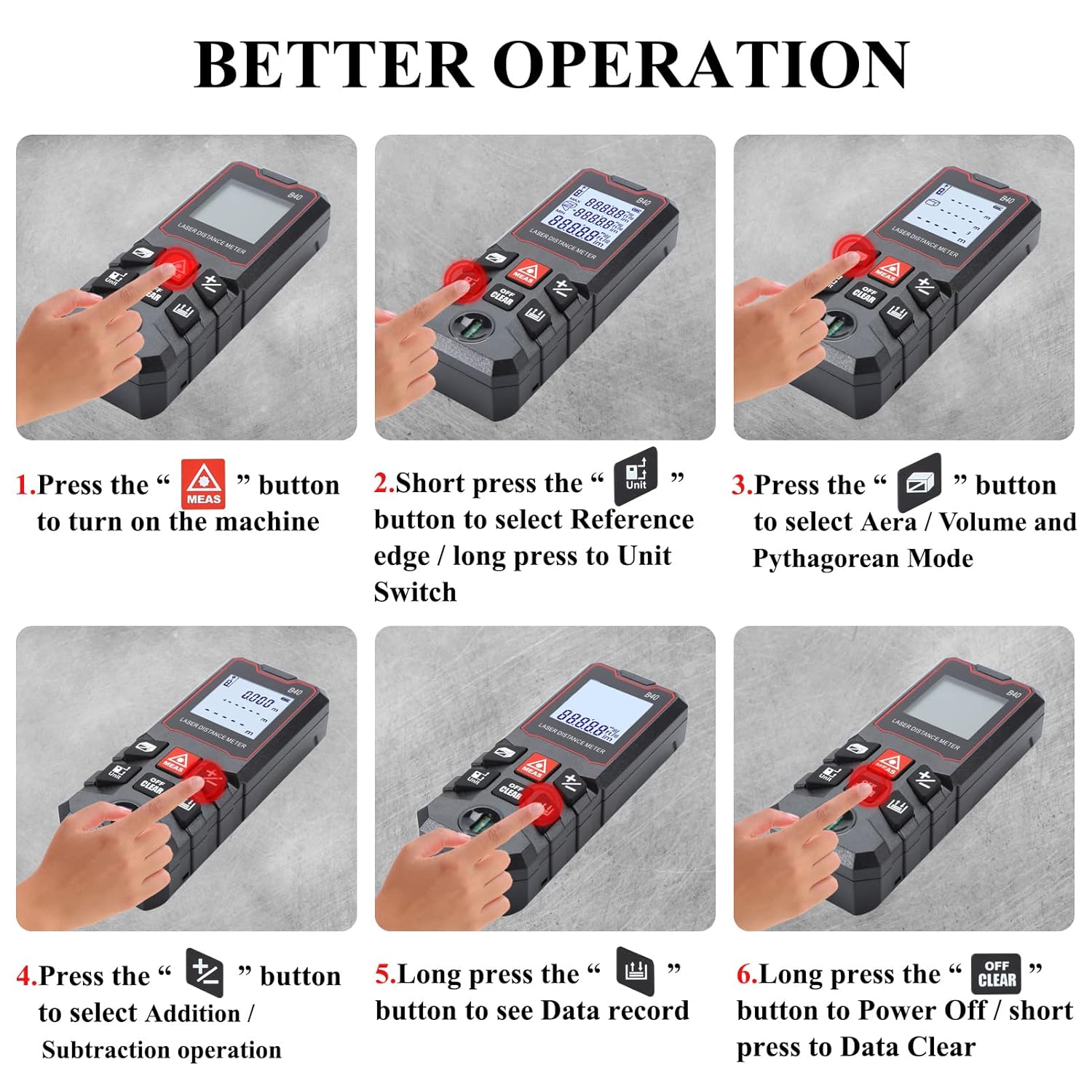
그림 3.1: Visual guide for basic operations including powering on, selecting reference point, choosing measurement modes, performing addition/subtraction, viewing data records, and powering off.
3.1 단일 거리 측정
- 장치의 전원이 켜져 있는지 확인합니다.
- 레이저를 목표 표면에 비추세요.
- 를 누르세요 측정 버튼을 한 번 누르세요. 측정값이 화면에 표시됩니다.
3.2 유닛 전환
The device supports multiple units of measurement. To switch between units (meter, feet, inch, feet+inch, inch with fraction mode):
- 길게 누르세요 단위 button. The unit will cycle through the available options.

그림 3.2: Illustration of unit switching sequence and reference point adjustment using the 'Unit' button.
3.3 기준점 조정
The measurement reference point can be set from the front or the back of the device. This is crucial for accurate measurements depending on where the device is placed.
- 짧게 누르세요 단위 button to toggle between front and back reference points. An icon on the display will indicate the current reference point.
3.4 덧셈과 뺄셈
The B-40 allows for adding or subtracting measurements.
- 측정을 수행하십시오.
- 를 누르세요 + button for addition or the - 뺄셈 버튼.
- Perform the next measurement. The result will be added or subtracted from the previous one.
3.5 데이터 저장
이 장치는 최대 50개의 측정 데이터 그룹을 저장할 수 있습니다.
- 에게 view stored data, long press the 데이터 메모리 단추.
- To clear data, short press the 끄기/지우기 동안 버튼 view데이터를 전송합니다.
4. 측정 모드
The MAKINGTEC B-40 offers several advanced measurement functions.

그림 4.1: 시각적 전amples of the different measurement modes available on the device.
4.1 연속 측정
This mode allows for dynamic measurement, continuously updating the distance as the device is moved. It is useful for finding minimum and maximum distances.
- 를 누르세요 측정 button to enter continuous measurement mode.
- Move the device, and the display will show real-time measurements, along with minimum and maximum values.
- 누르다 측정 다시 종료합니다.
4.2 면적 측정
직사각형 공간의 면적을 계산하려면:
- 를 누르세요 면적/부피/피타고라스 button until the area icon appears on the display.
- 첫 번째 변(길이)을 눌러 측정하세요. 측정.
- 눌러서 두 번째 변(너비)을 측정하세요. 측정.
- 이 장치는 자동으로 면적을 계산하여 표시합니다.
4.3 체적 측정
To calculate the volume of a cubic space:
- 를 누르세요 면적/부피/피타고라스 button until the volume icon appears.
- 길이, 너비, 높이 순으로 눌러 측정하세요. 측정 각 측정 후.
- 이 장치는 자동으로 볼륨을 계산하고 표시합니다.
4.4 Pythagorean Mode
This mode uses the Pythagorean theorem to calculate indirect measurements, such as height or distance, when direct measurement is not possible.
- 를 누르세요 면적/부피/피타고라스 button until the desired Pythagorean mode icon appears (e.g., for single or double Pythagorean calculations).
- Follow the on-screen prompts to measure the required sides (hypotenuse, base) by pressing 측정 각각에 대하여.
- 이 장치는 미지수의 길이를 계산하여 표시합니다.
5. 유지관리 및 관리
Proper maintenance ensures the longevity and accuracy of your MAKINGTEC B-40 Laser Measure.
5.1 청소
- 부드러운 천으로 장치를 닦으십시오. damp 천. 연마성 세척제나 용매를 사용하지 마십시오.
- Clean the laser lens carefully with a soft cloth, similar to cleaning camera lenses, to avoid scratching.
5.2 보관
- 기기를 서늘하고 건조한 곳에 보관하고, 직사광선과 극한의 온도를 피하세요.
- 장기간 보관할 경우 누액을 방지하기 위해 배터리를 제거하십시오.
5.3 내구성
The MAKINGTEC B-40 has an IP54 protection rating, meaning it is protected against dust ingress and splashing water from any direction. While durable, avoid submerging the device in water or exposing it to heavy rain.

그림 5.1: The device is designed with IP54 protection, offering resistance to dust and water splashes.
6. 문제 해결
기기에 문제가 발생하면 다음의 일반적인 문제와 해결 방법을 참조하세요.
| 문제 | 가능한 원인 | 해결책 |
|---|---|---|
| 장치의 전원이 켜지지 않습니다. | 배터리가 부족하거나 방전됨, 배터리가 잘못 설치됨. | 배터리를 교체할 때는 극성이 올바른지 확인하십시오. |
| 부정확한 측정. | Dirty laser lens; incorrect reference point; unstable surface. | Clean the laser lens; verify reference point setting; ensure stable measurement conditions. |
| 디스플레이가 어둡거나 읽을 수 없습니다. | 배터리가 부족함; 온도가 너무 높음. | Replace batteries; operate within specified temperature range. |
7. 사양
Key technical specifications for the MAKINGTEC B-40 Laser Measure.
| 특징 | 세부 사항 |
|---|---|
| 상표 | 메이킹텍 |
| 모델 번호 | B-40 laser measure |
| 측정 범위 | 0.03-40m (0.1-131ft) |
| 정확성 | ±1/16인치 |
| 국제 보호 등급 | IP54(방수, 방진) |
| 재료 | 금속, 플라스틱 |
| 품목 무게 | 85그램 |
| 제품 치수 | 10.9L x 4.9W x 2.5H 센티미터 |
| 배터리 유형 | Alkaline (Batteries Included: Yes) |
| 표시하다 | LCD 백라이트 |
| 데이터 저장 | 50개 그룹 |

그림 7.1: The B-40 Laser Measure offers fast and precise measurements with an accuracy of ±1/16 inch.
8. 제품 시연 영상
Watch this official product video for a visual demonstration of the MAKINGTEC B-40 Laser Measure's features and operation.
동영상 8.1 : An official demonstration of the MAKINGTEC B-40 Laser Measure, showcasing its design, button functions, and various measurement capabilities including length, area, and unit switching. This video provides a comprehensive visual guide to the device's operation.
9. 보증 및 지원
The MAKINGTEC B-40 Laser Measure comes with a 12-month return policy. Additionally, a 1-year extended warranty by Onsitego is available for purchase, providing further protection for your device.
For further assistance or inquiries, please refer to the contact information provided with your purchase or visit the official MAKINGTEC support channels.