
1. 제품 오버view
The USX MOUNT Soundbar Mount (Model XAS009) is designed to securely attach your soundbar either above or below your television. This versatile bracket supports soundbars weighing up to 16 lbs (7.26 kg) and is compatible with various TV wall mounts, including fixed, tilt, and full-motion types. It accommodates TVs with VESA patterns up to 600x400 mm. The design features detachable extension plates that swivel up to 180 degrees, allowing for flexible soundbar positioning.
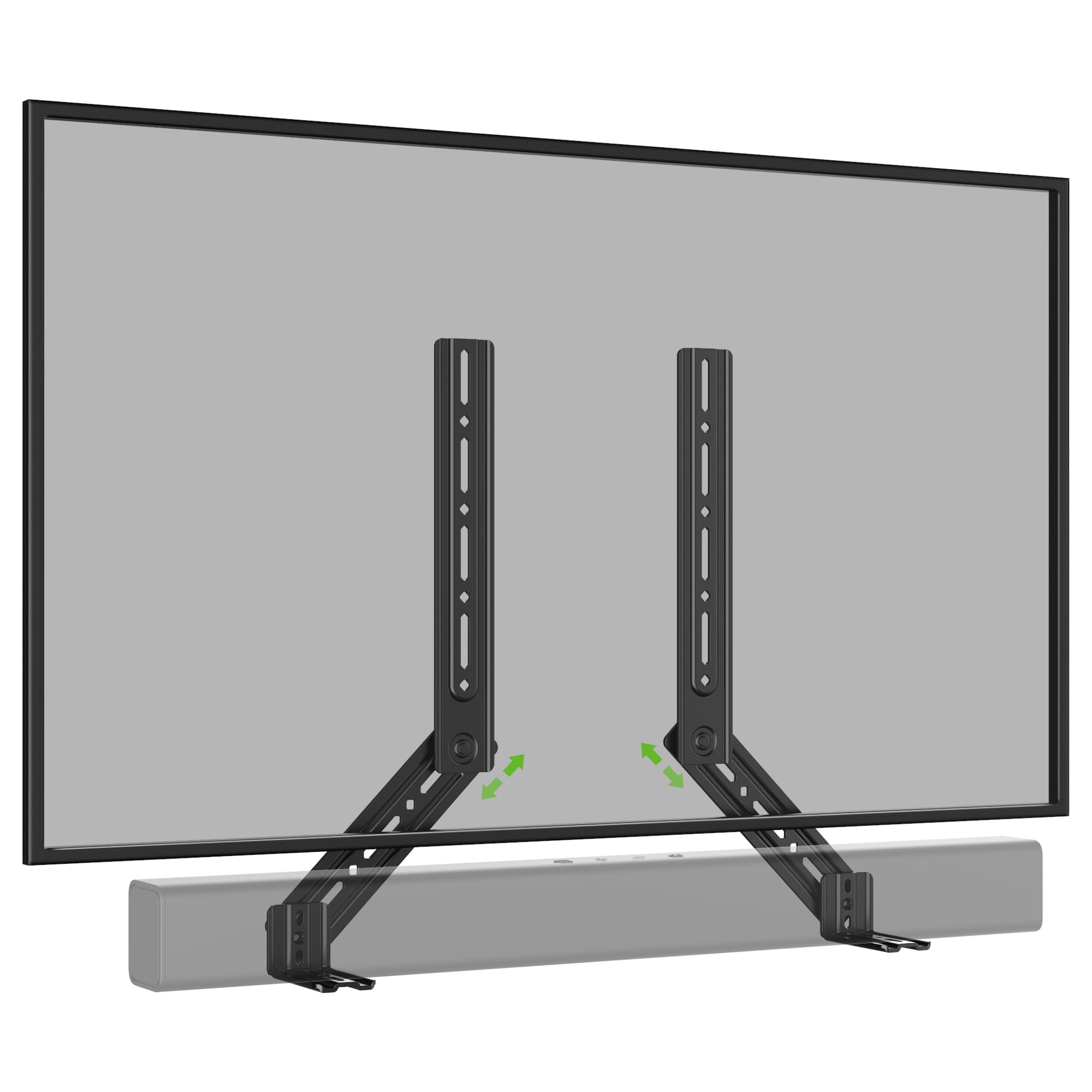
이미지 1: 이상view of the USX MOUNT Soundbar Mount XAS009.
2. 안전 정보
Please read and understand all instructions before installation and use. Failure to follow these instructions may result in property damage, serious injury, or death. If you have any questions, contact customer service.
- 중량 용량: 최대 중량 용량은 16파운드(7.26kg)를 초과하지 마십시오.
- TV 크기 : This mount may not fit TVs larger than 83 inches.
- VESA 호환성: Ensure your TV's VESA pattern is within 600x400 mm.
- 사운드바 장착 구멍: Verify your soundbar's mounting hole specifications match the bracket.
- 설치 표면: Ensure the wall or TV mount can safely support the combined weight of the TV, soundbar, and mount.
- 도구: 설치에 적합한 도구를 사용하십시오.
3. 패키지 내용
Carefully unpack the box and ensure all parts are present and undamaged. If any parts are missing or damaged, do not attempt to install. Contact customer support for assistance.
- Soundbar Mount Brackets (2 pieces)
- Detachable Extension Plates (L-shaped brackets)
- Assorted Screws, Washers, and Spacers for various VESA sizes and soundbar types
- 사용 설명서

Image 2: Illustration of universal compatibility, maximum load, and VESA size support.
4. 사양
| 특징 | 사양 |
|---|---|
| 모델 번호 | XAS009 |
| 최대 하중 용량 | 16파운드(7.26kg) |
| Compatible TV VESA Patterns | 최대 600x400mm |
| 회전 조정 | 최대 180도 |
| 장착 유형 | Above or Under TV (compatible with TV wall mounts) |
| 재료 | Steel (implied by "sturdy") |
| 색상 | 회색 |
5. 설치
The USX MOUNT Soundbar Mount offers flexible installation options, allowing you to attach your soundbar above or below your TV. The interlocking teeth on the arm connections ensure a secure fit.
5.1. Determine Mounting Position
Decide whether you want to mount the soundbar above or below your television. The brackets are designed to accommodate both configurations.

Image 3: Visual guide for installing the soundbar mount above or below the TV.
5.2. Attach Brackets to TV Mount
The soundbar mount brackets attach directly to your existing TV wall mount. They are compatible with full-motion, fixed, and tilting TV mounts. The brackets are designed to slide into place with the TV's VESA mounting arms.
Video 1: Demonstration of attaching the soundbar brackets to a TV mount, showing how they integrate with the TV's mounting arms.
5.3. Attach Soundbar to Brackets
Depending on your soundbar's design, you can attach it to the brackets using various methods:
- Back Hole Mounting: Use the provided screws and washers to secure the soundbar through its back mounting holes to the brackets.
- Key Hole Mounting: For soundbars with keyhole slots, align them with the bracket's keyhole screws and slide to lock.
- Bottom Hole Mounting (with L-shaped brackets): If your soundbar requires mounting from the bottom, use the included L-shaped brackets. Attach the L-shaped brackets to the main soundbar brackets, then secure your soundbar to the L-shaped brackets.

이미지 4: 상세 view of different soundbar attachment methods: back hole, keyhole, and bottom hole using L-shaped brackets.
Image 5: Dimensions and design of the practical L-shaped hooks for bottom-mounted soundbars.

Image 6: Visual guide for connecting various soundbars using back, key, or bottom holes.
5.4. 최종 조정
Once the soundbar is attached, you can make final adjustments to its position. The detachable extension plates allow for up to 180 degrees of swivel, ensuring optimal placement and sound projection.

Image 7: Diagram illustrating the 360-degree swivel capability of the soundbar mount for precise positioning.

Image 8: The soundbar mount allows the soundbar to move in conjunction with a full-motion TV mount, maintaining alignment.
6. 사용 설명서
The USX MOUNT Soundbar Mount is designed for a set-and-forget installation. Once installed, the primary operation involves adjusting the soundbar's angle or position if your TV mount allows for movement.
- 회전 조정: The extension plates can swivel up to 180 degrees. Loosen the locking mechanism, adjust the angle, and then re-tighten to secure the soundbar in your desired position.
- TV Mount Movement: If your TV is on a full-motion mount, the soundbar will move in conjunction with the TV, maintaining its relative position.
7. 유지관리
The soundbar mount requires minimal maintenance to ensure its longevity and continued performance.
- 청소: 먼지를 제거하려면 부드럽고 마른 천으로 거치대를 닦으십시오. 연마성 세척제나 용제를 사용하지 마십시오.
- 정기 점검: 모든 나사와 연결부가 단단히 조여져 있는지 주기적으로 점검하십시오. 필요한 경우 다시 조이십시오.
- 중량 제한: Do not place additional weight on the soundbar or mount beyond the specified capacity.
8. 문제 해결
설치 중이나 설치 후에 문제가 발생하면 다음의 일반적인 해결 방법을 참조하세요.
- Soundbar not fitting: Double-check your soundbar's weight and mounting hole pattern against the specifications. Ensure you are using the correct screws and spacers.
- 산이 불안정하다고 느껴집니다: Verify that all screws are securely tightened, especially those connecting the mount to the TV and the soundbar to the mount. Ensure the TV mount itself is properly installed on the wall.
- Difficulty with swivel adjustment: Loosen the adjustment knobs or bolts slightly before attempting to swivel. Do not force the movement.
- 잃어버린 부분들: Refer to the "Package Contents" section. If parts are missing, contact USX MOUNT customer support.
9. 보증 및 지원
USX MOUNT products are manufactured with quality and durability in mind. For warranty information or technical support, please refer to the official USX MOUNT web사이트를 방문하거나 고객 서비스에 직접 문의하세요. 보증 청구를 위해 구매 영수증을 보관하세요.
연락처 정보: 방문해주세요 USX MOUNT Store on Amazon for further details and support resources.