
SYNCO P2L
SYNCO P2L Wireless Lavalier Microphone User Manual
Model: P2L
1. 서론
The SYNCO P2L is a compact wireless lavalier microphone system designed for use with iOS devices. It features two transmitters (TX) and one receiver (RX), enabling two-person recording with high-fidelity audio transmission. This manual provides detailed instructions for setup, operation, maintenance, and troubleshooting to ensure optimal performance of your device.
2. 패키지 내용
아래 나열된 모든 품목이 패키지에 포함되어 있는지 확인하세요.
- Wireless Charging Storage Case x1
- 송신기(TX) x2
- Receiver (RX) with Lightning Connector x1
- 충전 케이블 x1
- Type-C to 3.5mm Adapter x1
- 사용 설명서 x1
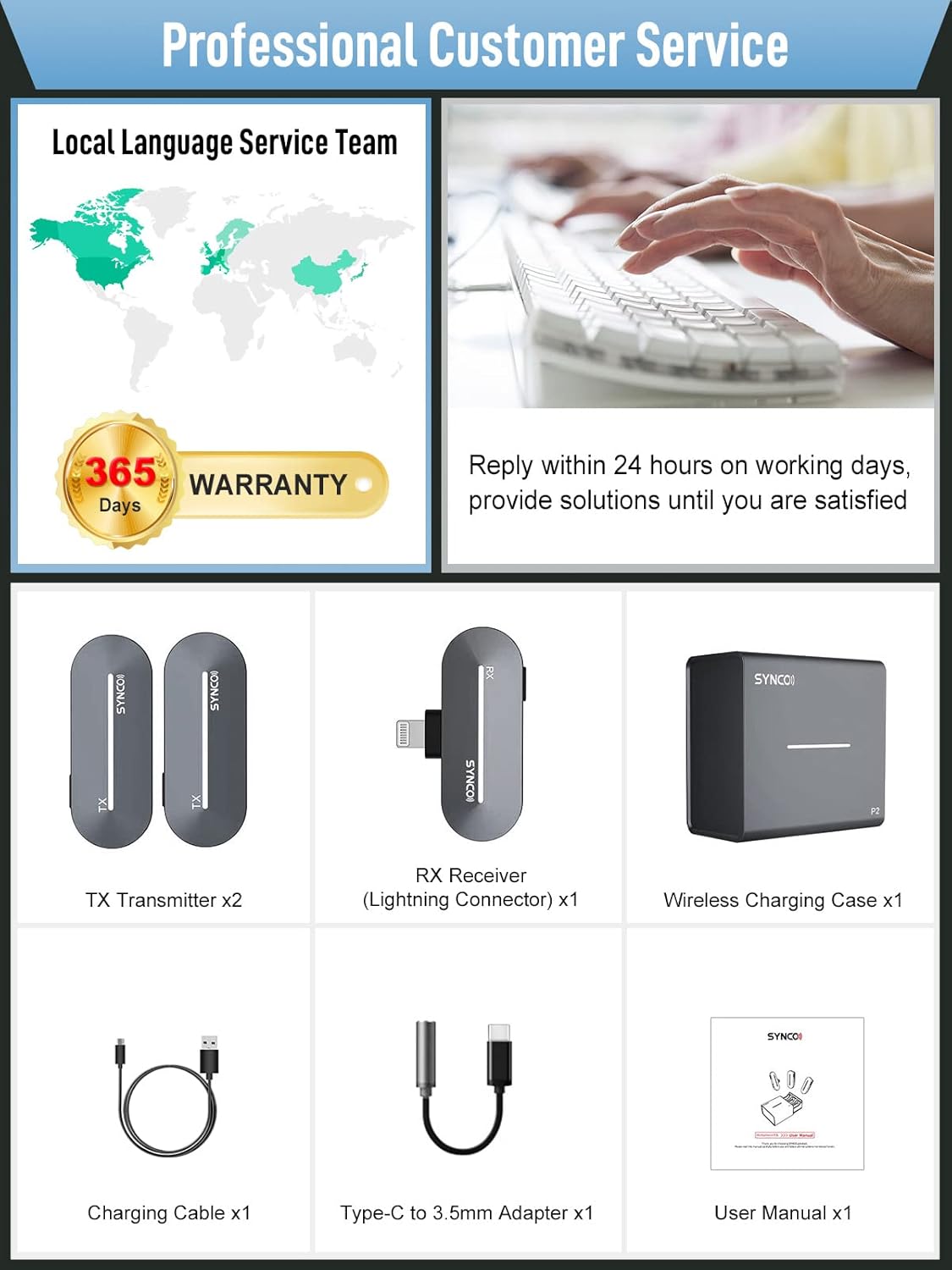
Image: Contents of the SYNCO P2L Wireless Microphone package, including the charging case, two transmitters, one receiver, charging cable, Type-C to 3.5mm adapter, and user manual.
3. 제품 오버view
The SYNCO P2L system consists of a charging case, two transmitters (TX), and one receiver (RX).
3.1. 송신기(TX)
- Integrated microphone for audio capture.
- Clip for attachment to clothing.
- Indicator lights for battery status and pairing.
3.2. 수신기(RX)
- Lightning connector for direct connection to iOS devices.
- Type-C port for real-time monitoring and phone charging.
- Button for activating vocal effects.
- Indicator lights for battery status and pairing.
3.3. 충전 케이스
- Stores and charges the TX and RX units.
- 장기 사용 시 추가 요금이 부과됩니다.
- Features a drawer design for easy access and contact pairing.

이미지: 이상view of the SYNCO P2L wireless microphone system, showing the charging case, two transmitters, and one receiver, along with a smartphone.
4. 설정 가이드
빠르고 쉽게 설정하려면 다음 단계를 따르세요.
- Step 1: Open the Charging Case. Press the front of the charging case to release the drawer.
- Step 2: Remove Transmitters and Receiver. Take out the two TX units and one RX unit from the charging drawer. They will automatically power on and attempt to pair.
- 3단계: 수신기를 연결하십시오. Plug the RX unit directly into the Lightning port of your iOS device.
- 4단계: 녹화를 시작합니다. Open your camera or recording application. The system is now ready for use.

Animation: A hand pressing the front of the SYNCO P2L charging case to open its drawer.

Animation: The two transmitters and one receiver being lifted out of the open charging case drawer.

Animation: The receiver unit being plugged into the Lightning port of a smartphone.

Animation: A smartphone screen displaying a recording interface with a checkmark, indicating successful connection and readiness to record.
5. 사용 설명서
5.1. Recording Modes (Mono/Stereo)
The SYNCO P2L supports both mono and stereo recording when using two transmitters. The system automatically detects the number of active transmitters and adjusts the recording mode. Stereo mode provides a richer and more immersive audio experience, suitable for interviews or performances with two speakers.
5.2. Vocal Effects
The P2L receiver integrates nine distinct vocal effects. These effects can be activated by pressing a dedicated button on the receiver. The available effects include:
- 원래의
- Studio TX
- KTV FX
- 목소리 Amp화
- 일렉트릭 디엠
- Baby FX
- 남자에서 여자로
- Female to Male
- Monster FX

Image: Illustration of the nine vocal effects available on the SYNCO P2L receiver, shown with various visual representations of sound modification.
5.3. 실시간 모니터링
The Type-C port on the RX unit allows for real-time audio monitoring. Connect a 3.5mm headphone (using the included Type-C to 3.5mm adapter) to this port to listen to the audio being recorded. This port also supports simultaneous charging of your phone while the microphone is in use.
5.4. 충전 및 배터리 수명
The charging case provides convenient storage and charging for the TX and RX units. A 10-minute charge can provide approximately 45 minutes of recording time for the transmitters. A full charge of the transmitters offers up to 5 hours of recording. The charging case itself holds enough power for two full charges of both transmitters.

Image: Visual representation of the SYNCO P2L's fast charging capabilities and battery life, showing the charging case and individual units.
6. 주요 특징
6.1. Obstacle-Free and High-Fidelity Transmission
Utilizing Syncoder 3.0 technology and an intelligent DSP chip, the SYNCO P2L ensures stable and clear sound transmission up to 150 meters (492 feet) in Line-of-Sight (LOS) areas. It effectively filters out low-frequency noises, reproducing clear voices even with minor obstructions.

Image: Diagram illustrating the transmission range of the SYNCO P2L wireless microphone, showing 150m (LOS) and 50m (N LOS) distances over a mountainous landscape.
6.2. 폭넓은 호환성
The P2L receiver with its Lightning connector is compatible with a wide range of iOS devices, including various models of iPhone (14/13/12/11/X/XR/XS/8/7/6/6s/5/5s/5c, Pro Max, Pro, mini, SE) and iPad (Air, Pro). It is suitable for use with popular applications for live streaming, video recording, and social media content creation.

Image: Visual showing the SYNCO P2L's compatibility with various iOS devices and popular social media and video recording applications.
7. 유지관리
- 기기를 깨끗하고 건조하게 유지하세요. 습기나 극한 온도에 노출되지 않도록 하세요.
- 부드럽고 마른 천으로 닦으십시오. 독한 화학 약품이나 연마제를 사용하지 마십시오.
- 송신기와 수신기는 사용하지 않을 때는 충전 케이스에 넣어 보관하여 보호하고 충전 상태를 유지하십시오.
- 장치를 떨어뜨리거나 강한 충격을 가하지 마십시오.
8. 문제 해결
| 문제 | 가능한 원인 | 해결책 |
|---|---|---|
| Transmitters/Receiver not pairing | Units are out of range, low battery, or pairing error. | Ensure units are fully charged and within close proximity. Place units back in the charging case, close it, then reopen to re-initiate pairing. If issues persist, try holding down the power button on both TX and RX for 3 seconds to force a re-pairing. |
| 오디오 볼륨이 낮음 | Microphone too far from source, recording app settings, or device volume. | Ensure the transmitter is clipped close to the speaker's mouth. Check the audio input settings in your recording application and adjust the device's volume levels. |
| Intermittent recording or noise | Interference, loose connection, or faulty unit. | Avoid environments with strong electromagnetic interference. Ensure the RX is securely plugged into your device. Check for physical damage to the units or charging contacts. If charging issues occur, ensure contacts are clean. |
| 휴대전화에서 장치를 인식하지 못합니다 | Loose connection, phone software issue, or incompatible device. | Ensure the RX is firmly plugged into the Lightning port. Restart your phone. Verify your iOS device model is listed as compatible. If using an older iOS version, ensure it is updated. |
9. 사양
| 특징 | 세부 사항 |
|---|---|
| 모델 번호 | P2L |
| 마이크 폼 팩터 | 라발리에 |
| 연결 기술 | Auxiliary (Wireless 2.4GHz) |
| 커넥터 유형 | 번개 |
| 호환 장치 | iPhone 14/13/12/11/X/XR/XS/8/7/6/6s/5/5s/5c, iPhone Pro Max 14/13/12/11/XS; iPad Air 3/2/1, iPhone Plus 14/8/7/6/6s; iPad Pro 10.5 in/9.7 in, iPhone Pro 14/13/12/11; iPhone mini 13/12, iPhone SE 1st Gen/2nd Gen/3rd Gen |
| 극성 패턴 | 전방위 |
| 주파수 응답 | 20 kHz (XNUMX kHz) |
| 신호 대 잡음 비율 | 75데시벨 |
| 오디오 감도 | 26데시벨 |
| 전원 | 배터리 구동(리튬 이온 배터리 1개 포함) |
| 재료 | 아크릴로 니트릴 부타디엔 스티렌 |
| 품목 무게 | 0.176온스(5그램) |
| 패키지 크기 | 4.69 x 4.65 x 1.89 인치 |
| 첫 번째 이용 가능 날짜 | 20년 2021월 XNUMX일 |
10. 보증 및 지원
SYNCO provides a 365-day warranty for this product. For technical assistance, troubleshooting, or warranty claims, please contact SYNCO customer service. Support is typically available within 24 hours on working days.
Image: Information regarding SYNCO's professional customer service and 365-day warranty.
Ask a question about this manual
Ask about setup, troubleshooting, compatibility, parts, safety, or missing instructions. Manuals+ will review the question and use this page’s manual context to help answer it.