
1. 서론
The ASUS Notebook E210 is a compact and lightweight 11.6-inch laptop designed for productivity and portability. It features an Intel Celeron N4020 Processor, 4GB RAM, and 64GB eMMC storage, running Windows 10 in S mode. This manual provides essential information for setting up, operating, and maintaining your device.

Figure 1: ASUS Notebook E210, showcasing its compact design with the screen displaying a colorful desktop background.
2. 설정
2.1 언박싱 및 초기 검사
모든 구성품을 포장에서 조심스럽게 꺼내세요. 다음 품목이 모두 포함되어 있는지 확인하세요.
- ASUS Notebook E210 (Model: E210MA-DB02)
- 전원 어댑터 및 코드
- 사용자 가이드
- 보증 카드
Inspect the laptop for any physical damage. If any components are missing or damaged, contact your retailer or ASUS support.
2.2 전원 켜기 및 초기 구성
- 전원 어댑터를 노트북의 충전 포트에 연결한 다음 전원 콘센트에 연결하세요.
- 노트북 덮개를 여세요. 노트북이 자동으로 켜질 수도 있고, 전원 버튼을 눌러야 할 수도 있습니다.
- Follow the on-screen instructions to complete the Windows 10 Home in S Mode setup, including language selection, network connection, and user account creation.
- Ensure the laptop is fully charged before its first use.
3. 사용 설명서
3.1 기본 사용법
- 전원 켜기/끄기: 전원 버튼을 눌러 전원을 켜세요. 전원을 끄려면 시작 버튼을 클릭한 다음 전원 > 종료를 클릭하세요.
- 수면 모드 : 뚜껑을 닫거나 시작 버튼을 클릭한 다음 전원 > 절전을 클릭합니다.
- 건반: The full-size keyboard offers comfortable typing with 1.4mm key travel.
- 터치패드: The touchpad supports multi-gesture input for navigation and control.
3.2 Windows 10 in S Mode
Windows 10 in S mode is a version of Windows 10 that is streamlined for security and performance, exclusively using apps from the Microsoft Store. If you require apps outside the Microsoft Store, you can switch out of S mode. This is a one-way switch and cannot be undone.
- 열기 시작 메뉴 그리고 선택하세요 설정.
- 이동하다 업데이트 및 보안 > 활성화.
- "Windows 10 Home으로 전환" 또는 "Windows 10 Pro로 전환" 섹션에서 선택하세요. 스토어로 이동.
- Microsoft Store에 나타나는 "S 모드 해제"(또는 유사한) 페이지에서 다음을 클릭합니다. 얻다 단추.
- After confirming, you will be switched out of S mode.
4. 기능 이상view
- 효율적인 성능: Powered by the Intel Celeron N4020 Processor for daily computing tasks.
- 소형 및 경량: Designed for portability, measuring 0.7 inches thin and weighing 2.31 lbs.
- 11.6인치 HD 디스플레이: A clear 1366 x 768 resolution display suitable for productivity and media consumption.
- Integrated NumberPad: The touchpad features an illuminated NumberPad for efficient data entry.
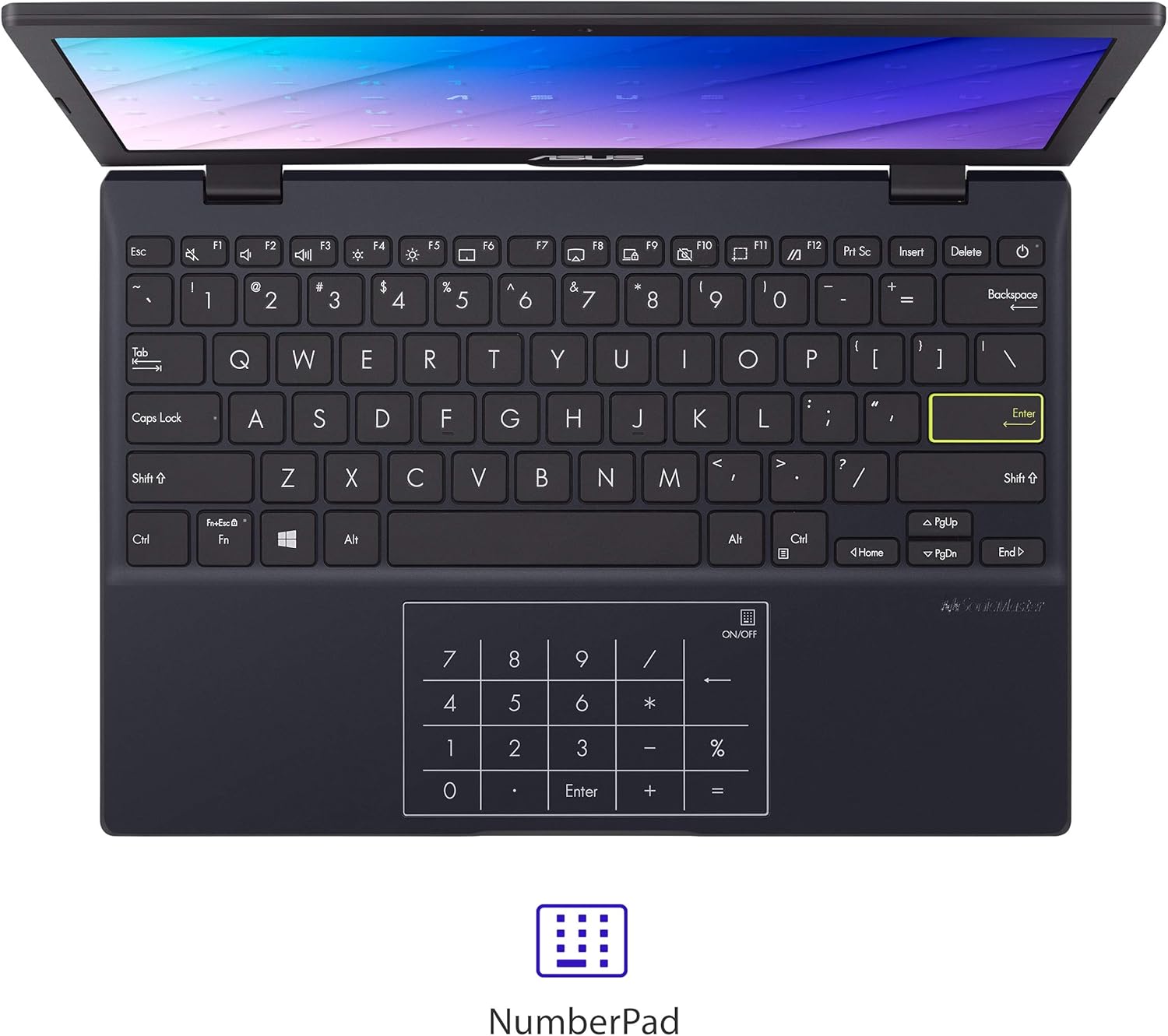
Figure 2: The touchpad with integrated NumberPad for quick numerical input.
- 180° Lay-Flat Hinge: Allows the laptop to open completely flat for easy sharing and collaboration.

Figure 3: The laptop's 180-degree lay-flat hinge allows for versatile view나눔과 나눔.
- 긴 배터리 수명: Provides up to 12 hours of battery life for extended use on the go.
5. 포트 및 연결성
The ASUS Notebook E210 offers a variety of ports for connecting peripherals and external displays:
- 1x USB 2.0 타입-A
- 1x USB 3.2 Gen 1 타입-A
- 1x USB 3.2 Gen 1 Type-C
- 1x HDMI 1.4
- 1x 3.5mm 콤보 오디오 잭
- 와이파이 802.11ac
- 블루투스
6. 유지관리
- 청소: 부드럽고 보풀 없는 천으로 화면과 본체를 닦으십시오. 강한 화학 약품 사용은 피하십시오.
- 배터리 관리 : To prolong battery life, avoid fully discharging the battery frequently. Store the laptop in a cool, dry place.
- 소프트웨어 업데이트: 최적의 성능과 보안을 유지하려면 Windows와 드라이버를 정기적으로 업데이트하십시오.
- 스토리지 관리: 불필요한 것을 주기적으로 정리하세요 files and applications to maintain adequate storage space.
7. 문제 해결
- 노트북 전원이 켜지지 않음: 전원 어댑터가 제대로 연결되어 있고 배터리가 충분히 충전되어 있는지 확인하세요. 다른 콘센트에 연결해 보세요.
- 느린 성능: 불필요한 애플리케이션을 닫고, 백그라운드 업데이트를 확인하고, 충분한 저장 공간을 확보하세요.
- Wi-Fi 연결 문제: Restart the laptop and your Wi-Fi router. Check network settings and ensure Wi-Fi is enabled.
- 화면 문제: If the screen is blank or flickering, try restarting the laptop. Connect to an external monitor to check if the issue is with the laptop's display or graphics.
8. 사양
| 특징 | 세부 사항 |
|---|---|
| 상표 | 아수스 |
| 모델명 | L210 |
| 품목 모델 번호 | E210MA-DB02 |
| 화면 크기 | 11.6 인치 |
| 화면 해상도 | 1366 x 768 픽셀 |
| 프로세서 | Intel Celeron N4020(1.1GHz, 최대 2.8GHz) |
| 숫양 | 4GB LPDDR4 |
| 하드 드라이브 | 64 GB eMMC Flash Storage |
| 그래픽 코프로세서 | 인텔 UHD 그래픽 600 |
| 운영 체제 | S 모드의 Windows 10 Home |
| 무선형 | 802.11ac, 블루투스 |
| USB 2.0 포트 | 1 |
| USB 3.0 포트 | 2 |
| 품목 무게 | 2.31파운드 |
| 제품 치수 | 10.98 x 7.52 x 0.67 인치 |
| 색상 | 스타 블랙 |
| 배터리 | 1개의 리튬 이온 배터리(포함) |
9. 보증 및 지원
9.1 보증 정보
This ASUS Notebook E210 is covered by a manufacturer's warranty. Please refer to the included Warranty Card for specific terms, conditions, and duration of coverage. Keep your proof of purchase for warranty claims.
9.2 고객 지원
For technical assistance, troubleshooting, or service inquiries, please visit the official ASUS support website or contact their customer service. Details can be found on the ASUS web사이트나 제품 설명서에서 확인하세요.