
소개
This manual provides comprehensive instructions for the setup, operation, and maintenance of your Logitech MX Master 3S Wireless Mouse. Please read this manual thoroughly to ensure proper use and to maximize the performance of your device.
The Logitech MX Master 3S is a high-performance wireless mouse designed for precision, comfort, and efficiency across multiple devices and operating systems. It features advanced tracking, quiet clicks, and ultra-fast scrolling capabilities.
제품 끝view
The Logitech MX Master 3S mouse is engineered for advanced users, offering a blend of ergonomic design and cutting-edge technology.
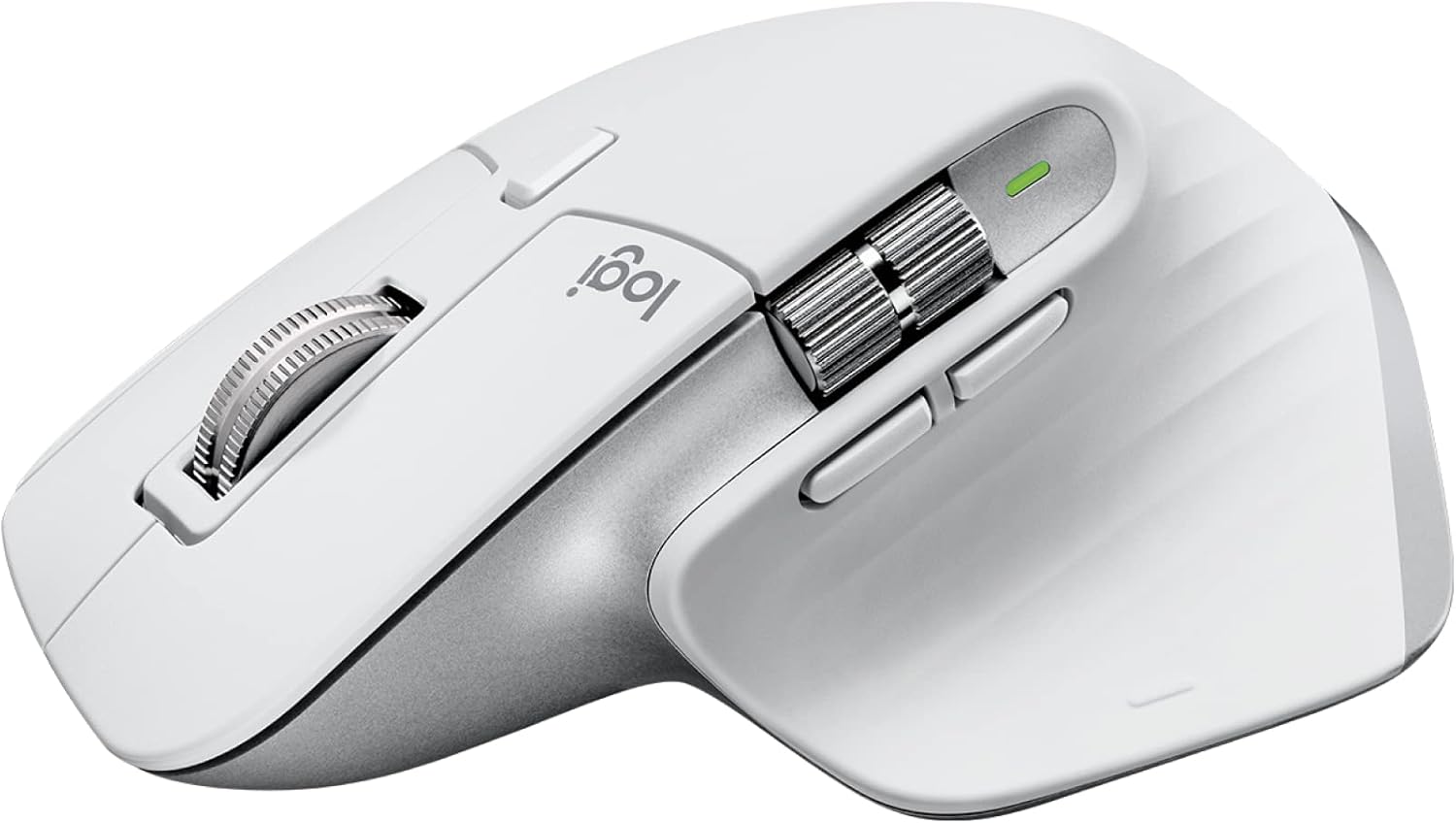
Image: Logitech MX Master 3S Wireless Mouse in Pale Grey, showcasing its ergonomic design and multiple buttons.
주요 특징:
- 8K DPI 모든 표면 추적: Precision tracking on virtually any surface, including glass.
- 조용한 클릭음: Reduced click noise for a quieter work environment.
- MagSpeed 스크롤링: Ultra-fast and precise electromagnetic scrolling.
- 인체공학적 디자인: Sculpted shape for comfortable hand posture.
- 사용자 정의 가능한 버튼: Seven programmable buttons for enhanced workflow.
- FLOW 크로스 컴퓨터 제어: Seamlessly switch between multiple computers and operating systems.
- 다중 장치 연결: Connects via Logi Bolt USB receiver or Bluetooth.
- 충전식 배터리: Long-lasting Li-Po battery (500 mAh) with USB-C charging.
패키지 내용:

Image: Contents of the MX Master 3S package, including the mouse, Logi Bolt USB receiver, and USB-C charging cable.
- Logitech MX Master 3S Wireless Mouse
- Logi Bolt USB 수신기
- USB-C Charging Cable (USB-A to USB-C)
구성 요소 식별:

Image: Labeled diagram showing the key components of the MX Master 3S mouse, including the Quiet Click buttons, MagSpeed wheel, Thumb wheel, 8K track-anywhere sensor, customizable buttons, and Easy Switch buttons. Also indicates compatibility with Windows, macOS, Chrome OS, Linux, iPadOS, Android, and connectivity options (USB receiver, Bluetooth).
- Quiet Click (Left/Right-click)
- MagSpeed Wheel (Main scroll wheel)
- Thumb Wheel (Horizontal scroll)
- 8K Track-Anywhere Sensor
- Customizable Buttons (Forward/Back, App-Switch, Middle click)
- Easy Switch Buttons (Bottom of mouse for device switching)
설정
1. 초기 충전
Before first use, it is recommended to fully charge your MX Master 3S mouse. Connect the included USB-C charging cable to the mouse's USB-C port and the other end to a USB-A port on your computer or a USB power adapter.
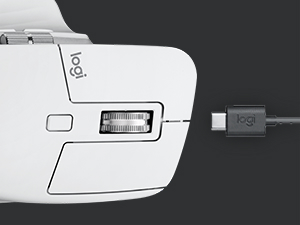
Image: Close-up of the MX Master 3S mouse with a USB-C cable connected for charging.
2. 마우스 연결
The MX Master 3S offers two primary connection methods: Logi Bolt USB Receiver or Bluetooth.
Connecting via Logi Bolt USB Receiver:
- Insert the Logi Bolt USB receiver into an available USB-A port on your computer.
- 마우스 바닥에 있는 전원 스위치를 사용하여 마우스를 켭니다.
- The mouse should automatically connect to the receiver. The LED indicator on the mouse will turn solid green.
블루투스를 통해 연결:
- 마우스 바닥에 있는 전원 스위치를 사용하여 마우스를 켭니다.
- Press and hold one of the Easy-Switch buttons (1, 2, or 3) on the bottom of the mouse for three seconds until the LED indicator for that channel starts blinking rapidly. This indicates the mouse is in pairing mode.
- 컴퓨터나 기기에서 Bluetooth 설정을 엽니다.
- Select "MX Master 3S" from the list of available devices and follow the on-screen prompts to complete pairing.
- Once connected, the LED indicator will glow solid for 5 seconds.
3. Installing Logi Options+ Software (Recommended)
To unlock the full potential of your MX Master 3S, including button customization, application-specific settings, and FLOW cross-computer control, download and install the free Logi Options+ software from the official Logitech web사이트 (www.logitech.com/optionsplus).

Image: A computer screen displaying the Logi Options+ application interface, showing options for customizing mouse buttons and creating app-specific profiles.
작동 지침
MagSpeed Electromagnetic Scrolling
The MX Master 3S features a MagSpeed electromagnetic scroll wheel that offers two modes:
- Ratcheted Mode: Provides precise, line-by-line scrolling, ideal for detailed work.
- 초고속 모드: Automatically switches to free-spinning mode for rapid scrolling through long documents or web pages. This mode can scroll 1,000 lines per second.

이미지: 클로즈업 view of the MagSpeed scroll wheel on the MX Master 3S mouse, highlighting its metallic finish and precision engineering.
You can manually switch between modes by pressing the mode-shift button located behind the scroll wheel, or configure it to switch automatically based on scrolling speed via Logi Options+.
조용한 클릭
The MX Master 3S is designed with Quiet Clicks, reducing audible click noise by 90% compared to previous models, providing a quieter user experience without compromising tactile feedback.

Image: A person working at a desk, using the MX Master 3S mouse, illustrating the quiet click feature in a typical office or home setting.
8K DPI Any-Surface Tracking
The advanced Darkfield High Precision sensor allows the MX Master 3S to track on virtually any surface, including glass (minimum 4mm thickness), with an 8000 DPI sensor for precise control.

Image: A hand operating the MX Master 3S mouse on a clear glass surface, demonstrating its ability to track on challenging materials.
Customizable Buttons and App-Specific Profiles
Utilize the Logi Options+ software to customize the seven programmable buttons (Left/Right-click, Back/Forward, App-Switch, Wheel mode-shift, Middle click) to perform specific actions or shortcuts. You can also create application-specific profiles, allowing the mouse buttons to behave differently depending on the active application.
FLOW Cross-Computer Control
Logitech FLOW enables seamless control of multiple computers with a single MX Master 3S mouse. You can move your cursor, text, and files between up to three computers, even across different operating systems (Windows and macOS), by simply moving your cursor to the edge of the screen. This feature requires Logi Options+ to be installed on all connected computers.

Image: A setup showing a laptop and a desktop monitor, with an arrow indicating the seamless transfer of cursor, text, and files between them using Logitech FLOW.
다중 장치 전환
The Easy-Switch buttons on the bottom of the mouse allow you to quickly switch between up to three paired devices (via Logi Bolt or Bluetooth) with a single press.
유지
마우스 청소
To maintain optimal performance and hygiene, regularly clean your MX Master 3S mouse:
- 부드럽고 털이 없는 천을 살짝 사용하세요.amp물이나 알코올계 세척제(예: 이소프로필 알코올)로 세척하십시오.
- 강한 화학 물질, 연마재 또는 과도한 습기를 피하세요.
- Gently wipe the surface of the mouse, paying attention to areas that come into frequent contact with your hand.
- For the optical sensor, use a dry cotton swab or compressed air to remove any dust or debris.
배터리 관리
The MX Master 3S uses a rechargeable Li-Po battery. Follow these guidelines for optimal battery life:
- 제공된 USB-C 케이블을 사용하여 마우스를 충전하세요.
- 극단적인 온도는 배터리 성능에 영향을 미칠 수 있으므로 피하십시오.
- 장기간 마우스를 보관할 경우, 보관하기 전에 약 50% 정도 충전하세요.
문제 해결
| 문제 | 가능한 해결책 |
|---|---|
| 마우스가 응답하지 않거나 연결되지 않습니다. |
|
| 커서 이동이 불규칙적이거나 정확하지 않습니다. |
|
| MagSpeed scrolling not working as expected. |
|
| Custom buttons not functioning. |
|
명세서
| 특징 | 세부 사항 |
|---|---|
| 모델 번호 | 910-006558 |
| 치수(길이x너비x높이) | 4.9 x 3.3 x 2.0인치(124.9 x 84.3 x 51mm) |
| 무게 | 4.97 온스 (141g) |
| 센서 기술 | Darkfield High Precision |
| DPI 범위 | 200~8000 DPI(50 DPI 단위로 조정 가능) |
| 버튼 | 7개 버튼(왼쪽/오른쪽 클릭, 뒤로/앞으로, 앱 전환, 휠 모드 전환, 가운데 클릭) |
| 스크롤 휠 | MagSpeed electromagnetic scroll wheel, Thumbwheel |
| 무선 작동 거리 | 최대 33피트(10m) |
| 배터리 유형 | 충전식 리튬폴리머(500mAh) |
| 배터리 수명 | Up to 70 days on a single full charge (may vary based on usage) |
| 연결성 | Logi Bolt USB 수신기, Bluetooth 저에너지 기술 |
| 호환성 | 윈도우, 맥OS, 리눅스, 크롬 OS, 아이패드OS, 안드로이드 |
| 재활용 플라스틱 함량 | 27% certified post-consumer recycled plastic (Graphite and Black models) |
보증 및 지원
For detailed warranty information and technical support, please refer to the official Logitech support website or contact Logitech customer service directly.
Logitech 지원 Web대지: support.logi.com
보증 청구를 위해 구매 증명서를 보관하십시오.