
1. 서론
This manual provides essential instructions for the safe and efficient use of your Andoer NP-FV5 Battery Charger and NP-FV5 Plus rechargeable batteries. Please read this manual thoroughly before using the product and retain it for future reference.

Image 1.1: Andoer NP-FV5 Battery Charger Kit Components
2. 안전 정보
To prevent injury or damage to your product, observe the following safety precautions:
- 배터리 팩을 분해하거나, 열거나, 파쇄하지 마십시오.
- 배터리를 열이나 불에 노출시키지 마십시오. 직사광선에 보관하지 마십시오.
- 배터리를 단락시키지 마십시오. 배터리를 상자나 서랍에 함부로 보관하지 마십시오. 배터리가 서로 단락되거나 다른 금속 물체에 의해 단락될 수 있습니다.
- 배터리에 기계적 충격을 가하지 마십시오.
- 배터리 누액 발생 시, 액체가 피부나 눈에 닿지 않도록 하십시오. 만약 닿았다면, 즉시 해당 부위를 흐르는 물에 깨끗이 씻고 의사의 진료를 받으십시오.
- 배터리를 깨끗하고 건조하게 유지하세요.
- 해당 장비와 함께 사용하도록 특별히 제공된 충전기 외에는 다른 충전기를 사용하지 마십시오.
- Do not leave a battery on charge when not in use.
- Do not immerse the charger or batteries in water or other liquids.
- 어린이의 손이 닿지 않는 곳에 보관하세요.
3. 패키지 내용
패키지에 모든 품목이 들어 있는지 확인하세요.
- 1 x Andoer NP-FV5 Battery Charger
- 2 x Andoer NP-FV5 Plus 3.7V 1000mAh Lithium-ion Polymer Batteries
- 1 x USB Charging Cable (Micro USB)
4. 제품 오버view
The Andoer NP-FV5 Battery Charger is designed to charge NP-FV5 series batteries efficiently. It features a compact design and an LED indicator for charging status.
4.1. Charger Components
- 배터리 슬롯: Area where the battery is inserted for charging.
- 충전 연락처: Metal pins inside the slot that connect to the battery.
- 마이크로 USB 포트: Input for the USB charging cable.
- LED 표시 등 : 충전 상태를 표시합니다.

Image 4.1: Charger Battery Slot and Contacts

Image 4.2: Charger with USB Port and LED
4.2. 배터리 오버view
The NP-FV5 Plus batteries are 3.7V 1000mAh Lithium-ion Polymer batteries, providing reliable power for compatible devices.
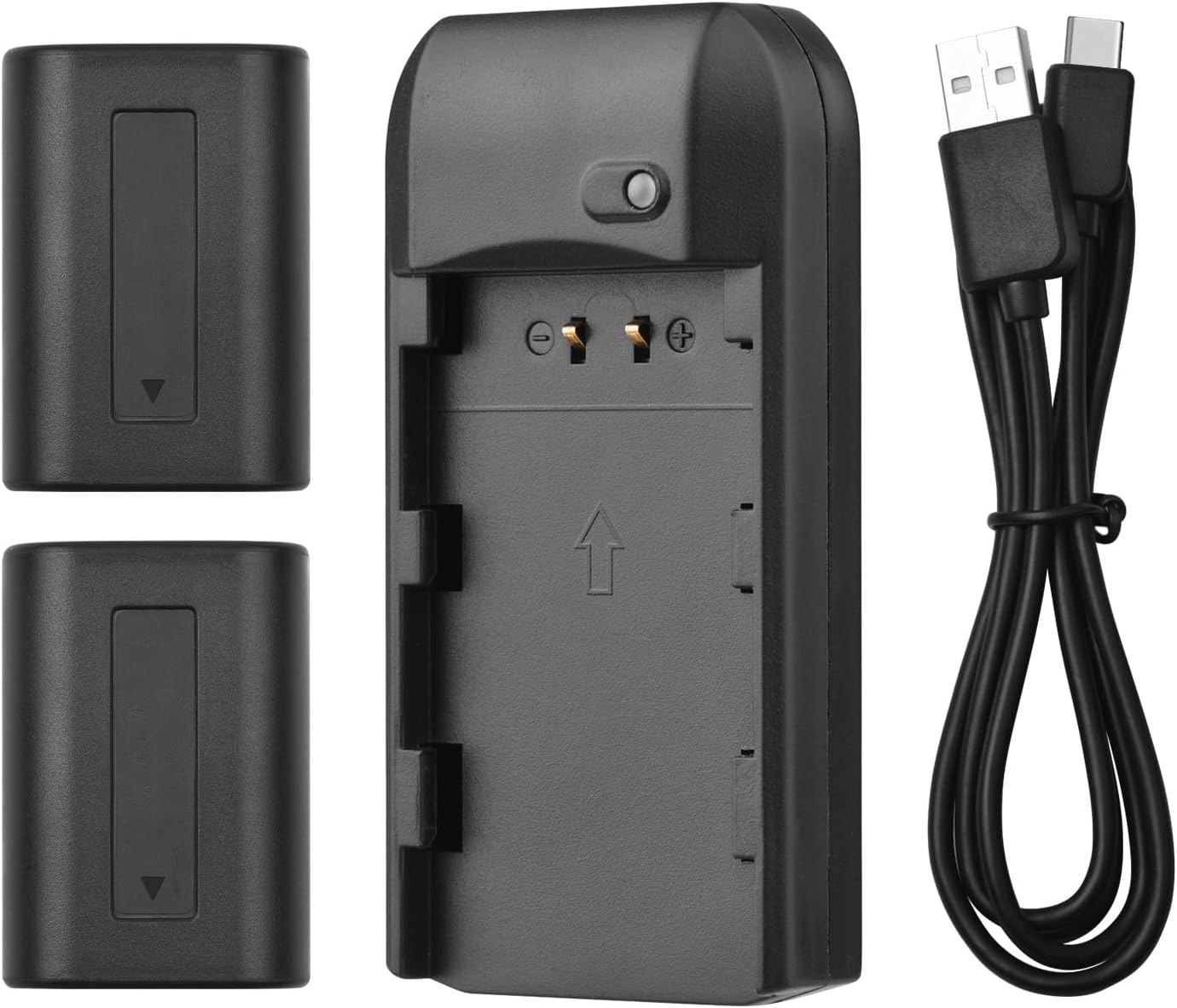
Image 4.3: All Kit Components
5. 설정 및 충전
Follow these steps to set up your charger and begin charging the batteries:
- 충전기 연결: Insert the Micro USB end of the provided USB charging cable into the charger's Micro USB port.
- 전원에 연결: Connect the standard USB-A end of the cable to a compatible 5V 1A USB power source. This can be a laptop, a USB wall adapter, or a power bank.
- 배터리 삽입: Carefully align the NP-FV5 battery with the charger's battery slot and gently push it in until it clicks into place. Ensure the battery contacts align with the charger's pins.
- 충전 상태 모니터링: The LED indicator light on the charger will show the charging status:
- 빨간불: 배터리가 현재 충전 중임을 나타냅니다.
- 녹색불: 배터리가 완전히 충전되었음을 나타냅니다.
- 배터리 제거: Once the LED turns green, the battery is fully charged. Gently pull the battery out of the charger.

Image 5.1: LED Indicator Light Status
6. 사용 설명서
The charger operates automatically once a battery is inserted and power is connected. No manual intervention is required during the charging process.
- Always ensure the charger is connected to a stable 5V 1A power source.
- Only charge NP-FV5 series batteries with this charger.
- 적절한 환기를 위해 작동 중에는 충전기를 덮지 마십시오.
7. 유지 관리 및 보관
Proper maintenance ensures the longevity of your charger and batteries:
- 청소: Use a soft, dry cloth to clean the charger and batteries. Do not use liquid cleaners or solvents.
- 저장: 충전기와 배터리는 직사광선과 극한의 온도를 피해 서늘하고 건조한 곳에 보관하세요.
- 배터리 관리 : For long-term storage, it is recommended to charge batteries to approximately 50% capacity. Avoid storing fully charged or completely depleted batteries for extended periods.
- 케이블 관리: USB 케이블을 과도하게 구부리거나 꼬지 마십시오.
8. 문제 해결
문제가 발생하면 다음의 일반적인 문제와 해결 방법을 참조하세요.
| 문제 | 가능한 원인 | 해결책 |
|---|---|---|
| LED 표시등이 켜지지 않습니다. | No power supply, faulty cable, or incorrect battery insertion. |
|
| Battery does not charge (LED remains red indefinitely or doesn't change). | Battery fault, charger fault, or insufficient power input. |
|
| 충전 중 충전기 또는 배터리가 과열됩니다. | Overload, faulty battery, or poor ventilation. |
|
9. 사양
Technical details for the Andoer NP-FV5 Battery Charger and NP-FV5 Plus Batteries:
| 요소 | 사양 |
|---|---|
| 충전기 입력 | 직류 5V 1A |
| 충전기 출력 | 직류 4.2V, 400mA |
| 충전 포트 | 마이크로 USB |
| 배터리 유형 | 리튬이온폴리머 |
| 배터리 용량tage | 3.7V |
| 배터리 용량 | 1000mAh |
| 충전기 치수 | 6.5 x 3.3 x 1.5cm(2.6 x 1.3 x 0.6인치) |
| 충전기 무게 | 11g(0.4온스) |
| 모델 번호 | XCW2361199610991EL (Charger) / NP-FV5 (Batteries) |

Image 9.1: Charger Dimensions

Image 9.2: Charger Label with Specifications
10. 보증 및 지원
보증 정보 및 고객 지원은 구매 시 제공된 문서를 참조하거나 판매점에 문의하십시오. 보증 청구를 위해 구매 증빙 자료를 보관하십시오.
For further assistance, you may visit the official Andoer web사이트 또는 고객 서비스 부서에 문의하십시오.