
1. 서론
This manual provides essential instructions for setting up, operating, and maintaining your Fossil Bronson HR Hybrid Smartwatch (Model FTW7059). This device combines the classic aesthetics of a traditional watch with modern smartwatch functionalities, including heart rate monitoring, activity tracking, and smartphone notifications. Please read this manual thoroughly before using your watch.
2. 설정
2.1 언박싱 및 초기 충전
Upon unboxing, ensure all components are present: the Fossil Bronson HR Hybrid Smartwatch and its charging cable. Before first use, fully charge your watch. Connect the charging cable to the watch's charging points and a USB power source. A full charge typically takes approximately 2 hours.
2.2 앱 설치 및 페어링
- 다운로드 Fossil Smartwatches 스마트폰 앱스토어에서 앱을 다운로드하세요(iOS 및 Android에서 사용 가능).
- 앱을 열고 계정을 만들거나 로그인하세요.
- Follow the on-screen instructions to add a new device. Select your Bronson HR Hybrid Smartwatch from the list.
- The app will guide you through the Bluetooth pairing process. Ensure your watch is sufficiently charged and your phone's Bluetooth is enabled.
- Once paired, the app will synchronize with your watch, allowing you to customize settings and view 데이터.
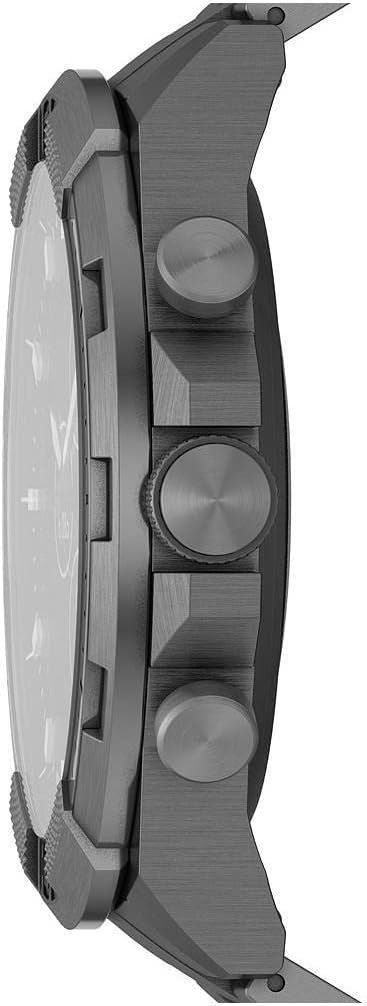
이미지: 측면 view of the Fossil Bronson HR Hybrid Smartwatch, highlighting the functional buttons and crown.
3. 사용 설명서
3.1 기본 탐색
Your Bronson HR Hybrid Smartwatch features a traditional watch face with physical hands and a discreet digital display. It is operated primarily through its three side buttons and the crown.
- 탑 푸셔: Customizable function (e.g., view date, control music).
- Middle Crown: Used for navigating menus on the digital display and confirming selections.
- 바텀 푸셔: Customizable function (e.g., start workout, check heart rate).
3.2 활동 및 건강 추적
The watch continuously tracks your heart rate, steps, and sleep patterns. This data is synchronized with the Fossil Smartwatches app, where you can view 상세한 통계 및 시간 경과에 따른 진행 상황.
- 심박수: The watch monitors your heart rate throughout the day and during workouts.
- 단계: Tracks your daily step count and estimated distance.
- 잠: Automatically detects sleep and tracks sleep stages (light, deep, awake) and duration.
3.3 알림 및 스마트 기능
Once paired with your smartphone, the watch can display notifications for calls, messages, and app alerts. You can customize which notifications appear via the Fossil Smartwatches app.
- 스마트폰 알림: Receive discreet vibrations and text previews on your watch.
- 음악 제어: 스마트워치에서 스마트폰의 음악 재생을 직접 제어하세요.
- 날씨: View 현재 날씨 상황 및 예보.
- 달력: See upcoming events from your synced calendar.

Image: The hybrid display of the Fossil Bronson HR Smartwatch, illustrating various data points like heart rate, steps, and weather.
4. 유지관리
4.1 시계 청소
시계의 외관과 기능을 유지하려면 정기적으로 시계를 청소하십시오. 부드러운 천을 사용하십시오.amp cloth to wipe the case and band. For stainless steel bands, a mild soap solution can be used, followed by thorough rinsing and drying. Avoid harsh chemicals or abrasive materials.
4.2 방수성
The Fossil Bronson HR Hybrid Smartwatch is water-resistant. It is suitable for everyday use, including splashes, rain, and showering. However, it is not recommended for diving or high-pressure water activities. Avoid pressing buttons underwater.
4.3 배터리 관리
To maximize battery life, avoid extreme temperatures. Charge the watch fully when the battery is low. The watch offers over 2 weeks of battery life on a single charge, depending on usage.
4.4 소프트웨어 업데이트
Ensure your Fossil Smartwatches app is up to date, as it delivers firmware updates to your watch. These updates can improve performance, add new features, and fix bugs.
5. 문제 해결
5.1 Watch Not Connecting to Phone
- 스마트폰에서 Bluetooth가 활성화되어 있는지 확인하세요.
- Check if the watch is sufficiently charged.
- Restart both your watch and your smartphone.
- Try unpairing and re-pairing the watch through the Fossil Smartwatches app.
5.2 부정확한 추적 데이터
- 시계를 손목에 꼭 맞게 착용하세요. 너무 느슨하거나 너무 꽉 조이지 마세요.
- 시계 뒷면에 있는 심박 센서를 청소하세요.
- 앱을 통해 시계 펌웨어를 업데이트하세요.

이미지: 뒤로 view of the Fossil Bronson HR Hybrid Smartwatch, displaying the heart rate sensor and Fossil logo.
5.3 짧은 배터리 수명
- 알림 빈도를 줄이세요.
- 시계가 항상 완전히 충전되어 있는지 확인하세요.
- Avoid using the watch in extreme temperatures.
5.4 디스플레이가 응답하지 않음
- Perform a soft reset by holding down the middle crown for approximately 10-15 seconds until the watch restarts.
- 시계가 충전되어 있는지 확인하세요.
6. 사양
| 모델 번호 | FTW7059 |
| 상표 | 화석 |
| 디스플레이 유형 | Analog with Digital Screen |
| 케이스 소재 | 스테인리스 스틸 |
| 밴드 소재 | 스테인리스 스틸 |
| 밴드 색상 | 회색 |
| 케이스 모양 | 둥근 |
| 화면 크기 | 44 밀리미터 |
| 대역폭 | 22 밀리미터 |
| 방수 레벨 | 방수복 |
| 운영 체제 | 아스테로이드OS |
| 연결 기술 | 블루투스 |
| 호환 장치 | Smartphone (iPhone and Android) |
| 배터리 셀 유형 | 산화은 |
7. 보증
This product is covered by a manufacturer's warranty. For detailed information regarding warranty terms, conditions, and duration, please refer to the official Fossil web구매 시 포함된 보증 카드 또는 웹사이트를 통해 구매하세요. 보증 청구를 위해 구매 증빙 자료를 보관하세요.
8. 지원
추가 지원, 기술 지원 또는 view frequently asked questions, please visit the official Fossil support website. You can typically find contact information for customer service there as well.