
소개
This manual provides detailed instructions for the installation, operation, and maintenance of your Hama 00118498 Monitor Desk Mount. Designed to enhance your ergonomic workspace, this monitor arm allows for flexible positioning of your display, promoting a comfortable and productive environment. Please read these instructions carefully before beginning installation.
설치 지침
Follow these steps to correctly install your Hama 00118498 Monitor Desk Mount.
1. 책상 클립 부착amp
- 책상을 놓다 clamp assembly onto the edge of your desk. Ensure the desk surface is sturdy and can support the weight of the mount and your monitor.
- cl을 조여주세요amp screw firmly until the mount is securely fastened to the desk. Do not overtighten.
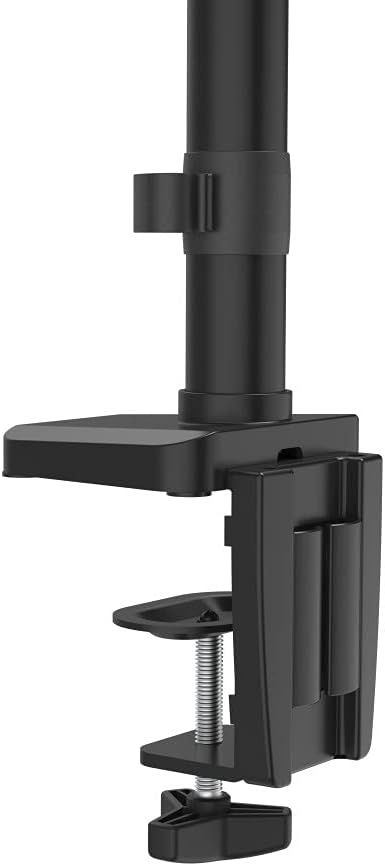
Image: The desk clamp mechanism, showing how it attaches to the desk edge for secure mounting.
2. 모니터 연결
- Ensure your monitor is VESA compatible (100x100mm or 75x75mm).
- Carefully attach the VESA plate from the monitor arm to the back of your monitor using the provided screws. Make sure the screws are tightened securely.
- Slide the monitor (with the attached VESA plate) onto the arm's mounting head. Ensure it clicks into place or is secured with any locking mechanism provided.

Image: The monitor arm's VESA plate and adjustable joint, ready for monitor attachment.

이미지: 측면 view of the assembled monitor arm, highlighting the VESA mount and integrated cable management channels.
3. 케이블 관리
Utilize the integrated cable management system to route your monitor cables neatly along the arm. This helps maintain a tidy workspace and prevents cable clutter.
작동 지침
The Hama 00118498 Monitor Desk Mount offers various adjustment options for optimal view편안함을.
- 높이 조정: The integrated pneumatic spring allows for smooth and effortless vertical height adjustment. Gently push or pull the monitor to your desired height.
- 받침: The arm can swivel horizontally, allowing you to rotate your monitor to share your screen or change your view잉 각도.
- 경사: Adjust the monitor's tilt angle (up or down) to reduce glare and find the most comfortable view위치입니다.
- 회전: Rotate your monitor from landscape to portrait orientation as needed for different tasks.
Adjustments should be smooth. If the monitor does not hold its position, refer to the troubleshooting section for tension adjustments.
유지
정기적인 유지 관리는 모니터 암의 수명과 최적의 성능을 보장합니다.
- 청소: Wipe the surface of the monitor arm with a soft, damp 옷감. 연마성 세척제나 용제를 사용하지 마십시오.
- 연결 확인: 모든 나사와 연결부가 단단히 조여져 있는지 정기적으로 점검하세요. 필요하면 다시 조이세요.
- 매끄럽게 하기: The pneumatic spring is maintenance-free. Do not attempt to lubricate internal components.
문제 해결
If you encounter issues with your Hama 00118498 Monitor Desk Mount, refer to the following common problems and solutions:
- 모니터가 처지거나 위치를 유지하지 못함: The tension of the pneumatic spring may need adjustment. Locate the tension adjustment screw (usually found on the arm joint) and turn it clockwise to increase tension for heavier monitors, or counter-clockwise for lighter monitors. Adjust gradually until the monitor holds its position.
- 모니터를 옮기기가 어렵습니다. If the arm is too stiff, the tension may be too high. Turn the tension adjustment screw counter-clockwise to decrease tension.
- Arm Feels Loose on Desk: 책상이 깨끗한지 확인하세요amp is fully tightened. If the desk surface is too thin or fragile, consider adding a protective pad between the clamp and the desk.
- 모니터 흔들림: Check all mounting screws on the VESA plate and the arm joints to ensure they are securely fastened.
명세서
| 특징 | 세부 사항 |
|---|---|
| 모델 번호 | 00118498 |
| 장착 유형 | 데스크 Clamp |
| 이동 유형 | Rotating, Swivel, Tilt, Height Adjustable (Pneumatic Spring) |
| 상표 | 하마 |
| 재료 | 알류미늄 |
| 색상 | 검은색 |
| 호환 장치 | 감시 장치 |
| 최소 호환 크기 | 10인치 |
| 최대 호환 크기 | 32인치 |
| 품목 무게 | 2.2 킬로그램 |
| 원산지 | 중국 |
보증 및 지원
For warranty information or technical support, please refer to the documentation included with your purchase or visit the official Hama web해당 사이트에서 지원 담당자 연락처, FAQ 및 추가 자료를 찾을 수 있습니다.
공식 하마 Web대지: www.hama.com