
1. 서론
The TecMate OptiMate 7 (Model TM267) is an advanced 12V/24V battery charger and maintainer designed for lead-acid batteries, including AGM, Wet, EFB, Spiral Cell, and Gel types. It features a 10A output for 12V batteries and a 5A output for 24V batteries, making it suitable for a wide range of applications from motorcycles and cars to trucks, boats, RVs, and industrial equipment. This manual provides essential information for safe and effective use of your OptiMate 7 charger.

Figure 1: OptiMate 7 in use, demonstrating simple connection for various vehicles. Learn more about OptiMate 7
2. 안전 정보
Always read and understand all safety warnings and instructions before using the OptiMate 7 charger. Failure to do so may result in electric shock, fire, or serious injury.
- Use the charger only for 12V or 24V lead-acid batteries (AGM, Wet, EFB, Spiral Cell, Gel). Do not use for other battery types.
- Ensure proper ventilation during charging. Do not charge in a sealed area.
- Avoid sparks or flames near the battery. Batteries can produce explosive gases.
- 배터리로 작업할 때는 보안경과 보호복을 착용하십시오.
- 어린이의 손이 닿지 않는 곳에 보관하세요.
- 충전기를 비나 과도한 습기에 노출시키지 마십시오.
- 배터리에 연결하거나 분리하기 전에 AC 전원을 차단하십시오.
- If the battery is completely dead or internally shorted, the OptiMate charger cannot revive it. Such batteries require replacement.
- If the green LED indicates full charge but the engine does not start, a minor internal short in the battery may be present. The OptiMate charger may not detect such minor shorts, and the battery will require replacement.
3. 패키지 내용
Verify that all items are present in your OptiMate 7 package:
- OptiMate 7 12V/24V Battery Charger Unit (Model TM267)
- M8/M10 Ring Terminal Cable (for permanent connection to vehicle battery terminals)
- Alligator Clip Cable (for temporary connection)
- User Manual (Japanese, refer to this translated version for English instructions)

Figure 2: Included accessories with the OptiMate 7 charger.
4. 제품 특징
The OptiMate 7 incorporates several advanced technologies to ensure optimal battery performance and longevity:
- Ampmatic Technology: This patented technology automatically adjusts the charge current based on the battery's size and condition, ensuring efficient and safe charging without overcharging.
- Battery Recovery Function: 강력한 3초 기능을 갖추고 있습니다.tage desulfation mode to recover deeply discharged batteries, starting charging even from 0.5V.
- Battery Diagnosis Function: Provides clear battery health status indication (red, yellow, green LEDs) to help identify potential issues.
- 24/7 Maintenance: Safe for long-term connection, the charger automatically switches to a maintenance mode, preventing self-discharge and keeping the battery optimally charged.
- 단락 보호: Built-in safety features prevent damage from accidental short circuits.
- 온도 보상: 충전 전압을 자동으로 조절합니다.tag다양한 기후 조건에서 최적의 성능을 발휘하도록 주변 온도에 따라 결정됩니다.


Figure 3: Key features and trusted quality of OptiMate chargers.
5. 설정
Follow these steps to set up your OptiMate 7 charger:
- 배터리 준비: Ensure the battery terminals are clean and free of corrosion. If charging a wet cell battery, check electrolyte levels and top up with distilled water if necessary.
- 배터리에 연결: Choose either the ring terminal cable for permanent installation or the alligator clip cable for temporary connection. Connect the red (+) clamp/terminal to the positive (+) battery terminal and the black (-) clamp/terminal to the negative (-) battery terminal. Ensure a secure connection.
- 전원에 연결: Plug the AC power cord of the OptiMate 7 into a standard wall outlet.
The charger will automatically begin its diagnostic and charging process. The battery can remain in the vehicle during charging.
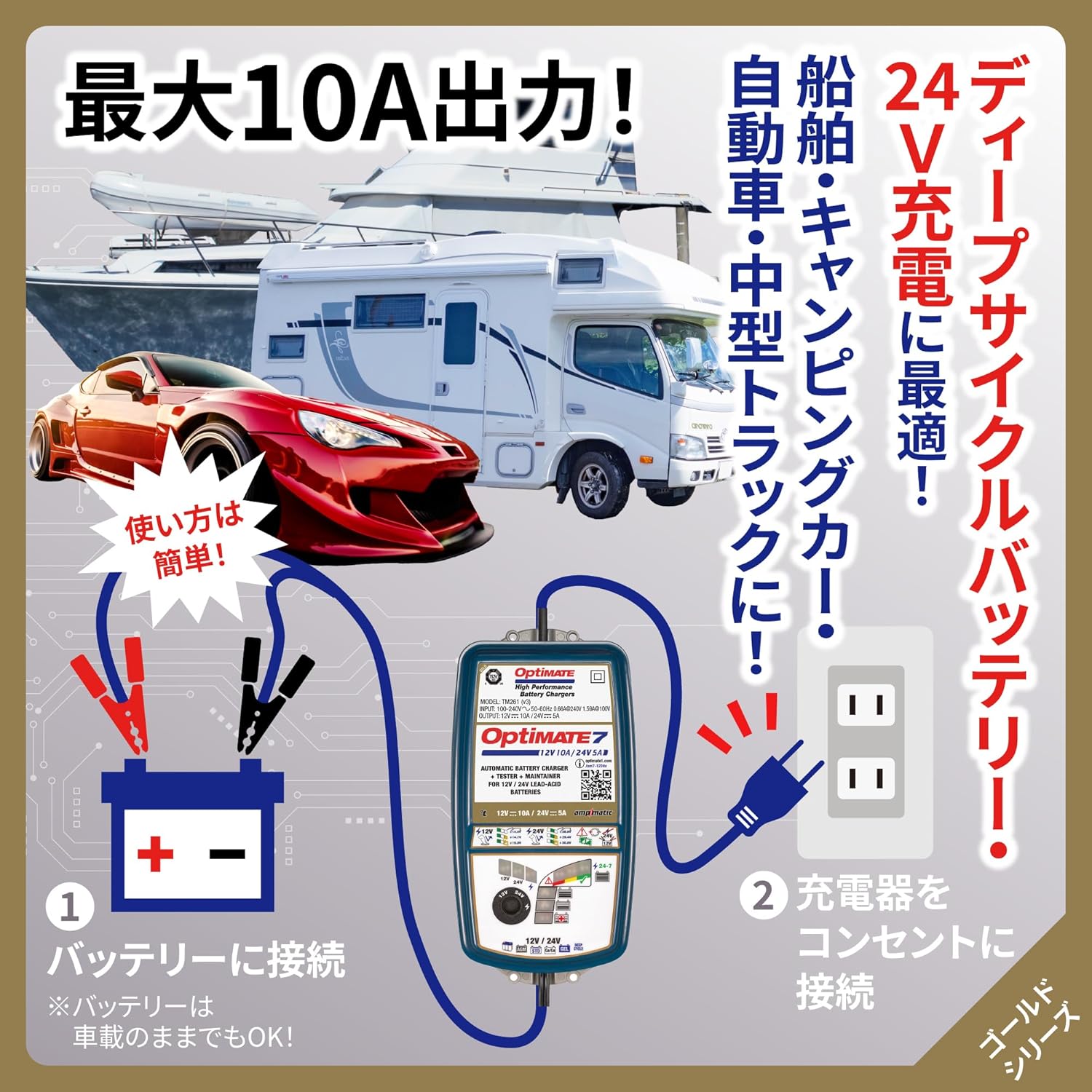
Figure 4: Simple two-step connection process for the OptiMate 7.
6. 사용 설명서
The OptiMate 7 features an intelligent multi-step charging program. Once connected, it automatically diagnoses the battery and proceeds through the charging stag에스.
6.1 Charging Process Overview
- 진단: The charger first checks the battery's voltage and overall health.
- Desulfation (if needed): If a deeply discharged or sulfated battery is detected, the pulse recovery mode activates to break down lead sulfate crystals.
- 대량 청구 : Delivers maximum current to bring the battery to approximately 80% charge.
- 흡수 요금: Gradually reduces current while increasing 권tag배터리를 완전히 충전하려면 e를 사용하십시오.
- 확인: Checks if the battery can retain charge.
- 유지: Once fully charged, the charger enters a long-term maintenance mode, delivering small charges as needed to counteract self-discharge.
6.2 Mode Selection (12V / 24V and Voltage 옵션)
The OptiMate 7 allows selection between 12V and 24V charging, and offers specific voltage settings for different battery types:
- Use the 'SELECT' dial on the charger to choose the appropriate voltage (12V or 24V) and charging mode for your battery.
- 12V 배터리의 경우 :
- 14.4V: For standard lead-acid batteries.
- 14.7V: For general deep cycle batteries.
- 15.0V: For Optima, Voyager, and other spiral cell type batteries.
- 24V 배터리의 경우 :
- 28.8V: For standard 24V lead-acid batteries.
- 29.4V: For general 24V deep cycle batteries.
- 30.0V: For 24V Optima, Voyager, and other spiral cell type batteries.

Figure 5: Selectable charging voltages for 12V and 24V batteries.
7. 유지관리
The OptiMate 7 is designed for long-term battery maintenance, ensuring your battery remains in optimal condition, especially during periods of non-use.
- 연결하고 잊어버리세요: The 24/7 maintenance function allows you to leave the charger connected to the battery indefinitely. It will automatically monitor the battery's state and deliver small, precise charges to prevent self-discharge.
- Pulse Recovery: The powerful pulse recovery feature helps to reverse sulfation, a common cause of battery failure, by dissolving lead sulfate crystals that build up on battery plates. This can extend battery life.
- 배터리 상태 모니터링: The charger continuously monitors the battery's health and provides feedback through its LED indicators. A green LED indicates a healthy, fully charged battery.

Figure 6: Pulse recovery charging for sulfation removal.

Figure 7: Long-term maintenance and battery diagnosis features.
8. 문제 해결
If you encounter issues with your OptiMate 7 charger, refer to the following common problems and solutions:
- Charger does not start: Ensure the AC power cord is securely plugged into a live outlet and the battery connections are correct (red to positive, black to negative).
- Battery does not charge / Charger indicates error:
- 배터리 용량 확인tage. If the battery is completely dead (e.g., 0V), the charger may not be able to initiate charging.
- 중요 참고 사항 1: The OptiMate charger cannot revive batteries that have reached the end of their service life or have an internal short circuit. If an internal short occurs, no charger can revive it, and the battery must be replaced.
- Green LED is on, but engine won't start:
- 중요 참고 사항 2: If the green LED indicates a full charge but the engine still won't start, a minor internal short may be present within the battery. While the surface voltage may appear normal, it drops sharply during engine cranking, preventing startup. The OptiMate charger's battery health diagnosis is a guideline and may not detect such minor internal shorts. In such cases, the battery requires replacement as internal shorts cannot be repaired by a charger.
- 평소와 다른 열이나 냄새: Immediately disconnect the charger from both the AC outlet and the battery. Contact customer support.
9. 사양
| 특징 | 사양 |
|---|---|
| 모델 | TM267 |
| 입력 Voltage | 100-240V (Global Input) |
| 출력 전류 | 10A(12V), 5A(24V) |
| 배터리 용량tage | 12V & 24V Lead-Acid Batteries |
| 호환 배터리 유형 | AGM, Wet, EFB, Spiral Cell, Gel |
| 권장 배터리 용량 | 10-240Ah (12V), 5-120Ah (24V) |
| Charging Modes (12V) | 14.4V (Standard), 14.7V (Deep Cycle), 15.0V (Optima/Spiral Cell) |
| Charging Modes (24V) | 28.8V (Standard), 29.4V (Deep Cycle), 30.0V (Optima/Spiral Cell) |
| 특징 | Ampmatic, Pulse Recovery, Battery Diagnosis, 24/7 Maintenance, Short Protection, Temperature Compensation |
| 침투 방지(IP) 등급 | IP54 (Rated down to -40°C/-40°F) |
| 제품 치수 | 27 x 18 x 13cm |
| 제품 무게 | 1.44kg |

Figure 8: Detailed technical specifications and charging program overview.
10. 보증 및 지원
For warranty information, technical support, or service inquiries regarding your TecMate OptiMate 7 charger, please refer to the official TecMate web사이트를 방문하거나 가까운 대리점에 문의하세요. 보증 청구를 위해 구매 증빙 자료로 구매 영수증을 보관하세요.
- 온라인 리소스: Visit the official TecMate webFAQ, 제품 등록 및 추가 지원 자료는 이 사이트에서 확인하세요.
- 고객 서비스: Contact details for customer support can typically be found on the TecMate web사이트 또는 원래 제품 포장에 보관하십시오.