
시작하기
패키지 내용
Upon opening the MAXTOP Smart Watch T5 package, you should find the following items:
- MAXTOP Smart Watch T5 device
- Silicone watch strap (black)
- USB 충전 케이블
- 사용자 설명서

Image: MAXTOP Smart Watch T5 package contents, showing the watch, a black silicone strap, a USB charging cable, and the user manual.
장치 충전하기
Before first use, fully charge your smart watch. Connect the magnetic charging cable to the charging points on the back of the watch and plug the USB end into a standard USB power adapter (not included) or a computer's USB port. The watch display will indicate charging status.
메모:
- 충전 접점이 깨끗하고 건조한지 확인하십시오.
- Use a 5V/1A charger for optimal charging.
전원 켜기/끄기
- 전원을 켜려면: Press and hold the side button for a few seconds until the MAXTOP logo appears.
- 전원을 끄려면: From the watch face, swipe down to access quick settings, or navigate to the "Settings" menu. Select the power icon and confirm to shut down the device.
앱 설치 및 페어링
To unlock the full functionality of your MAXTOP Smart Watch T5, you need to install the companion app on your smartphone.
- 앱 다운로드: 검색 the "MAXTOP" app (or specified companion app in the included manual) in the Apple App Store (for iOS) or Google Play Store (for Android).
- 계정 생성: 앱을 열고 화면의 지시에 따라 계정을 만들고 프로 설정을 완료하세요.file.
- 시계 페어링:
- 스마트폰에서 Bluetooth가 활성화되어 있는지 확인하세요.
- 앱을 열고 기기 페어링 섹션으로 이동하세요.
- Select "Add Device" or similar option. The app will search for nearby devices.
- Select "MAXTOP T5" from the list of found devices.
- 메시지가 표시되면 휴대폰과 시계 모두에서 페어링 요청을 확인하세요.
중요한:
- Keep the watch close to your phone during the pairing process.
- Allow all requested permissions for the app to function correctly.
특징 및 작동
인터페이스 탐색
The MAXTOP Smart Watch T5 features a 1.54-inch full touch screen for easy navigation.
- 위/아래로 스와이프: 메뉴나 알림을 스크롤합니다.
- 왼쪽/오른쪽으로 스와이프: Access different feature screens or quick views.
- 수도꼭지: 항목을 선택하거나 작업을 확인하세요.
- 측면 버튼: 눌러서 메인 시계 화면으로 돌아가거나 화면을 켜세요.

Image: The MAXTOP Smart Watch T5 display showcasing multiple functions including heart rate, blood pressure, music control, and various sports modes.
일일 활동 추적
Your smart watch automatically tracks your daily activities, including steps, distance, and calories burned. You can view detailed summaries in the companion app.

Image: The MAXTOP Smart Watch T5 tracking daily activities such as steps, calories, and distance, alongside icons representing various sports modes like hiking, cycling, and running.
스포츠 모드
The watch supports 10 different sport modes to accurately track your workouts. To start a sport mode:
- Swipe on the watch face to find the "Sport" icon or menu.
- Tap to select your desired activity (e.g., Outdoor Run, Indoor Walk, Cycling).
- The watch will begin tracking your activity. Tap to pause or end the workout.

Image: The MAXTOP Smart Watch T5 interface showing 10 distinct sport modes, such as hiking, outdoor cycling, indoor running, and elliptical training.
Heart Rate and Blood Pressure Monitoring
The watch can monitor your heart rate (HR) and blood pressure (BP). For accurate readings:
- Wear the watch snugly on your wrist, about one finger's width from your wrist bone.
- 측정 중에는 가만히 있습니다.
- To measure: Navigate to the HR or BP icon on the watch and tap to start.

Image: The MAXTOP Smart Watch T5 displaying heart rate in beats per minute (BPM) and illustrating different sleep stages (awake, light, deep sleep).
수면 모니터링
The watch automatically tracks your sleep patterns, including awake time, light sleep, and deep sleep. View your sleep quality report in the companion app.

Image: The MAXTOP Smart Watch T5's sleep monitoring feature, displaying sleep duration and a detailed sleep quality analysis within the companion application.
메시지 알림
Receive notifications from your smartphone directly on your watch. Ensure the watch is paired and app notifications are enabled in your phone's settings and the companion app.
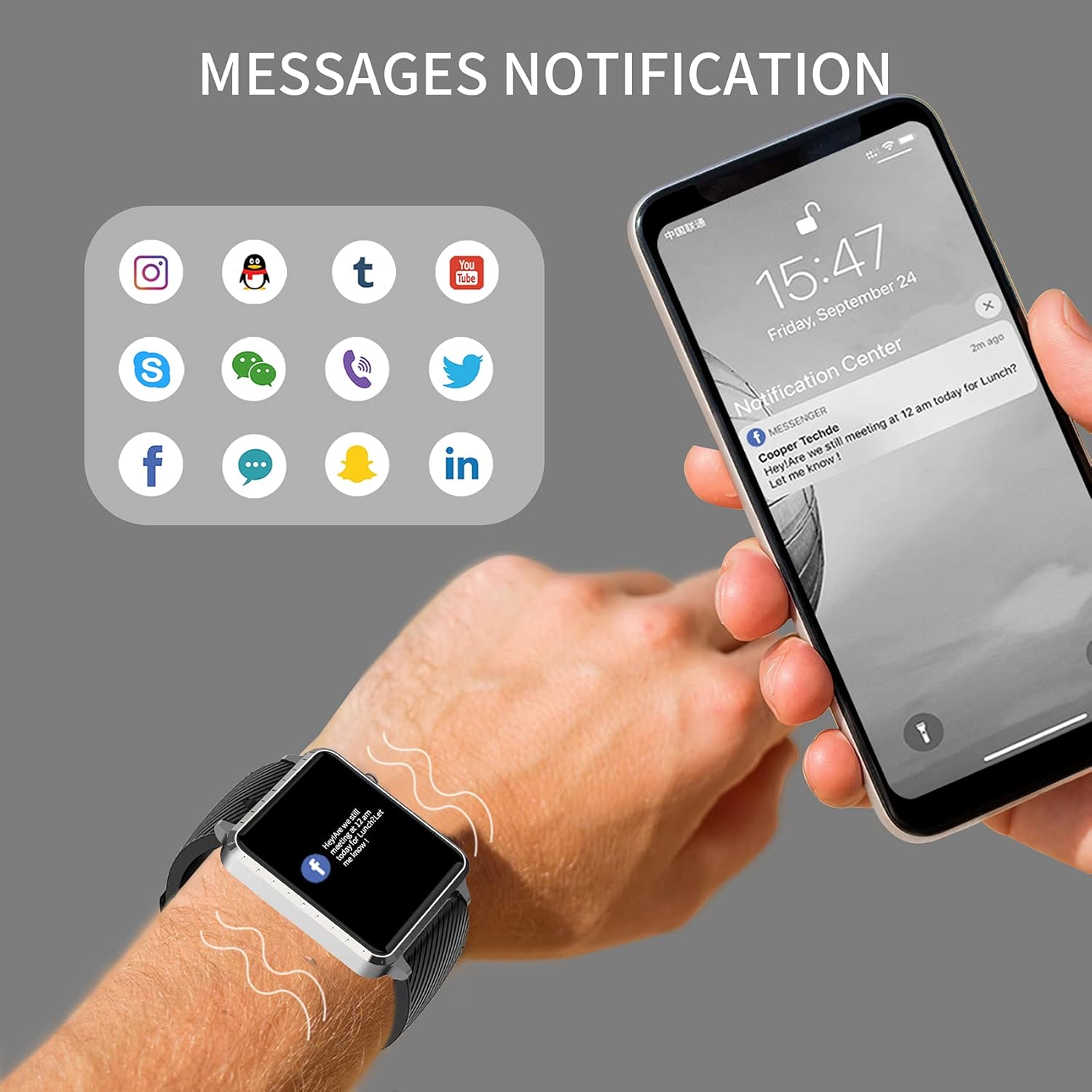
Image: The MAXTOP Smart Watch T5 showing incoming message notifications from popular social media and communication applications on its screen.
음악 제어
Control music playback on your smartphone directly from your watch. This feature allows you to play, pause, skip tracks, and adjust volume without taking out your phone.

Image: The MAXTOP Smart Watch T5 demonstrating various features including music control, message notifications, sedentary reminders, and the 'find phone' function.
기타 기능
- 앉아있는 알림: 앱에서 알림을 설정하여 장시간 활동하지 않은 후 움직이도록 유도하세요.
- 전화번호 찾기: Use this feature on your watch to make your paired phone ring, helping you locate it.
- 스톱워치 및 카운트다운: Access these tools from the watch's menu for timing activities.
유지 보수 및 관리
방수성
The MAXTOP Smart Watch T5 is rated IP67 waterproof. This means it is resistant to splashes, rain, and brief immersion in water. It is suitable for daily use and can withstand hand washing or light rain.
주의:
- 수영, 다이빙 또는 뜨거운 물로 샤워할 때 시계를 착용하지 마십시오.
- Avoid exposing the watch to high-pressure water or steam.
- 방수 기능은 영구적인 것이 아니며, 일반적인 사용으로 인해 시간이 지남에 따라 성능이 저하될 수 있습니다.
청소
Regularly clean your watch and strap to maintain hygiene and prevent skin irritation.
- 시계 화면과 본체는 부드러운 천으로 닦아주세요.amp, 보푸라기 없는 천.
- For the silicone strap, you can wash it with mild soap and water, then rinse thoroughly and dry completely before reattaching to your wrist.
- 가혹한 화학물질이나 연마재의 사용은 피하세요.
배터리 관리
배터리 수명을 연장하려면:
- 처음 사용하기 전에 시계를 완전히 충전하십시오.
- 극한의 온도를 피하세요.
- 장기간 시계를 사용하지 않을 경우, 보관하기 전에 배터리를 약 50%까지 충전하십시오.
문제 해결
시계가 켜지지 않음
- 시계가 완전히 충전되었는지 확인하세요. 충전기에 최소 30분 동안 연결해 두세요.
- 측면 버튼을 10~15초 동안 길게 눌러 강제로 재시작하십시오.
휴대폰과 페어링할 수 없습니다
- 휴대폰에서 블루투스가 켜져 있고 시계가 블루투스 범위 내에 있는지 확인하세요.
- 휴대폰과 시계를 모두 다시 시작하세요.
- 동반 앱이 설치되어 있고 최신 버전으로 업데이트되어 있는지 확인하세요.
- Forget the device from your phone's Bluetooth settings and try pairing again through the app.
- 시계가 이미 다른 기기와 페어링되어 있는지 확인하세요.
Inaccurate Readings (HR/BP/Sleep)
- Ensure the watch is worn correctly: snug on the wrist, not too tight or too loose.
- 측정하는 동안 움직이지 마십시오.
- Note that smart watch readings are for reference only and should not be used for medical diagnosis.
알림이 나타나지 않음
- 시계가 휴대폰과 성공적으로 페어링되었는지 확인하십시오.
- 휴대폰과 관련 앱에서 앱 알림 설정을 확인하세요.
- 앱이 백그라운드에서 실행 중인지, 휴대폰의 절전 기능으로 인해 종료되지 않았는지 확인하세요.
명세서
| 특징 | 세부 사항 |
|---|---|
| 상표 | 맥스탑 |
| 모델 | T5 |
| 화면 크기 | 1.54 인치 |
| 제품 치수 | 1.46 x 1.57 x 0.28 인치 |
| 품목 무게 | 1.87온스(53그램) |
| 운영 체제 | 안드로이드, iOS 호환 |
| 무선 통신 | 블루투스 |
| 배터리 유형 | 리튬폴리머(1개 포함) |
| 배터리 수명 | 최대 10일 |
| 방수 레벨 | 방수 (IP67) |
| 첫 번째 가능한 날짜 | 6년 2022월 XNUMX일 |

Image: Detailed physical dimensions of the MAXTOP Smart Watch T5, including the watch face width, height, and the adjustable strap length.
보증 및 지원
For warranty information and customer support, please refer to the official MAXTOP website or contact their customer service directly. Details are typically provided in the packaging or on the manufacturer's web대지.
구매 영수증을 보관하여 보증 청구에 대비하세요.