
1. 서론
This manual provides detailed instructions for the installation, operation, and maintenance of the Huanyang 1.5KW 2HP Variable Frequency Drive (VFD) Inverter. This VFD is designed for precise motor speed control in various applications, including lathes, mills, car hoists, pumps, and conveyors. It supports both single-phase and three-phase input, providing a three-phase output for motor control. The VFD utilizes Sine Wave Pulse Width Modulation (SPWM) for its control system, ensuring excellent performance and efficiency.
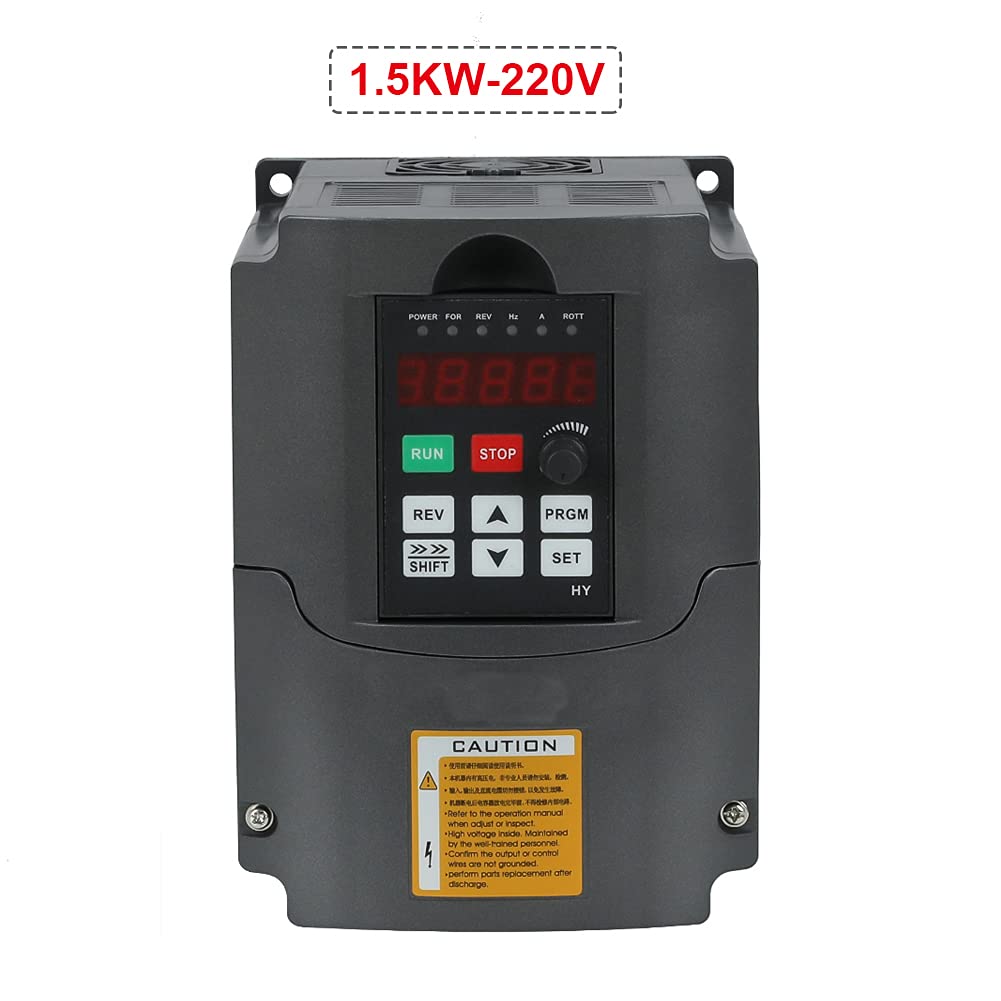
Figure 1: Huanyang 1.5KW 2HP Variable Frequency Drive Inverter.
2. 안전 정보
경고: Improper installation or operation can lead to serious injury or death. Read this manual thoroughly before installation and operation. Only qualified personnel should install, operate, and maintain this equipment.
- Always disconnect power before performing any wiring, inspection, or maintenance.
- VFD와 모터의 적절한 접지를 확인하세요.
- Do not touch electrical components when power is applied. High voltage is present even after power is disconnected; wait for capacitors to discharge.
- 입력 볼륨 확인tage matches the VFD's specifications (220V).
- Install the VFD in a clean, dry, and well-ventilated environment, away from direct sunlight, corrosive gases, and excessive vibration.
- 과열을 방지하려면 전원 연결에 적절한 와이어 게이지를 사용하십시오.
- 모든 연결 부분이 안전하고 적절히 절연되어 있는지 확인하세요.
- Refer to local electrical codes and regulations for installation requirements.
3. 제품 오버view
3.1 주요 특징
- 입력 단계 : Supports 1-phase or 3-phase 220V input.
- 출력 단계: 3-phase 220V output.
- 제어 시스템: Sine Wave PWM (SPWM) for precise motor control.
- PLC Function: Easy PLC function for 16-segment speed and inverter control.
- 조용한 작동: Carrier frequency adjustable up to 16KHz for soundless working.
- Anti-jamming Capability: Extremely strong anti-jamming performance.
- Low Speed Torque: 0.5Hz-150% low output rated torque.
- AVR Technique: 자동 볼륨tage Regulation (AVR) ensures stable load capability.
- Error Protection: Perfect error protection and short circuit starting protection.
- 의사소통: RS485 communication port with standard international MODBUS protocol.
3.2 구성 요소 및 인터페이스

Figure 2: Front panel with display and control buttons, showing internal access.
The VFD features a user-friendly control panel with a digital display and various buttons for operation and parameter setting. The main control buttons include RUN, STOP, REV (Reverse), SHIFT, UP, DOWN, PRGM (Program), and SET.

그림 3: 상세 view of the VFD's terminal block for power and control wiring.
The terminal block provides connections for input power (R, S, T for 3-phase or L1, L2 for single-phase), output to the motor (U, V, W), and various control signals. This model is equipped with two rows of terminals for comprehensive control options.
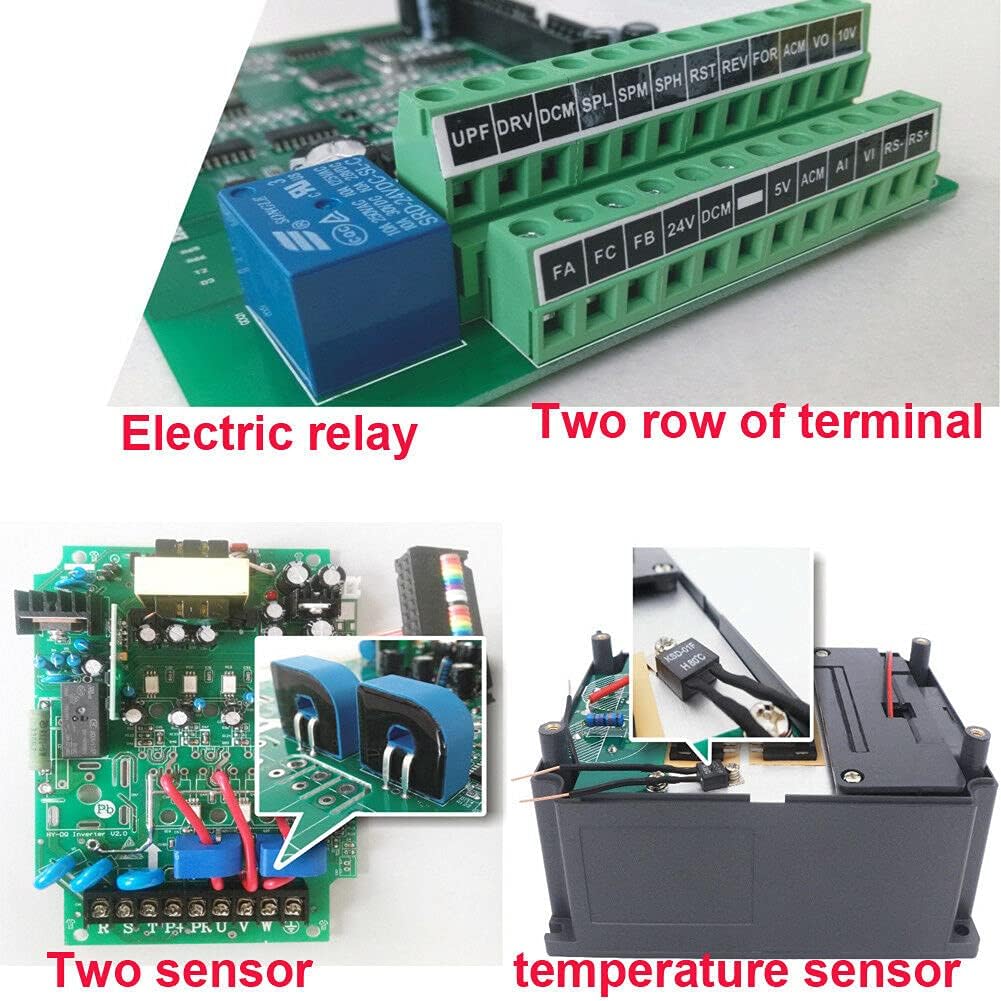
그림 4: 내부 view highlighting the electric relay and two sensors, contributing to enhanced functionality and protection.
Internally, the VFD incorporates robust components such as an electric relay and two sensors, which contribute to its reliable operation and protective features. It also features bigger capacitors and transformers for improved performance and stability compared to some other models.
4. 사양
| 특징 | 값 |
|---|---|
| 모델 번호 | USTS15220V-D-AMZ |
| 전력 정격 | 1.5KW (2HP) |
| 입력 Voltage | 220 Volts (Single or 3 Phase) |
| 출력 볼륨tage | 220볼트(3상) |
| 현재 평가 | 7A |
| 제어 방법 | Sine Wave PWM (SPWM) |
| 통신 포트 | RS485 (MODBUS) |
| 캐리어 주파수 | Adjustable up to 16KHz |
| 품목 무게 | 3.99파운드 |
| 패키지 크기 | 9.5 x 9.4 x 7.6 인치 |
| 색상 | 검은색 |

Figure 5: Approximate dimensions of the VFD unit.
5. 설정 및 설치
5.1 장착
Mount the VFD vertically on a stable, non-flammable surface in an area with adequate ventilation. Ensure sufficient clearance around the unit for heat dissipation. Avoid mounting in direct sunlight or areas with excessive dust, moisture, or corrosive substances. Use appropriate fasteners to secure the unit firmly.

그림 6: 측면 view of the VFD, showing ventilation grilles for proper airflow.
5.2 배선 연결
All wiring must be performed by a qualified electrician in accordance with local and national electrical codes. Ensure power is disconnected before making any connections.
- 입력 전력(220V): Connect the incoming AC power to the input terminals (R, S, T for 3-phase or L1, L2 for single-phase). This VFD supports both single-phase and three-phase 220V input.
- 모터 출력: Connect the three-phase motor leads to the output terminals (U, V, W). Ensure correct phase sequence for desired motor rotation.
- 접지: Connect the ground terminal of the VFD to a reliable earth ground. The motor frame must also be properly grounded.
- 제어 터미널: Utilize the control terminals for external control signals such as start/stop commands, speed reference (e.g., potentiometer, 0-10V, 4-20mA), and fault indications. Refer to the detailed wiring diagram in the full product manual for specific terminal assignments.
- RS485 통신 : If using MODBUS communication, connect the RS485 A and B lines to the designated terminals.
Note: Always refer to the wiring diagram provided with your specific VFD unit for precise terminal identification and connection instructions.
6. 사용 설명서
6.1 기본 작업
- 전원 켜기: After ensuring all connections are secure and safe, apply power to the VFD. The digital display will illuminate.
- 시동 모터: 를 누르세요 달리다 제어판의 버튼을 눌러 모터를 시동하십시오.
- 정지 모터: 를 누르세요 멈추다 모터를 멈추는 버튼입니다.
- 방향 반전: 를 누르세요 회전 button to change the motor's rotation direction.
6.2 속도 제어
Motor speed can be controlled via the built-in potentiometer, external analog signals (e.g., 0-10V, 4-20mA), or digital inputs, depending on parameter settings.
- 전위차계: Rotate the potentiometer knob on the control panel to adjust the output frequency and thus the motor speed.
- External Analog Input: If configured, an external voltage or current signal connected to the AI terminals can control the speed.
- 디지털 입력 : Pre-set speeds can be selected using digital input terminals, often used with the PLC function.
6.3 파라미터 설정
The VFD has numerous parameters that can be adjusted to customize its operation for specific applications. These parameters control motor characteristics, acceleration/deceleration times, control modes, and protective functions.
- 프로그램 모드 시작: 를 누르세요 홍보 파라미터 설정 모드로 들어가려면 이 버튼을 클릭하십시오.
- 매개변수 탐색: 사용하세요 UP 그리고 아래에 arrow buttons to scroll through parameter groups and individual parameters.
- 매개변수 선택: 누르다 세트 to select a parameter for editing.
- 값 조정: 사용하세요 UP 그리고 아래에 buttons to change the parameter value. The 옮기다 button can be used to move the cursor for digit selection.
- 값 저장: 누르다 세트 새로운 값을 저장하려면 다시 한 번 클릭하세요.
- 프로그램 모드 종료: 누르다 홍보 to exit the parameter setting mode and return to the main display.
Consult the comprehensive parameter list in the full product manual for detailed descriptions and recommended settings for each parameter.
6.4 고급 기능
- PLC Function: The VFD includes an easy PLC function that allows for programming up to 16 segments of speed and inverter control, enabling complex automated sequences without an external PLC.
- RS485 통신 : The built-in RS485 port supports the standard MODBUS protocol, allowing the VFD to be integrated into a larger control system for remote monitoring and control.
7. 유지관리
Regular maintenance ensures the longevity and reliable operation of your VFD. Always disconnect power and wait for capacitors to discharge before performing any maintenance.
- 청소: 주기적으로 VFD의 외부와 통풍구를 청소하여 먼지 축적을 방지하십시오. 먼지가 쌓이면 냉각 성능이 저하될 수 있습니다. 부드럽고 마른 천을 사용하십시오. 액체 세척제는 사용하지 마십시오.
- 점검: 배선 연결부의 조임 상태와 마모 또는 손상 여부를 정기적으로 점검하십시오. 작동 중 이상한 소음이나 냄새가 나는지 확인하십시오.
- 환경 점검: Ensure the operating environment remains within specified temperature and humidity ranges and is free from excessive dust or corrosive elements.
- 팬 체크: Verify that the cooling fan operates freely and is not obstructed.
8. 문제 해결
This section provides general guidance for common issues. For detailed error codes and advanced troubleshooting, refer to the complete product manual.
| 문제 | 가능한 원인 | 해결책 |
|---|---|---|
| VFD 전원이 켜지지 않습니다 | 전원 입력 없음; 퓨즈 단선; 배선 오류 | Check power supply; Inspect fuses; Verify input wiring. |
| 모터가 작동하지 않습니다 | STOP button pressed; Fault condition; Incorrect parameters; Motor wiring error | Press RUN; Check display for fault codes and clear; Verify motor parameters and wiring. |
| 모터가 잘못된 속도로 작동합니다 | Incorrect speed reference; Parameter settings incorrect | Adjust potentiometer or external signal; Check frequency and motor parameters. |
| 과전류 오류 | Motor overload; Short circuit in motor wiring; Rapid acceleration/deceleration | Reduce load; Check motor wiring; Increase acceleration/deceleration times. |
| 오버볼tage/언더볼tage 결함 | Unstable input power; Regenerative braking | 입력 볼륨 확인tage stability; Consider braking resistor if regenerative braking is an issue. |
9. 보증 및 지원
For specific warranty terms, conditions, and technical support, please refer to the documentation provided at the time of purchase or contact the manufacturer, Huanyang, directly. Warranty coverage typically includes defects in materials and workmanship under normal use. Keep your purchase receipt as proof of purchase.
Contact information for support can usually be found on the product packaging, the manufacturer's official web웹사이트 또는 공인 대리점을 통해 구입하실 수 있습니다.