
1. 서론
This manual provides essential instructions for the proper setup, operation, and maintenance of your SENTRY BLWHC102 Wired Overhead Headphones and Earbuds 2-Pack. Please read this manual thoroughly before using the product to ensure optimal performance and longevity. This package includes one pair of overhead headphones and one pair of in-ear earbuds, both featuring a 3.5mm stereo plug for universal compatibility with various audio devices.
2. 패키지 내용
Upon opening your SENTRY BLWHC102 2-Pack, verify that all items listed below are present and in good condition.
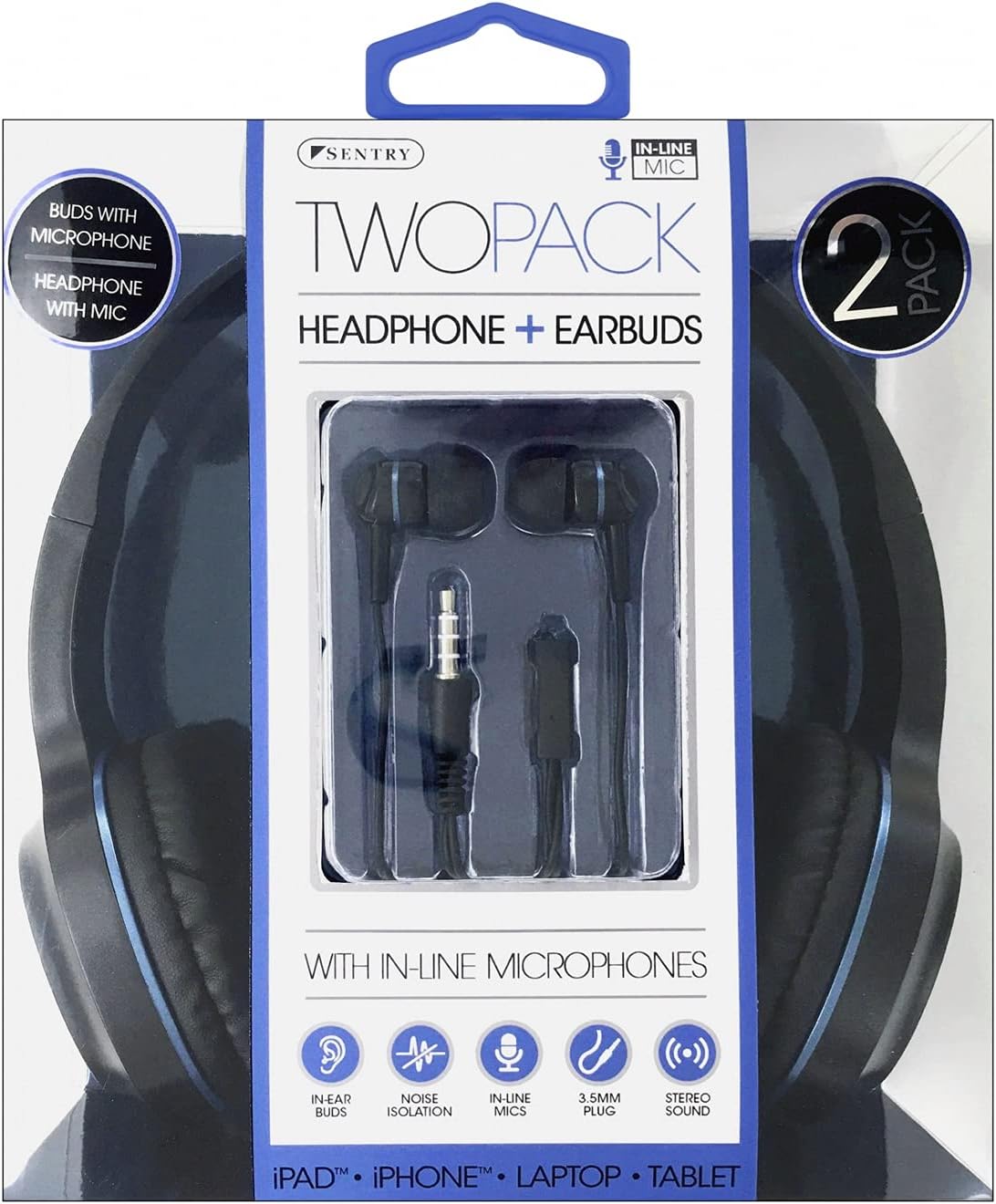
Image 2.1: SENTRY BLWHC102 2-Pack Retail Packaging. The packaging displays both the overhead headphones and the in-ear earbuds, along with key features like in-line microphones and 3.5mm stereo plugs.
- 1 x SENTRY Overhead Headphones (Wired)
- 1 x SENTRY In-Ear Earbuds (Wired)
- 1 x 사용자 매뉴얼(이 문서)
3. 제품 오버view
The SENTRY BLWHC102 package provides two distinct audio solutions: comfortable overhead headphones and discreet in-ear earbuds, both designed for clear audio and communication.

Image 3.1: SENTRY BLWHC102 Overhead Headphones and Earbuds. This image displays both audio devices included in the 2-pack, highlighting their 3.5mm audio jack and in-line microphone.
3.1 Overhead Headphones

Image 3.2: SENTRY BLWHC102 Overhead Headphones. This image shows the full overhead headphone unit with its adjustable headband and cushioned earcups.
- 조정 가능한 머리띠: 편안하고 안정적인 착용감을 위해.
- 쿠션 이어컵: 장시간 청취 시 편안함을 제공하도록 설계되었습니다.
- 3.5mm 오디오 잭: 오디오 기기용 표준 커넥터.
- 인라인 마이크: 손을 사용하지 않고 통신할 수 있도록.
3.2 In-Ear Earbuds

Image 3.3: SENTRY BLWHC102 In-Ear Earbuds. This image focuses on the in-ear earbuds, showing their design and the in-line microphone with a single button control.
- 인체공학적 디자인: For a comfortable fit within the ear canal.
- 3.5mm 오디오 잭: 오디오 기기용 표준 커넥터.
- In-line Microphone with Control Button: For hands-free calls and media playback control.
4. 설정 및 연결
Both the overhead headphones and the earbuds utilize a standard 3.5mm audio jack for connection.
4.1 오디오 장치 연결하기
- Identify the 3.5mm audio port on your device (e.g., smartphone, tablet, laptop, MP3 player). This port is typically marked with a headphone icon.
- Insert the 3.5mm audio jack of either the SENTRY Overhead Headphones or the SENTRY Earbuds firmly into the audio port of your device.
- Ensure the connection is secure. If the audio is not immediately recognized, try rotating the jack slightly or re-inserting it.
- 오디오 기기의 볼륨을 편안한 청취 수준으로 조절하세요.
5. 사용 설명서
5.1 Using the Overhead Headphones
- 착용: Place the headphones over your head, ensuring the earcups fully cover your ears. Adjust the headband for a snug yet comfortable fit.
- 오디오 재생: Once connected, audio from your device will play through the headphones. Control playback (play/pause, skip tracks) and volume directly from your connected device.
- 마이크로폰: The in-line microphone is automatically active when connected to a compatible device for calls or voice commands.
5.2 Using the In-Ear Earbuds
- 착용: Gently insert the earbuds into your ear canals. Ensure a comfortable and secure fit for optimal sound quality and noise isolation.
- 오디오 재생: Audio from your device will play through the earbuds. Control playback and volume directly from your connected device.
- In-line Control Button: The earbuds feature a single multi-function button on the in-line microphone.
- 한 번 누르세요: 음악 재생/일시 정지, 전화 받기/끊기.
- 두 번 누르세요: Skip to next track (for music playback).
- 3번 누르세요: Go to previous track (for music playback).
- 마이크로폰: The in-line microphone is active for calls and voice commands when connected to a compatible device.
6. 관리 및 유지 보수
Proper care will extend the life of your SENTRY audio devices.
- 청소: Use a soft, dry cloth to clean the exterior surfaces of both the headphones and earbuds. Do not use liquid cleaners or solvents.
- 이어폰 팁: For hygiene, regularly clean the earbud tips with a dry cotton swab.
- 저장: When not in use, store the headphones and earbuds in a clean, dry place, away from extreme temperatures and direct sunlight. Avoid tangling the cables.
- 습기를 피하세요: Do not expose the devices to water or excessive moisture. They are not waterproof.
- 케이블 관리: Avoid sharp bends or excessive pulling on the cables, as this can damage internal wiring.
7. 문제 해결
문제가 발생하면 다음의 일반적인 해결책을 참조하세요.
| 문제 | 가능한 해결책 |
|---|---|
| No sound from headphones/earbuds. |
|
| 소리가 왜곡되거나 간헐적입니다. |
|
| 마이크가 작동하지 않습니다. |
|
| In-line control button not responding (earbuds). |
|
8. 기술 사양
Below are the general specifications for the SENTRY BLWHC102 audio devices.
| 특징 | 세부 사항 |
|---|---|
| 모델 | BLWHC102 |
| 상표 | 보초 |
| 연결성 | Wired (3.5mm Stereo Plug) |
| 마이크로폰 | 인라인 마이크 |
| 색상 | 검정/파란색 |
| 재료 | Faux Leather (Headphones) |
| 품목 무게 | 6.4온스(전체 패키지) |
| 패키지 크기 | 8 x 6.5 x 2.5 인치 |
| 한국어: | 080068431022 |
9. 보증 및 지원
SENTRY products are manufactured with quality and reliability in mind. For specific warranty information, please refer to the documentation included with your purchase or visit the official SENTRY website. If you require technical assistance or have questions not covered in this manual, please contact SENTRY customer support through their official channels.
향후 참고를 위해 이 설명서를 보관하시기 바랍니다.