
1. 서론
Thank you for choosing the Sonew G6 Gaming Mouse. This manual provides essential information for setting up, operating, and maintaining your new gaming mouse. Please read this manual carefully before use to ensure optimal performance and longevity of your device.
2. 제품 특징
- 인체공학적 디자인: Shaped to fit the palm for comfortable long-term use.
- 조정 가능한 DPI: Six-gear adjustable photoelectric resolution up to 3200dpi for precise control.
- 유선 USB 연결: Reliable and stable connection with a 1.5m (4.9ft) cable.
- 다채로운 LED 조명: Integrated LED lighting for visual effects.
- High-End Chip: Built-in chip for accurate positioning and responsiveness.

Image 2.1: The ergonomic design of the Sonew G6 Gaming Mouse, illustrating how it conforms to the hand for comfortable use.

Image 2.2: The Sonew G6 Gaming Mouse showcasing its colorful LED lighting effects.
3. 패키지 내용
패키지에 모든 품목이 들어 있는지 확인하세요.
- 1 x Sonew G6 Gaming Mouse
4. 설정
Follow these steps to connect your Sonew G6 Gaming Mouse:
- 컴퓨터(데스크탑이나 노트북)에서 사용 가능한 USB 포트를 찾으세요.
- Plug the USB connector of the Sonew G6 Gaming Mouse into the USB port.
- 운영 체제가 필요한 드라이버를 자동으로 감지하고 설치합니다. 이 과정은 다소 시간이 걸릴 수 있습니다.
- 설치가 완료되면 마우스를 바로 사용할 수 있습니다.

Image 4.1: The Sonew G6 Gaming Mouse showing its integrated USB cable, ready for connection to a computer.
5. 사용 설명서
5.1 기본 작업
The Sonew G6 Gaming Mouse functions as a standard computer mouse. Move the mouse to control the cursor on your screen. Use the left and right buttons for primary and secondary clicks, respectively. The scroll wheel allows for vertical scrolling through documents and web 페이지.
5.2 DPI 조정
The mouse features an adjustable DPI (Dots Per Inch) setting, allowing you to change the sensitivity and speed of the cursor. This mouse offers six adjustable gears. To change the DPI, press the dedicated DPI button, usually located behind the scroll wheel. Each press will cycle through the available DPI settings, indicated by changes in the LED lighting or a brief pause in movement.
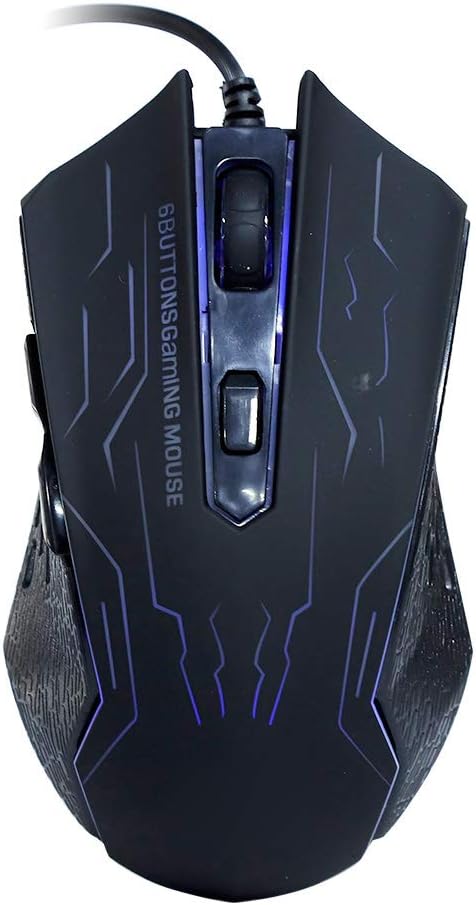
이미지 5.1: 상단 view of the Sonew G6 Gaming Mouse, highlighting the left and right click buttons, scroll wheel, and the DPI adjustment button.
6. 유지관리
To ensure the longevity and optimal performance of your Sonew G6 Gaming Mouse, follow these maintenance guidelines:
- 청소: 부드럽고 마른 천을 사용하여 마우스 표면을 닦으세요. 잘 지워지지 않는 오염의 경우, 살짝 damp천에 물이나 순한 세척액을 묻혀 닦아주세요. 강한 화학 물질이나 연마재는 사용하지 마세요.
- 센서 관리: 마우스 바닥의 광학 센서를 깨끗하고 먼지나 이물질이 없도록 유지하세요. 필요한 경우 면봉이나 압축 공기를 사용하세요.
- 케이블 관리 : 내부 손상을 방지하기 위해 USB 케이블을 심하게 구부리거나 비틀지 마십시오.
- 저장: 사용하지 않을 때는 마우스를 극한의 온도를 피해 깨끗하고 건조한 곳에 보관하세요.
7. 문제 해결
If you encounter issues with your Sonew G6 Gaming Mouse, refer to the following table for common problems and solutions:
| 문제 | 가능한 원인 | 해결책 |
|---|---|---|
| 마우스가 응답하지 않음 | USB 연결이 느슨하거나, USB 포트에 결함이 있거나, 드라이버에 문제가 있습니다. | USB 케이블이 제대로 연결되어 있는지 확인하세요. 다른 USB 포트에 연결해 보세요. 컴퓨터를 다시 시작하세요. |
| 커서 움직임이 불규칙하거나 갑작스럽습니다. | 더러운 광학 센서, 부적합한 마우스 패드 표면. | Clean the optical sensor on the bottom of the mouse. Use a clean, uniform mouse pad or surface. |
| DPI 조정이 작동하지 않습니다 | 소프트웨어 충돌, 버튼 오작동. | Ensure no conflicting software is running. If the issue persists, contact customer support. |
8. 사양
Technical specifications for the Sonew G6 Gaming Mouse:
| 특징 | 세부 사항 |
|---|---|
| 모델 | G6 |
| Photoelectric Resolution | Up to 3200dpi (Six gears adjustable) |
| 인터페이스 | USB |
| 줄 길이 | 대략. 1.5m / 4.9피트 |
| 연결 기술 | 열광한 |
| 움직임 감지 기술 | 광학 |
| 특징 | 인체공학적 디자인 |
| 품목 무게 | 5.5 온스 |
| 패키지 크기 | 5.51 x 4.33 x 1.97 인치 |

이미지 8.1: 하단 view of the Sonew G6 Gaming Mouse, displaying regulatory marks and electrical ratings (5V 100mA).
9. 보증 및 지원
보증 정보 또는 기술 지원에 대한 문의는 구매 시 제공된 설명서를 참조하시거나 판매점에 문의해 주세요. 보증 청구를 위해 구매 증빙 자료를 보관해 주세요.