
1. 서론
This manual provides comprehensive instructions for the installation, operation, maintenance, and troubleshooting of your LeeKooLuu LK8 RV Backup Camera System. Please read this manual thoroughly before installation and use to ensure proper function and safety.
2. 제품 구성품
The LeeKooLuu LK8 RV Backup Camera System includes a wireless camera unit designed for vehicle rear-view monitoring. Key components are detailed below:
- Wireless Camera Unit: Features a wide-angle lens, CMOS optical sensor, and integrated LED lights for enhanced visibility.
- 조절 가능한 장착 브래킷: Allows for secure and flexible positioning of the camera.
- 무선 안테나: Ensures stable signal transmission to a compatible monitor (monitor sold separately).

그림 2.1: 앞쪽 view of the LeeKooLuu LK8 wireless RV backup camera, showing the central lens and surrounding LED lights for night vision.

그림 2.2: 각진 앞면 view of the LeeKooLuu LK8 wireless RV backup camera, highlighting the antenna and adjustable mounting bracket.
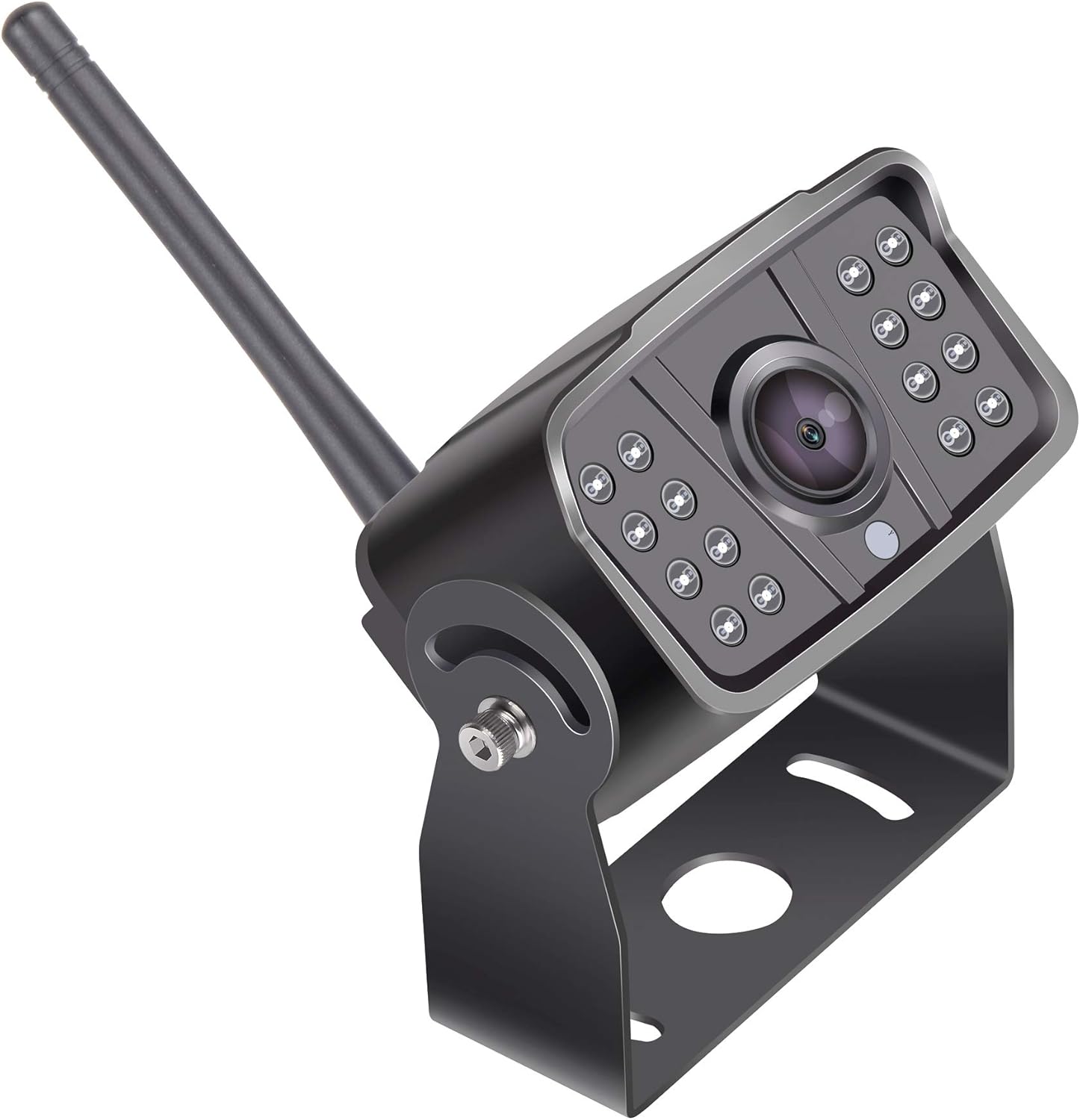
그림 2.3: 옆 view of the LeeKooLuu LK8 wireless RV backup camera, illustrating the adjustable mounting bracket and the position of the wireless antenna.
3. 설치 가이드
The LK8 camera is designed for monitor-based installation and wireless connectivity. Ensure your compatible monitor (e.g., LeeKooLuu LK8 monitor) is ready for pairing.
3.1 카메라 장착
- 위치 선택: Choose a suitable location at the rear of your RV or vehicle that provides a clear, unobstructed view. The camera's wide-angle lens offers broad coverage.
- 안전한 브라켓: Use appropriate fasteners (not included) to securely attach the adjustable mounting bracket to the chosen surface. Ensure the bracket is stable and can support the camera's weight.
- 카메라 부착: Mount the camera unit onto the bracket. Adjust the camera angle for optimal viewing, then tighten the bracket screws to fix its position.
3.2 전원 연결
The camera requires a stable power supply. Connect the camera's power cable to a 12V DC power source on your vehicle. Common connection points include:
- Reverse light circuit (for automatic activation when reversing).
- Running lights or auxiliary power (for continuous monitoring).
Ensure all connections are secure and properly insulated to prevent short circuits and water damage.
3.3 무선 페어링
Once the camera is powered, it will automatically attempt to pair with a compatible LeeKooLuu wireless monitor. Refer to your monitor's user manual for specific pairing instructions if automatic connection does not occur.
동영상 3.1 : Detailed installation guide for the LeeKooLuu RV Backup Camera System. This video provides visual steps for mounting and connecting the camera.
4. 작동 지침
After successful installation and pairing, your LeeKooLuu LK8 camera system is ready for use.
4.1 전원 켜기/끄기
The camera's operation is typically linked to its power source. If connected to reverse lights, it will activate when the vehicle is in reverse. If connected to continuous power, it will operate whenever the vehicle's ignition is on or the power source is active.
4.2 Viewing the Feed
The camera feed will automatically display on your paired monitor. Use the monitor's controls to adjust brightness, contrast, or other display settings as needed. The wide-angle lens provides a comprehensive view of your surroundings, aiding in parking and maneuvering.
4.3 야간 투시경
The integrated LED lights automatically activate in low-light conditions, providing clear night vision for safe operation in the dark.
동영상 4.1 : 위에view of the LeeKooLuu RV Backup Camera System's operational features, including day and night vision capabilities.
5. 유지관리
정기적인 유지보수는 카메라 시스템의 수명과 최적의 성능을 보장합니다.
- 렌즈 청소: 카메라 렌즈는 주기적으로 부드러운 천으로 닦아주세요.amp 천으로 닦아주세요. 렌즈에 흠집을 낼 수 있는 연마성 세척제는 사용하지 마세요.
- 연결 확인 중: Inspect all power and antenna connections regularly to ensure they are secure and free from corrosion or damage.
- 브래킷 보안: Verify that the mounting bracket remains securely fastened and the camera's angle has not shifted due to vibrations or impacts.
6. 문제 해결
If you encounter issues with your LeeKooLuu LK8 RV Backup Camera System, refer to the following troubleshooting steps:
| 문제 | 가능한 원인 | 해결책 |
|---|---|---|
| 모니터에 이미지가 없습니다 | No power to camera or monitor; Loose connection; Pairing issue; Interference. | Check power supply to both camera and monitor. Ensure all cables are securely connected. Re-attempt wireless pairing. Minimize sources of wireless interference. |
| Poor image quality / Flickering | Dirty lens; Weak wireless signal; Electrical interference. | Clean the camera lens. Ensure the camera and monitor are within effective range and antenna is unobstructed. Check for strong electrical sources nearby. |
| Camera not activating | Incorrect power connection; Blown fuse. | Verify power connection to the correct circuit (e.g., reverse lights). Check vehicle fuses related to the power source. |
동영상 6.1 : Troubleshooting common issues with wireless backup camera systems, including signal loss and power problems.
7. 사양
| 특징 | 사양 |
|---|---|
| 상표 | 리쿠루 |
| 모델 | LK8 |
| 제품 치수 | 12.2 x 6.1 x 3.1인치(12.2인치 길이 x 6.1인치 너비 x 3.1인치 높이) |
| 품목 무게 | 1.01파운드 |
| 호환 장치 | LK8 (compatible monitors) |
| 설치 유형 | Monitor-based |
| 광센서 기술 | CMOS |
| 렌즈 유형 | 와이드 앵글 |
| 커넥터 유형 | 무선 전화 |
| 광학 센서 크기 | 1/3 인치 |
| 기타 디스플레이 기능 | 무선 전화 |