
Petcube Petcube Cam
Petcube Cam Indoor Wi-Fi Pet and Security Camera
사용자 설명서
1. 서론
The Petcube Cam is an indoor Wi-Fi pet and security camera designed to help you monitor your pets and home from anywhere. It features 1080p HD video, 2-way audio, night vision, and smart alerts, providing peace of mind and allowing you to interact with your pets remotely.

Image: The Petcube Cam device shown above a smartphone displaying a live feed of a dog and a cat, illustrating its monitoring capabilities.
2. 상자 안에 무엇이 들어있나요?
Your Petcube Cam package includes the following components:
- Petcube Cam device
- 2m USB 케이블
- Petcube power adapter
- 3M tape for mounting
- 빠른 시작 가이드
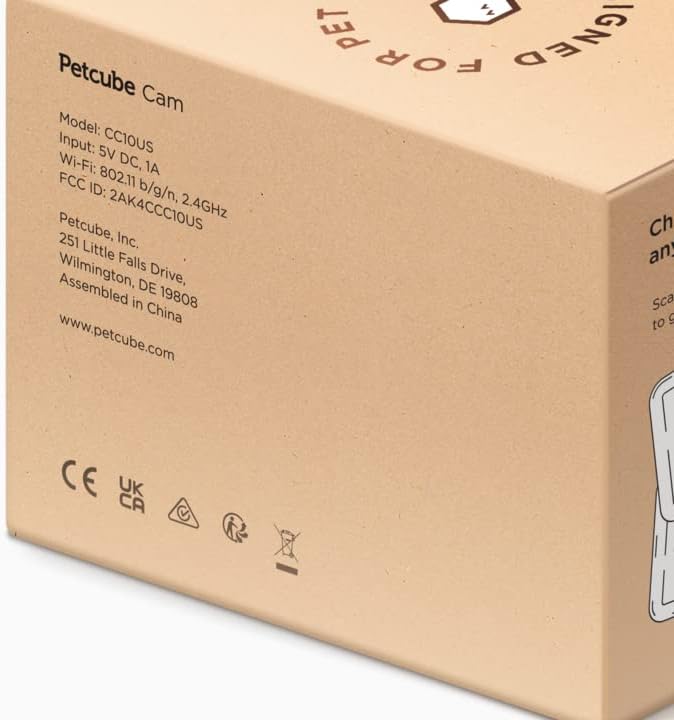
Image: The side of the Petcube Cam packaging, detailing product information such as model number (CC10US), input voltage (5V DC, 1A), Wi-Fi specifications (802.11 b/g/n, 2.4GHz), and manufacturer details.
3. 설정 가이드
Setting up your Petcube Cam is a quick and straightforward process:
- Download the Petcube App: 검색 "Petcube" in your smartphone's app store (iOS or Android) and download the official application.
- 전원 켜기: Connect the Petcube Cam to a power outlet using the provided 2m USB cable and power adapter. The camera will power on automatically.
- Wi-Fi에 연결: Open the Petcube app and follow the on-screen instructions to connect your camera to your home Wi-Fi network. Ensure your Wi-Fi is 2.4 GHz, as the Petcube Cam is only compatible with 2.4 GHz networks.
- 놓기: Position your Petcube Cam in a location that provides the best view of your pet or desired area. The camera offers flexible mounting options, including tabletop placement or wall mounting using the included 3M tape.

Image: A Petcube Cam device next to a smartphone displaying the Wi-Fi connection screen, emphasizing compatibility with 2.4GHz Wi-Fi networks for setup.

Image: A collage demonstrating the versatile mounting options for the Petcube Cam, including placement on a flat surface, attachment to a wall, and hanging from a ceiling, allowing for optimal view각도를 나타냅니다.
4. Operating Your Petcube Cam
Once set up, you can utilize the Petcube app to access and control your camera's features:
4.1. Live HD Video Monitoring
Access a live 1080p HD video stream of your home 24/7. The camera provides a 110° wide-angle view and 8x digital zoom, ensuring you don't miss any moments.

Image: The Petcube Cam positioned to monitor a dog, with a smartphone displaying a close-up live view of the dog's face, highlighting the live HD video capability.
4.2. Crystal-Clear 2-Way Audio
Engage with your pets remotely using the built-in microphone and speaker. You can talk to them to soothe anxiety or listen for barks and meows. This feature helps reinforce positive behavior through audio feedback.

Image: A Petcube Cam mounted on a wall, observing a puppy playfully chewing on toilet paper, accompanied by a speech bubble indicating the two-way audio feature with the command "Maxie, drop it!".
4.3. AI-Powered Smart Alerts
Receive instant sound and motion alerts customized by AI. The camera can differentiate between human and pet activity, providing real-time notifications for significant events at home.

Image: An illustration of the AI-powered smart alerts, showing a person holding a dog with green and orange outlines identifying the human as "Becky" and the dog as "Good boy," demonstrating human and pet recognition.
4.4. 야간 투시경
The Petcube Cam offers clear night vision up to 30 feet, ensuring you can monitor your pets and home even in complete darkness.

Image: Two small puppies sleeping soundly in a dimly lit environment, with the Petcube Cam subtly visible in the background, illustrating its effective night vision capabilities.
4.5. Video History & Downloads (Petcube Care)
With a Petcube Care subscription, you can review up to 90 days of pet cam activity and save your favorite moments. A web interface is also available for easy access to your video history.

Image: Two smartphone screens displaying the Petcube app. One shows a notification for motion detection, and the other illustrates the video history timeline with various recorded clips, highlighting the Petcube Care features.
5. 유지관리
To ensure optimal performance and longevity of your Petcube Cam, follow these maintenance guidelines:
- 청소: 부드럽고 마른 보풀 없는 천으로 카메라 렌즈와 본체를 살살 닦아주세요. 강한 화학 약품이나 연마제를 사용하지 마십시오.
- 놓기: 카메라를 직사광선, 극한 온도 및 습기를 피해 안정적인 위치에 설치하십시오.
- 소프트웨어 업데이트: Keep your Petcube app and camera firmware updated to the latest versions to benefit from new features and security enhancements.
- 전원 주기: If you experience minor issues, try unplugging the camera from the power outlet for 10 seconds and then plugging it back in.
6. 문제 해결
If you encounter issues with your Petcube Cam, refer to the following common solutions:
- 카메라 오프라인:
- Check your Wi-Fi connection and ensure it is stable and within range of the camera.
- Verify that the camera is powered on and the power adapter is securely connected.
- Restart your Wi-Fi router and the Petcube Cam.
- 낮은 비디오 품질:
- Ensure your internet connection speed is adequate for streaming HD video.
- 부드러운 천으로 카메라 렌즈를 닦아주세요.
- 렌즈 앞에 장애물이 있는지 확인하십시오.
- 2-Way Audio Issues:
- Ensure the microphone and speaker settings are enabled in the Petcube app.
- 스마트폰의 볼륨 설정을 확인하세요.
- 카메라나 휴대폰 주변의 배경 소음을 줄이세요.
- 알림을 받지 못했습니다:
- Verify that notifications are enabled in both the Petcube app and your smartphone's system settings.
- Adjust motion and sound detection sensitivity in the app.
7. 사양
| 특징 | 세부 사항 |
|---|---|
| 모델명 | Petcube Cam |
| 모델 번호 | 854592007394 |
| 비디오 해상도 | 1080p HD |
| View잉 각도 | 110도 |
| 나이트 비전 범위 | 30 피트 |
| 오디오 | 2-웨이 오디오 |
| 무선 기술 | Wi-Fi(2.4GHz만 해당) |
| 전원 | 유선 전기 (10와트) |
| 색상 | 검은색 |
| 장착 유형 | 탁상 마운트 |
| Item Dimensions (L x B x H) | 10 x 5 x 1.27cm |
| 품목 무게 | 313g |
| 제조업체 | 펫큐브 |
| 원산지 | 중국 |
8. 보증 및 지원
For information regarding product warranty, returns, or technical support, please refer to the official Petcube website or contact Petcube customer service directly. You can also visit the Petcube Store on Amazon 추가 자료가 필요합니다.
Petcube also offers subscription-based services like "Online Vet" and "Emergency Fund" for comprehensive pet care support. For more details, please check the Petcube app or their official web대지.

Image: A smartphone displaying a chat interface for "Vet Chat," showing a conversation between a user and a veterinarian about a dog's behavior, illustrating the online vet support service.
Ask a question about this manual
Ask about setup, troubleshooting, compatibility, parts, safety, or missing instructions. Manuals+ will review the question and use this page’s manual context to help answer it.