1. 서론
구매해주셔서 감사합니다asing the Generic H2O Portable Mini Humidifier. This compact and versatile device is designed to improve air quality by adding moisture to the air, helping to alleviate dry skin and respiratory discomfort. It also functions as an essential oil diffuser and features a colorful LED light, making it suitable for various environments such as bedrooms, offices, cars, and desktops.
Please read this manual carefully before use to ensure proper operation and maintenance.
2. 패키지 내용
- 1 x USB 케이블
- 가습기 1대
- 1 x 사용 설명서
- 1 x Cotton Swab (pre-installed or spare)
3. 사양
| 특징 | 세부 사항 |
|---|---|
| 입력 | 직류 5.0V/1.0A |
| 힘 | 2W |
| 현재의 | 250~350mA |
| 컨테이너 볼륨 | 300ml |
| 안개 모드 | Continuous (4 hours), Intermittent (6 hours) |
| 특별 기능 | Quiet Operation (30 dB), Automatic Shut-off, Colorful LED Light, Essential Oil Diffuser capability |
| 치수 | 3.07 x 3.07 x 4.72 인치 |
| 무게 | 5.3 온스 |
4. 설정
- 가습기 포장 풀기: 포장에서 모든 구성 요소를 조심스럽게 제거합니다.
- Prepare the Cotton Swab: Ensure the cotton swab is properly inserted into the humidifier's mist outlet. If it's a new swab, soak it in water for a few minutes before insertion to ensure optimal misting.
- Fill the Water Container:
Remove the top cover of the humidifier. Fill the water container with clean tap water. Do not exceed the maximum fill line (300ml capacity). For best performance and longevity, use distilled or purified water.
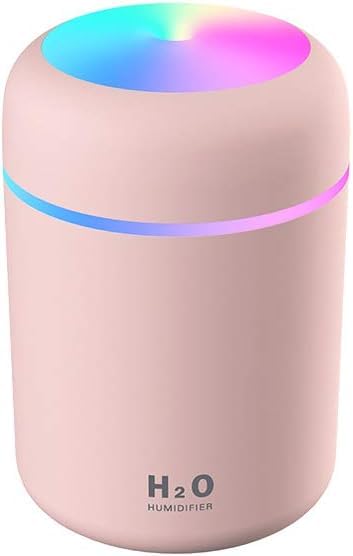
Image: The humidifier with its top removed, revealing the water tank and the cotton swab mechanism.
- 에센셜 오일 추가 (선택 사항): If using as an essential oil diffuser, add a few drops of 수용성 essential oil directly into the water tank. Do not use oil-based essential oils as they can clog the misting mechanism.
- 덮개 교체: 가습기 윗부분의 덮개를 다시 단단히 닫으세요.
- 전원 연결: Plug the provided USB cable into the humidifier's USB port and connect the other end to a compatible USB power source (e.g., computer, power bank, USB wall adapter). The humidifier requires continuous power to operate.
5. 사용 설명서
The humidifier is controlled by a single multi-function button located on the front or top of the unit.
- Power On / Continuous Spray Mode:
Press the button once to turn on the humidifier. It will start in continuous spray mode, producing a steady mist for approximately 4 hours. The colorful LED light will also activate automatically.
- 간헐 분사 모드:
While in continuous spray mode, press the button a second time to switch to intermittent spray mode. In this mode, the humidifier will spray mist for 3 seconds and then pause for 3 seconds, repeating the cycle. This mode extends operation time to approximately 6 hours.
- 안개 끄기:
Press the button a third time to turn off the mist function. The LED light will remain on.
- LED 조명 제어:
- Turn On/Off Colorful Light: Long press the button for 3 seconds to turn the colorful LED light on or off.
- 고정 색상 모드: While the colorful light is on, long press the button again for 3 seconds to fix the light to a specific color.
- 자동 차단 : The humidifier features an automatic shut-off function. It will automatically turn off when the water level is too low or after the set operating time (4 hours for continuous, 6 hours for intermittent) to prevent dry burning and ensure safety.
6. 유지관리
정기적인 청소와 유지관리를 통해 가습기의 수명과 최적의 성능을 보장할 수 있습니다.
- 물탱크 청소:
- 가습기의 전원을 뽑고 윗덮개를 제거하세요.
- 탱크에 남아 있는 물을 모두 비우십시오.
- 물탱크 내부를 부드러운 천으로 닦아주세요.amp cloth. For stubborn mineral deposits, use a small amount of white vinegar, then rinse thoroughly with clean water.
- 기기 전체를 물에 담그지 마십시오.
- Replacing the Cotton Swab:
- The cotton swab should be replaced every 1-3 months, or when mist output decreases significantly.
- Remove the top cover and gently pull out the old cotton swab.
- Insert a new cotton swab, ensuring it is fully saturated with water before first use.
- 분무구 청소하기:
Gently wipe the mist outlet with a cotton swab dipped in clean water to remove any residue that may affect mist production.
7. 문제 해결
| 문제 | 가능한 원인 | 해결책 |
|---|---|---|
| 안개 없음 또는 안개 출력 낮음 |
|
|
| 가습기가 켜지지 않아요 |
|
|
| 물이 새다 |
|
|
8. 안전 정보
- Do not use oil-based essential oils, only water-soluble ones.
- 어린이와 애완동물의 손이 닿지 않는 곳에 보관하세요.
- 제품 전체를 물이나 기타 액체에 담그지 마십시오.
- 청소나 재충전을 하기 전에 장치의 플러그를 뽑으세요.
- 미스트 배출구를 막지 마십시오.
- 제공된 USB 케이블 또는 호환되는 대체 케이블만 사용하십시오.
- 기기가 손상된 경우 즉시 사용을 중단하세요.
9. 보증 및 지원
This product comes with a standard manufacturer's warranty. For specific warranty details, please refer to the product packaging or contact your retailer. For technical support or inquiries, please reach out to the seller through the platform where the product was purchased.
첫 이용 가능 날짜: 12년 2021월 XNUMX일


