
1. 서론
Thank you for choosing the Andoer W200RGB LED Video Light. This manual provides detailed instructions for the proper setup, operation, and maintenance of your device. Please read this manual thoroughly before use to ensure optimal performance and longevity of the product. Keep this manual for future reference.
2. 제품 오버view
2.1 패키지 내용
패키지를 열 때 아래 나열된 모든 품목이 들어 있고 상태가 양호한지 확인하세요.
- Andoer W200RGB LED Video Light
- USB Type-C 충전 케이블
- 미니 삼각대
- 손목 스트랩
- 사용자 설명서 (영어 및 중국어)

Image: Contents of the Andoer W200RGB LED Video Light package, showing the light, USB cable, mini tripod, and wrist strap.
2.2 주요 특징
- 컴팩트하고 휴대하기 편리한 디자인: Rod-shaped design, 20cm in length, lightweight for easy transport.
- 고휘도 : Equipped with 184 high-quality LED beads (69 white, 69 yellow, 46 RGB) with 7W output and CRI 95+.
- RGB Colored Light Mode: 360° adjustable HUE and 0%-100% adjustable brightness for diverse colorful lighting effects.
- CCT Cold & Warm Light Mode: Wide adjustable color temperature range from 2500K to 9000K.
- 20가지 특수 조명 효과: Includes ambulance, fireworks, TV, candle, party, strobe, RGB strobe, red flash, green flash, blue flash, slow HSI, fast HSI, and more.
- 내장형 충전식 배터리: Integrated 3.7V 3000mAh lithium battery for extended working time, rechargeable via Type-C port.
- 마그네틱 백: Built-in magnets at both ends allow for easy attachment to magnetic surfaces.
2.3 컨트롤 및 디스플레이
The Andoer W200RGB features intuitive controls and an LCD screen for easy operation.

Image: The control panel of the Andoer W200RGB LED Video Light, showing the power button, mode button, adjustment buttons, and LCD screen.
- 전원 버튼: Press and hold to turn the light on or off. Short press to switch between modes.
- 모드 버튼(M): Short press to cycle through CCT, HSI (RGB), and Scene modes.
- 위/아래 버튼(▲/▼): Adjust parameters such as brightness, color temperature, HUE, or saturation depending on the selected mode.
- LCD 화면: Displays current settings including mode, brightness, color temperature, HUE, and battery level.
- Type-C 충전 포트: Located at one end for charging the internal battery.
3. 설정
3.1 배터리 충전
The Andoer W200RGB LED Video Light comes with a built-in rechargeable lithium battery. Before first use, it is recommended to fully charge the device.
- Connect the supplied USB Type-C cable to the charging port on the light.
- USB 케이블의 다른 쪽 끝을 표준 USB 전원 어댑터(별도 구매) 또는 컴퓨터 USB 포트에 연결하십시오.
- The LCD screen will indicate the charging status. A full charge typically takes a few hours.

Image: The Andoer W200RGB LED Video Light highlighting its internal 3.7V 3000mAh battery and Type-C charging capability.
3.2 미니 삼각대 부착하기
The included mini tripod can be attached to the 1/4-inch screw hole at the bottom of the light for stable placement.
- Locate the 1/4-inch screw hole on the bottom of the LED light.
- Screw the mini tripod securely into the screw hole.
- Adjust the tripod legs for desired height and stability.
4. 사용 설명서
4.1 전원 켜기/끄기
- To turn on the light, press and hold the Power button (labeled with a circle and vertical line) for a few seconds.
- To turn off the light, press and hold the Power button again for a few seconds.
4.2 스위칭 모드
After powering on, short press the Mode button (M) to cycle through the available lighting modes:
- CCT Mode (Color Correlated Temperature): For adjusting white light from warm to cool.
- HSI 모드(색조, 채도, 명도): For adjusting RGB colored light.
- 장면 모드: For selecting special lighting effects.
4.3 CCT Mode Operation
CCT 모드에서는 색온도와 밝기를 조절할 수 있습니다.
- Use the Up/Down buttons (▲/▼) to adjust the brightness from 0% to 100%.
- Short press the Power button to switch to color temperature adjustment. Use the Up/Down buttons (▲/▼) to adjust the color temperature from 2500K (warm) to 9000K (cool).

Image: Visual representation of brightness adjustments (0%, 50%, 100%) and color temperature settings (6000K, 5000K, 2800K) in CCT mode.
4.4 HSI Mode (RGB) Operation
In HSI mode, you can adjust the HUE (color), saturation, and brightness.
- Use the Up/Down buttons (▲/▼) to adjust the HUE (360° color spectrum).
- Short press the Power button to switch to saturation adjustment. Use the Up/Down buttons (▲/▼) to adjust saturation.
- Short press the Power button again to switch to brightness adjustment. Use the Up/Down buttons (▲/▼) to adjust brightness from 0% to 100%.
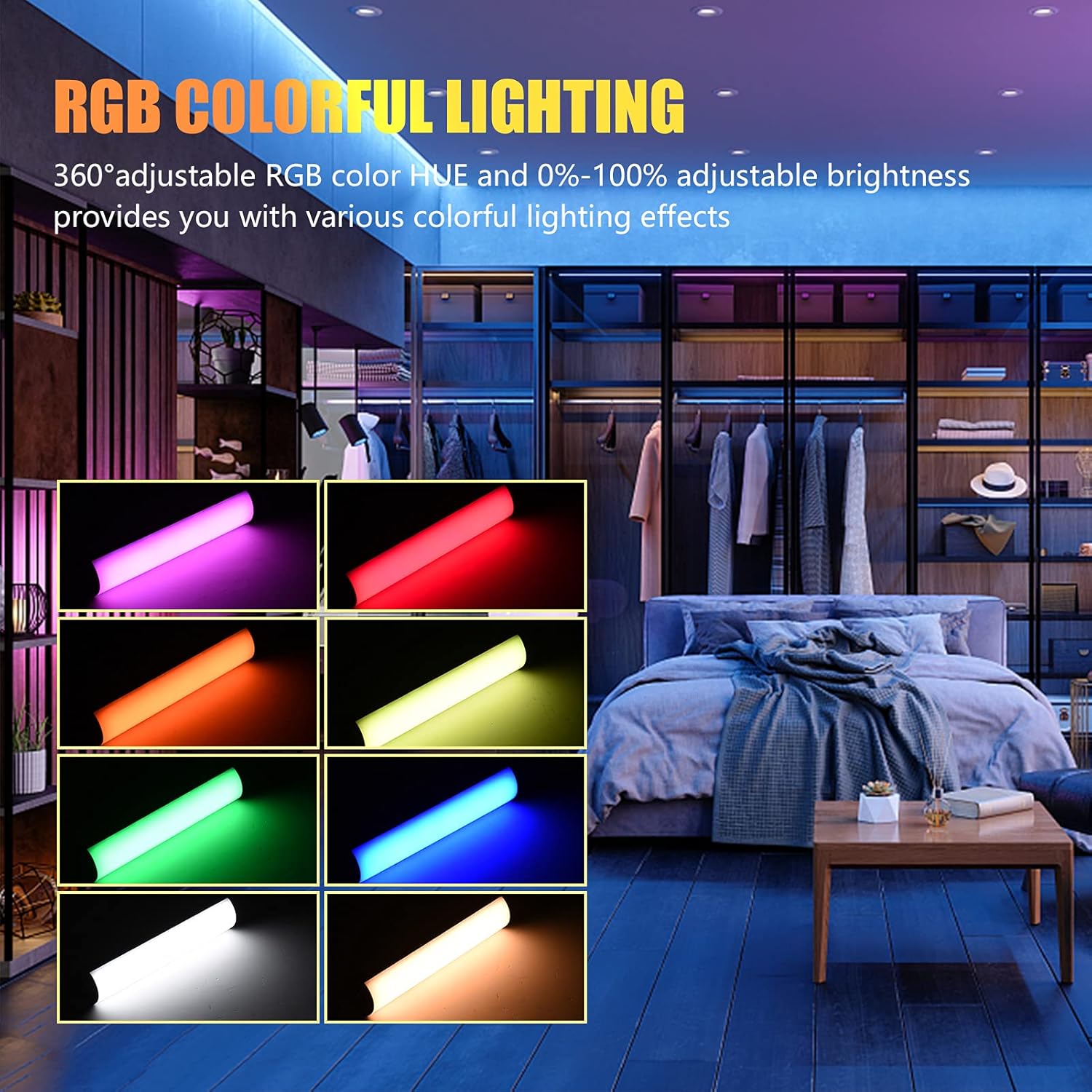
Image: The Andoer W200RGB LED Video Light demonstrating its RGB colorful lighting capabilities, showing different hues and brightness levels.

Image: Several Andoer W200RGB LED Video Lights illuminated in various solid RGB colors, showcasing the rod-shaped design.
4.5 Scene Mode Operation (Special Effects)
In Scene mode, you can select from 20 pre-programmed special lighting effects.
- Use the Up/Down buttons (▲/▼) to cycle through the 20 special effects.
- Some effects may have adjustable parameters (e.g., speed or intensity), which can be adjusted by short pressing the Power button and then using the Up/Down buttons.

Image: A visual guide to the 20 dynamic scene light effects, such as police car, ambulance, fireworks, TV, candle, party, strobe, and various color flashes.
4.6 Using the Magnetic Back
The Andoer W200RGB LED Video Light features built-in magnets at both ends, allowing it to be easily attached to metallic surfaces for flexible lighting setups.
- Simply place either end of the light onto a suitable magnetic surface.
- Ensure the surface is stable and can support the weight of the light.

Image: The Andoer W200RGB LED Video Light highlighting its magnetic ends, demonstrating how it can be attached to metal surfaces.
4.7 실제 적용 사례

Image: A comparison of scenes before and after using the Andoer W200RGB LED Video Light, illustrating its effectiveness in enhancing illumination for various activities.
5. 유지관리
5.1 청소
- 청소하기 전에 기기의 전원을 끄고 모든 전원에서 분리하세요.
- 부드럽고 마른 천으로 조명 표면을 닦으세요.
- 완고한 먼지에는 약간 damp천에 물을 묻혀 닦아주세요. 강한 화학 물질, 용제 또는 연마성 세제는 사용하지 마세요.
- Do not allow water or liquids to enter the device.
5.2 보관
- 조명은 직사광선과 극한의 온도를 피해 서늘하고 건조한 곳에 보관하세요.
- 장기간 보관할 경우, 배터리 수명 유지를 위해 3개월마다 배터리를 약 50%까지 충전하십시오.
5.3 배터리 관리
- 배터리를 자주 완전히 방전시키지 마세요.
- 배터리를 고온에 노출시키거나 구멍을 뚫지 마십시오.
- If the battery shows signs of swelling or leakage, discontinue use immediately and dispose of it properly according to local regulations.
6. 문제 해결
If you encounter any issues with your Andoer W200RGB LED Video Light, please refer to the following common problems and solutions:
- 표시등이 켜지지 않음:
- Ensure the battery is charged. Connect the light to a power source using the USB Type-C cable.
- 전원 버튼을 짧게 누르는 것이 아니라 몇 초 동안 길게 눌러주세요.
- Light flickers or output is unstable:
- Check the battery level; low battery can cause unstable performance. Recharge if necessary.
- Ensure the light is not exposed to extreme temperatures.
- Cannot change modes or adjust parameters:
- Ensure you are pressing the correct buttons (Mode button for mode changes, Power button to cycle through adjustable parameters within a mode, Up/Down buttons for value adjustment).
- 장치를 껐다가 다시 켜서 다시 시작하십시오.
- 배터리가 충전되지 않음:
- Verify the USB Type-C cable is securely connected to both the light and the power source.
- 결함이 있는 액세서리를 배제하기 위해 다른 USB 케이블이나 전원 어댑터를 사용해 보세요.
- 전원이 정상적으로 작동하는지 확인하십시오.
이러한 해결 방법을 시도한 후에도 문제가 지속되면 고객 지원팀에 문의하여 추가 지원을 받으세요.
7. 사양
| 특징 | 사양 |
|---|---|
| 상표 | 안도어 |
| 모델 | W200RGB |
| LED 비즈 | 69pcs White + 69pcs Yellow + 46pcs RGB |
| 색온도 | 2500K-9000K |
| CRI(연색지수) | 95+ |
| 최대 출력 전력 | 7W |
| 광속 | 800Lux / 0.3m |
| 빔 각도 | 120° |
| 배터리 유형 | 내장 3.7V 3000mAh 리튬 배터리 |
| 충전 포트 | USB 타입-C |
| 품목 크기 | 20 x 4 x 3.5cm(7.9 x 1.6 x 1.4인치) |
| 품목 무게 | 11.3온스(약 320g) |
| Tripod (folded length) | 7.5cm (use height 4.5cm) |
| 모델 번호 (ASIN) | QEX6686347803069PL (B09F8RLMSY) |
8. 안전 정보
경고:
If you find the product damaged, deformed, or exhibiting abnormal performance, please stop using it immediately and contact us.
Always handle the device with care. Do not disassemble or modify the product. Keep out of reach of children.
9. 보증 및 지원
Andoer products are designed for reliability and performance. This product is covered by a standard manufacturer's warranty against defects in materials and workmanship. For specific warranty terms and conditions, please refer to the documentation provided at the time of purchase or contact your retailer.
For technical support, troubleshooting assistance, or warranty claims, please contact Andoer customer service through the retailer's platform or the official Andoer web사이트입니다. 고객 지원팀에 문의하실 때는 제품 모델명과 구매 정보를 준비해 주시기 바랍니다.
방문하세요 Andoer Store on Amazon 더 많은 정보와 제품을 확인하세요.