
소개
This manual provides detailed instructions for the setup, operation, and maintenance of your ABKO Hacker KN01 Electro-Capacitive RGB PBT Keyboard. Please read this manual thoroughly before using the product to ensure proper functionality and longevity.
The ABKO Hacker KN01 is a high-performance gaming keyboard featuring electro-capacitive non-contact switches, full RGB LED effects, and durable PBT dual-injection keycaps. It is designed for optimal gaming experience with features like full N-key rollover and a 1000Hz polling rate.

Image: The ABKO Hacker KN01 keyboard in white, showcasinRGB 조명 기능을 갖추고 있습니다.
설정
- 짐 풀기: 키보드와 모든 액세서리를 포장에서 조심스럽게 꺼내십시오. 모든 구성품이 있는지 확인하십시오.
- 연결: Connect the provided USB Type-C cable to the keyboard's port and the other end to an available USB port on your computer.
- 드라이버 설치: The keyboard is typically plug-and-play. For advanced customization and software features, download the official software from the ABKO web대지.
- 초기 테스트: After connecting, the keyboard's RGB lighting should illuminate. Test basic key functions to ensure proper operation.
작동 지침
The KN01 keyboard offers various functions and customization options. Below are key operating instructions:
주요 기능 이상view
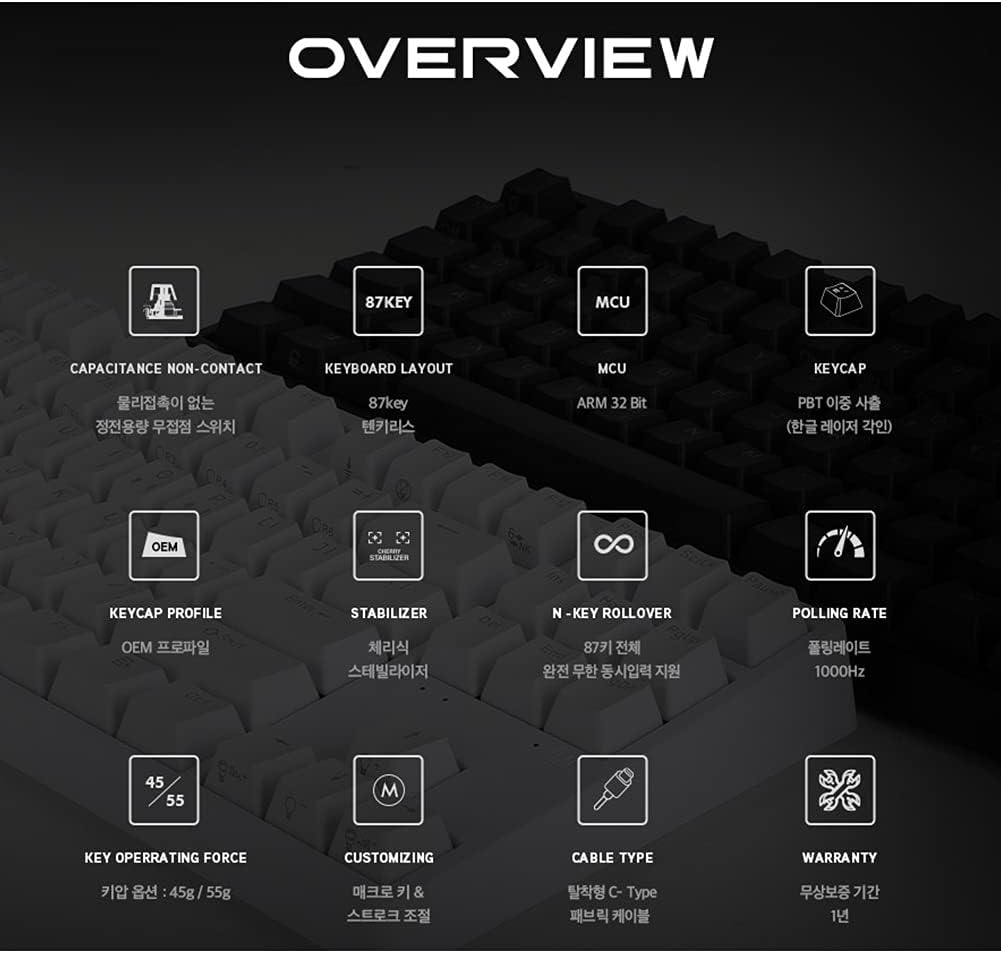
이미지: 오버view diagram detailing the technical specifications and features of the ABKO Hacker KN01 keyboard.
- Capacitance Non-Contact Switches: Provides a responsive and durable typing experience.
- 87키 레이아웃: A compact layout without a numeric keypad.
- MCU : Equipped with an ARM 32-bit Microcontroller Unit for efficient processing.
- PBT Dual Injection Keycaps: 퇴색되지 않는 레전드가 새겨진 내구성 있는 키캡입니다.
- N 키 롤오버: Supports full N-key rollover, allowing all keys to be registered simultaneously.
- 1000Hz 폴링 속도: Ensures rapid response times for gaming.
- 분리형 USB Type-C 케이블: 간편한 연결과 휴대성을 위해.
RGB LED Effects
The keyboard features full RGB LED effects. Specific lighting modes and customization options can be accessed through the dedicated software or by using FN key combinations. Refer to the software interface for detailed control over lighting patterns, brightness, and speed.
Adjusting Key Stroke
The key stroke length can be adjusted to suit your preference. Press FN + F9 to cycle through different key stroke settings. This feature allows for fine-tuning the actuation point of the electro-capacitive switches.
키 잠금 기능
The keyboard includes a key lock function to prevent accidental presses during critical moments, especially in gaming. Consult the software or specific FN key combinations for activating and deactivating this feature.
표시등

이미지: 클로즈업 view of the keyboard highlighting the Caps Lock, Scroll Lock, and Win Lock indicator lights, which are simple white LEDs.
The indicator lights for 캡스락, 스크롤 잠금, 그리고 승리 잠금 are located above the arrow keys. These indicators use simple white LEDs for a clean and minimalist design.
유지
- 청소: The ABKO Hacker KN01 keyboard is IP68 certified for full waterproofing. To clean, you can gently rinse the keyboard under running water (ensure USB cable is disconnected) or wipe it with a damp cloth. Allow it to dry completely before reconnecting.
- 일반 관리 : Avoid exposing the keyboard to extreme temperatures, direct sunlight, or harsh chemicals. Do not attempt to disassemble the keyboard, as this may void the warranty.
- 케이블 관리 : Ensure the USB cable is not bent or kinked excessively to prevent damage.
문제 해결
- 키보드가 응답하지 않음:
- USB 케이블이 키보드와 컴퓨터에 모두 단단히 연결되어 있는지 확인하세요.
- 키보드를 다른 USB 포트에 연결해보세요.
- 컴퓨터를 다시 시작하세요.
- USB 허브를 사용하는 경우 컴퓨터에 직접 연결해보세요.
- LED Lights Not Working/Incorrect:
- Check the keyboard software for lighting settings.
- Ensure no FN key combinations have turned off or changed the lighting.
- Reinstall the keyboard software if necessary.
- 키가 등록되지 않음:
- Clean the affected key area, as debris might be interfering with the switch.
- 키 잠금 기능이 활성화되어 있지 않은지 확인하십시오.
- Test the keyboard on another computer to rule out software or system issues.
If you continue to experience issues, please refer to the Warranty & Support section for further assistance.
명세서
| 특징 | 설명 |
|---|---|
| 모델 | KN01 |
| 키보드 유형 | 노름 |
| 스위치 유형 | Electro-Capacitive Non-Contact (45g actuation force) |
| 키 카운트 | 104 |
| 키캡 | PBT Dual Injection |
| 폴링 속도 | 1000Hz |
| MCU | ARM 32비트 |
| 연결성 | 분리형 USB Type-C |
| 방수 등급 | IP68 인증 |
| 색상 | 하얀색 |
| 손의 방향 | 양손잡이 |
| 호환성 | CherryMX compatible (switches) |
보증 및 지원
The ABKO Hacker KN01 keyboard comes with a 1년 보증 구매일로부터 제조상의 결함에 대한 보증을 제공합니다. 보증 청구를 위해 구매 증빙 서류를 보관해 주세요.
For technical support, warranty inquiries, or further assistance, please contact ABKO customer service through their official website or the retailer where the product was purchased. Provide your product model (KN01) and a detailed description of the issue when seeking support.
For the latest drivers and software, please visit the official ABKO web대지.