
소개
The Keychron Q2 is a fully customizable wired mechanical keyboard featuring a compact 65% layout. Constructed with a solid full aluminum frame, the Q2 is designed for easy assembly and offers a premium typing experience. It supports full QMK and VIA programming for extensive customization and features hot-swappable switches for personalized tactile feedback.

Image: The Keychron Q2 Wired Custom Mechanical Keyboard, showcasing its compact 65% layout and blue color scheme.
설치 가이드
1. 패키지 내용
시작하기 전에 모든 구성 요소가 있는지 확인하세요.
- Keychron Q2 Keyboard Kit (Aluminum Case, PCB, Steel Plate, Sound Absorbing Foam, Case Foam, Gaskets)
- USB Type-C to Type-C 케이블
- USB Type-A-Type-C 어댑터
- 스위치 풀러
- 키캡 풀러
- 드라이버
- 육각 키
- Stabilizers (4 sets)
Note: All tools are typically located at the bottom of the packaging.

Image: Diagram illustrating the contents of the Keychron Q2 package, including the keyboard, cables, and tools.
2. 키보드 연결
- Locate the USB Type-C port on the back of the Keychron Q2 keyboard.
- Connect one end of the provided USB Type-C to Type-C cable to the keyboard.
- Connect the other end of the cable to your computer's USB Type-C port. If your computer only has USB Type-A ports, use the included USB Type-A to Type-C adapter.
- Ensure the operating system switch (located on the back edge of the keyboard) is set to the correct position for your system (Mac or Windows).
- 키보드는 운영 체제에서 자동으로 인식됩니다.

이미지: 클로즈업 view of the Keychron Q2 keyboard with a USB-C cable connected, showing the Mac/Win switch.
작동 지침
1. QMK/VIA 맞춤형
The Keychron Q2 supports full QMK and VIA programming, allowing you to remap keys, create macros, and customize lighting effects. To use VIA software:
- Keychron 공식 웹사이트에서 VIA 소프트웨어를 다운로드하세요. web사이트 (keychron.com/pages/qmk-via).
- Connect your Q2 keyboard to your computer via the USB cable.
- Launch the VIA software. The software should automatically detect your Q2 keyboard. If not, you may need to import the Q2 keymap JSON file, also available on the Keychron web대지.
- Use the graphical interface to drag and drop functions, assign macros, and configure lighting for each key. Changes are applied in real-time.

Image: Screenshot of the VIA software interface, demonstrating how to remap keys on the Keychron Q2 keyboard.
2. 핫스왑 가능 스위치
The Q2's PCB supports both 3-pin and 5-pin MX style mechanical switches, allowing for easy switch replacement without soldering.
- 제공된 키캡 풀러를 사용하여 교체하려는 스위치에서 키캡을 조심스럽게 제거하십시오.
- Use the provided switch puller to gently grip the top and bottom clips of the switch. Pull the switch straight up to remove it from the PCB.
- 새 스위치의 핀을 PCB의 구멍에 맞추세요. 핀이 구부러지지 않도록 똑바로 놓으세요.
- 새 스위치를 딸깍 소리가 날 때까지 단단히 눌러 넣으세요.
- 키캡을 다시 부착하세요.

이미지: 클로즈업 view of the Keychron Q2's PCB with several switches removed, demonstrating the hot-swappable feature.
3. Keycaps and RGB Lighting
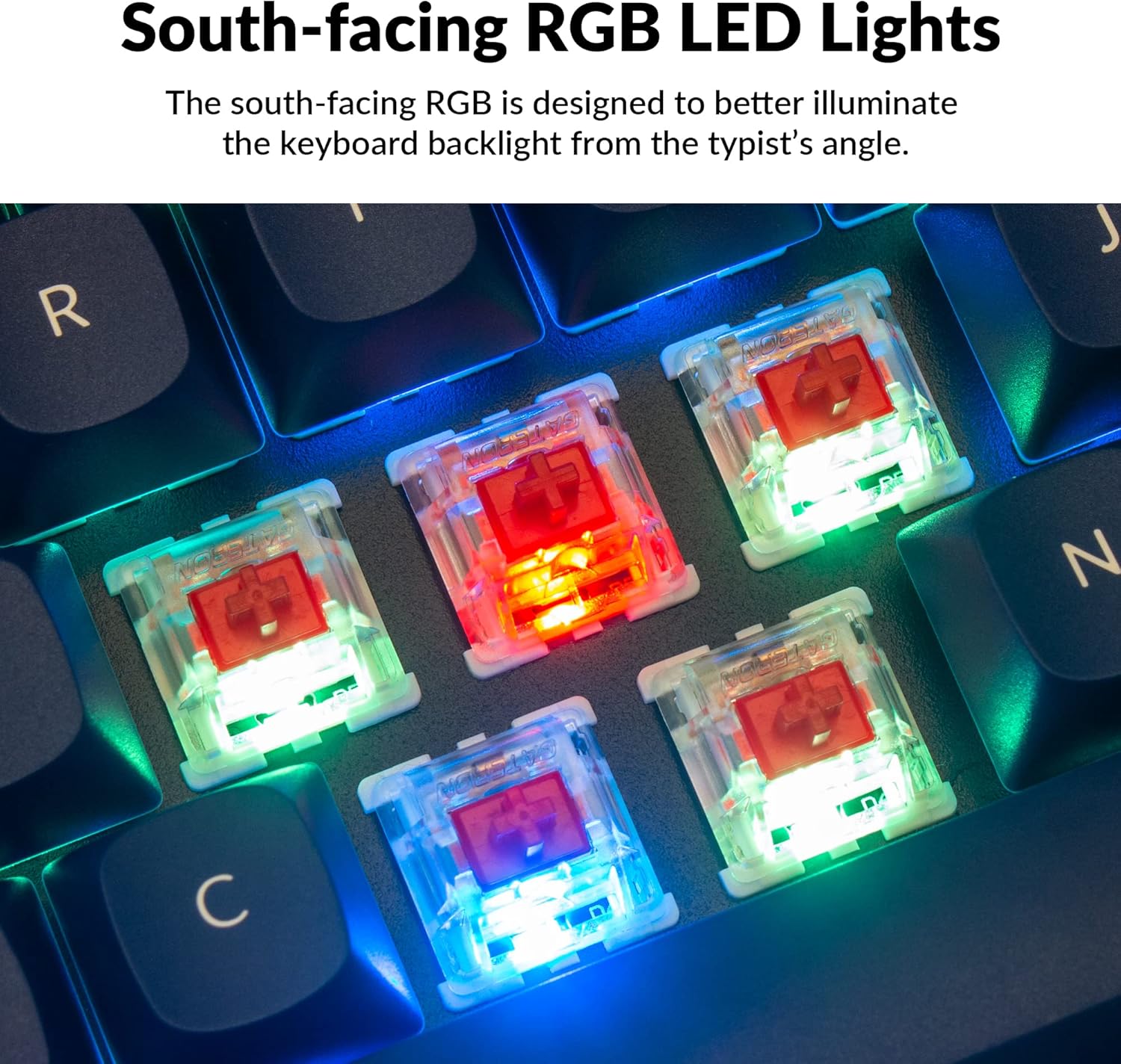
The Q2 comes with premium non-shine-through PBT keycaps, known for their durability and oil resistance. The keyboard features south-facing RGB LEDs, designed to provide better illumination of the backlight from the typist's perspective.
이미지: 자세한 view of the Keychron Q2's double-shot PBT keycaps, highlighting their texture and legends.

Image: A close-up of the Keychron Q2's south-facing RGB LEDs illuminating the switches from below.
유지
1. 키보드 청소
정기적으로 청소하면 키보드의 성능과 외관을 유지하는 데 도움이 됩니다.
- 먼지 제거: 압축 공기 캔을 사용하여 키캡 사이의 먼지와 이물질을 불어냅니다.
- 키캡 청소: For deeper cleaning, remove the keycaps using the provided keycap puller. Wash them with mild soap and water, then ensure they are completely dry before reattaching.
- 케이스 청소: 알루미늄 케이스를 부드러운 천으로 닦으세요.amp 천. 마감을 손상시킬 수 있는 강한 화학 물질은 피하세요.
2. Switch and Stabilizer Maintenance
The hot-swappable design allows for easy maintenance of switches and stabilizers.
- 스위치 교체: If a switch becomes faulty, replace it using the hot-swapping procedure described in the Operating Instructions.
- 안정제 윤활: For optimal performance and reduced wobbliness on larger keys (space bar, shift, enter), the PCB-mounted screw-in stabilizers can be lubricated. This typically involves disassembling the keyboard to access the stabilizers.

Image: An exploded diagram of the Keychron Q2, showing its various components like keycaps, switches, top case, gaskets, plate, PCB, sound absorbing foam, case foam, bottom case, and silicone gaskets, illustrating ease of disassembly.
문제 해결
일반적인 문제 및 해결책:
- 키보드가 응답하지 않음:
- USB 케이블이 키보드와 컴퓨터에 모두 단단히 연결되어 있는지 확인하세요.
- Verify the Mac/Windows switch on the back of the keyboard is set to the correct operating system.
- Try connecting the keyboard to a different USB port or a different computer to rule out port issues.
- 컴퓨터를 다시 시작하세요.
- 작동하지 않는 특정 키:
- Remove the keycap and switch for the non-functional key. Inspect the switch pins for bends or damage. Straighten bent pins carefully or replace the switch if damaged.
- 스위치가 PCB에 완전히 고정되었는지 확인하세요.
- Check VIA software to ensure the key has not been accidentally remapped or disabled.
- RGB 조명 문제:
- 키보드가 제대로 연결되어 있는지 확인하세요.
- Use the VIA software to check and adjust lighting settings.
- Perform a factory reset if lighting issues persist (refer to Keychron's official support for specific reset procedures).
- Keyboard Disconnecting Randomly:
- 다른 USB 케이블을 사용해 보세요.
- Ensure the USB port on your computer is stable and providing sufficient power.
- 컴퓨터의 USB 드라이버를 업데이트하세요.
If you encounter issues not covered here, please refer to the official Keychron support resources.
명세서
| 특징 | 세부 사항 |
|---|---|
| 상표 | 키크론 |
| 모델명 | Q2 |
| 모델 번호 | Q2-J1 |
| 키보드 레이아웃 | 65% (68 Keys), QWERTY |
| 연결 기술 | 유선(USB-A, USB-C) |
| 호환 장치 | PC (Linux, MacOS, Windows) |
| 스위치 유형 | Gateron G Pro Red (Linear), Hot-swappable |
| 백라이트 | RGB(남향) |
| 재료 | Full Aluminum Frame, PBT Keycaps |
| 제품 치수 | 12.89인치 길이 x 4.76인치 너비 x 1.33인치 높이 |
| 특별 기능 | QMK/VIA Programmable, Double Gasket Design |
보증 정보
Keychron products typically come with a standard manufacturer's warranty. For detailed information regarding the warranty period, coverage, and terms and conditions for your Keychron Q2 keyboard, please refer to the official Keychron web사이트 또는 제품에 포함된 보증서를 확인하세요. 보증 청구를 위해 구매 증빙 자료를 보관하세요.
지원 및 리소스
For further assistance, software downloads (VIA), firmware updates, and frequently asked questions, please visit the official Keychron support page:
- 키크론 공식 Web대지: www.keychron.com
- QMK/VIA Software & Firmware: www.keychron.com/pages/qmk-via
- Keychron Store: 아마존에서 Keychron 스토어를 방문하세요.
You can also find community forums and additional user guides online for advanced customization and troubleshooting tips.