
1. 서론
This manual provides detailed instructions for the installation, configuration, and operation of your ASUS TUF-AX5400 Dual Band WiFi 6 Gaming Router. Designed for high-performance networking, this router incorporates advanced features such as WiFi 6 (802.11ax) technology, AiMesh support, and dedicated gaming functionalities to enhance your internet experience. Please read this manual thoroughly before using the device.
2. 안전 정보
- Place the router in a well-ventilated area, away from direct sunlight, heat sources, and moisture.
- Use only the power adapter supplied with the device. Using unauthorized adapters may damage the router and void your warranty.
- 라우터 c를 열지 마세요asing. Servicing should only be performed by authorized personnel.
- 기기를 어린이의 손이 닿지 않는 곳에 보관하세요.
- 기기의 전원을 켜기 전에 모든 케이블이 제대로 연결되어 있는지 확인하십시오.
3. 패키지 내용
패키지에 다음 품목이 포함되어 있는지 확인하십시오.
- ASUS TUF-AX5400 WiFi 6 Gaming Router
- 전원 어댑터
- 이더넷 케이블(RJ-45)
- 빠른 시작 가이드
- 보증 카드
품목이 누락되었거나 손상된 경우 판매점에 문의하세요.
4. 신체적 이상view
Familiarize yourself with the ports and indicators on your ASUS TUF-AX5400 router.

영상: 뒤쪽 view of the ASUS TUF-AX5400 router, highlighting its connectivity options. From left to right, the image shows the power port, power switch, USB 3.1 Gen1 port, four LAN ports (one labeled 'Gaming port'), a WPS button, a WAN port, and a reset button. Six fixed antennas are also visible, along with metal port protectors for enhanced durability.
- 전원 포트: 전원 어댑터에 연결합니다.
- 전원 스위치: 라우터를 켜거나 끕니다.
- USB 3.1 Gen 1 포트: USB 저장 장치나 4G/5G 동글을 연결하는 데 사용됩니다.
- LAN 포트(1-4): Connect wired devices such as computers, gaming consoles, or network-attached storage (NAS). LAN 1 is a dedicated Gaming Port.
- WPS 버튼: WPS 호환 장치를 빠르고 쉽게 연결합니다.
- WAN 포트: 모뎀 또는 인터넷 서비스 제공업체(ISP)의 장치에 연결됩니다.
- 재설정 버튼: 5~10초 동안 길게 누르면 공장 초기 설정으로 복원됩니다.
- 안테나 : Six fixed antennas for optimal wireless signal coverage.
5. 설정
5.1 하드웨어 연결
- 라우터 위치 지정: Place the router in a central location to maximize WiFi coverage.
- 안테나 연결: Ensure all six antennas are securely attached and oriented vertically for best performance.
- 모뎀에 연결: Connect one end of the provided Ethernet cable to the WAN port of the TUF-AX5400 router and the other end to your modem's LAN port.
- 전원 켜기: Connect the power adapter to the router's power port and plug it into an electrical outlet. Press the power switch to turn on the router.
- 지표를 기다리세요: Allow a few minutes for the router to boot up. The Power, 2.4GHz, 5GHz, and WAN LED indicators should illuminate.
5.2 초기 구성
라우터는 다음 방법을 통해 설정할 수 있습니다. web 웹 브라우저 또는 ASUS 라우터 앱을 사용하세요.
를 사용하여 Web 브라우저:
- 라우터에 연결: Connect your computer to the router via an Ethernet cable (to any LAN port) or wirelessly using the default WiFi network name (SSID) and password found on the router's label.
- 입장 Web 인터페이스: 열기 web 브라우저로 이동하여 탐색하세요
router.asus.comor192.168.50.1. - 설치 마법사를 따르세요: The ASUS Setup Wizard will guide you through the initial configuration steps, including setting up your internet connection, WiFi network name (SSID), and password, and creating an administrator username and password for the router.
ASUS 라우터 앱 사용 방법:
- 앱 다운로드 : Download the ASUS Router app from your mobile device's app store.
- 라우터에 연결: Connect your mobile device to the router's default WiFi network.
- 앱 실행: Open the ASUS Router app and follow the on-screen instructions to set up your router.
6. 사용 설명서
6.1 WiFi 6 (802.11ax) Features
The TUF-AX5400 leverages WiFi 6 technology to deliver enhanced performance and efficiency.

영상: An infographic detailing the advantages of WiFi 6 (802.11ax) technology. Key features highlighted are OFDMA, TWT (Target Wake Time), MU-MIMO, and 160MHz channels. It also shows improvements such as 4X efficiency for multi-devices, 2X WiFi speed, 7X battery life for client devices, and an 80% increase in WiFi range, with speeds up to 5400Mbps.
- OFDMA(직교 주파수 분할 다중 접속): Improves network efficiency, especially in high-density environments, by allowing multiple devices to share a single channel simultaneously.
- MU-MIMO(다중 사용자, 다중 입력, 다중 출력): Enables the router to communicate with multiple devices simultaneously, increasing overall network capacity and speed.
- 160MHz 채널: Provides wider bandwidth for compatible devices, resulting in significantly faster wireless speeds.
- 목표 기상 시간(TWT): Reduces power consumption for connected devices by scheduling when they need to transmit or receive data.
6.2 게임 기능
The TUF-AX5400 is optimized for gaming performance.

영상: A visual representation of the router's three gaming optimization modes. It depicts a user playing on a PC with a 'Dedicated Gaming Port' label, another user playing on a mobile device with a 'Mobile Game Mode' label, and a console controller with an 'Open NAT' label, illustrating how the router optimizes for various gaming scenarios.
- Dedicated Gaming Port: Connect your gaming PC or console to the dedicated LAN port to automatically prioritize its network traffic, ensuring lower latency and stable connections during gameplay.
- 모바일 게임 모드: Activate this mode via the ASUS Router app to prioritize mobile gaming traffic, reducing lag for smartphone and tablet games.
- Open NAT (Network Address Translation): Simplifies port forwarding for online gaming, allowing for easier setup of game servers and improved connectivity for multiplayer games. This feature can be configured in the router's web 인터페이스.
6.3 AiMesh 지원
Create a seamless whole-home mesh WiFi system with AiMesh-compatible routers.
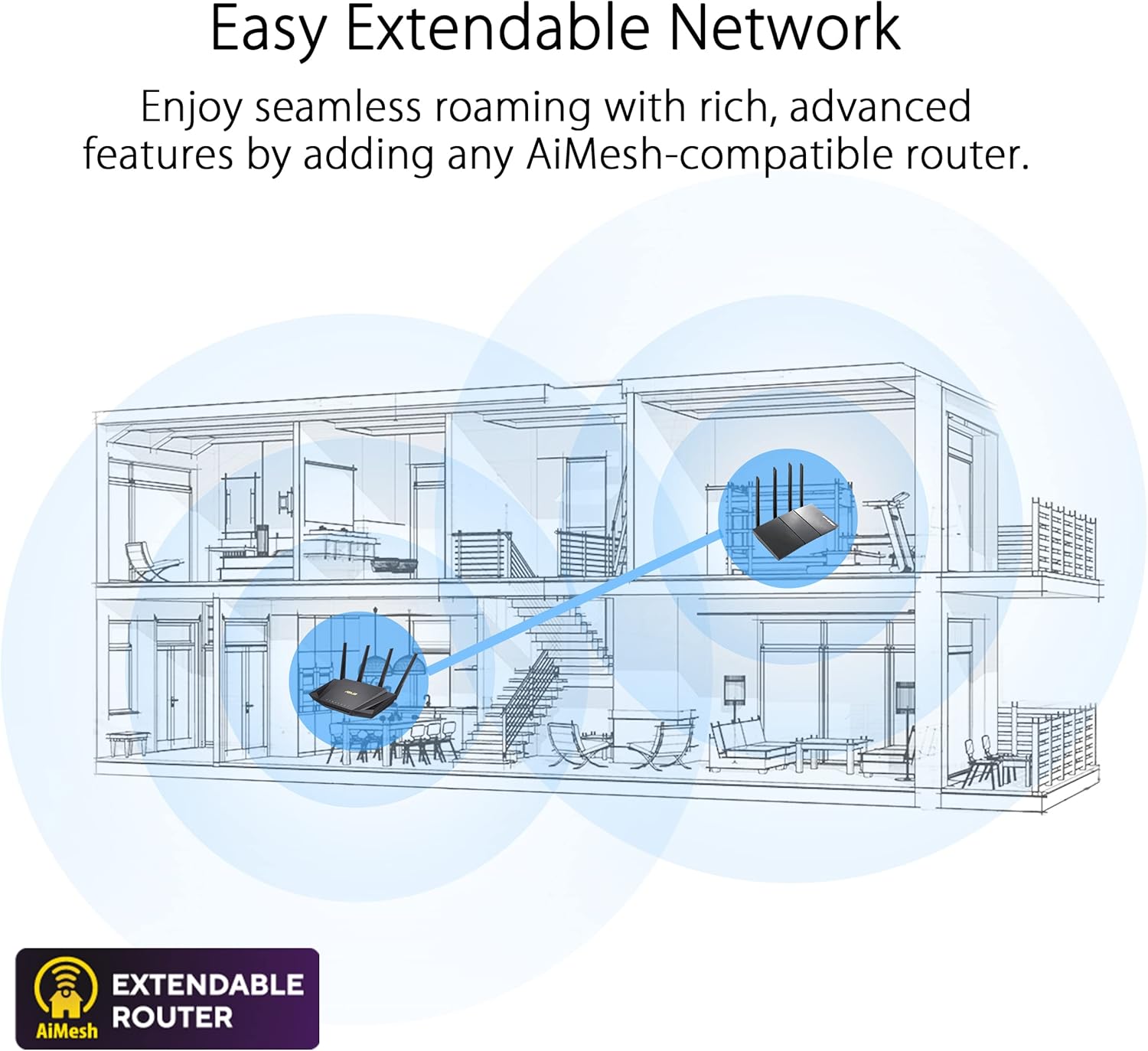
영상: A diagram illustrating an 'Easy Extendable Network' using ASUS AiMesh technology. It shows a multi-story house with a main router on the ground floor and an AiMesh-compatible router on the upper floor, working together to provide seamless WiFi coverage across the entire home, eliminating dead zones.
AiMesh allows you to combine multiple ASUS routers into a single, unified WiFi network, providing extended coverage and eliminating WiFi dead zones. Your devices will automatically switch to the strongest signal as you move around your home.
6.4 Advanced Parental Controls
가족 구성원의 인터넷 사용을 관리하고 모니터링합니다.

영상: A visual representation of 'Advanced Parental Controls' for WiFi management. The image shows a child using a smartphone under a blanket, while an overlay highlights features like 'Timing' (setting internet access schedules), 'Filtering' (blocking inappropriate content), and 'Scheduling' (managing device online times).
Access these features through the router's web interface or the ASUS Router app to set time limits, filter content, and schedule internet access for specific devices.
6.5 액세스 포인트(AP) 모드
The TUF-AX5400 can function as an Access Point, extending an existing wired network with wireless capabilities. In AP mode, the router disables its NAT functions and acts as a switch and wireless access point.
7. 유지관리
- 펌웨어 업데이트: Regularly check for and install firmware updates via the router's web interface. Updates often include security patches, performance improvements, and new features.
- 정기 재부팅: Rebooting your router periodically (e.g., once a month) can help maintain optimal performance and resolve minor network issues.
- 청소: Use a soft, dry cloth to clean the router's exterior. Do not use liquid cleaners or solvents. Ensure ventilation openings are free from dust.
- 백업 구성: 주요 변경 사항이나 펌웨어 업데이트를 수행하기 전에 라우터의 구성 설정을 백업하는 것이 좋습니다.
8. 문제 해결
8.1 인터넷 연결 없음
- Check if the WAN LED indicator is lit. If not, ensure the Ethernet cable from your modem is securely connected to the router's WAN port.
- Reboot your modem and then your router. Wait for both devices to fully boot up.
- 라우터의 인터넷 연결 설정을 확인하세요. web interface. Contact your ISP if the issue persists.
8.2 Slow WiFi Speed
- Ensure your devices are WiFi 6 compatible to fully utilize the router's capabilities.
- 다른 전자 장치(예: 전자레인지, 무선 전화기)의 간섭이 있는지 확인하세요.
- Adjust router placement to minimize obstacles and maximize signal strength.
- 공유기의 펌웨어를 최신 버전으로 업데이트하세요.
8.3 라우터에 접속할 수 없음 Web 인터페이스
- 기기가 라우터에 연결되어 있는지 확인하십시오(유선 또는 무선).
- 브라우저 캐시를 지우거나 다른 브라우저를 사용해 보세요.
- 올바른 IP 주소를 사용하고 있는지 확인하세요(
router.asus.comor192.168.50.1). - If you forgot your login credentials, you may need to perform a factory reset (see Physical Overview for Reset Button location).
9. 사양
| 특징 | 사양 |
|---|---|
| 모델명 | TUF-AX5400 |
| 네트워크 표준 | IEEE 802.11a, IEEE 802.11b, IEEE 802.11g, WiFi 4 (802.11n), WiFi 5 (802.11ac), WiFi 6 (802.11ax), IPv4, IPv6 |
| AX Technology | 예 |
| 데이터 속도 | AX5400 ultimate AX performance: 574+4804 Mbps (up to 5400 Mbps total) |
| 안테나 | 외부 안테나 x 6 |
| 송신/수신 | 2.4 GHz 2 x 2, 5 GHz 4 x 4 |
| 프로세서 | 1.5 GHz tri-core processor |
| 메모리 | 256MB 플래시, 512MB RAM |
| Boosts Speed | OFDMA, Beamforming, 1024-QAM, 20/40/80/160 MHz bandwidth |
| 작동 주파수 | 2.4G Hz / 5 GHz |
| 포트 | RJ45 for Gigabits BaseT for WAN x 1, RJ45 for Gigabits BaseT for LAN x 4, USB 3.2 Gen 1 x 1 |
| 버튼 | WPS 버튼, 리셋 버튼, 전원 버튼 |
| LED 표시등 | Power x 1, 2.4GHz x 1, 5GHz x 1, WAN x 1, LAN x 4 |
| 제품 무게 | 600g |
| 제품 치수 | 29.7 x 33.5 x 6.8cm |
| 특별 기능 | Access Point Mode, AiMesh Support, AiProtection Pro |
10. 보증 및 지원
The ASUS TUF-AX5400 router comes with a manufacturer's warranty. Please refer to the warranty card included in your package for specific terms and conditions. For technical support, driver downloads, and further product information, please visit the official ASUS support web대지.
ASUS 지원 Web대지: www.asus.com/support/