
소개
This manual provides detailed instructions for the proper use and care of your Loluka Blue Wireless Over Ear Headphones. These headphones feature Bluetooth 5.1 for stable connectivity, IPX6 waterproofing for durability during activities, and noise-cancelling microphones for clear calls. Please read this manual thoroughly before using your headphones to ensure optimal performance and longevity.
1. 설정
1.1 상자 내용물
개봉 후 모든 구성품이 있는지 확인해 주세요.
- Loluka Wireless Earbuds
- 충전 케이스
- USB-C 충전 케이블
- Multiple Sizes of Silicone Ear Tips (S/M/L)
- Detachable Earhooks (2 pairs)
- 빠른 시작 가이드

이미지 설명: This image shows all items included in the product package: the Loluka headphones, charging case, USB-C charging cable, multiple sizes of silicone ear tips, detachable earhooks, and a quick start guide.
1.2 초기 충전
Before first use, fully charge the headphones and charging case. Connect the provided USB-C cable to the charging case and a power source. The indicator lights on the case will show charging status.
- Charging Time for Case: Approximately 1-2 hours.
- Earbud Playtime: Up to 6-7 hours on a single charge.
- 충전 케이스 사용 시 총 재생 시간: 최대 28시간.

이미지 설명: This visual highlights the extended battery life, showing the headphones provide 7 hours of use per charge, with the charging case offering an additional 3 full charges for a total of 28 hours of playback. A USB-C charging cable is also visible.
1.3 블루투스 페어링
- 헤드폰이 충전되어 있는지 확인하십시오.
- 충전 케이스를 여세요. 이어버드가 자동으로 켜지고 페어링 모드로 진입합니다.
- 기기(스마트폰, 태블릿 등)에서 Bluetooth를 활성화하고 사용 가능한 기기를 검색하세요.
- Select "MS-T20" from the list to connect. Once connected, a voice prompt will confirm successful pairing.

이미지 설명: The image displays the automatic pairing process, where the headphones (identified as 'MS-T20') connect to a mobile device via Bluetooth, simplifying initial setup.
1.4 헤드폰 착용하기
The headphones are designed for comfort and stability, featuring detachable earhooks and various ear tip sizes.
- 귀 팁: Choose the silicone ear tips (S/M/L) that provide the best seal and comfort for your ears. A good seal enhances sound quality and noise isolation.
- Detachable Earhooks: For secure fit during intense activities like sports or workouts, attach the earhooks. For casual listening, the earhooks can be removed.

이미지 설명: This image illustrates the versatility of the headphones, demonstrating how the detachable earhooks can be used for secure fit during activities like fitness, cycling, and running, or removed for a more casual listening experience.

이미지 설명: A person is shown wearing the Loluka headphones, illustrating their ergonomic design and comfortable fit around the ear, suitable for extended wear.
2. 사용 설명서
2.1 전원 켜기/끄기
- 전원 켜기: Open the charging case, and the earbuds will automatically power on. Alternatively, press and hold the touch control area on either earbud for 2 seconds.
- 전원 끄기 : Place the earbuds back into the charging case and close the lid. Alternatively, press and hold the touch control area on either earbud for 5 seconds.
2.2 터치 컨트롤
The headphones feature intuitive touch controls on each earbud. Refer to the diagram below for specific functions:
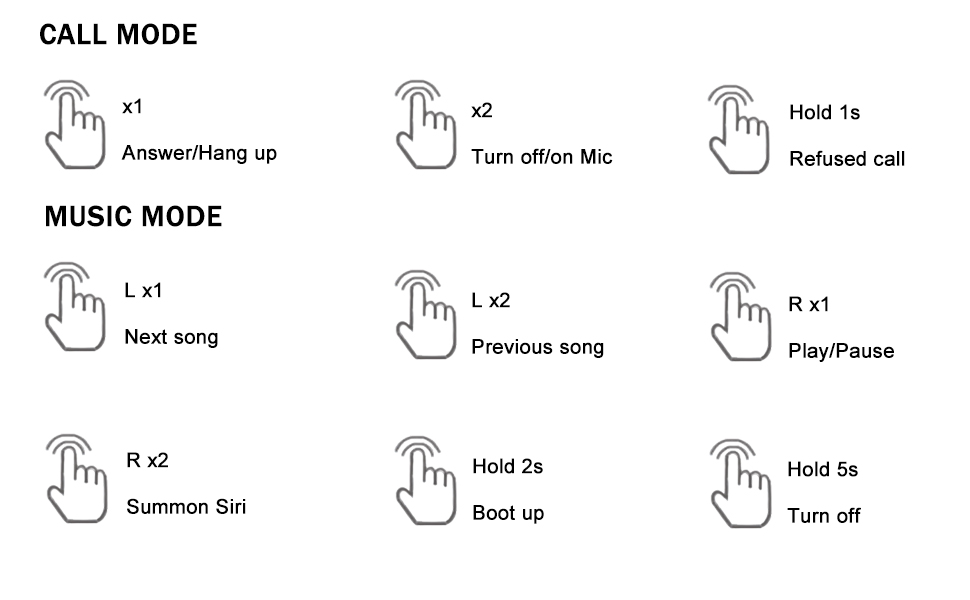
이미지 설명: A detailed diagram outlining the touch control functions for the headphones, including single, double, and long presses for answering calls, controlling music playback, and activating voice assistants.
- 전화 받기/끊기: Single tap (x1) on either earbud.
- 전화 거부: 이어버드 중 하나를 1초 동안 길게 누르세요.
- Turn On/Off Mic: Double tap (x2) on either earbud during a call.
- 음악 재생/일시 중지: Single tap (R x1) on the right earbud.
- 다음 노래: Single tap (L x1) on the left earbud.
- 이전 노래: Double tap (L x2) on the left earbud.
- Summon Voice Assistant (Siri, Google Assistant, etc.): Double tap (R x2) on the right earbud.
3. 유지관리
3.1 청소
정기적인 청소는 음질과 위생을 유지하는 데 도움이 됩니다.
- 부드럽고 마른 보푸라기 없는 천으로 이어버드와 충전 케이스를 조심스럽게 닦으세요.
- 이어팁을 제거하고 순한 비누와 물로 세척한 후 완전히 말린 후 다시 부착하세요.
- 연마재, 알코올, 화학 세척제 사용은 피하세요.
3.2 방수 등급(IPX6)
The headphones are rated IPX6 waterproof, meaning they are protected against high-pressure water jets from any direction. This makes them suitable for workouts and use in rainy conditions.
- 헤드폰을 물에 담그지 마십시오.
- 충전하기 전에 충전 포트가 건조한지 확인하십시오.
- 충전 케이스는 방수가 아닙니다.

이미지 설명: The image depicts the headphones and case with water splashes, emphasizing their IPX6 waterproof rating, which protects them from sweat and rain.
3.3 보관
When not in use, store the headphones in their charging case to protect them from dust, damage, and to keep them charged.
4. 문제 해결
헤드폰 사용에 문제가 발생하면 다음의 일반적인 해결 방법을 참조하십시오.
- 소리 또는 연결 문제 없음:
1. 두 개의 이어버드가 모두 충전되어 있는지 확인하세요.
2. Turn off and then turn on Bluetooth on your device.
3. Delete "MS-T20" from your device's Bluetooth list and re-pair.
4. Ensure the earbuds are within the 10-meter Bluetooth range of your device. - 충전 문제:
1. Verify the USB-C cable is securely connected to both the charging case and the power source.
2. Ensure the charging contacts on the earbuds and inside the case are clean and free of debris.
3. Make sure the charging case itself has power. - 나쁜 음질:
1. Try different sizes of ear tips to ensure a proper seal in your ear canal.
2. Ensure the earbuds are correctly positioned in your ears.
3. Clean any earwax or debris from the ear tips and speaker mesh. - 버튼이 응답하지 않음:
1. Ensure you are pressing the correct touch control area.
2. Apply firm but not excessive pressure for touch commands.
5. 사양
| 특징 | 사양 |
|---|---|
| 모델명 | Loluka Earbuds with hook |
| 연결 기술 | 무선(블루투스) |
| 블루투스 버전 | 5.1 |
| 블루투스 범위 | 10 미터 |
| 방수 레벨 | IPX6 방수 |
| 배터리 수명(이어버드) | 6-7시간 |
| 총 배터리 수명(케이스 포함) | 28시간 |
| 충전 시간(케이스) | 1~2시간 (C형) |
| 오디오 드라이버 유형 | 동적 드라이버 |
| 소음 제어 | Sound Isolation (Environmental Noise Reduction for calls) |
| 제어 유형 | 터치, 음성 |
| 호환 장치 | Bluetooth-enabled smartphones, tablets, etc. |
| 품목 무게 | 2.71 온스 |
| 제품 치수 | 3.9 x 2.44 x 1.2 인치 |
6. 보증 및 지원
For warranty information and customer support, please refer to the documentation included with your purchase or contact Loluka customer service through the retailer where the product was purchased. Please retain your proof of purchase for warranty claims.