
JOYING 6GB+128GB
JOYING 10.1 Inch Android Car Stereo User Manual
Model: 6GB+128GB
소개
This manual provides comprehensive instructions for the installation, operation, maintenance, and troubleshooting of your JOYING 10.1 Inch Android Car Stereo. Please read this manual thoroughly before using the device to ensure proper functionality and safety.
The JOYING Android Car Stereo is an advanced in-dash navigation and entertainment system designed to enhance your driving experience. It features a high-resolution display, powerful processing capabilities, and seamless smartphone integration.

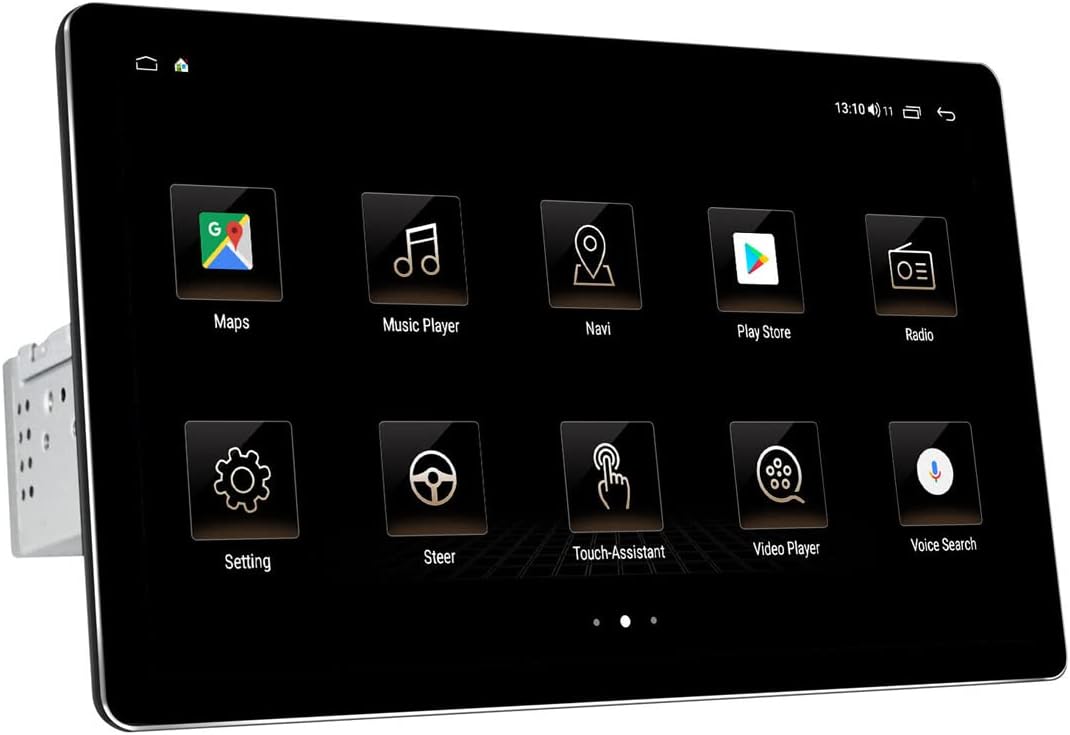
앞쪽 view of the JOYING 10.1 Inch Android Car Stereo.
설정 및 설치
Proper installation is crucial for the optimal performance of your car stereo. It is recommended to have the unit installed by a professional if you are unfamiliar with car audio wiring.
1. 패키지 구성품 및 크기
Before beginning, verify all components are present as listed in the package contents. Familiarize yourself with the unit's dimensions to ensure compatibility with your vehicle's dashboard.

Dimensions and included accessories for the JOYING car stereo.
2. Detachable Screen and Adjustable Mount
The unit features a detachable screen and an adjustable fixed mount. This design allows for flexible positioning to avoid obstructing air-conditioning vents or control switches during installation.

Illustration of the detachable screen and adjustable mounting system.
3. 배선 및 연결
Connect the main power harness, speaker wires, and other necessary cables to the corresponding ports on the back of the unit. Ensure all connections are secure. If your car has a CANbus system, an additional CANbus decoder harness may be required (sold separately).

상세한 view of the rear connections and ports on the car stereo.

Example of the wiring harness for connecting the stereo to the vehicle's electrical system.
4. SIM Card and WiFi Setup
The unit supports a built-in 4G module. Insert a SIM card for internet access. It also supports dual-band WiFi (2.4GHz and 5GHz) for stable network connectivity.

Instructions for inserting a SIM card into the unit's 4G module.
5. Initial Power-Up and Screen Attachment
After all connections are made, power on the unit. The first boot-up may take longer (approx. 30-40 seconds). Once the main unit is powered, attach the display screen to the main unit using the provided connectors.
Video demonstrating the physical dimensions, screen attachment, and initial setup of the JOYING 10.1 Inch Car Radio.
작동 지침
Your JOYING car stereo runs on Android 10 OS, providing a familiar and intuitive user interface.
1. 사용자 인터페이스 탐색
The 10.1-inch touchscreen allows for easy navigation through various applications and settings. The home screen provides quick access to frequently used functions like Maps, Music Player, and Radio.

Examples of the JOYING car stereo's user interface screens.
2. CarLink (Android Auto / CarPlay)
The unit features built-in Carlink, supporting both wired/wireless CarPlay (iOS 10.1 or later) and wired Android Auto (Android 7.0 or later). This allows for seamless integration of your smartphone for navigation, calls, and music, minimizing distractions while driving.

CarPlay interface displaying navigation and music simultaneously.

Explanation of Car-Smartphone Connectivity features.
3. 블루투스 5.1
With Bluetooth 5.1, the stereo supports audio streaming, automatic phone book transfer, and hands-free calling. Note that it primarily supports phone and OBD dongle connections.
4. Built-in DSP and Audio Settings
The unit features a built-in Digital Signal Processor (DSP) with a 32-band equalizer, allowing independent adjustment for front and rear speakers. This provides enhanced sound quality and customizable audio experiences, including bass reinforcement and filtering.
DSP interface for advanced audio customization.

Visual representation of the Built-in DSP capabilities.
5. Video Playback and Display Quality
The 1920x1200 resolution screen offers a high-definition viewing experience for videos and other media. The brightness adjusts to ensure clear visibility even in daylight.

Resolution comparison illustrating the superior clarity of the 1920x1200 display.
6. 스티어링 휠 제어
The unit supports factory steering wheel controls, allowing you to easily switch songs, radio channels, and adjust volume for a safer and more enjoyable journey.

Steering wheel control integration for convenient operation.
유지
JOYING 차량용 스테레오의 수명 연장 및 최적의 성능 유지를 위해 다음 유지 관리 지침을 따르십시오.
- 화면 청소: 부드럽고 보풀이 없는 천을 사용하여 터치스크린을 부드럽게 닦으세요. 잘 지워지지 않는 얼룩은 가볍게 닦아주세요.amp천에 물이나 화면에 안전한 세척제를 묻혀 닦아주세요. 연마재나 강한 화학 물질은 사용하지 마세요.
- 먼지 제거: Regularly use a soft brush or compressed air to remove dust from vents and connection ports to prevent overheating and maintain proper airflow.
- 소프트웨어 업데이트: 정기적으로 제조업체를 확인하십시오 website or the unit's settings for available software updates. Keeping the software updated can improve performance, add new features, and fix bugs.
- 환경 조건: 본 제품을 극한의 온도, 장시간 직사광선 또는 과도한 습기에 노출시키지 마십시오.
문제 해결
If you encounter issues with your JOYING car stereo, refer to the following common problems and their solutions:
| 문제 | 가능한 원인 | 해결책 |
|---|---|---|
| 장치의 전원이 켜지지 않습니다. | 배선 오류; 퓨즈 단선; 전원 공급 문제. | Check all power connections (yellow and red wires may need to be swapped if not powering on correctly). Inspect the fuse on the unit's wiring harness. Ensure stable power supply from the vehicle. |
| Poor sound quality or crackling microphone. | Improper audio settings; Loose speaker connections; External microphone interference. | Adjust DSP and equalizer settings. Ensure all speaker wires are securely connected. Check external microphone placement and connection; consider relocating it if experiencing excessive noise. |
| Main screen/launcher cannot be changed or font is too small. | Default software limitations; Display scaling settings. | While direct font size adjustment may be limited, some users report success by enabling Developer Options (Settings > About device > Build number, tap 7 times) and adjusting 'Smallest width' (DPI) settings. Installing an alternative launcher from the Play Store may also provide more customization. |
| CarPlay/Android Auto not connecting or unstable. | Incorrect cable; Software incompatibility; Phone settings. | Ensure you are using a high-quality USB cable. Verify your phone's operating system is compatible (Android 7.0+ for Android Auto, iOS 10.1+ for CarPlay). Check phone settings for CarLink permissions. Try restarting both the phone and the car stereo. |
| 핸들 컨트롤이 작동하지 않습니다. | Incorrect wiring; Missing CANbus decoder. | Ensure the steering wheel control wires are correctly connected. If your car has a CANbus system, an additional CANbus decoder harness may be required for full functionality. |
명세서
- 제품 크기: 9.65 x 5.08 x 6.34 인치
- 품목 무게: 5.99파운드
- ASIN: B09CM17SZ2
- 첫 이용 가능 날짜: 14년 2021월 XNUMX일
- 제조업체: 기쁨
- 상표: 기쁨
- 연결 기술 : 블루투스, 와이파이, USB
- 컨트롤러 유형 : iOS, 안드로이드
- 특징: 소량
- 호환 장치: 스마트폰, 스피커
- 총 HDMI 포트: 4
- 커넥터 유형: USB
- 오디오 인코딩 : 스테레오 재생
- 오디오 출력 모드: 스테레오 재생
- 서라운드 사운드 채널 구성: 4채널
보증 및 지원
For warranty information and technical support, please refer to the official JOYING web사이트를 방문하거나 고객 서비스에 직접 문의하세요. 보증 청구에 대비해 구매 증빙 자료로 구매 영수증을 보관하세요.
Ask a question about this manual
Ask about setup, troubleshooting, compatibility, parts, safety, or missing instructions. Manuals+ will review the question and use this page’s manual context to help answer it.