
1. 서론
The Rakstore ZB2L3 Battery Capacity Tester is a versatile device designed to measure the capacity of various battery types, including 18650 Lithium batteries and Lead-Acid batteries. It functions as a discharge tester, allowing users to determine the actual capacity by discharging the battery through a load and measuring the discharged energy. This manual provides detailed instructions for the safe and effective use of the ZB2L3 tester.
2. 안전 정보
- Always ensure correct polarity when connecting batteries to avoid damage to the tester and battery.
- Use appropriate discharge loads. Overloading the tester or using incorrect loads can cause overheating and damage.
- 배터리 단자를 단락시키지 마십시오.
- Operate the device in a well-ventilated area, especially when discharging batteries, as they can generate heat.
- 기기를 습기와 극한 온도에 두지 마세요.
- 이 장치는 장난감이 아닙니다. 어린이의 손이 닿지 않는 곳에 보관.
3. 제품 특징
- 전원 공급 장치: DC4.5-6V via micro USB interface.
- 작동 전류: Less than 70mA.
- 방전량tag전자 범위: 1-15V with 0.01V resolution.
- 종료 Voltag전자 범위: 0.5-11.0V.
- Supported Discharge Current: Up to 3.000A with 0.001A resolution.
- 권tage 측정 오류: Less than 1% + 0.02V.
- 전류 측정 오류: Less than 1.2% ± 0.002A.
- 배터리 용량 범위 : Up to 9999Ah (1Ah=1000mAh). Display adjusts decimal point for large values (e.g., X.XXX Ah, XX.XX Ah).
- 컴팩트한 사이즈: Circuit board 50mm x 37mm, finished product 50mm x 37mm x 17mm (L x W x H, including copper foot height).
4. 패키지 내용
- 1 x Rakstore ZB2L3 Battery Capacity Tester Unit
- (Note: Discharge resistors and battery holders are typically sold separately and are required for operation.)
5. 설정
Before operating the ZB2L3 tester, ensure all connections are made correctly.

Figure 1: ZB2L3 Battery Capacity Tester showing the micro USB power input, battery terminals, and load terminals.
- 전원 공급 장치 연결: Connect a DC 4.5-6V power source to the micro USB port on the tester. A standard phone charger or power bank can be used. The display should light up.
- 배터리 연결: Connect the battery to be tested to the "BAT+" and "BAT-" terminals. Ensure correct polarity. The tester will display the current battery voltage.
- Discharge Load Connection: Connect an appropriate discharge resistor (load) to the "LOAD+" and "LOAD-" terminals. The resistance value of the load will determine the discharge current. Ensure the load can handle the expected power dissipation.
중요한: The discharge current should not exceed 3.000A. Calculate the required resistance using Ohm's Law (R = V/I) and Power Law (P = V*I or P = I²*R) to ensure the resistor can handle the power. For example, if testing a 3.7V battery at 1A, you need a 3.7 Ohm resistor capable of dissipating at least 3.7W.
6. 사용 설명서
Follow these steps to perform a battery capacity test:
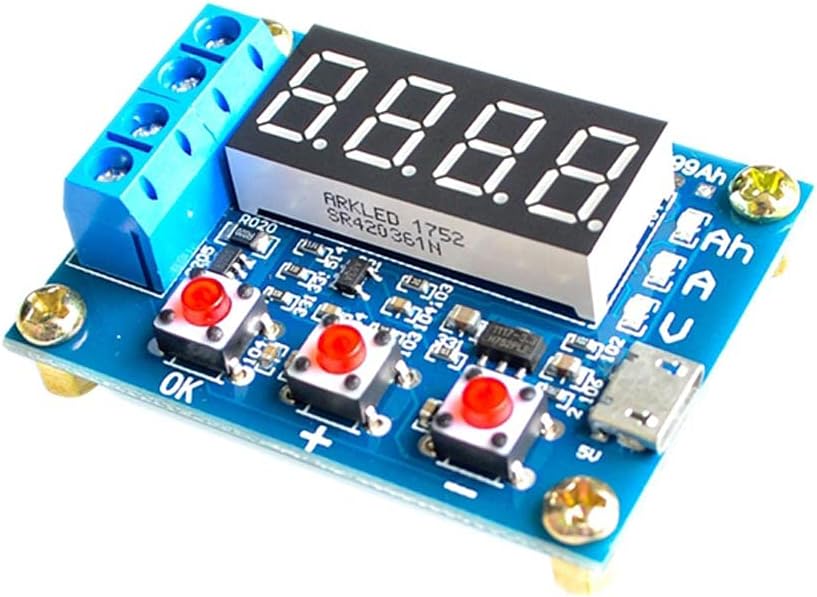
Figure 2: ZB2L3 Battery Capacity Tester showing the 'OK', '+', and '-' buttons for operation.
- 초기 표시: After connecting the power and battery, the tester will display the battery's current voltage.
- 설정 종료 볼륨tage:
- Press the "OK" button once. The display will show the current termination voltage (e.g., "U 3.00").
- Use the "+" and "-" buttons to adjust the termination voltage. 이것은 볼륨입니다tage at which the discharge test will stop. For 18650 Lithium batteries, a common termination voltage is 3.0V. For Lead-Acid batteries, consult the battery's specifications.
- Press "OK" again to confirm the setting and return to the main display.
- Start Discharge Test:
- With the battery and load connected, and the termination voltage set, press and hold the "OK" button for approximately 3 seconds.
- The tester will begin discharging the battery through the connected load. The display will cycle through current voltage (V), discharge current (A), and accumulated capacity (Ah).
- Monitor Test Progress: Observe the display. The voltage will gradually decrease, and the accumulated capacity will increase.
- 테스트 완료: The test will automatically stop when the battery voltage는 설정된 종료 볼륨에 도달합니다.tage. The display will then show the final accumulated capacity (Ah) and flash.
- View 결과: After the test stops, you can press the "OK" button to cycle through the final voltage, current, and capacity readings.
- Reset for New Test: To start a new test, disconnect the battery and load, then reconnect them, or simply press and hold the "OK" button again to clear the previous results and start a new cycle.
7. 유지관리
- 청소: 부드럽고 마른 천으로 기기를 닦으십시오. 액체 세척제나 용제를 사용하지 마십시오.
- 저장: 테스터는 직사광선과 극한 온도 변화를 피해 서늘하고 건조한 곳에 보관하십시오.
- 점검: Periodically check the terminals and connections for any signs of wear or damage.
8. 문제 해결
| 문제 | 가능한 원인 | 해결책 |
|---|---|---|
| 디스플레이가 켜지지 않습니다. | 전원이 공급되지 않거나 전원 공급에 문제가 있습니다. | Ensure micro USB power supply is connected and providing DC 4.5-6V. Check cable and adapter. |
| Test does not start. | Battery not connected, load not connected, or "OK" button not held long enough. | Verify battery and load connections. Hold "OK" button for 3 seconds to initiate. |
| Incorrect capacity reading. | Incorrect termination voltage set, or load resistance is too high/low. | 종료 볼륨을 확인하십시오tage setting. Ensure the discharge load is appropriate for the desired current. |
| Tester gets hot during operation. | High discharge current or insufficient ventilation. | Ensure the discharge current does not exceed 3.000A. Operate in a well-ventilated area. The discharge load resistor will also generate heat; ensure it is rated for the power. |
9. 사양
| 매개변수 | 값 |
|---|---|
| 전원 공급 장치tage | DC 4.5-6V (Micro USB) |
| 작업 전류 | < 70mA |
| 방전량tag및 범위 | 1-15V (0.01V resolution) |
| 종료 Voltag및 범위 | 0.5-11.0V |
| Supported Discharge Current | ≤ 3.000A (0.001A resolution) |
| 권tage 측정 오차 | < 1% + 0.02V |
| 현재 측정 오차 | < 1.2% ± 0.002A |
| 배터리 용량 범위 | 0-9999Ah (1Ah=1000mAh) |
| 회로 기판 크기 | 50mm x 37mm |
| 완제품 크기 | 50mm x 37mm x 17mm (L x W x H, including copper foot height) |
10. 보증 및 지원
This product is manufactured by Rakstore. For any technical support or warranty inquiries, please refer to the retailer where the product was purchased or visit the official Rakstore web연락처 정보 사이트.
보증 청구를 위해 구매 증명서를 보관하십시오.