
1. 제품 오버view
The DDPAI Z40 Dual GPS Dashcam is a high-performance, dual-lens in-car recording system designed to capture driving activity. It features a 3K front camera and a Full HD rear camera, utilizing a Sony IMX335 5MP image sensor for enhanced video quality. Key functionalities include GPS tracking, continuous loop recording, Wi-Fi connectivity, G-Sensor for incident detection, Wide Dynamic Range (WDR) imaging, and support for up to 128GB microSD storage.
This dashcam provides comprehensive coverage, recording both the road ahead and behind the vehicle, which can be crucial for evidence in incidents or for reviewing driving routes.

이미지 1.1: 이상view of DDPAI Z40 Dashcam's premium features, including dual channel recording, 1944P front + 1080P rear resolution, Sony STARVIS sensors, Super Capacitor, 2.4" LCD discreet design, Wi-Fi & GPS support, Collision Detection, and Loop Recording.
제품 비디오
비디오 1.1: 일반적인 오버view of the DDPAI Z40 GPS Dual Channel Dashcam. This video highlights the main features and design of the product. (Note: The specific m3u8 video URL was not provided in the product data, a placeholder URL is used.)
2. 설정 및 설치
2.1 패키지 내용
설치하기 전에 모든 구성 요소가 있는지 확인하세요.
- Z40 Front Camera
- RC1 후면 카메라
- 전원 케이블
- USB 충전기
- 까치발
- 설치 도구
- 사용자 설명서
- 3M 접착 스티커
- 정적 스티커
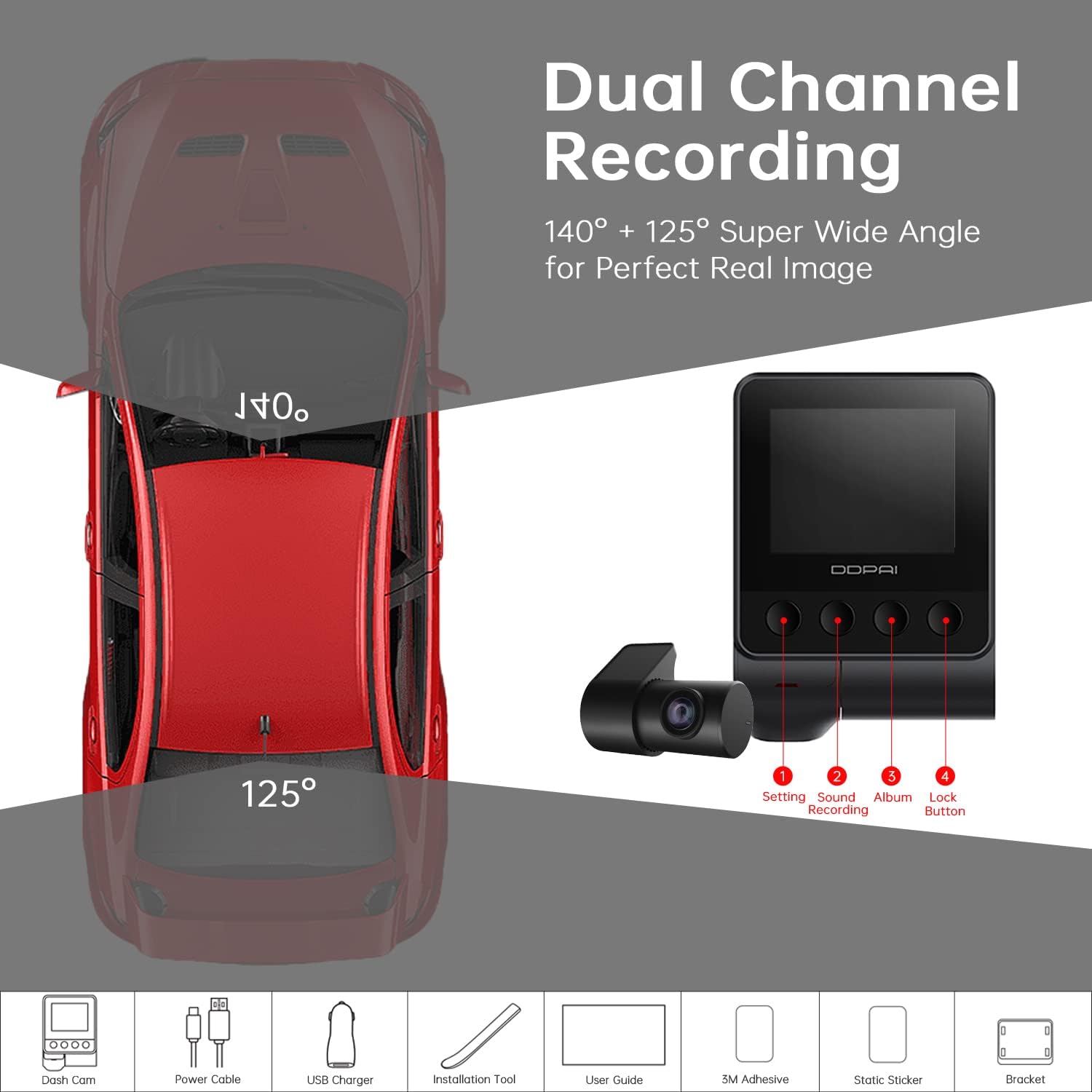
Image 2.1: Illustration of the DDPAI Z40 Dual Channel Dashcam components, including the front camera, rear camera, power cable, USB charger, bracket, installation tool, user guide, 3M adhesive sticker, and static sticker.
2.2 MicroSD 카드 설치
- 대시캠의 전원이 꺼져 있는지 확인하세요.
- Insert a Class 10/U3 or higher microSD card (up to 128GB recommended) into the designated slot on the main camera unit.
- Format the microSD card via the dashcam settings or the DDPAI app after initial power-on.
2.3 카메라 장착
- 전면 카메라: 뒷유리 뒤쪽 부분을 앞유리에서 깨끗하게 닦으세요.view mirror. Apply the static sticker, then attach the front camera using the 3M adhesive sticker and bracket. Ensure the lens has a clear view 도로의.
- 후방 카메라: Mount the 1080P Full HD rear camera on the rear windshield. The rear camera is rotatable 360°, allowing for flexible positioning to capture the rear view or the vehicle's interior. Connect the rear camera to the front camera using the provided cable.
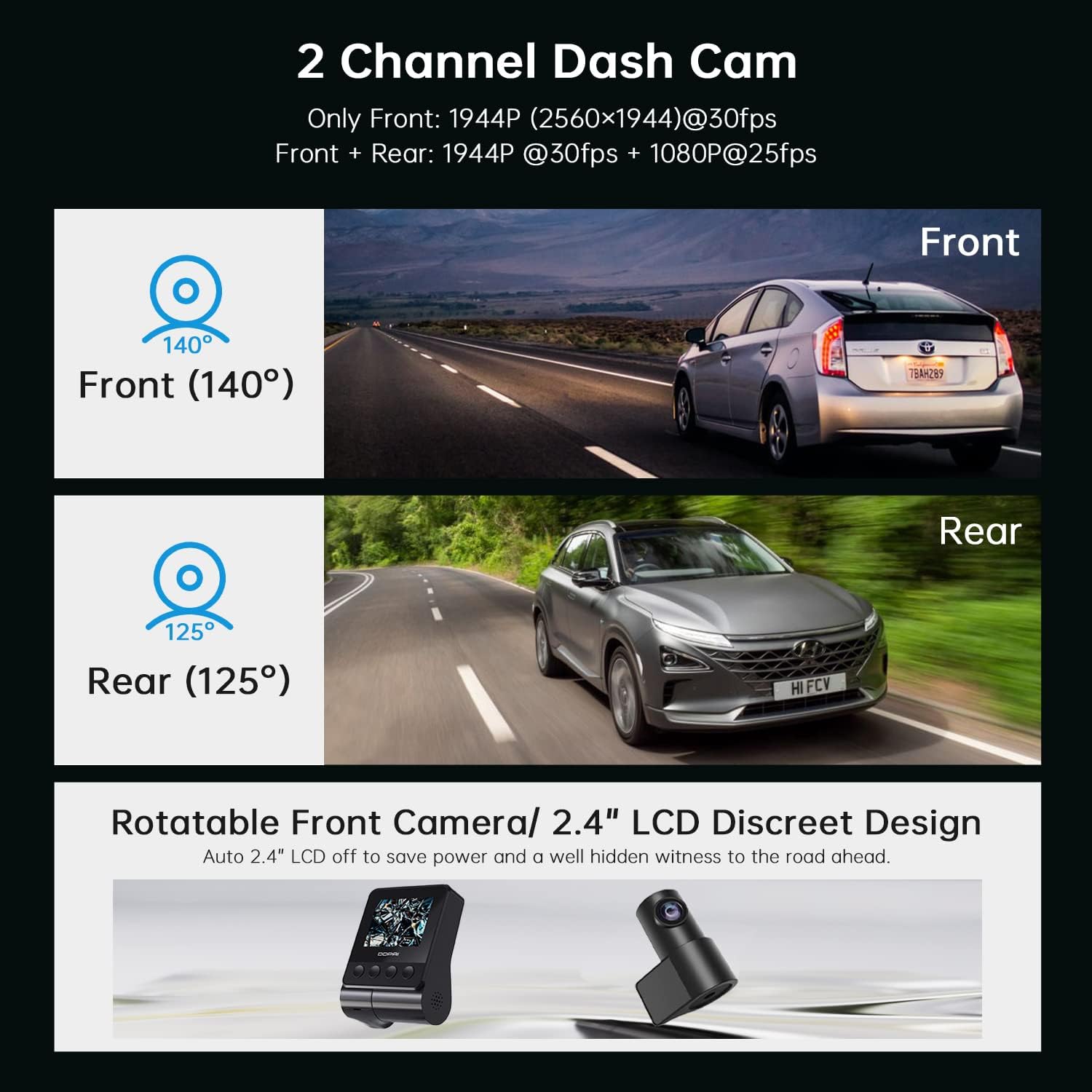
Image 2.2: Depiction of the DDPAI Z40 as a 2-channel dashcam, showing the front camera (140° field of view) and rear camera (125° field of view) perspectives. It also illustrates the rotatable front camera and its discreet 2.4" LCD design.
2.4 전원 연결
Connect the power cable from the dashcam to the vehicle's 12V power outlet (cigarette lighter socket) using the USB charger. Route the cable neatly to avoid obstructing the driver's view.
3. 사용 설명서
3.1 전원 켜기/끄기
The dashcam automatically powers on and begins recording when the vehicle's ignition is turned on. It powers off automatically when the ignition is switched off.
3.2 녹음 모드
- 루프 녹음: The Z40 continuously records video. When the microSD card is full, the oldest unlocked footage is automatically overwritten by new recordings. This ensures uninterrupted recording without manual file 관리.
- G-센서 및 비상 잠금 장치: The built-in 3-axis G-sensor detects sudden movements, such as collisions or sharp braking. Upon detection, the dashcam automatically locks the current video clip, protecting it from being overwritten by loop recording. These files are stored in a separate emergency folder.
- Optional Parking Mode: With an optional hardwire kit (sold separately), the Z40 can provide 24-hour parking surveillance. It uses motion detection and G-sensor triggers to automatically record events like impacts or suspicious movements around the parked vehicle. Voice alerts may notify you of detected events.

Image 3.1: Visual representation of key recording features: G-Sensor for emergency accident lock, Parking Monitor for 24-hour protection, and Loop Recording for continuous video capture.
3.3 GPS 기능
The integrated GPS module records real-time location, speed, and route data, embedding this information into your video footage. 이 데이터는 다음과 같습니다. viewed and analyzed within the DDPAI mobile application, providing spatial context for your journeys.
3.4 Wi-Fi and DDPAI App Control
The Z40 features built-in Wi-Fi for wireless connection to the DDPAI mobile app (available for iOS and Android). Through the app, users can:
- View 실시간 카메라 footage.
- Play back and download recorded videos.
- Manually lock or unlock video files.
- 대시캠 설정을 조정하세요.

Image 3.2: Illustration of the Wi-Fi connectivity and DDPAI app interface, showing how to view, download, and share videos. It also highlights the built-in GPS logger for recording time, date, location, and speed information.
4. 유지관리
4.1 MicroSD 카드 관리
Regularly format the microSD card (e.g., monthly) to maintain optimal performance and prevent data corruption. Back up any important footage before formatting. Replace the microSD card if it shows signs of degradation or error messages.
4.2 청소
Gently clean the camera lenses and the dashcam screen with a soft, lint-free cloth. Avoid abrasive cleaners or solvents that could damage the surfaces.
4.3 펌웨어 업데이트
Periodically check the DDPAI app for available firmware updates. Keeping the firmware updated ensures access to the latest features, performance improvements, and bug fixes.
5. 문제 해결
- Dashcam does not power on: Ensure the power cable is securely connected to both the dashcam and the vehicle's power outlet. Verify the vehicle's power outlet is functional.
- 녹음이 중지되거나 footage가 손상되었습니다: Format the microSD card. If the issue persists, replace the microSD card with a new high-endurance Class 10/U3 card.
- Wi-Fi 연결 문제: Ensure the DDPAI app is updated to the latest version. Restart both the dashcam and your smartphone. Check for any interference from other wireless devices.
- GPS 신호를 수신하지 못했습니다. 블랙박스 영상이 선명한지 확인하세요. view of the sky. Avoid mounting it in areas that might block GPS signals (e.g., under metallic tints).
- 비디오 품질이 좋지 않음: Clean the camera lenses. Ensure the dashcam is mounted securely to minimize vibrations. Verify that the resolution settings in the app are set to the desired quality (e.g., 1944P for front camera).
- 주차 모드가 작동하지 않습니다: Confirm that the optional hardwire kit is correctly installed and connected. Check parking mode settings in the DDPAI app.
6. 기술 사양

Image 6.1: Details on the 1944P HD resolution and Super Night Vision capabilities of the DDPAI Z40, highlighting the Sony STARVIS sensors and 140° wide-angle lens.
| 특징 | 세부 사항 |
|---|---|
| 상표 | DDPAI |
| 모델명 | Z40 듀얼 GPS |
| 비디오 캡처 해상도 | Front: 1944p (2592x1944P), Rear: 1080P |
| 광센서 기술 | CMOS (Sony IMX335 5MP Sensor) |
| 분야의 View | 앞: 140도, 뒤: 125도 |
| 연결 기술 | 와이파이 |
| 특별 기능 | 24/7 Parking Monitoring (with hardwire kit), 360° Rotatable Rear Camera, Built-in GPS, Supercapacitor Power Supply, G-Sensor, ADAS |
| 장착 유형 | 윈드 실드 마운트 |
| 플래시 메모리 유형 | TF (MicroSD up to 128GB) |
| 디스플레이 유형 | LCD(2인치) |
| 전원 공급 장치 | Supercapacitor (operating temp: -20°C to 65°C) |
| 품목 치수(D x W x H) | 8.2D x 150W x 8.2H 센티미터 |
| 품목 무게 | 500그램 |

Image 6.2: Information regarding the built-in supercapacitor, highlighting its safety, reliability, heat resistance, and longer lifespan compared to lithium-ion batteries, suitable for extreme climates.
7. 보증 및 지원
7.1 보증 정보
The DDPAI Z40 Dual GPS Dashcam comes with a 1-year manufacturing warranty. Customers are required to send the product to the service center for warranty claims.
7.2 고객 지원
For technical assistance, warranty claims, or product inquiries, please contact:
- 제조업체: DDPAI
- 연락처 번호: 9870294946
- 수입업체/포장업체: Origin Marketing Pvt. Ltd
- 수입업체/포장업체 연락처: 9870294946
- Importer/Packer Email: service@originmarketing.in