
1. 서론
Welcome to the Hubble Connected Touch Twin 5-inch Smart Baby Monitor. This device is designed to provide reliable monitoring of your child with advanced features including a 5-inch interactive touchscreen viewer, two portable camera units, Wi-Fi connectivity for smartphone access, remote pan, tilt, and zoom, two-way talk, room temperature display, infrared night vision, and preloaded lullabies. This manual will guide you through the setup, operation, and maintenance of your new baby monitor system.
2. 중요한 안전 정보
- 목졸림 위험: Keep all cords out of reach of children. Never place camera or cords within 3 feet (1 meter) of the crib or playpen. Secure cords to a wall or floor using cable clips.
- 질식 위험: 이 제품에는 작은 부품이 포함되어 있습니다. 어린이의 손이 닿지 않는 곳에 보관.
- 과열: Do not cover the monitor or camera with blankets or towels. Ensure proper ventilation.
- 물과 습기: Do not expose the product to water or moisture. Use only in dry indoor environments.
- 전원: 제공된 전원 어댑터만 사용하십시오. 승인되지 않은 어댑터를 사용하면 제품이 손상되고 보증이 무효화될 수 있습니다.
- 간섭: Keep the monitor away from other electronic devices that may cause interference.
- 성인 감독: This product is intended to assist in monitoring your child and should not be used as a substitute for responsible adult supervision.
3. 패키지 내용
Your Hubble Connect Touch Twin 5-inch Smart Baby Monitor package includes:
- 아기 카메라 2대
- 1 x Parent Monitor (5-inch Interactive Touchscreen View어)
- 2 x 전원 어댑터
- 1 x 빠른 시작 가이드
- 2 x Hubble Grip flexible mounts

4. 설정
4.1 Charging the Parent Unit and Camera Units
Before initial use, fully charge the Parent Monitor and both Camera Units using the provided power adapters. A full charge ensures optimal performance and portability.
4.2 카메라 배치
Position the camera units in locations that provide a clear view of your child. Ensure the camera is at least 3 feet (1 meter) away from the crib or playpen to prevent strangulation hazards from the power cord. The flexible Hubble Grip mounts allow for versatile placement on crib rails or other surfaces.

The camera features remote pan, tilt, and zoom capabilities, allowing you to adjust the viewing angle from the parent unit or smartphone app.
4.3 Pairing the Camera Units (if not pre-paired)
Your camera units should be pre-paired with the parent unit. If re-pairing is needed, consult the Quick Start Guide for specific instructions. Generally, this involves accessing the pairing menu on the parent unit and pressing a pairing button on the camera unit.
4.4 Connecting to Wi-Fi and Smartphone App
For advanced features and remote viewing, download the HubbleClub app on your smartphone or tablet. Follow the in-app instructions to connect your monitor system to your home Wi-Fi network.

5. 모니터 작동
5.1 기본 Viewing 및 항해
Turn on the Parent Monitor. The screen will display the live video feed from one of your camera units. Use the directional buttons on the parent unit to pan and tilt the camera remotely. Pinch-to-zoom functionality may be available on the touchscreen for closer views.

5.2 양방향 대화
Press and hold the microphone button on the parent unit to speak to your child through the camera's speaker. Release the button to listen.
5.3 야간 투시경
The camera automatically switches to infrared night vision in low-light conditions, providing a clear black-and-white image of your child.

5.4 자장가와 마음을 편안하게 해주는 소리
Access the menu on the parent unit to select and play preloaded lullabies, audiobooks, or soothing sounds to help your child relax.
5.5 실내 온도 모니터링
The parent unit displays the room temperature detected by the camera unit, allowing you to ensure a comfortable environment for your child.
5.6 개인 정보 보호 모드
For enhanced privacy, manually close the camera lens cover. This physically blocks the camera's view.

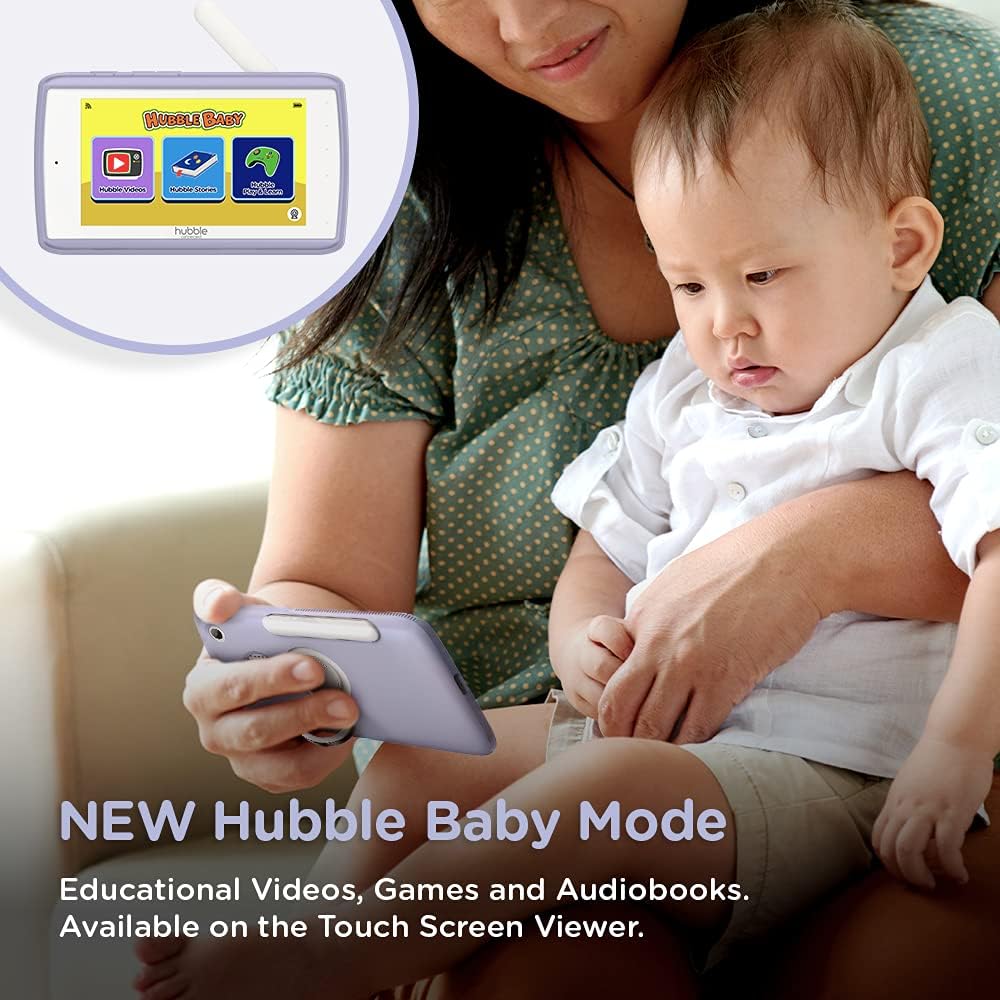
5.7 Hubble Baby Mode
The 5-inch interactive touchscreen viewer can switch to "Hubble Baby Mode," offering educational videos, games, and audiobooks for your child's entertainment and learning as they grow.
6. 유지관리
- 청소: 모니터와 카메라 장치를 닦을 때는 부드럽고 마른 천을 사용하십시오. 연마성 세척제나 용제를 사용하지 마십시오.
- 배터리 관리 : 배터리 수명을 연장하려면 극한 온도 변화를 피하고 배터리를 주기적으로 완전히 방전시킨 후 충전하십시오.
- 저장: If storing the product for an extended period, ensure it is fully charged and stored in a cool, dry place.
7. 문제 해결
| 문제 | 해결책 |
|---|---|
| 부모 기기에서 영상/음성이 나오지 않습니다. | Ensure both parent unit and camera are powered on and charged. Check if they are within range. Re-pair the units if necessary (refer to Quick Start Guide). |
| Poor video quality or interference. | Move the camera or parent unit closer. Ensure no large metal objects or other electronic devices are causing interference. Check Wi-Fi signal strength if using the app. |
| 부모 유닛의 배터리가 빨리 소모됩니다. | Reduce screen brightness. Enable ECO mode (if available). Ensure the unit is fully charged before use. Battery life can vary with usage. |
| Cannot connect to HubbleClub app. | Ensure your home Wi-Fi is active and the camera is within range. Restart the camera and your router. Verify correct Wi-Fi password in the app. |
| Camera not responding to pan/tilt/zoom. | Check connection between parent unit/app and camera. Restart both devices. Ensure no physical obstructions are blocking camera movement. |
8. 사양
| 특징 | 세부 사항 |
|---|---|
| 화면 크기 | 5 인치 |
| 비디오 캡처 해상도 | 720p |
| 연결 기술 | 무선, Wi-Fi |
| 전원 | 배터리 구동 |
| 특징 | 나이트 비전 |
| 실내/실외 사용 | 실내 |
| 포함된 구성 요소 | 2 x Baby Camera Units, Parent Monitor, 2 x Power Adapters, Quick Start Guide |
| 품목 무게 | 3.25파운드 |
| 제품 치수 | 13 x 13 x 13 인치 |
| 배터리 | 3개의 리튬 이온 배터리 필요(포함) |
9. 보증 및 지원
For warranty information and technical support, please refer to the official Hubble Connected web사이트를 방문하거나 고객 서비스에 직접 문의하세요. 보증 청구를 위해 구매 증빙 자료를 보관하세요.
방문하세요 HUBBLE CONNECTED Store 더 많은 정보와 제품을 확인하세요.