
1. 서론
The XTUGA GA816 is a professional UHF wireless antenna distribution system designed to optimize the performance of multiple wireless microphone receivers. It allows up to four wireless receivers to share a single pair of antennas, reducing antenna clutter and improving signal reception stability. This system is compatible with a wide range of UHF microphones operating within the 400-950MHz frequency band, making it suitable for various professional audio applications.
This manual provides essential information for the proper setup, operation, and maintenance of your GA816 system. Please read it thoroughly before use to ensure optimal performance and longevity of the product.
2. 안전 정보
- 전원 공급 장치: 제공된 전원 어댑터만 사용하세요. 볼륨을 확인하세요.tage는 장치의 요구 사항과 일치합니다.
- 환경: Avoid exposing the unit to water, moisture, extreme temperatures, or direct sunlight. Operate in a well-ventilated area.
- 손질: Do not drop or subject the unit to severe impacts. Do not attempt to open or service the unit yourself; refer all servicing to qualified personnel.
- 케이블 : 모든 케이블이 단단히 연결되어 있고 끼이거나 손상되지 않았는지 확인하세요.
- 청소: 청소하기 전에 전원을 차단하십시오. 부드럽고 마른 천을 사용하십시오. 액체 세척제나 스프레이형 세척제는 사용하지 마십시오.
3. 패키지 내용
아래 나열된 모든 품목이 패키지에 포함되어 있는지 확인하세요.
- XTUGA GA816 Antenna Distribution AmpLIFIER 단위
- UHF Paddle Antennas (x2)
- 전원 어댑터
- Power Cable (for adapter)
- DC Power Cables (x4, for receivers)
- BNC to BNC Coaxial Cables (x10, for antenna connections)
- 사용 설명서 (본 문서)
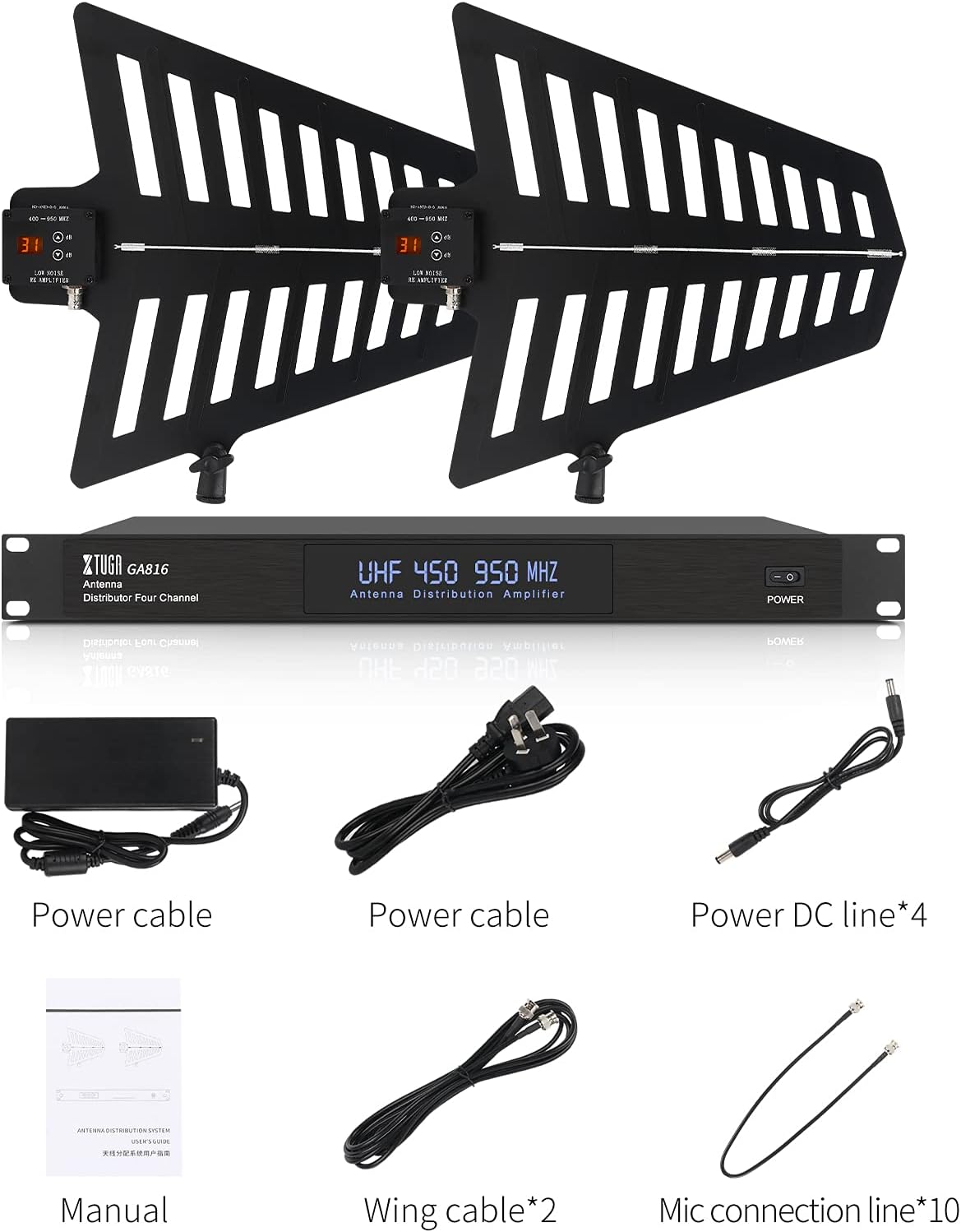
Image: Contents of the XTUGA GA816 package, including the main distribution unit, two paddle antennas, power cables, DC power cables, and BNC cables.
4. 제품 오버view
The XTUGA GA816 system consists of a central antenna distribution amplifier unit and two high-gain paddle antennas. The distribution unit manages signal reception and distribution to multiple wireless receivers, while the paddle antennas are designed for enhanced signal capture over long distances.

Image: The XTUGA GA816 system, showing the main distribution unit and two paddle antennas.
4.1. Main Distribution Unit
The main unit features a robust metal chassis suitable for rack mounting. It includes inputs for the two paddle antennas, multiple outputs for connecting wireless receivers, and DC power outputs to power compatible receivers directly. The front panel displays the operating frequency range (UHF 450-950 MHz) and a power indicator.
4.2. Paddle Antennas
The two included paddle antennas are omnidirectional, designed to capture signals across a 360-degree range. Each antenna features an integrated low-noise re-amplifier with adjustable gain settings (displayed in dB) to compensate for coaxial cable signal loss and optimize reception. They are constructed from durable, anti-oxidation and anti-corrosion materials.

Image: Diagram illustrating the UHF frequency band compatibility (400-950MHz) of the GA816 system, showing signal reception by the paddle antennas.
5. 설정
Follow these steps to set up your XTUGA GA816 antenna distribution system:
- 안테나 배치:
- Position the paddle antennas in a clear line of sight to the wireless transmitters.
- The installation height of the antenna should ideally be greater than 1.8 meters (approximately 6 feet).
- Ensure the antennas are placed within the effective range of the signal transmitter and away from large metal objects or other sources of signal interference.
- When used outdoors, place the antennas in a dry, protected position.
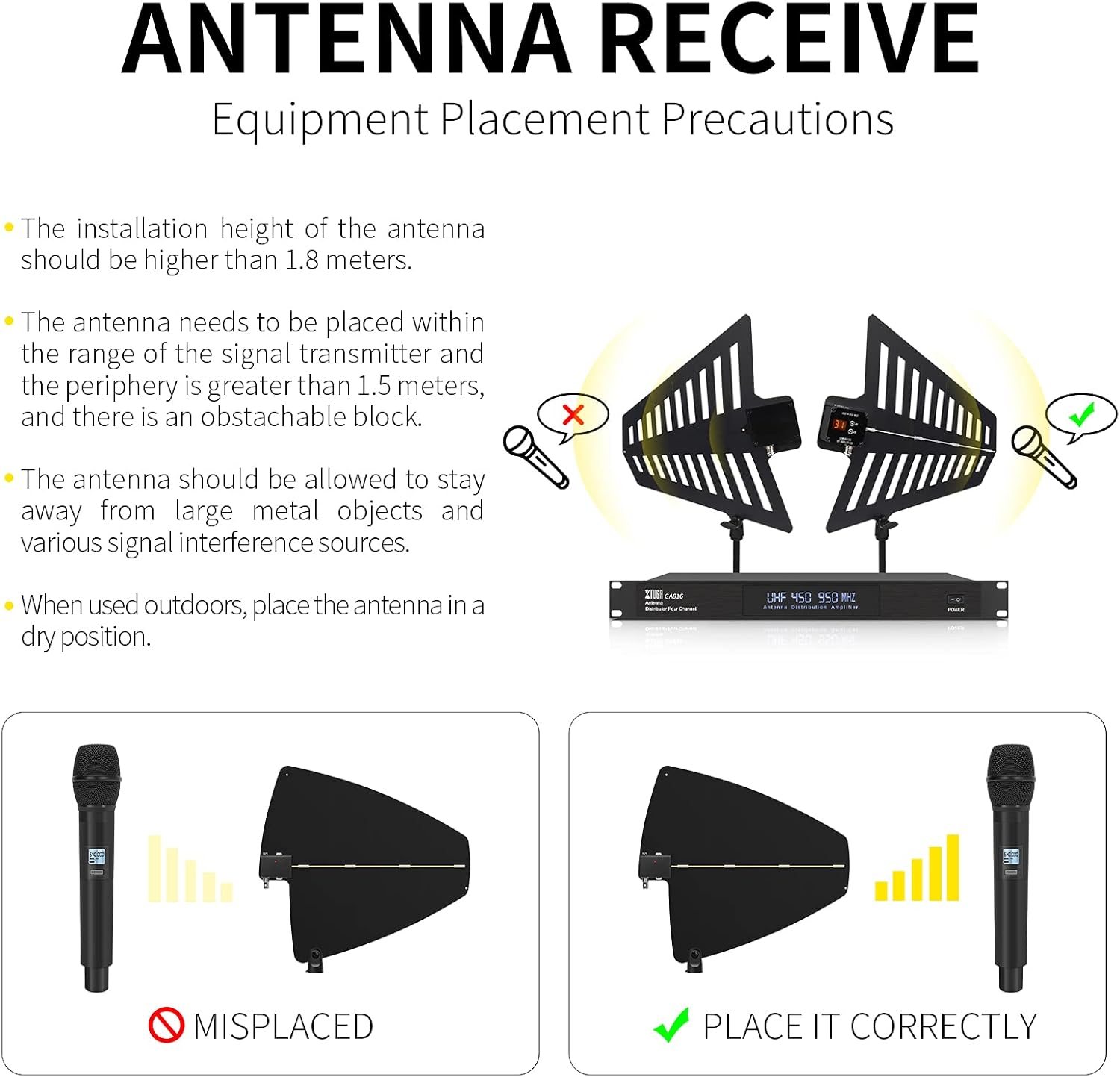
Image: Visual guide for correct antenna placement, showing optimal height and avoiding obstructions for better signal reception.
- Connect Antennas to Distribution Unit: Use the provided BNC coaxial cables to connect each paddle antenna to the 'ANTENNA IN' ports on the rear of the GA816 distribution unit.
- Connect Receivers to Distribution Unit: Use the remaining BNC coaxial cables to connect the antenna inputs of your wireless microphone receivers to the 'RECEIVER OUT' ports on the GA816 unit. The system supports up to four receivers directly.
- Power Receivers (Optional): If your wireless receivers support 12V DC power via a barrel connector, use the provided DC power cables to connect the 'DC OUT' ports on the GA816 to your receivers. This can simplify power management.
- Power the GA816 Unit: Connect the power adapter to the 'DC IN' port on the GA816 unit and then plug the power adapter into a suitable electrical outlet. Turn on the power switch on the front panel.
6. 운영
시스템 설정이 완료되면 다음 운영 지침을 따르십시오.
6.1. 게인 조정
Each paddle antenna has an adjustable gain setting, indicated by a digital display in dB. This allows you to compensate for signal loss over long coaxial cable runs. Adjust the gain using the up/down buttons on each antenna until you achieve optimal signal strength on your receivers without introducing excessive noise. Start with a lower gain setting and increase it gradually if needed.

Image: Close-up of a paddle antenna showing the digital display for gain setting (in dB) and adjustment buttons.
6.2. Signal Range and Stability
The GA816 system is designed to provide stable signal reception over long distances, up to 2600 feet (approximately 800 meters) under ideal conditions. Proper antenna placement and gain adjustment are crucial for maximizing this range and maintaining signal integrity.

Image: Graphic illustrating the long-distance signal transmission capability of the GA816 system, indicating a range of 800 meters.

Image: Comparison graphic showing the extended and more stable signal reception range of the GA816 (800m) compared to other systems (200-300m).
6.3. Cascading Multiple Units
The GA816 unit includes a cascade port, allowing you to connect a fifth receiver or link to a second antenna distribution system for expanding the number of wireless channels. Refer to the specific connection diagrams for cascading in advanced setup guides or contact XTUGA support for detailed instructions.
7. 유지관리
- 청소: Regularly wipe the unit and antennas with a soft, dry, lint-free cloth. Do not use abrasive cleaners, solvents, or chemical sprays.
- 저장: When not in use for extended periods, store the system in its original packaging or a protective case in a cool, dry place.
- 케이블 검사: Periodically check all cables for signs of wear, cuts, or damage. Replace any damaged cables immediately.
8. 문제 해결
If you encounter issues with your GA816 system, refer to the following common problems and solutions:
- 전원 없음:
- 전원 어댑터가 본체와 작동하는 전원 콘센트에 제대로 연결되어 있는지 확인하십시오.
- 전면 패널의 전원 스위치가 '켜짐' 위치에 있는지 확인하십시오.
- Poor Signal Reception / Dropouts:
- Verify antenna placement: Ensure clear line of sight, proper height, and distance from obstructions or interference sources.
- Adjust antenna gain: Increase the gain on the paddle antennas if using long coaxial cables, but avoid excessive gain which can introduce noise.
- Check all BNC cable connections between antennas, distribution unit, and receivers for tightness.
- Ensure the wireless microphone frequencies are within the 400-950MHz range supported by the GA816.
- Test with shorter cables if possible to rule out cable issues.
- Receivers Not Powering On (via GA816 DC Out):
- Confirm your receivers are compatible with 12V DC input via a barrel connector.
- Ensure the DC power cables are correctly connected.
- Verify the GA816 unit itself is powered on.
If problems persist after attempting these solutions, please contact XTUGA customer support for further assistance.
9. 사양
| 특징 | 사양 |
|---|---|
| 모델 번호 | GA816 |
| 주파수 범위 | UHF 400-950MHz |
| 채널 수 | 10 (Antenna groups) |
| 안테나 유형 | 360° Active Omnidirectional Paddle |
| 안테나 이득 | Adjustable (dB) |
| 임피던스 | 50옴 |
| 최대 범위 | 2600피트(약 800미터) |
| DC 전원 출력 | 12V (x4 ports) |
| 전원 | 코드식 전기 |
| 권tage | 110V |
| 제품 치수 | 21.65 x 15.75 x 5.9 인치 |
| 품목 무게 | 14.22파운드 |
| 색상 | 검은색 |
10. 보증 및 지원
For warranty information and customer support, please refer to the documentation provided with your purchase or visit the official XTUGA web사이트. 보증 청구를 위해 구매 증빙 자료를 보관하세요.
You can find more information about XTUGA products and support at the XTUGA Brand Store.