
1. 서론
This manual provides essential instructions for the safe and effective operation of your CREWORKS 15"x15" 5-in-1 Heat Press Machine. This versatile machine is designed for heat transfer applications on various items, including T-shirts, caps, mugs, and plates, utilizing its interchangeable attachments. Please read this manual thoroughly before initial use and retain it for future reference.

Figure 1: CREWORKS 5-in-1 Heat Press Machine with various attachments for T-shirts, mugs, caps, and plates.
2. 안전 지침
Your safety is paramount. Observe all warnings and instructions to prevent injury or damage to the machine. This product contains chemicals known to the State of California to cause cancer and birth defects or other reproductive harm (Proposition 65 warning).
- 기계는 항상 안정적이고 내열성이 있는 표면에서 작동하십시오.
- Keep hands clear of the heating platen during operation. The platen reaches high temperatures.
- Utilize the 360-degree swing-away feature to move the heating element away from the working area when loading or unloading items, minimizing burn risk.
- 작업 공간의 적절한 환기를 보장하십시오.
- 기기가 작동 중이거나 가열 중일 때는 자리를 비우지 마십시오.
- 사용하지 않을 때나 청소 및 유지 보수를 하기 전에는 기기의 전원 플러그를 콘센트에서 뽑으십시오.
- 기계나 전기 부품을 물이나 다른 액체에 담그지 마십시오.
- 작동 중에는 어린이와 애완동물을 기계 가까이에 두지 마십시오.

Figure 2: The 360-degree swing-away design enhances safety during operation.
3. 제품 오버view 및 구성 요소
Familiarize yourself with the main parts of your heat press machine:
- Heat Platen Handle: Used to raise and lower the heating element.
- 높이 조절 손잡이: Adjusts the pressure applied by the heating platen.
- LCD Control Box: Digital display for setting and monitoring temperature and time.
- Heat-Resistant Platen Cover: Protects the heating element and ensures even heat distribution.
- Silicone & Foam Pads: Provide a soft, heat-resistant surface for items being pressed.
- 교체 가능한 부착물: Includes flat press (T-shirt), mug press, cap press, and plate presses (8" and 10").

Figure 3: The doubled tube design ensures even heating across the platen.

Figure 4: Heat-resistant casing and pads for safe operation.

Figure 5: Intelligent LCD Control Box for precise temperature and time settings.
4. 설정
This section details the assembly of the heat press machine and its various attachments. For a visual guide, please refer to the assembly video below.
Video 1: This video guides users through the assembly process of the CREWORKS Heat Press Machine, demonstrating how to set up the flat press, and install the mug and cap press attachments.
4.1. Installing the Flat Press
- Set up the base by attaching the support brackets using the provided screws and wing nuts.
- Place the lower pad onto the base, aligning the holes, and secure it with the screws and wing nuts.
- Attach the upper heating platen assembly to the main column, ensuring it is securely fastened.
- Connect the control box cable to the designated port on the heating platen assembly.
4.2. Installing the Plate Press
- Remove the upper heating platen assembly by loosening the screws.
- Remove the round plate from the base by unscrewing it.
- Insert the foam pad for the plate press into the base.
- Attach the appropriate plate press attachment (8" or 10") to the main column and secure it.
- Connect the control box cable to the plate press attachment.
4.3. Installing the Mug Press
- Remove the flat press upper and lower pads.
- Attach the mug press heating element to the main column.
- Connect the control box cable to the mug press attachment.
4.4. Installing the Cap Press
- Remove any previously installed attachments.
- Attach the cap press heating element to the main column.
- Connect the control box cable to the cap press attachment.
5. 사용 설명서
This section outlines the general operation of the heat press machine for various applications.
비디오 2: 이 비디오는 다음을 제공합니다.view of the CREWORKS 15x15 inch Heat Press Machine, showcasing its 5-in-1 capabilities for various items like T-shirts, caps, mugs, and plates. It demonstrates the machine's features and ease of use for heat transfer applications.
5.1. 일반 운영
- 기기를 접지된 전기 콘센트에 연결하십시오.
- Turn on the power switch located on the control box.
- Use the digital control panel to set the desired temperature and time according to your transfer material's specifications. Refer to the image below for typical settings.
- Allow the machine to preheat until it reaches the set temperature.
- Place your item and transfer design onto the appropriate platen.
- Lower the heating platen and apply pressure using the handle. The timer will begin automatically.
- Once the timer expires, lift the heating platen and swing it away (if applicable) to safely remove your item.
Figure 6: The LCD control box with preset modes for different materials.
Typical Preset Modes:
- Silicone Fiber Fabrics: 302°F
- Cotton Clothing: 356°F
- Ceramic Mugs & Plates: 392°F
5.2. T-Shirt (Flat Press) Operation
Use the 15"x15" flat platen for T-shirts, bags, and other flat items.
- Place the T-shirt smoothly onto the lower platen.
- Position your transfer design on the T-shirt.
- Lower the heating platen and press for the recommended time (e.g., 30 seconds at 320-360°F).
- Lift the platen and remove the T-shirt.
5.3. Cap Press Operation
Attach the cap press for custom hats.
- Place the cap onto the curved platen.
- Position your transfer design on the cap.
- Lower the heating element and press for the recommended time (e.g., 40 seconds at 330-350°F).
- Lift the element and remove the cap.
5.4. Mug Press Operation
Use the mug press attachment for custom mugs.
- Insert the mug into the mug press attachment.
- Secure the mug and position your transfer design.
- Close the mug press and apply pressure for the recommended time (e.g., 30 seconds at 330-380°F).
- Open the press and carefully remove the hot mug.
5.5. Plate Press Operation
Utilize the plate press attachments for custom plates.
- Place the plate onto the foam pad in the base.
- Position your transfer design on the plate.
- Lower the heating element and press for the recommended time (e.g., 30 seconds at 330-380°F).
- Lift the element and carefully remove the hot plate.
6. 유지관리
정기적인 유지관리는 열 프레스 기계의 수명과 최적의 성능을 보장합니다.
- 청소: After each use, allow the machine to cool completely. Wipe down the heating platen and other surfaces with a soft, damp 천. 연마성 세척제나 용매를 사용하지 마십시오.
- 저장: Store the machine in a clean, dry environment away from direct sunlight and extreme temperatures.
- 점검: 모든 나사, 너트 및 전기 연결부가 단단히 고정되어 있는지 주기적으로 점검하십시오.
7. 문제 해결
If you encounter issues with your heat press machine, consider the following common solutions:
- 기계의 전원이 켜지지 않음: Check if the power cord is securely plugged into a working outlet and the machine's power switch is in the 'ON' position.
- 온도가 설정값에 도달하지 않음: Ensure the control box cable is firmly connected. Allow sufficient time for preheating.
- 불균일한 열전달: Verify that the pressure is evenly distributed across the platen. Adjust the height adjustment knob if necessary. Ensure the item is placed flat on the platen.
- LCD에 표시되는 오류 코드: (가능한 경우) 전체 제품 설명서에서 특정 오류 코드를 참조하거나 고객 지원팀에 문의하십시오.
8. 사양

Figure 7: Key specifications of the CREWORKS Heat Press Machine.
| 사양 | 세부 사항 |
|---|---|
| 상표 | 크레웍스 |
| 모델 | B099RH2RYN |
| 재료 | 금속, 플라스틱 |
| 색상 | 검은색 |
| 권tage | 110 볼트 |
| 왓tage | 1000 와트 |
| 플래튼 영역 | 15인치 x 15인치 |
| 최대 온도 | 화씨 410도(섭씨 210도) |
| 타이머 범위 | 0~999초 |
| 첨부 파일 | 11 oz. Mug Press, Cap Press, 8" Plate Press, 10" Plate Press |
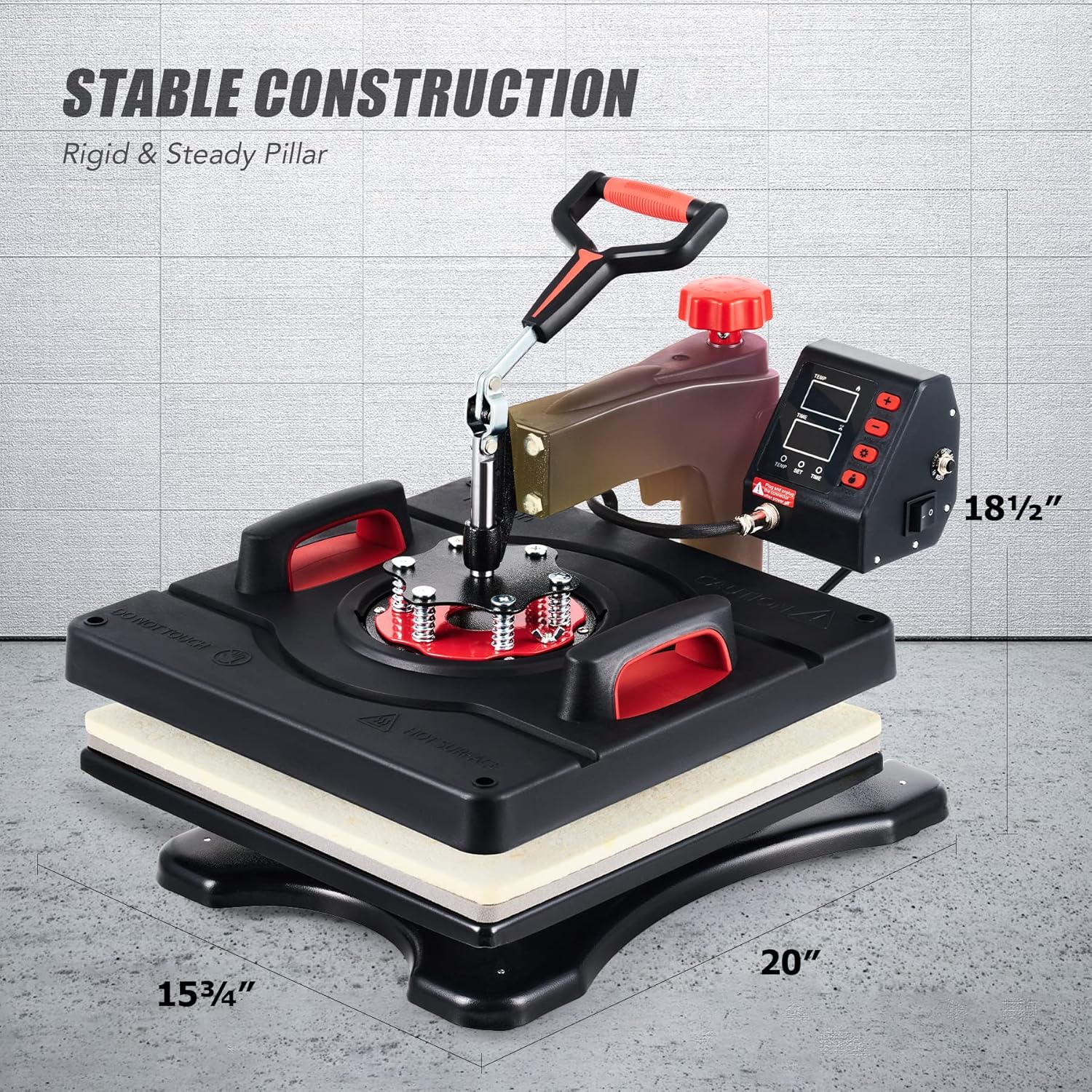
Figure 8: Physical dimensions of the CREWORKS Heat Press Machine.
9. 보증 및 지원
The CREWORKS Heat Press Machine comes with a 6-month warranty. For warranty claims, technical support, or any questions not covered in this manual, please contact CREWORKS customer service. Keep your purchase receipt as proof of purchase for warranty purposes.